

Executive Overview
As Large Language Model (LLM) chat interfaces rapidly cement themselves as a foundational medium for human
-computer interaction, ensuring their universal accessibility is no longer optional—it is a critical imperative. From standalone applications like Claude and ChatGPT to corporate enterprise tools like Glean and GitHub Copilot, full-screen, immersive chat interfaces are transforming how humanity accesses information, writes code, creates content, and solves complex problems.
However, this technological revolution carries a hidden risk: systematic exclusion. Because software design remains heavily anchored in visual biases, standard LLM chat patterns frequently fail to integrate baseline accommodations for individuals relying on assistive technologies, such as screen readers, refreshable Braille displays, and keyboard-only navigation.
Drawing from extensive career experience improving accessibility in complex LLM interfaces, accessibility expert Eric Bailey outlines the structural, technical, and psychological adjustments required to build equitable web and native applications. This article breaks down how to replace inaccessible assumptions with robust technical solutions—such as dedicated live regions, hidden semantic headings, composite widgets, and customizable user preferences—ensuring that the transformative utility of AI remains open to everyone.
Detailed Chronology: The Evolution and Accessibility Shortfalls of LLM Interfaces
The explosive growth of chat-based user interfaces (UIs) across the web over the past several years caught many design systems unprepared. Unlike static websites or traditional web forms, LLM chat applications are dynamic, asynchronous, and heavily reliant on real-time streaming text, multi-turn contexts, and visual cues like left-and-right message alignment.
When LLMs first transitioned from research environments to mass-market web applications, developers treated them as simple textboxes wrapped in streaming output containers. This approach overlooked the lived experiences of users relying on assistive technologies.
- The Initial Blind Spot: Early conversational AI deployments lacked text alternatives for dynamic content. When an LLM generated a multi-paragraph response, screen readers remained silent. Users who could not visually monitor the screen had no notification that text had arrived, creating a profound communication breakdown.
- The Streaming Conundrum: To enhance perceived performance, developers introduced streaming text—characters and words rendering dynamically on the screen. However, applying accessibility live region attributes directly to every streaming chunk resulted in an unparseable, stuttering mess of audio announcements that overwhelmed screen reader users.
- The Landmark Clutter Phase: In an attempt to structure these chaotic chat feeds, some developers wrapped individual messages in semantic landmarks or section elements. While well-intentioned, this practice polluted screen reader landmark lists with dozens—sometimes hundreds—of redundant entries, making keyboard navigation impossible.
- Maturation and Standardization: Through iterative inclusive user research, accessibility advocates like Eric Bailey and Sarah Higley began establishing pattern libraries. Best practices shifted toward centralized live regions, visually hidden headings, and deliberate focus management, turning chaotic interfaces into predictable, navigable experiences.
Supporting Context & Metrics: Defining Exclusion in the AI Era
To understand why accessibility must be baked into the foundation of LLM chat development, one must re-examine the definition of "exclusion." In the context of the digital economy, exclusion is not merely a minor inconvenience; it is the systematic stripping away of fundamental human opportunities.
- Loss of Knowledge and Utility: Denying access to generative AI cuts users off from immediate, synthesized research and educational tools.
- Loss of Employability and Productivity: As enterprises increasingly mandate the use of AI tools (such as GitHub Copilot or internal LLM assistants) for daily workflows, inaccessible interfaces directly impact professional output and job retention.
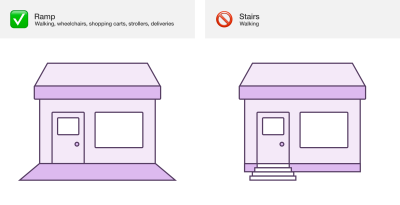
- The Social Model of Disability: Rooted in disability studies, the social model dictates that disability is not an individual medical failing, but rather the result of a built environment that fails to accommodate bodily and cognitive differences. Just as physical stairs exclude wheelchair users in favor of ramps, inaccessible digital layouts exclude screen reader and keyboard users in favor of mouse-and-sight paradigms.
The Visual Bias Trap
Human software creation suffers from an overwhelming visual bias. Because creators live in a hyper-visual culture, their unconscious outputs reflect that bias. In a standard LLM chat interface, visual cues dictate interactions:
- Message Ownership: Visually, users distinguish between their prompts and the LLM’s replies via left- and right-side bubble alignment and distinct color palettes.
- Processing Status: Loading states are often communicated via subtle animations, spinning icons, or color shifts.
- Spatial Layout: Users quickly scan a page using an "F-shaped" visual pattern to orient themselves within sidebars, input boxes, and main content regions.
For a screen reader user, none of these visual indicators exist unless developers explicitly construct non-visual equivalents.
Technical Solutions and Implementation Strategies
Creating an equivalent experience for users of assistive technology requires deliberate engineering choices across several key domains.
1. Master Live Region Announcements
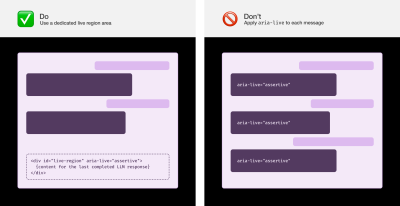
Instead of applying aria-live attributes to individual streaming message bubbles—which causes audio chaos—developers should implement a dedicated, assertive live region placed at the end of the DOM.
- Wait for Complete Streams: Never attempt to announce text as it streams in character-by-character. Wait until the LLM response has fully rendered on the screen, then dispatch the complete message content to the live region.
- Communicate Processing States: Because LLM responses take time, users need to know their request is being handled. If visual text (like "Thinking" or "Researching") appears, trigger a matching live region announcement simultaneously. If a text-less loading animation is displayed, use a timed fallback—triggering a "Loading" announcement five seconds after prompt submission, and repeating it every five seconds until the response arrives.
- The Future of
ariaNotify(): While the nativeariaNotify()API promises to simplify live region management in the future, cross-browser compatibility gaps, lack of stable baseline support, and incomplete polyfills mean developers should stick to proven TetraLogical live region techniques for the time being.
2. Implement Visually Hidden Headings for Message Ownership
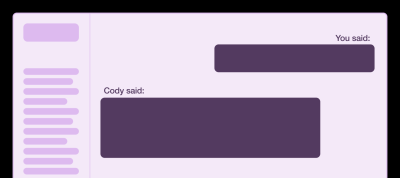
Because screen reader users heavily rely on headings to navigate pages, developers should inject visually hidden heading elements (<h2> or appropriate hierarchy levels) before each message.
<article>
  <h2 class="sr-only" aria-label="You said:" tabindex="-1">
    You said:
  </h2>
  <div>
    What are the strengths and drawbacks of using utility CSS?
  </div>
</article>

<article>
  <h2 class="sr-only" aria-label="Cody said:" tabindex="-1">
    Cody said:
  </h2>
  <div>
    Utility CSS trades cleaner global styling for faster, more explicit component styling...
  </div>
</article>
This simple prefix ("You said:" / "Cody said:") replicates the contextual clarity that visual users gain from message alignment, allowing keyboard and screen reader users to jump effortlessly through conversation histories.
3. Balance Landmarks and Composite Widgets
While landmark regions (nav, main, form, aside) are vital for outlining major application zones, wrapping every single chat message in a landmark pollutes screen reader menus. Instead, rely on hidden headings for message navigation.
Furthermore, use composite widgets for conversation lists in sidebars. By managing focus programmatically, users can press the Tab key once to enter a conversation list, and subsequently use the Up and Down arrow keys to browse through dozens of sessions without suffering physical fatigue from endless tabbing.
4. Recreate Control + F6 Navigation
Drawing inspiration from traditional desktop applications, developers can implement custom event listeners for Control + F6 (and Shift + Control + F6) to allow rapid jumping between key application zones—such as hopping instantly from the prompt input box to the last generated LLM response.
5. Tailor Special Content Handling
Plain text live region announcements strip away semantic HTML. To prevent code blocks or complex data tables from sounding like unparseable gibberish:
- Tables: Summarize tables in live regions by announcing the row and column counts alongside high-level performance trends (e.g., "Table containing a performance audit with 4 columns and 36 rows. Audit is broken down by severity.").
- Code Blocks: Announce the filename, file type, and total line count rather than reading out thousands of lines of code character-by-character (e.g., "settings.json, 738 lines."). Users can then inspect the fully rendered semantic markup in the chat history if needed.
Official Statements and Expert Insights
Industry standards and accessibility pioneers emphasize that compliance is merely a floor, not a ceiling.
"Accessibility is a core part of a functional digital experience. As the LLM chat pattern continues to spread like wildfire across the web, we risk excluding people if these experiences are not built with accessibility as a core consideration."
— Eric Bailey, Accessibility Specialist and Engineer
Experts also stress the importance of inclusive user research. True digital equity cannot be achieved by guessing what disabled users need in a vacuum; it requires placing disabled individuals at the center of the testing process, acknowledging them as the ultimate experts in their own lived experiences.
Furthermore, critical research by accessibility engineers like Sarah Higley has heavily informed how modern chat applications handle streaming text, focus traps, and screen reader announcements, bridging the gap between cutting-edge artificial intelligence and decades-old web standards.
Future Outlook
As generative artificial intelligence matures, the integration of LLMs into everyday software will only accelerate. The future of web and native application development hinges on whether technology companies view accessibility as an afterthought—a burdensome litigation shield—or as an essential engine of innovation.
Immersive chat experiences are poised to become primary operating system interfaces. If left unaddressed, poor accessibility practices will lock millions of individuals out of the AI-driven economy, deepening societal inequities. Conversely, by proactively adopting robust live region strategies, customizable preference toggles, flexible keyboard navigation, and semantic structuring, developers can ensure that generative AI fulfills its ultimate promise: empowering every human being, universally and equitably.
