

Executive Overview
The promise of artificial intelligence in design and prototyping has always outpaced its practical reality. While modern AI models can spin up functional prototypes, wireframes, and code snippets in seconds, product teams frequently run into a frustrating wall: inconsistencies. Scattered across design systems, these tiny discrepancies manifest as undocumented decisions, lingering hard-coded values, and broken component states. Ultimately, expecting large language models (LLMs) to reliably interpret complex mockups or sprawling design flows without explicit, structured context is a recipe for design drift.
To address this systemic bottleneck, industry practices are shifting. Drawing inspiration from a recent, highly practical guide by Atlassian’s Hardik Pandya, product designers and front-end engineers are reimagining how design systems must be structured. Rather than treating design guidelines as static PDF documentation or unsearchable visual canvases, organizations must transform design decisions into active infrastructure.
This comprehensive guide explores the architecture of AI-ready design systems. By leveraging structured Markdown "spec files," rigorous token layers, automated auditing via tools like FigmaLint, and context engineering, teams can radically minimize mistakes, maintain institutional context, and elevate the quality of AI-generated prototypes.
Detailed Chronology: The Evolution of AI-Assisted Prototyping
Phase 1: The Era of Blind Mockup Translation
In the early days of generative UI tooling, the workflow was straightforward yet deeply flawed: feed a static visual mockup or a screenshot into a multimodal model and pray for clean code.
The approach suffered from profound limitations. LLMs were forced to act as visual decoders, guessing margins, inferring accessibility standards, and hallucinating color values when contrast or context was ambiguous. Without a programmatic understanding of an enterprise’s design language, models defaulted to generic, out-of-the-box UI frameworks. This introduced immense design debt, requiring developers to manually strip out hard-coded styles and rebuild component hierarchies from scratch.
Phase 2: The Recognition of Design Drift
As teams scaled their reliance on AI assistants, a new phenomenon—design drift—took center stage. Minor, unrecorded decisions made during sprint planning failed to make it into the core design system.
When engineers or AI agents subsequently generated features, they pulled from fragmented sources of truth. A button padding here, a deprecated border radius there; these micro-inconsistencies compounded over time, resulting in fragmented user experiences. It became clear that the missing link wasn’t better prompting capabilities from the user, but rather a structured, machine-readable vocabulary from the design system itself.
Phase 3: Transitioning to LLM-Readable Infrastructure
The current paradigm shift reframes design systems not merely as human-centric component libraries, but as dual-purpose infrastructure readable by both humans and machines. Pioneered by forward-thinking practitioners like Hardik Pandya, this approach relies on explicit, text-based specification files.

By offloading rules, spacing scales, and accessibility priorities into structured Markdown files, teams have largely bypassed the need for AI to guess visual intent. Instead of interpreting a picture, the model reads the explicit blueprint, leading to predictable, scalable, and system-compliant prototypes.
Supporting Context & Metrics: The Architecture of an AI-Ready Design System
To successfully bridge the gap between design tokens and AI output, modern design systems must adopt a robust three-tier architecture: Spec Files, a Token Layer, and Automated Auditing.
+-----------------------------------------------------------------+
|                        SPEC FILES (Markdown)                    |
|       Spacing rules, color choices, priorities, guidelines      |
+-----------------------------------------------------------------+
                                 │
                                 ▼
+-----------------------------------------------------------------+
|                         TOKEN LAYER                             |
|         Closed set of named variables (No ad-hoc values)        |
+-----------------------------------------------------------------+
                                 │
                                 ▼
+-----------------------------------------------------------------+
|                     AUTOMATED AUDITING                          |
|         FigmaLint & scripts flag hard-coded styles & debt       |
+-----------------------------------------------------------------+
1. Design Decisions as Infrastructure
A common misconception is that AI naturally understands design best practices. In reality, large language models mirror the quality of the data and instructions they ingest. If an organization’s design principles live only in the heads of senior designers, AI will inevitably fall back on generalized patterns.
Treating design decisions as infrastructure means every standard operating procedure—from how elevation is handled to how accessibility constraints are prioritized—must be codified. When a design choice is made, it must immediately find its way into the spec file consumed by the AI workflow. Extending clean, pre-existing code based on strict specs consistently outperforms generating entirely new code from scratch based on raw mockups.

2. Streamlining Audits with FigmaLint
Manual audits of design systems are time-consuming and prone to human oversight. Fortunately, specialized tooling has emerged to automate the cleanup process.
Plugins like FigmaLint serve as invaluable allies for product teams—especially those collaborating with external vendors and third-party agencies. FigmaLint automates the detection of:
- Unbound or unassigned design tokens.
- Detached component instances.
- Missing interactive states (hover, focus, active, disabled).
- Hard-coded spacing, typography, and color values.
- Inconsistent layer renaming and structural disarray.
By running these audits regularly, teams ensure that the foundational data feeding into their AI pipelines remains pristine.
3. The Three Layers in Practice
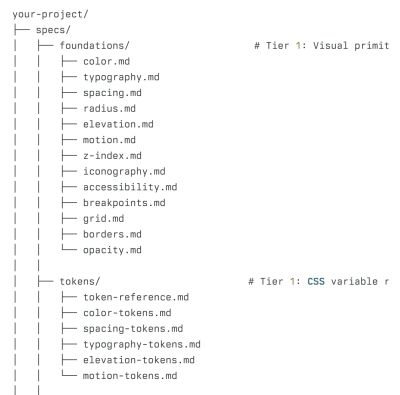
- The Spec File Layer: Comprising structured Markdown documents organized within a dedicated repository folder, these files outline spacing rules, component usage matrices, and priority hierarchies. Because they are text-based, they are computationally lightweight, highly cost-effective to process, and far more accurate than visual interpretation.
- The Token Layer: A centralized, constantly updated repository of design tokens. When an AI generates a prototype, it is strictly constrained to draw from this closed set of named variables, completely eliminating the risk of arbitrary or unauthorized color hex codes and padding values.
- The Auditing Script Layer: Automated linting scripts act as a quality-assurance firewall. They scan generated prototypes, flag anomalies or hard-coded shortcuts, and feed those corrections back into the iteration loop before human review even begins. Furthermore, when design systems ship version updates, automated synchronization routines flag which specific Markdown specs require updates to prevent the AI from referencing obsolete documentation.
Official Statements and Industry Insights
The discourse surrounding context engineering and AI-ready design systems highlights a unified industry consensus: context is everything.
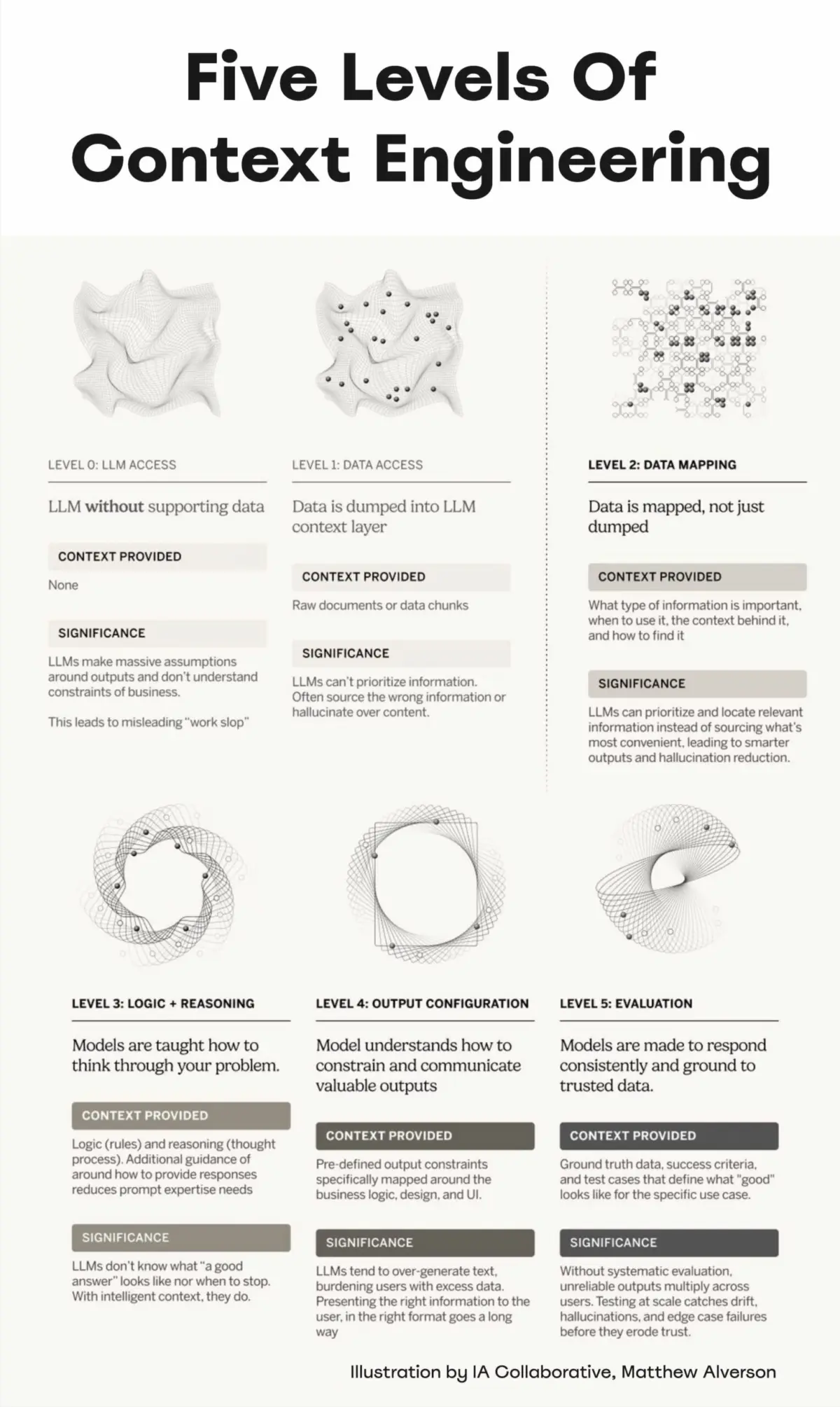
As design systems architect Matthew Alverson notes in his framework on the Five Levels of Context Engineering (popularized via industry leaders like Addy Osmani), managing how context is distributed to models determines whether an AI tool acts as a productivity multiplier or a technical debt factory.
"AI cannot magically resolve technical debt or design debt without proper guidance. It relies heavily on clear decisions, established priorities, and well-defined principles."
This sentiment is echoed throughout the product design community. Designers are shifting from pixel-pushers to system architects. The value is no longer just in drawing a screen, but in authoring the precise, unambiguous rules that allow autonomous systems to build screens correctly at scale.
Future Outlook: The Road Ahead for AI-Driven UX
The integration of artificial intelligence into product design workflows is far from a temporary trend; it is a permanent structural evolution. Over the coming years, the role of the product designer will pivot increasingly toward governance, system curation, and context engineering.

As design systems grow more sophisticated, we can anticipate several key developments:
- Bidirectional Syncing: Future tooling will automatically update Markdown spec files the moment a designer modifies a variable in Figma or a developer pushes a token update to GitHub, closing the loop between design and code entirely.
- Autonomous Design Linter Agents: Rather than static scripts, we will see specialized AI agents whose sole job is to monitor pull requests and prototype builds against the design system spec, proactively opening PRs to fix drift before human review.
- Standardized AI-Ready Repositories: Open-source templates for LLM-readable design systems will become the baseline standard for new software projects, dramatically cutting down the ramp-up time for AI-assisted development.
Ultimately, the more deliberate and precise designers are in guiding AI, the better the overall outcomes will be. This requires a sustained commitment to cleaning up, structuring, and maintaining design systems over time. The work of shaping the future of human-computer interaction is just beginning, and product teams will be busy refining these workflows for years to come.
Meet “Design Patterns For AI Interfaces”
As these workflows mature, understanding how users interact with intelligent systems is more critical than ever. Created by Vitaly Friedman, Design Patterns For AI Interfaces is a comprehensive video course packed with hundreds of real-life examples and advanced UX guidelines designed to help you build AI features that people actually want to use.
Whether you are looking to master prompt UX, handle streaming latency gracefully, or design trustworthy fallback states, this course bridges the gap between complex AI capabilities and intuitive user experience.
- Explore the Course: Check out the official Design Patterns For AI Interfaces platform.
- Watch a Preview: Jump straight into a free YouTube preview to see the methodology in action.
- Join the Training: Secure your spot in the upcoming live UX training workshops later this year.
