

Executive Overview
For decades, the standard response to almost any front-end architectural challenge was swift and predictable: “There’s a library for that.”
Need to format a date? Install moment or dayjs. Want to deep-clone an object? Pull in lodash.clonedeep. Looking to manage modal accessibility, parse HTTP requests, or group arrays? Add more packages to your package.json, install dependencies, run your tests, and move on.
This habit is rarely born of laziness. Rather, it stems from the sheer velocity of modern software development. Once a dependency is integrated and passing tests, it tends to become invisible. Meanwhile, web browsers have quietly evolved into hyper-capable virtual machines. Features that once required dozens of kilobytes of third-party JavaScript are now natively built into the web platform.
In a typical mid-sized JavaScript application, developers can routinely uncover 60KB to 90KB (minified and gzipped) of dependencies—translating to hundreds of kilobytes of uncompressed code—that the modern web browser can now handle natively. Thanks to initiatives like the Baseline project, championed by the WebDX Community Group, developers now have a reliable, standardized metric to track browser support.
This comprehensive guide will examine how you can audit your dependencies, evaluate native browser APIs, and safely shrink your JavaScript bundles without sacrificing user experience or maintainability.
Detailed Chronology: The Closing Gap Between Libraries and the Platform
The architectural divide between what developers must build themselves and what the browser provides out-of-the-box has been narrowing for years. To understand how we arrived at this juncture, it is helpful to review the historical trajectory of web platform capabilities versus community-driven solutions.

The Era of Polyfills and Framework Helpers (2010–2018)
In the early 2010s, JavaScript ecosystems suffered from severe fragmentation. Standard APIs for data manipulation, internationalization, asynchronous networking, and UI component behavior were either non-existent or radically inconsistent across Internet Explorer, Firefox, Safari, and early versions of Chrome.
During this era, libraries like jQuery, Lodash, Moment.js, and Axios were not merely conveniences; they were absolute necessities. They shielded developers from browser bugs and provided missing abstractions. However, as modern browsers converged around the ECMAScript standard, many of these third-party lifelines transformed from essential tools into redundant overhead.
The Rise of Standardized Specifications and Baseline (2019–Present)
Recognizing the friction caused by unpredictable browser implementation timelines, major browser vendors (Google, Mozilla, Apple, and Microsoft) collaborated through the WebDX Community Group to establish Baseline.
Baseline provides plain-language definitions for feature availability across major engines. Features are categorized into two primary actionable states:
- Newly Available: Supported across all major browser engines, though not yet meeting the time-threshold required to be safely assumed everywhere without checking.
- Widely Available: Safely supported across all major browsers for at least 30 months, making them universally safe for production use.
This structural clarity has fundamentally altered the calculus of dependency management. Instead of guessing whether an API is safe to use, engineering teams can reference Baseline data to systematically prune their dependency trees.
Supporting Context & Metrics: Auditing Your Dependencies by Cluster
Rather than reviewing dependencies one by one—a tedious and inefficient process—developers achieve the best results by auditing in thematic clusters. Wins naturally aggregate when you analyze related features together.

Cluster 1: Internationalization (The Easiest Modern Win)
Internationalization is typically the source of the most bloated, unnecessary KBs in legacy applications. Popular libraries handling relative times, numbers, currency conversions, and pluralization can easily drain performance budgets.
- Relative Time: Instead of importing
timeago.js, developers can utilize the nativeIntl.RelativeTimeFormatAPI, which is Widely available:const rtf = new Intl.RelativeTimeFormat("en", numeric: "auto" ); rtf.format(-1, "day"); // "yesterday" rtf.format(3, "hour"); // "in 3 hours" - Numbers, Currency, and Lists: Native APIs like
Intl.NumberFormatandIntl.ListFormateasily handle thousand separators, localized currencies, compact notations, and sentence-joining with Oxford commas, bypassing the need for dedicated formatting packages. - The Cumulative Impact: Replacing legacy formatting libraries with native
Intlnamespaces routinely saves approximately 14 KB gzipped per application.
Cluster 2: HTTP Clients
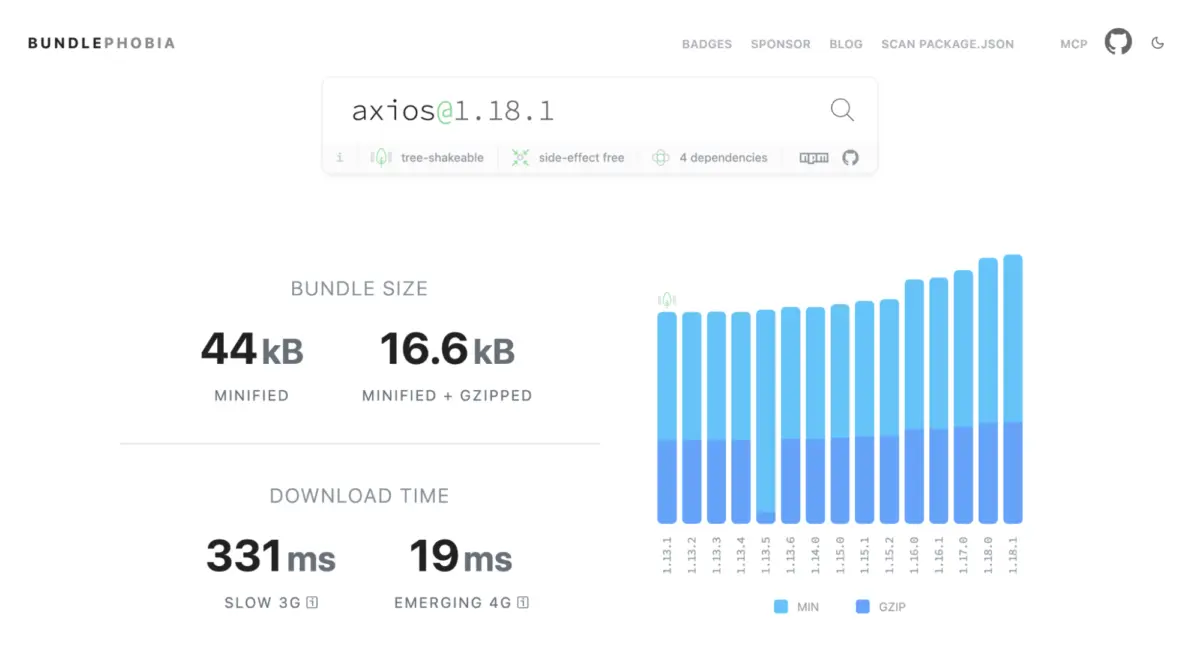
Heavyweight network libraries like axios (approx. 17 KB gzipped) and superagent (approx. 19 KB gzipped) are frequently employed out of habit. However, native fetch combined with AbortController and AbortSignal.timeout() handles standard GET and POST requests cleanly:
const res = vawait fetch("/api/users",
  signal: AbortSignal.timeout(5000), // native timeout after 5 seconds
);
const data = await res.json();
While advanced features like request/response interceptors or automatic retries still require custom wrappers or specialized libraries, standard applications can eliminate massive HTTP dependencies by adopting a lightweight fetch utility.
Cluster 3: UI Primitives & Accessibility
Historically, developers relied on external packages to manage modal dialogs, focus trapping, body scroll locks, and tooltips. Today, the modern web platform offers powerful primitives:
- The
<dialog>Element: Handles focus management,Escapekey handling, background inertness, and Top Layer rendering natively. - The Popover API: Provides light-dismiss behavior and accessibility defaults for dropdowns and floating elements without custom JavaScript.
- CSS Anchor Positioning: Replaces external positioning libraries like Popper.js by allowing elements to anchor directly to triggers via pure CSS.
Combining these native primitives allows engineering teams to drop modal libraries, focus-trap utilities, scroll lockers, and tooltip handlers, saving roughly 24 KB gzipped while improving accessibility compliance.
Cluster 4: Lodash and Utility Libraries
While full imports of lodash are less common today, modular packages like lodash.clonedeep and lodash.groupby still clutter dependency graphs. Modern JavaScript natively handles these operations:

- Grouping:
Object.groupBy()andMap.groupBy()organize collections natively. - Deep Cloning:
structuredClone()securely duplicates complex data structures (including Dates, Maps, and Sets) without relying on custom recursive utilities. - Set Operations: Native Set methods (
intersection,union,difference,symmetricDifference) eliminate external mathematical utility packages.
Pruning these specific utilities routinely recovers another 8 KB gzipped or more from average bundle sizes.
Official Statements and Architectural Frameworks
Before executing a mass deletion of dependencies, engineering teams must apply a rigorous decision-making framework to avoid unintended regressions. Experts recommend evaluating every potential package swap against three fundamental questions:
- Is the replacement Baseline-safe for my audience?
Assess your user base via analytics orbrowserslistconfigurations. B2B dashboards utilized on modern corporate browsers have a very different risk profile than public-facing portals accessed via older mobile devices. - What does the swap actually cost?
Ensure that adopting a native feature does not force you to introduce a heavier polyfill. For example, bleeding-edge APIs that lack universal support may require conditional loading strategies to prevent bundle bloat. - Does the platform feature cover my real-world use case?
Libraries often pack hidden utility functions. Always audit your actual codebase usage before assuming a native feature is a drop-in replacement.
Future Outlook: What to Watch Next
The horizon of web platform development promises even greater reductions in dependency overhead.
- Temporal API: While JavaScript’s long-awaited replacement for the legacy
Dateobject has reached advanced specification stages, its lack of universal stable support across all major engines means developers should continue using lightweight libraries likedayjsordate-fnstemporarily. OnceTemporalachieves complete Baseline status, it will represent one of the most impactful platform upgrades in JavaScript history. - Advanced CSS and Layout Primitives: Upcoming platform features will continue to absorb complex layout and state-management behaviors, further minimizing the reliance on external JavaScript frameworks for basic UI interactions.
The Step-by-Step Audit Process
To apply these insights to your own projects, follow this repeatable quarterly workflow:
- List Production Dependencies: Run
npm ls --omit=dev --depth=0to identify what actually reaches your users. - Measure Costs: Utilize bundle analyzers (
source-map-explorer, Vite bundle visualizers, or Bundlephobia) to calculate exact minified and gzipped sizes. - Check Baseline Status: Reference
webstatus.devor MDN documentation badges to verify browser support. - Execute Progressive Swaps: Replace Widely available features outright. For Newly available features, implement progressive enhancement checks with robust fallbacks.
By treating dependency management as an ongoing architectural maintenance cycle rather than a set-it-and-forget-it chore, engineering teams can continuously deliver faster, leaner, and more resilient web experiences.