

Executive Overview
For decades, the standard developer response to complex frontend requirements was straightforward: "There’s a library for that." Whether formatting dates, managing modal focus, orchestrating HTTP requests, or deep-cloning state objects, engineers routinely turned to external packages. These dependencies were added to package.json, integrated into build pipelines, and promptly forgotten. If the tests passed, the code shipped, and development marched forward.
However, the web platform has evolved at a breathtaking pace. Modern browsers have aggressively closed the gap between what developers once required external packages to achieve and what native APIs can handle out of the box. Today, a typical mid-sized JavaScript application carries between 60KB and 90KB (minified and gzipped) of redundant dependencies that modern browser engines can natively process.
This technical debt is rarely the result of developer negligence. Instead, it stems from a lack of regular dependency audits measured against modern browser standards like Baseline. While security audits via tools like npm audit are standard practice, engineering teams rarely ask a more fundamental question: Is this library still executing a task that the browser cannot handle natively?
This investigative guide explores how you can audit your dependency tree, leverage the power of native platform features, and reclaim dozens of kilobytes of bundle size without compromising functionality or user experience.
Detailed Chronology: The Shift from Polyfills to Native Platform Capabilities
To understand how we arrived at an era where external dependencies can be systematically purged, we must examine the historical trajectory of browser standardization and the introduction of the Baseline initiative.
The Fragmented Past
In the early 2010s, JavaScript ecosystems were fragmented. Browser inconsistencies made native development treacherous. Date manipulation required Moment.js; deep-cloning objects reliably required Lodash; internationalization was inconsistent across engines; and simple UI primitives like modals or dropdowns demanded heavy JavaScript wrappers to satisfy basic accessibility (a11y) standards.

Libraries emerged not merely as conveniences, but as mandatory polyfills for a broken web platform. They insulated developers from inconsistent implementations across Internet Explorer, legacy Safari, and early versions of Chrome and Firefox.
The Rise of Standardized Specifications
Over the past five to seven years, standards bodies—most notably the WebDX Community Group—recognized that developer fatigue and bloated bundle sizes were threatening the performance of the web. Through collaborative efforts involving engineers from Google, Mozilla, Apple, and Microsoft, browser vendors synchronized their release cycles.
This synchronization culminated in the creation of Baseline, a clear metric for feature readiness:
- Newly Available: A feature has recently landed across all major browser engines, signaling that it is safe to use with minor caveats or feature detection.
- Widely Available: A feature has been supported across all major engines for at least 30 months, making it universally safe for production environments without polyfills.
- Limited Availability: A feature is currently supported in only a subset of browsers, requiring careful consideration or conditional polyfilling.
By categorizing features transparently via initiatives like webstatus.dev and integration directly into MDN documentation, the web platform has shifted from a fragmented landscape to a unified runtime environment. Today, features that once required entire ecosystems of third-party packages are landing natively in stable browser releases.
Supporting Context & Metrics: Auditing Your Dependencies by Cluster
Ripping out libraries at random can break production applications. To execute a safe, strategic cleanup, developers should analyze their dependencies in functional clusters. Below is a breakdown of four primary clusters where native web platform features render heavy packages obsolete.
Cluster 1: Internationalization (The Highest-Yield Optimization)
The Internationalization (Intl) namespace built directly into modern browsers eliminates the need for a wide array of formatting libraries.

- Relative Time: Instead of relying on
timeago.jsto render strings like "3 hours ago", the browser providesIntl.RelativeTimeFormat, which is Baseline Widely available.const rtf = new Intl.RelativeTimeFormat("en", numeric: "auto" ); rtf.format(-1, "day"); // "yesterday" rtf.format(3, "hour"); // "in 3 hours" - Numbers, Currency, and Lists:
Intl.NumberFormatandIntl.ListFormateasily handle complex tasks such as currency formatting, compact notation (e.g., "1.2M"), and Oxford comma array joining ("Alice, Bob, and Carol"), eliminating packages likenumeralorpluralize. - The Math: Combining and removing libraries like
humanize-duration,timeago.js,pluralize, andnumeralimmediately saves roughly 14 KB gzipped from your production bundle.
Cluster 2: HTTP Clients (fetch vs. axios)
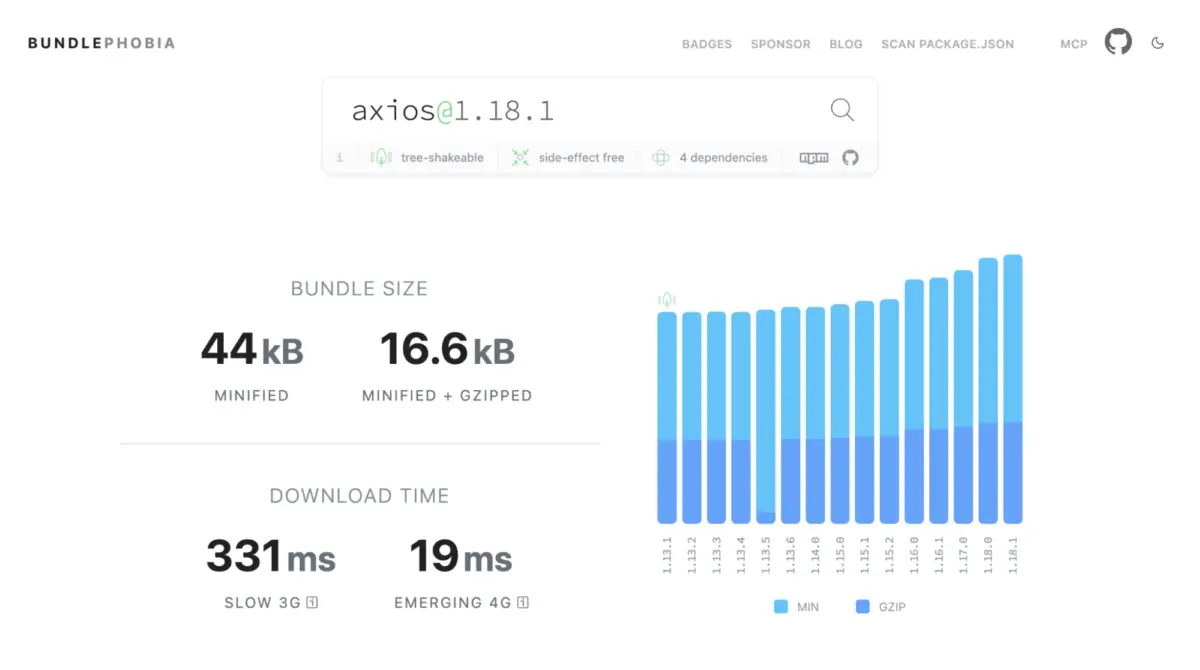
Many applications import axios (17 KB gz) or superagent (19 KB gz) out of habit. However, native fetch combined with AbortController covers the vast majority of standard use cases.
- Timeouts: While
axiosrelies on a customtimeoutconfiguration, nativefetchsupports robust timeout handling viaAbortSignal:const res = await fetch("/api/users", signal: AbortSignal.timeout(5000), // Automatically aborts after 5 seconds ); - Caveat: Advanced features like request/response interceptors, automatic retries, or download progress tracking are not natively built into
fetch. If your application depends heavily on these, a lightweight wrapper class written aroundfetchis often superior to retaining a monolithic client. A clean transition saves approximately 17 KB gzipped.
Cluster 3: UI Primitives (Modals, Popovers, and Positioning)
Accessibility-heavy UI components once required packages like a11y-dialog, tippy.js, focus-trap, and body-scroll-lock. Today, three platform features handle these natively:
- The
<dialog>Element: Widely available, native dialogs handle focus trapping, background inertness,Escapekey listeners, and top-layer rendering without stacking-context conflicts (z-indexwars). Background scrolling can be locked with a single CSS rule:body:has(dialog:modal) overflow: hidden; - The Popover API & Anchor Positioning: Lightweight UI panels, dropdowns, and tooltips are now natively supported via the Popover API and CSS Anchor Positioning. This eliminates the need for heavy tooltip libraries and positioning engines like Popper, saving roughly 24 KB gzipped while securing superior accessibility defaults.
Cluster 4: Lodash Utilities
Importing full utility libraries—or even standalone packages like lodash.clonedeep and lodash.groupby—is largely unnecessary in modern JavaScript.
- Grouping:
Object.groupByandMap.groupByorganize arrays and iterables natively into objects or maps. - Deep Cloning:
structuredClone()is Widely available and securely handles complex data types includingDate,Map,Set,ArrayBuffer, and circular references without the security and performance baggage ofJSON.parse(JSON.stringify(...)). - Set Operations: Native
Setobjects now include built-in methods forintersection,union,difference,symmetricDifference, and subset checks. - The Math: Pruning
lodash.clonedeepandlodash.groupbyyields an immediate savings of around 8 KB gzipped.
Official Statements and Strategic Frameworks
Before executing a codebase-wide deletion spree, engineering teams must evaluate every potential swap against a rigorous three-part decision framework:
- Is the replacement Baseline-safe for my specific audience?
Evaluate your user analytics orbrowserslistconfiguration. A B2B enterprise dashboard populated by users on evergreen browsers can adopt newly available features immediately. Conversely, public-facing applications with long-tail traffic on older mobile devices require conditional feature detection or polyfills. - What does the swap actually cost?
Never assume dropping a library reduces bundle size if it forces you to introduce an oversized polyfill. (As seen withTemporal, discussed below, premature adoption can inadvertently inflate your bundle). - Does the platform feature cover my actual use case?
Verify whether your codebase utilizes advanced proprietary features of a library that native APIs do not replicate out of the box.
A Case Study in Patience: The Temporal API
Not every modern API is ready for immediate adoption. The long-awaited Temporal proposal—designed to replace JavaScript’s legacy Date object with immutable, time-zone-aware objects—has reached advanced specification stages and is landing across major browsers.
However, because stable support is still rolling out across all primary engines, Temporal is not yet universally Baseline. Attempting to polyfill it today via @js-temporal/polyfill adds between 19 KB and 44 KB gzipped to your application. Consequently, engineering teams are advised to maintain lightweight date libraries (such as dayjs) until Temporal achieves full Baseline status, serving as a textbook reminder that timing is everything in dependency auditing.

Future Outlook: The Continuous Audit Model
Migrating away from legacy dependencies is not a one-time project; it is an ongoing engineering discipline. As the web platform continues to mature, upcoming native capabilities—such as advanced CSS functions, expanded internationalization helpers, and deeper DOM primitives—will continue to absorb tasks currently delegated to third-party libraries.
To maintain a lean, high-performing application, engineering teams should institutionalize a quarterly dependency review:
- Step 1: List production dependencies using
npm ls --omit=dev --depth=0. - Step 2: Measure actual bundle impact using build analyzers like
source-map-exploreror bundler visualizers. - Step 3: Cross-reference candidate packages with modern web status platforms like
webstatus.devto identify native replacements. - Step 4: Apply progressive enhancement and feature detection where appropriate to ship zero redundant bytes to modern browser clients.
By treating the browser as a powerful, evolving application runtime rather than a generic document viewer, developers can drastically reduce bundle sizes, improve execution speeds, and deliver exceptionally responsive user experiences.