

Executive Overview
For over two decades, responsive web design has been shackled to a single, rigid proxy: the viewport. When media queries were introduced, they revolutionized how we built for the web, granting developers the power to alter page layouts based entirely on screen dimensions. Yet, as the modern web evolved from monolithic desktop structures to component-driven design systems—where UI elements are modular, reusable, and scattered dynamically across grids, sidebars, and nested modules—the limitations of the viewport became glaringly obvious.
Enter CSS Container Queries. Boasting nearly 94% global browser support today, container queries represent one of the most anticipated leaps forward in CSS history. They liberate components from the tyranny of the browser window, allowing them to adapt intelligently to the physical space of their immediate surroundings.
Yet, despite widespread browser compatibility and years of developer demand, adoption remains shockingly low. Industry surveys indicate that while a vast majority of developers are aware of container queries, fewer than half actively use them in production. Why? Because they look deceivingly like traditional media queries. This surface-level familiarity has led to widespread confusion, poor implementation patterns, and a fundamental misunderstanding of their core purpose.
This deep dive investigates the psychological and technical barriers stalling container query adoption, deconstructs the structural differences between macro and micro layouts, and provides an authoritative framework for when—and how—to harness the true power of context-driven styling.
Detailed Chronology: The Evolution from Viewport Proxies to Component Context
To understand why container queries are so frequently mishandled, we must first retrace the historical trajectory of responsive web design.
The Media Query Era (2010–2020)
When Ethan Marcotte coined "Responsive Web Design" in 2010, the @media query became the definitive tool for crafting adaptable interfaces. Developers learned to ask the browser a singular question: "How wide is the screen right now?"
For macro-layout decisions—such as transitioning a multi-column dashboard into a single-column stack on mobile devices—media queries performed admirably. However, as web applications matured into component-based architectures built with frameworks like React, Vue, and Svelte, the cracks began to show.
A .card component, for instance, might be designed to look gorgeous when laid out horizontally in a full-width container. But what happens when that exact same card is dropped into a 300px-wide sidebar on a 1920px desktop monitor? Because the viewport width is still 1920px, the media query fires its desktop-optimized rules, completely ignoring the cramped reality of the sidebar. The result? Text overflows, images distort, and layouts break. Developers were forced to write convoluted, brittle CSS hacks or rely on heavy JavaScript ResizeObserver scripts just to achieve basic component responsiveness.
The Rise, Stall, and Awakening of Container Queries (2021–Present)
The ability for components to respond to their parent containers sat atop the official CSS wishlist for years. When container queries finally landed in modern browsers, shipping across Chrome, Safari, and Firefox within a remarkably tight window, they achieved broad support at breakneck speed.
However, as CSS expert Kevin Powell noted during his landmark talk at SmashingConf Amsterdam, adoption rates have been exceptionally poor relative to the feature’s utility. Developers, encountering a syntax that closely mirrored @media (@container (min-width: ...)), immediately attempted to map their existing media-query mental models directly onto container queries.
Because they looked identical, developers assumed they worked identically. This cognitive shortcut triggered widespread architectural missteps—ranging from attempts to query elements based on their own dimensions (creating infinite logic loops) to unexpected layout collapses caused by misunderstanding inline versus block size constraints.
Supporting Context & Metrics: The Adoption Paradox
The disconnect between browser capabilities and developer utilization is starkly highlighted by industry data. According to recent developer ecosystem reports, while over 86% of frontend engineers are aware that CSS container queries exist, only roughly 41.4% actually deploy them in production environments.
This represents one of the widest awareness-to-adoption gaps for a major CSS specification in recent memory. To put this fragmentation into perspective, data tracking modern browsing environments reveals over 2,300 unique viewport sizes in active rotation across the global web. Attempting to manage component states across thousands of fragmented device dimensions using viewport-bound media queries is an exercise in futility.
The mathematical reality of the modern web dictates that layout logic must move closer to the container. When we shift our paradigm from managing the viewport to empowering the component, we effectively rely on the content and its immediate container to dictate layout rules. Yet, breaking free from old habits requires unlearning a decade of media query muscle memory.

Official Perspectives and Technical Deep Dive
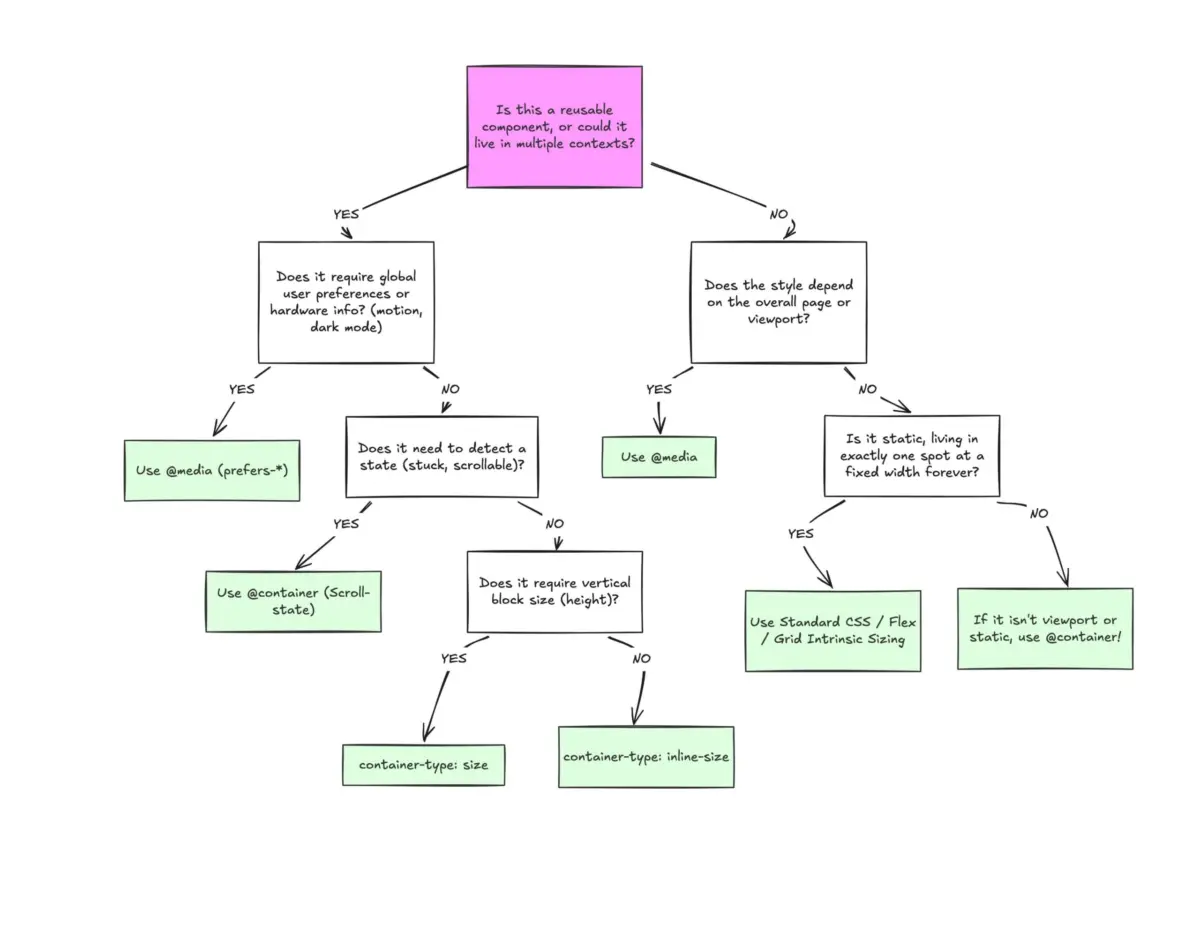
To properly utilize container queries, one must master the distinction between macro layouts and micro layouts.
- Macro Layouts (Media Queries): These look outward. They govern the overarching page structure, global grids, navigation headers, system preferences (
prefers-color-scheme), and hardware capabilities (touch screens versus mouse inputs). - Micro Layouts (Container Queries): These look inward. They govern self-contained UI components—cards, widgets, form controls, and modular components—that need to respond organically to whatever spatial allocation they receive, regardless of where they are placed on the page.
Code Comparison: Viewport vs. Container
Consider the classic card component implementation. Under the legacy approach, we relied on viewport dimensions:
@media (min-width: 1024px)
  .card
    display: flex;
In contrast, a container query decouples the component from the screen entirely, anchoring its behavior to its direct wrapper:
.card-wrapper
  container-name: card;
  container-type: inline-size;


@container card (min-width: 450px)
  .card
    display: flex;
    flex-direction: row;
Here, the card evaluates only one condition: Does my parent wrapper have at least 450px of horizontal space? If true, it expands horizontally; if false, it falls back to its default block display.
Advanced Patterns: Fluid Typography and Flexbox Wrap Detection
Container queries unlock advanced layout capabilities that were previously impossible without heavy JavaScript interventions.
-
Container-Relative Typography: Traditional fluid typography relies on viewport units (
vw,vh) via functions likeclamp(). However, if a component moves into a sidebar, viewport-based scaling causes the text to become disproportionately large or small. By leveraging container query length units (cqi,cqw,cqb), typography scales natively to the component:.card-title font-size: clamp(1rem, .5rem + 3cqi, 2rem); -
Flexbox Wrap Detection: Flexbox excels at wrapping items when space runs thin, but CSS historically lacked a mechanism to detect when a wrap event occurred. By registering a flex item as an inline-size container, developers can trigger container queries precisely when items reflow onto a new line—bridging the gap between layout states without a single line of JavaScript.

Navigating Pitfalls and Side Effects
Despite their elegance, container queries introduce specific constraints that developers must navigate:
- Self-Querying Prohibition: An element cannot query itself. Trying to apply a container query to the exact same element declaring the
container-typeresults in an infinite logic loop. A dedicated wrapper element is always required. - Layout Collapses from Size Queries: Querying a container’s block (
size) dimension without an explicit height or aspect-ratio can instantly collapse the container to0px, as the browser calculates dimensions independently of its children. Sticking toinline-sizeavoids this pitfall. - Custom Property Restrictions: At present, container queries cannot directly accept CSS custom properties (variables) within their conditions due to cascading evaluation cycles.
Future Outlook: The Component-First Architecture
As design systems become increasingly modular and micro-frontends redefine how web applications are architected, the future of CSS firmly belongs to context-aware styling.
Stop treating container queries as a modern drop-in replacement for traditional media queries. They are not competing technologies; they are complementary tools operating at different levels of the abstraction hierarchy. Media queries will retain their indispensable role in macro-level page orchestration, while container queries will power the intelligent, resilient components of tomorrow.
By embracing container queries, developers can finally build truly portable, resilient UI components that render flawlessly whether they occupy a massive hero grid or a cramped mobile sidebar. The tools are fully supported across all modern browsers—it is time for our development practices to catch up.