

Executive Overview
For decades, the web design industry has relied on a single master proxy to dictate how user interfaces adapt to their environments: the viewport. From the earliest days of responsive web design—popularized by Ethan Marcotte in 2010—media queries have reigned supreme, giving developers the tools to mold layouts based on the physical width and height of a device’s browser window. But as modern web applications have matured into component-driven ecosystems, the limitations of the viewport proxy have become glaringly apparent.
Enter CSS Container Queries. Boasting nearly 94% global browser support, container queries represent a paradigm shift in how we approach fluid design. Rather than asking, "How wide is the screen right now?", container queries allow individual components to ask, "How much space is available for me in this specific spot, right now?"
Despite this robust browser backing and years of being a top-requested feature on developer wishlists, adoption rates remain troublingly low. According to the State of CSS survey, while 86% of developers are aware of container queries, only 41.4% actively use them in production. This article explores why container queries are so frequently misunderstood, how they fundamentally differ from traditional media queries, and how leveraging them correctly can drastically improve component reusability and layout resilience.
Detailed Chronology: The Evolution from Viewports to Containers
To understand why container queries are struggling to achieve widespread integration, we must first trace how the web development community arrived at the viewport-centric model and why changing old habits proves so difficult.
The Media Query Era (2010–2020)
When responsive design burst onto the scene, the primary challenge was transitioning desktop websites down to mobile devices. Media queries (@media) were introduced as a breakthrough solution. They successfully bridged the gap between varying screen sizes by letting developers establish breakpoints.
However, media queries are, by design, fundamentally decoupled from the elements they style. They only look outward at the browser window. A media query has no visibility into whether a component lives inside a spacious main grid or a cramped, narrow sidebar.
The Component-Driven Revolution and the Birth of Container Queries
As front-end architecture shifted from monolithic page builds to component-driven libraries (such as React, Vue, Svelte, and modern Web Components), the disconnect grew wider. Developers began building highly reusable components—like cards, widgets, and navigation bars—intended to be dropped anywhere on a page.
Yet, forcing these components to respond using viewport-based media queries led to brittleness. A card designed to stretch horizontally on a large screen would break if placed inside a narrow desktop sidebar, because the viewport was still 1920 pixels wide, triggering the desktop media query despite the spatial constraint.
CSS Container Queries were developed to solve this exact problem. By allowing developers to declare an element as a containment context (container-type: inline-size), children elements could finally react to their parent wrapper’s dimensions rather than the global screen size.
Supporting Context & Metrics: The Adoption Gap and Technical Realities
The web ecosystem is currently trapped in an adoption paradox. Developers recognize the utility of container queries, yet hesitate to integrate them into daily workflows.
The Numbers Behind the Adoption Lag
- Browser Support: At approximately 94% globally, container queries are fully supported across all modern evergreen browsers (Chrome, Safari, Firefox, and Edge). Technical capability is no longer a barrier.
- Developer Awareness vs. Usage: The State of CSS data highlights a massive conversion gap: 86% of developers know container queries exist, but only 41.4% use them.
- Viewport Fragmentation: Modern analytics reveal over 2,300 unique viewport sizes actively interacting with the web. Hardcoding breakpoints via media queries to account for thousands of fragmented screen sizes is a losing battle. Component-level responsiveness is no longer just a luxury; it is a necessity.
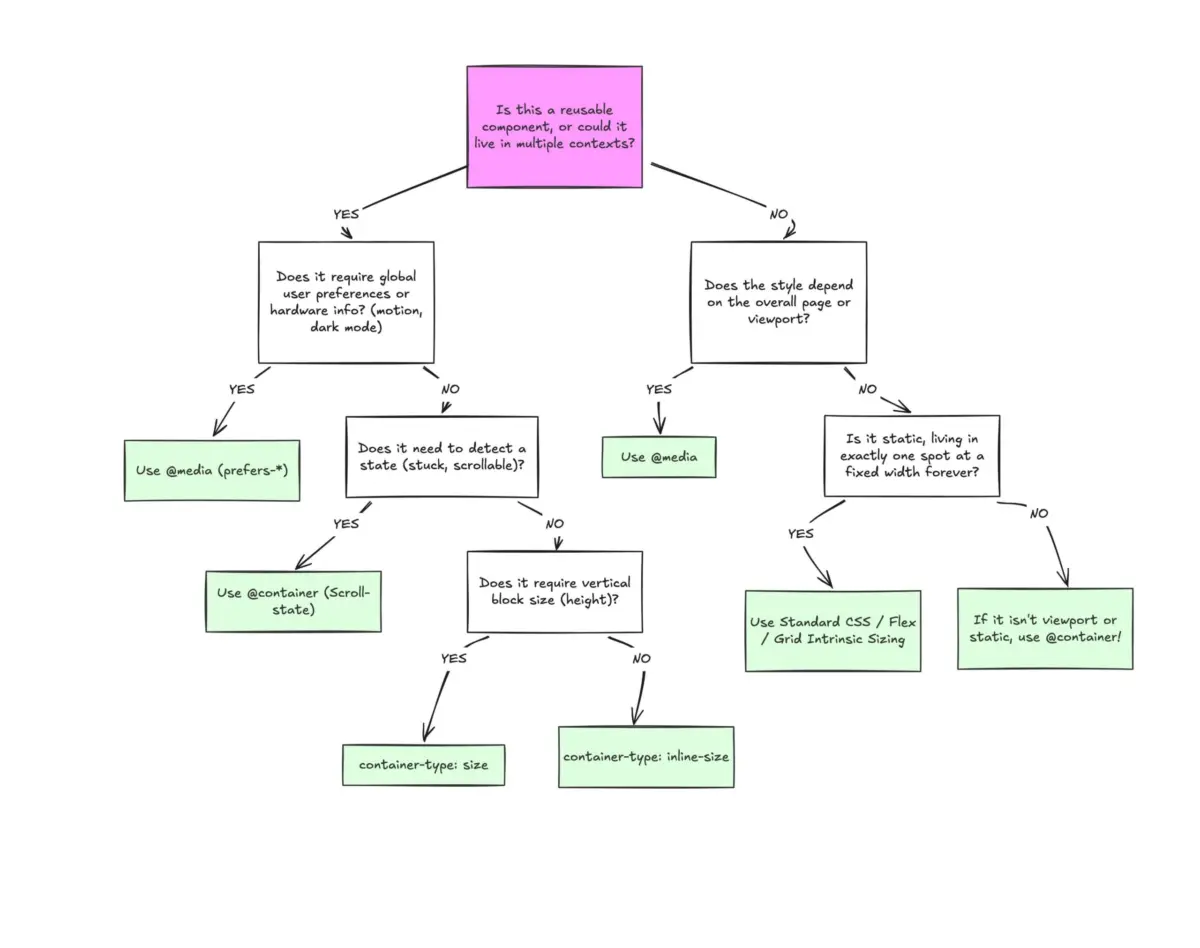
Macro vs. Micro Layouts: Where Each Query Belongs
A helpful mental framework for modern responsive design is distinguishing between macro layouts and micro layouts:
- Macro Layouts (Media Queries): These dictate the overall page structure—headers, footers, main grid systems, system preferences like
prefers-color-scheme, and device-specific capabilities (e.g., touch screens). Media queries excel at looking outward across the entire viewport. - Micro Layouts (Container Queries): These govern everything inside the macro layout. Components like cards, forms, widgets, and buttons should be entirely self-contained. They should shift layouts based on available spatial context, not arbitrary viewport thresholds like
768px.
Official Statements & Industry Insights
Industry experts and thought leaders have been vocal about the slow transition to container-first design methodologies.

At SmashingConf Amsterdam, performance and CSS expert Kevin Powell addressed the issue directly, stating bluntly: "Container Queries adoption has been terrible." Powell emphasized a core truth about legacy styling habits: "Media queries are dumb. Not dumb in terms of the concept, but dumb in that they don’t know very much. In fact, most people assume that they know more than they do."
Because container queries share a remarkably similar syntax to media queries (@container vs. @media), developers often mistakenly assume they function under the same hood. This superficial similarity breeds misuse. When developers attempt to apply container queries with a viewport mindset, unexpected bugs arise, leading them to abandon the feature prematurely.
Furthermore, community discussions on platforms like CSS-Tricks have long highlighted that component reusability is stifled when layout logic relies on global dimensions. By relying on containers, developers effectively allow the content and its immediate environment to dictate layout behavior organically.
Practical Implementations: Beyond the Basics
To successfully leverage container queries, developers must master both their syntax and their distinct capabilities, such as fluid typography and flex-wrap detection.
1. Fluid Typography within Components
Traditionally, fluid typography relied on viewport units (vw, vh) paired with CSS clamp() functions:
.card-title
  font-size: clamp(100%, 1rem + 2vw, 24px);
While functional, this ties text scaling to the screen. If the card is moved to a narrow sidebar, the typography scales inappropriately. By using container query length units (cqi, cqw, cqb) alongside clamp(), typography becomes truly responsive to the component:

.card-title
  font-size: clamp(1rem, .5rem + 3cqi, 2rem);
2. Flexbox Wrap Detection
Media queries are structurally blind to internal layout events, such as when flex items wrap onto a new line. Traditionally, detecting a wrap required heavy JavaScript via ResizeObserver.
However, by registering a flex item as a container, developers can create pure CSS wrap-detection workflows:
/* The flex parent */
.flex-layout
  display: flex;
  flex-wrap: wrap;


/* Register a flex item as a container */
.flex-item
  container-type: inline-size;
  flex: 1 1 390px;


/* Default vertical layout */
.card
  display: flex;
  flex-direction: column;


/* Once the container has enough room, switch to horizontal */
@container (min-width: 600px)
  .card
    flex-direction: row;
    align-items: center;
Navigating Pitfalls and Caveats
Container queries do come with important side effects and limitations that developers must navigate:
- Self-Containment Restrictions: An element cannot query itself. To style
.cardbased on a container query, you must apply the container properties to a parent wrapper (.cards), ensuring a clear parent-child structural relationship. - Layout Collapse via Block Size: Querying a container’s full
size(both inline and block) without defining an explicit height or aspect-ratio can cause elements to collapse to0px. Sticking toinline-sizeavoids this pitfall. - Custom Property Limitations: At present, container queries cannot directly accept CSS custom properties (variables) as breakpoints due to cascading evaluation loops.
Future Outlook: The Component-First Web
The path forward for responsive web design is undeniably component-centric. As design systems grow increasingly complex and multi-platform deployment becomes standard practice, relying on a single global viewport to dictate component behavior is no longer sustainable.
Container queries do not spell the end of media queries; rather, they establish a healthy division of labor. Media queries handle macro-level page architecture and system preferences, while container queries empower micro-level components to adapt intelligently to any context they inhabit.
As developers continue to unlearn old viewport habits and embrace inward-looking design patterns, container queries will transition from an underused modern feature to the absolute cornerstone of resilient, scalable front-end architecture. The tools are ready, the browser support is universal—it is time for our workflows to catch up.