

Executive Overview
Despite achieving robust, cross-browser support that now sits at an impressive 94%, CSS container queries remain surprisingly underused and frequently misunderstood across the front-end development ecosystem. Years after their initial introduction, developers continue to grapple with a conceptual hangover rooted in decades of viewport-centric design. Too often, container queries are treated as mere drop-in replacements for traditional media queries—syntax swapped out lazily, leading to implementation errors, structural confusion, and missed architectural opportunities.
This article investigates the systemic friction surrounding container query adoption. By drawing a sharp demarcation line between macro-layout management (via media queries) and micro-layout component responsiveness (via container queries), we will explore how modern web applications can achieve genuine modularity. We will analyze why traditional media queries are fundamentally "blind" to internal component contexts, examine advanced practical patterns such as fluid typography and flexbox wrap detection using container-relative units (cqi), and directly address the inherent limitations, side effects, and structural caveats that every engineer must navigate.
Ultimately, the shift from viewport queries to container queries is not merely a syntactic evolution; it is a profound paradigm shift. It moves us away from asking, "How wide is the physical screen right now?" and toward the much more powerful question, "How much space is available for this specific component in its current context?"
Detailed Chronology & The Adoption Paradox
To understand where we are today, we must retrace the path of modern CSS layout evolution. For generations, web developers operated under the tyranny of the viewport. Media queries gave us the illusion that screen width alone was the ultimate arbiter of how responsive applications should adapt to their environments. We learned to write rules like @media (min-width: 1024px) as a proxy for device categories, structuring our entire layout systems around arbitrary desktop, tablet, and mobile breakpoints.
When CSS Container Queries finally shipped, the industry reaction was predictably muted. Many developers, caught up in fast-paced delivery cycles, missed the initial launch announcements. When they finally encountered the feature, the immediate internal monologue was often defensive: "Why exactly do I need this when media queries already exist and work fine?"
This skepticism was widespread, creating an unexpected adoption paradox. According to the State of CSS survey data, an overwhelming 86% of developers are explicitly aware of container queries. Yet, actual usage languishes at roughly 41.4%. During SmashingConf Amsterdam, industry expert Kevin Powell pulled no punches, characterizing overall container query adoption as "terrible." This stagnation is deeply ironic, especially when considering that the ability for individual components to adapt dynamically to the size of their outer container occupied the absolute pinnacle of community CSS wishlists for years.
Why the severe lag between awareness and active implementation? The culprit is visual and syntactic familiarity. Because container queries borrow a syntax heavily inspired by media queries, it is dangerously easy to assume they serve identical purposes under the hood. Developers naturally attempt to apply container queries with a viewport mindset, leading to misfires, confusion, and a reversion back to comfortable, legacy patterns.
Supporting Context & Metrics: Macro vs. Micro Layouts
To unlock the power of container queries, we must first recognize the fundamental structural blindness of traditional media queries.
The Problem with Viewport Proxies
When a developer writes a standard media query:
@media (min-width: 1024px)
  .card
    display: flex;
They are asking the browser a single, isolated question: How wide is the screen right now?
Media queries answer this question reliably, but they operate with zero awareness of the DOM tree below them. Consider what happens when that exact .card component is nested inside a grid cell that happens to be restricted to 300 pixels wide on a massive 1920-pixel desktop monitor. Because the browser viewport remains at 1920 pixels, the media query fires, forcing .card into a multi-column flex layout designed for expansive spaces. The result is a cramped, overflowing, and visually broken UI component.
As Kevin Powell famously noted:
"Media queries are dumb. Not dumb in terms of the concept, but dumb in that they don’t know very much. In fact, most people assume that they know more than they do."
With over 2,300 unique viewport sizes documented across the modern web ecosystem, attempting to account for every edge case using global viewport breakpoints is an exercise in futility.
The Solution: Looking Inward
Container queries invert this relationship entirely. Instead of looking outward at the browser window, they look inward at the immediate structural environment. They allow components to ask: How much space is available for me in this specific spot, right now?
.card-wrapper
  container-name: card;
  container-type: inline-size;


@container card (min-width: 450px)
  .card
    display: flex;
    flex-direction: row;
In this architecture, the card remains entirely unbothered by the device viewport. It cares exclusively about whether its parent wrapper (.card-wrapper) possesses at least 450 pixels of horizontal inline space.

Macro vs. Micro Layouts
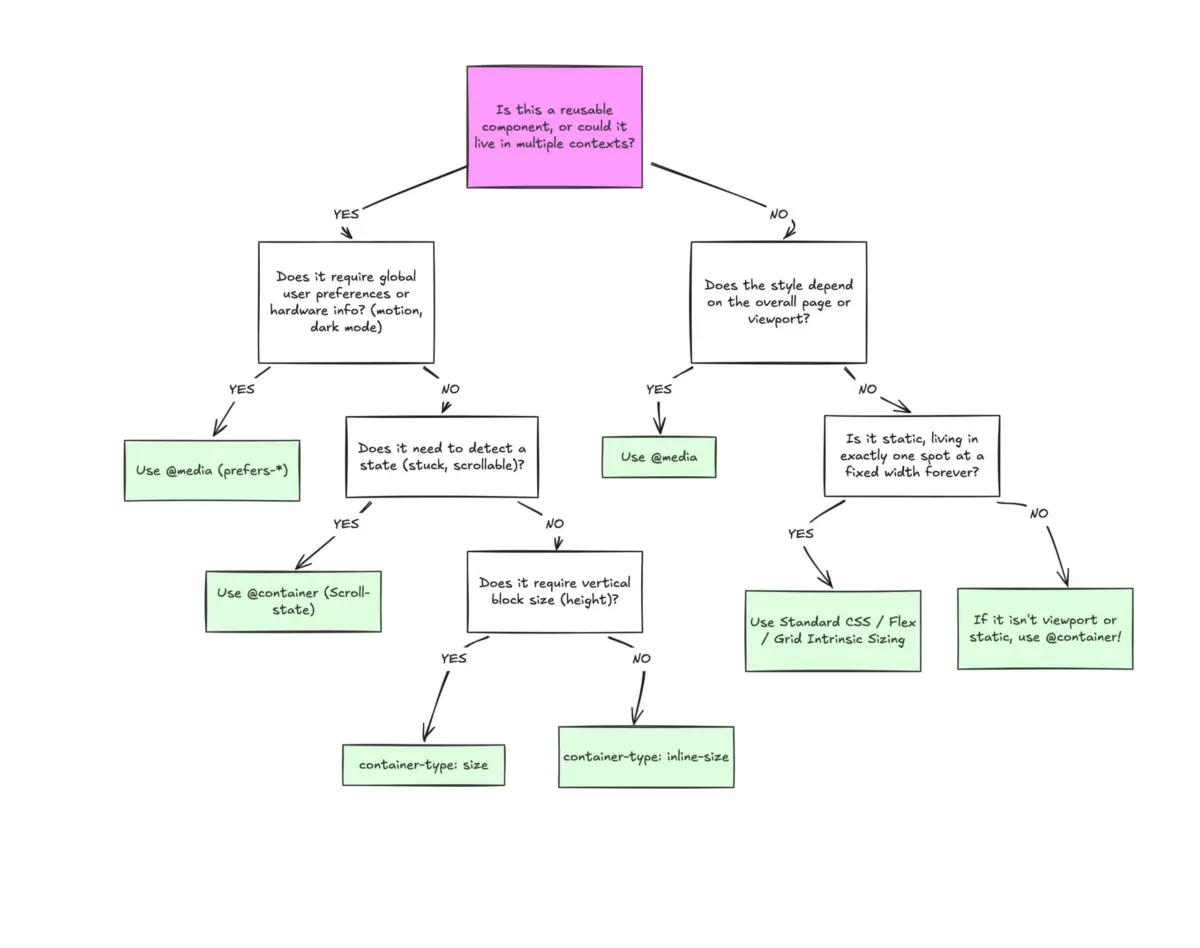
To systematically organize a modern CSS codebase, developers should divide layout logic into two distinct tiers:
- Macro Layouts (Media Queries): Responsible for outward-facing, page-level architecture. This includes global page structures, multi-column macro grids, sticky headers, system preferences (
prefers-color-scheme), and physical device capabilities like touch screens. - Micro Layouts (Container Queries): Responsible for internal component responsiveness. This encompasses modular UI elements such as cards, complex widgets, dynamic forms, and navigation bars that must adapt gracefully regardless of whether they render inside a full-width main content area or a constricted sidebar.
Advanced Practical Implementations
Moving beyond basic card layouts, container queries unlock sophisticated design patterns that previously required heavy JavaScript intervention.
1. Fluid Typography Inside Components
Traditionally, responsive typography relied heavily on viewport-relative CSS units (vw, vh) paired with clamp() functions:
.card-title
  font-size: clamp(100%, 1rem + 2vw, 24px);
While effective at the page level, this approach breaks down the moment a component is relocated to a sidebar. Because the typography is anchored to the viewport rather than the component’s container, text scales inappropriately.
Container queries introduce dedicated container-relative length units (cqi, cqw, cqb). By coupling these units with CSS clamp(), we can achieve true component-level fluid typography:
.card-title
  font-size: clamp(1rem, .5rem + 3cqi, 2rem);
Now, the typography scales dynamically in direct proportion to the component’s available inline space, maintaining perfect visual hierarchy across any layout context.
2. Flexbox Wrap Detection Without JavaScript
One of the most exciting capabilities enabled by container queries is indirect internal state detection. CSS Flexbox is exceptional at wrapping items (flex-wrap: wrap) when a container runs out of horizontal space. However, CSS has traditionally lacked a native mechanism to detect when that wrapping event occurs—historically forcing developers to rely on JavaScript ResizeObserver APIs.
By nesting container queries inside flex items, we can create a pure CSS wrap-detection workflow:

/* The flex parent */
.flex-layout
  display: flex;
  flex-wrap: wrap;


/* Register a flex item as a container */
.flex-item
  container-type: inline-size;
  flex: 1 1 390px; /* Grow to fill space, wrap at 390px */


/* Default Card Styles (narrow / side-by-side) */
.card
  display: flex;
  flex-direction: column;
  background: #f4f4f4;


/* Once there's enough room for a full row */
@container (min-width: 600px)
  .card
    flex-direction: row;
    align-items: center;
    background: #e2f0d9;
As the parent container shrinks and items wrap onto subsequent lines, the individual flex item expands, triggering the container query and seamlessly updating the internal card layout without a single line of JavaScript.
Caveats, Side Effects, and Limitations
While powerful, container queries are not a silver bullet. Developers must account for several distinct structural limitations and side effects before integrating them into production environments:
- The Self-Querying Restriction: A container cannot query itself. Attempting to apply
container-typeto an element and immediately querying that same element for layout changes will result in an infinite calculation loop. Developers must always establish an explicit parent-child wrapper relationship. - Layout Collapse via Size Queries: Querying a container’s full
size(incorporating both inline and block dimensions) rather than itsinline-sizecan cause blocks to collapse to0pxheight if explicit dimensions or aspect ratios are not declared. Browsers calculate these dimensions independently of child content during the layout pass. - Custom Property Incompatibility: Container queries cannot currently accept CSS custom properties (variables) directly within their conditional checks (e.g.,
@container (min-width: var(--breakpoint-lg))). This limitation prevents recursive cascade loops where a query condition dynamically alters the variable it relies upon.
Future Outlook & Strategic Recommendations
The transition toward component-driven architecture is irreversible. As design systems grow increasingly complex and multi-platform applications become the industry standard, relying exclusively on global viewport media queries is no longer viable.
Engineering teams should adopt a balanced, intentional approach:
- Use Media Queries for macro-level architectural decisions, global page navigation, and global environmental preferences.
- Use Container Queries for micro-level component styling, ensuring that reusable UI assets remain resilient, portable, and completely context-agnostic.
By stopping the practice of treating container queries as mere syntactic replacements for media queries, front-end developers can finally unlock the true promise of responsive, modular web design—building interfaces that react intelligently to their immediate environment, exactly where it matters most.