In the modern landscape of front-end engineering and user experience (UX) design, building deeply immersive, gamified web interfaces usually triggers a predictable industry reflex: reach for a physics engine. When tasked with creating interactive elements that demand a tangible sense of weight, bounce, resistance, or destruction, standard development playbooks point directly to heavy libraries like Matter.js, Cannon.js, or complex custom WebGL shaders. These tools are the established gold standard for simulating real-world physical interactions on a two-dimensional browser canvas.
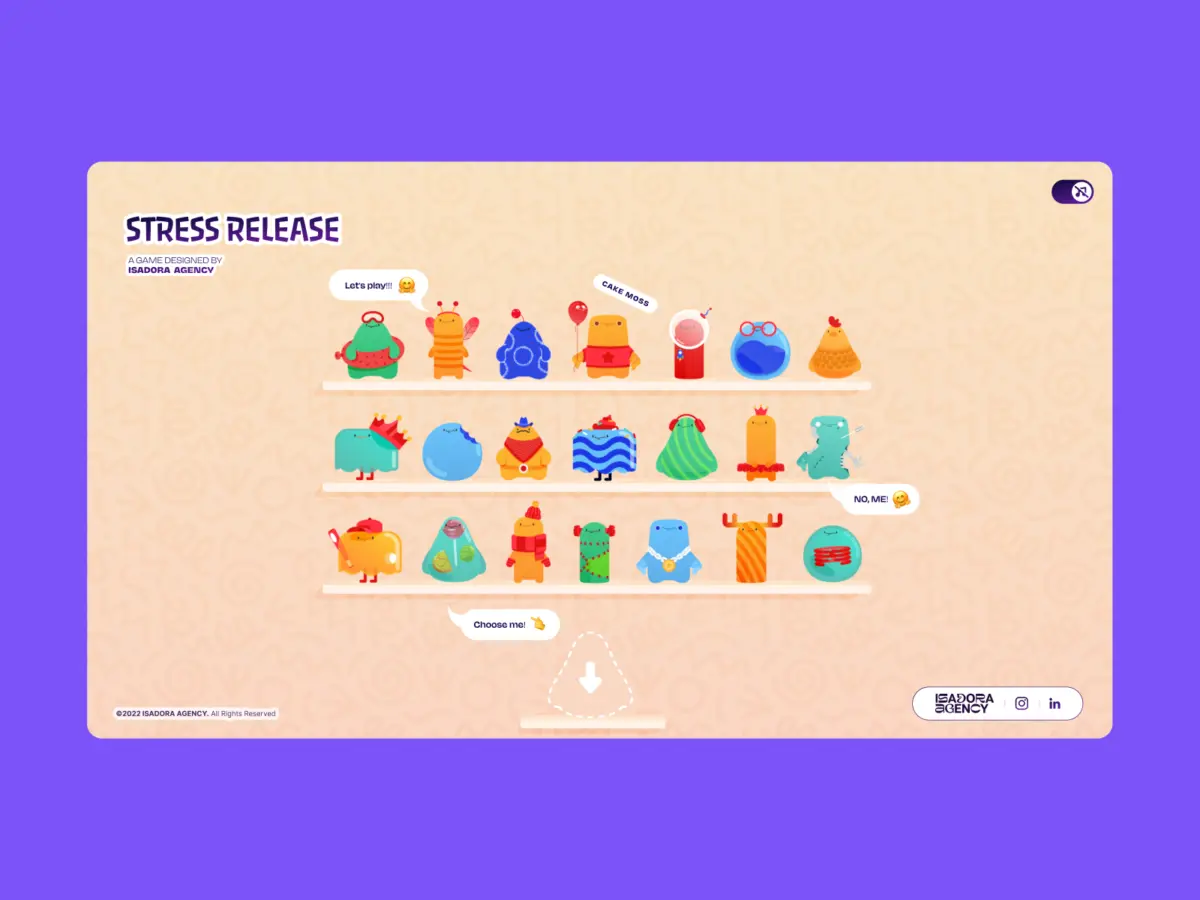
However, developer intuition does not always align with the exact requirements of high-end art direction. When the development team at Isadora Agency set out to build Stress Release—a digital stress-relief squeeze toy designed to let burnt-out creatives smash, stretch, and distort animated UI characters—they initially marched down the traditional physics simulation path. Their primary goal was clear: construct a hyper-tactile experience where every click yields a satisfying, squishy, and contextually aware reaction.
As prototyping progressed, the team encountered a fundamental philosophical divergence between procedural physics and hand-crafted art direction. Physics engines produce plausible motion—unpredictable bounces, gravity-driven collisions, and algorithmic momentum. But the animators on the project had meticulously designed intentional motion—precisely timed keyframe sequences, custom facial expressions, and tightly choreographed distortion arcs that could not be left to random mathematical calculations.
Abandoning traditional physics engines altogether, the engineering team engineered a real-time, tactile web experience relying entirely on programmatic Lottie state controls, standard DOM manipulation, and straightforward distance-based math. This architectural choice proved that developers can achieve rich, tactile user engagement without writing a single line of WebGL or Matter.js, prioritizing deterministic artistic control over emergent simulation.
Detailed Chronology: The Making of Stress Release
The architectural evolution of Stress Release highlights how technical constraints and creative demands shape modern web development. The project moved through distinct phases, from initial design concepts to the final production-ready build.
Phase 1: The Trap of Procedural Simulation
At the inception of the project, the primary technical challenge appeared to be collision detection and realistic deformation. The industry standard suggested that characters reacting to clicks needed a simulation loop. Developers coded initial prototypes using canvas-based rendering and rigid-body dynamics to simulate a squeezable surface.
The early results, however, felt disconnected from the intended brand identity. When a user clicked a character, the physics engine calculated a realistic deformation based on velocity and force vectors, but it completely overrode the animators’ deliberate timing. A bespoke 181-frame build-up sequence designed to build psychological tension before a satisfying release was warped into erratic, unscripted jitter. The team realized that while physics engines excel at games requiring open-ended simulation (like Angry Birds clones), a micro-interaction designed for emotional release demands absolute narrative and visual predictability.
Phase 2: Embracing Deterministic Architecture
Pivoting away from physics engines required a new foundational philosophy: the architecture must serve the art direction, not the other way around. The team decided to leverage Lottie—a library typically used for lightweight, scalable vector animations—not just as a playback tool, but as a state-driven interactive engine.
By mapping Lottie’s native timeline capabilities directly to standard Document Object Model (DOM) elements, developers retained absolute, frame-by-frame control. Every character asset was delivered as a bespoke .json file housing carefully constructed animation segments. The click-feedback loop became entirely deterministic:
User Input: A desktop click or mobile tap occurs.
Mathematical Mapping: The system calculates the exact coordinates of the interaction relative to the character’s center point.
State Activation: The Lottie runtime instantly halts any ongoing loop and plays a specific, pre-compiled frame range corresponding to the intensity of the impact.
Visual Reward: An explosion animation is dynamically repositioned to the exact touch or click coordinate, creating an immediate, visceral sense of physical impact.
Phase 3: Solving Responsiveness and DOM Integration
Shifting away from WebGL and custom canvas elements unlocked massive benefits in responsive design and accessibility. Handling responsive scaling across diverse desktop monitors and mobile viewports typically requires complex matrix transformations and bounding-box recalculations in canvas environments.
By keeping the application rooted in the DOM, the team bypassed these complexities entirely. Responsive behavior was managed smoothly via CSS custom properties. By recalculating viewport dimensions on every window resize event and pushing those values into CSS variables, Lottie-rendered SVGs scaled naturally inside their containers without losing state or degrading vector clarity.
Phase 4: Performance Optimization at Scale
The decision to use Lottie for 21 distinct character animations, alongside multiple dynamic explosion variants, introduced a steep performance hurdle: file size and rendering overhead. Playing dozens of vector animations simultaneously on mobile devices threatened to tank frame rates.
To overcome this, the engineering team deployed targeted optimization strategies. For the character selection shelf—where 21 separate animations played concurrently—they reduced Lottie’s rendering quality setting to 50% (lottie.setQuality(0.5)) and throttled the playback speed to 0.6 to minimize interpolation calculations. Conversely, once a user selected a character for the active play screen, the application dialed the quality back up to 100% for that single focused instance, ensuring silky-smooth visual feedback where it mattered most.
Supporting Context & Metrics
To truly understand why programmatic DOM control outperformed physics-based simulations in this context, we must examine the underlying metrics, mathematical implementations, and architectural trade-offs.
The Mathematics of Tactile Feedback
To make a flat screen feel like a physical, squeezable object, the interface must respond differently depending on where the user applies pressure. The Isadora Agency team achieved this illusion using radial input mapping via the Pythagorean theorem.
When a click event fires, the code extracts the cursor position relative to the document, translates it into the character’s local coordinate space, and calculates the straight-line distance from the center point:
// Character's center point in its own coordinate space
var x_center = parseFloat($("#playChar").width() / 2);
var y_center = parseFloat($("#playChar").height() / 2);

// Click position relative to the character's top-left corner
var offset = $("#playChar").offset();
var X = parseFloat(e.pageX - offset.left);
var Y = parseFloat(e.pageY - offset.top);

// Vector from center to click point
var a = parseFloat(X - x_center);
var b = parseFloat(Y - y_center);

// Calculate straight-line distance from center
var distance = Math.hypot(a, b);
This single numerical value drives the entire interaction economy. Distance zones map directly to point rewards—acting much like a dartboard—while simultaneously dictating the positioning of visual effects:
// Distance zones map to point rewards
if      (distance < 10)  givePts = 100; // Bullseye
else if (distance < 40)  givePts = getRndInteger(70, 90);
else if (distance < 70)  givePts = getRndInteger(40, 70);
else if (distance < 100) givePts = getRndInteger(20, 40);
else if (distance < 120) givePts = getRndInteger(10, 20);
else if (distance < 145) givePts = getRndInteger(1, 10);
else givePts = 0; // Miss

// Reposition the explosion Lottie to the exact click point
var shiftPosition = window.innerWidth < 1023 ? -20 : 200;
$("#explosionChar").css(
  "margin-left": a + shiftPosition + "px",
  "margin-top":  b + shiftPosition + "px",
);

// Trigger the squish animation instantly
explosion.goToAndPlay(0);
By decoupling the hitbox from complex physics raycasting and reducing it to a clean concentric circle math model, the developers ensured zero lag between user input and visual output.
Official Statements and Architectural Insights
Reflecting on the philosophy behind the build, the development team emphasizes that technology selection must always be subordinate to design intent.
"When tasked with building a highly interactive, tactile web experience, the architecture must serve the art direction," notes the project’s lead technical documentation. "By mapping Lottie’s native timeline capabilities to the DOM, you can deliver incredibly rich, tactile user experiences while maintaining absolute control over the art direction."
The core debate in modern interactive development often centers on performance versus creative fidelity. Standard industry consensus pushes developers toward heavy engines under the assumption that "interactive equals physics." However, Isadora Agency’s approach proves that when an interface’s primary purpose is emotional resonance—such as stress relief—predictable, handcrafted animations deliver a far more satisfying psychological payload than randomized simulations.
Furthermore, the team highlights the efficiency of utilizing native DOM event listeners over custom raycasting layers. Because the characters render internally as SVGs via the Lottie runtime, desktop mouse clicks and mobile touch events hook directly into standard browser architecture. This eliminates overhead, reduces script execution times, and ensures cross-browser stability without requiring specialized rendering pipelines.
Future Outlook: The Evolution of Tactile Web Design
As web browsers continue to evolve into fully fledged application platforms capable of supporting complex graphics, the temptation to over-engineer solutions will only grow. With the rise of advanced WebGL frameworks, WebGPU, and heavy physics wrappers, developers are routinely equipped with tools powerful enough to render hyper-realistic 3D worlds.
However, the success of Stress Release points toward a counter-trend: the renaissance of hyper-polished, vector-driven micro-interactions. As digital fatigue sets in among users bombarded by hyper-realistic, noisy 3D environments, lightweight, highly responsive, and artistically deliberate 2D interfaces offer a refreshing alternative.
Future iterations of tactile web design will likely see deeper integration between design tools (like After Effects and Figma) and code repositories. As Lottie players and vector rendering engines become more heavily optimized, the boundary between static graphic design and dynamic interactive engineering will blur further. Developers who master the art of programmatic state control—manipulating vector timelines through clean mathematics rather than relying on brute-force simulation—will be uniquely positioned to craft web experiences that feel genuinely alive, deeply responsive, and artistically uncompromising.