

Executive Overview
In the realm of digital interface design, few UI components are as ubiquitous—or as frequently mishandled—as the collapsible accordion. Used ubiquitously across e-commerce mega-menus, mobile navigation drawers, FAQs, and dense data tables, accordions serve a vital architectural purpose: they condense vast amounts of information into digestible, space-saving layouts. However, as recent comprehensive usability research from the Nielsen Norman Group (NN/g) demonstrates, the subtle visual indicators we rely on to signal accordion expansion can make or break the user experience.
When a user encounters a menu item, their brain immediately runs a subconscious predictive calculation based on established mental models. Does tapping this element take me to an entirely new page, or will it slide open a localized sub-menu? According to empirical UX research, the presence—or absence—of an icon fundamentally dictates this expectation.
Worse still, modern interface design has frequently fallen victim to "over-engineering." Designers often implement overly complex visual strategies, such as split menus (where the text label links to a destination page while the accompanying icon triggers the accordion drawer) or heavily overloaded symbols like arrows, chevrons, and plus/minus signs. These patterns consistently confuse users, increase cognitive load, and drive up interaction errors.
This report takes a deep dive into the findings of recent accordion iconography studies. We will examine why traditional signifiers fail, why split menus are harmful to conversion and retention, how users actually interact with icon hit areas, and why the humble, unassuming caret remains the gold standard for expansion signaling.

Detailed Chronology: The Evolution of Accordion Usability Studies
To understand how the modern web arrived at its current best practices regarding collapsible containers, we must look at how menu design has evolved alongside shifting user behaviors.
The Early Days of Web Navigation: The Wild West of Cues
In the early iterations of web design, multi-level dropdowns and accordions were largely unpredictable. Developers relied on proprietary JavaScript frameworks or native HTML <details> and <summary> elements without standardized visual guidelines. During this era, custom icons reigned supreme. Designers attempted to brand every menu system with unique, stylized vector graphics that matched the aesthetic of the site.
Unfortunately, user testing consistently showed that custom icons performed dismally. Because users had no prior mental model for these proprietary symbols, they were forced to guess whether an icon represented an expanding menu, a bookmarking action, a download link, or a page navigation trigger.
The Rise (and Fall) of the Split Menu
As e-commerce giants and enterprise SaaS platforms sought to pack deeper categorization into restricted mobile viewports, designers engineered the "split menu" or "split button" accordion pattern. In this setup, the parent category’s text label acted as a direct hyperlink to the main category page, while a small icon pinned to the right edge of the container was designated as the sole trigger to open the accordion drawer.

On paper, this seemed like a clever compromise: it supposedly gave users immediate access to the category page while still offering sub-category expansion. In practice, however, usability testing revealed an unmitigated disaster. Because users do not draw rigid boundary lines between a text label and its adjacent icon—treating the entire row as a single unified target—split menus routinely generated high frustration rates. Users accidentally triggered page navigation when they wanted to view sub-categories, or found themselves stuck staring at a closed drawer when they tapped desperately on a text label that was coded as a hyperlink.
The Shift Toward Empirical UX Metrics
Recognizing the friction inherent in these disparate design choices, usability research groups—most notably the Nielsen Norman Group—began conducting large-scale empirical studies. By observing real users interacting with various icon variants (carets, chevrons, arrows, plus/minus signs, and no icons at all), researchers were able to quantify exact expectations.
These studies revealed that users do not evaluate icons in a vacuum. The chosen symbol dictates not only the visual expectation of the container but also influences the physical hit-testing behavior of the user’s finger or mouse cursor. This data-driven reality has forced the UX community to pivot away from stylistic experimentation in favor of strict functional predictability.
Supporting Context & Metrics: What the Data Tells Us
To design intuitive interfaces, designers must look past subjective aesthetic preferences and examine hard user-behavior metrics. The recent data surrounding accordion iconography offers several definitive takeaways.

1. The "No Icon" Expectation
When a menu item appears with no icon whatsoever, user expectations are remarkably uniform: they expect tapping the item to navigate them directly to a new page.
Without a visual signifier indicating container expansion, users apply standard web conventions where text links lead to destination URLs. If an interface designer attempts to use a text-only accordion without an icon and programs it to expand rather than navigate, it results in an immediate breakdown of user trust and an increased bounce rate.
2. The Hit Area Dilemma: Icons Dictate Target Behavior
One of the most profound insights from NN/g’s research is that users tap fairly equally on both the text label and the icon for the vast majority of accordion variations.
- The Exception: When a caret is used, users display a distinct behavioral shift, showing a higher tendency to tap directly on the icon itself.
- The Implication: Because users treat the icon and text label as an interactive ecosystem, the choice of icon affects the entire hit area, not merely acting as a passive decorative indicator.
3. The Problem of Overloaded Symbols
Not all icons carry equal semantic weight. Symbols like plus/minus (+/-) and arrows (→/← or ↓/↑) are widely understood, but they suffer from severe semantic overloading:

- Plus / Minus (
+/-): While intuitively understood as expand/collapse in simple contexts, the plus icon is heavily overloaded across digital products. It can signify "add to cart," "save for later," "zoom in," or "create new entry." In multi-level deep navigation where multiple accordions are expanded simultaneously, plus/minus symbols lose their clarity and create visual clutter. - Directional Arrows (
→/←or↓/↑): Right-facing arrows (→) do not consistently imply page navigation to all users, nor do downward-facing arrows (↓) universally communicate accordion expansion. Furthermore, arrows are frequently used to indicate scrolling, horizontal sliding, pagination, or anchor-link page jumping.
4. The Superiority of the Caret
Among all tested icons, the caret (or triangle pointing downward, ▼) emerged as the safest and most universally understood choice for collapsed states, transforming into an upward-pointing caret (▲) or a sideways orientation (▶) upon expansion. Its minimalist geometry lacks the complex baggage of arrows or mathematical symbols, instantly signaling to the human eye that hidden content lies beneath the surface.
Official Guidelines & Best Practices for Modern UI Design
Synthesizing the empirical data leads to a concise set of actionable rules for product designers, front-end engineers, and UX architects building modern web and mobile applications.
Rule 1: Default to the Caret
When designing collapsible containers, accordions, or expandable search filters, use a standard caret-down (▼) for the collapsed state and transition it to a caret-up (▲) or caret-right/sideways (▶) when active. This eliminates ambiguity and aligns directly with established user mental models across both desktop and mobile operating systems.
Rule 2: Eliminate Split Menus
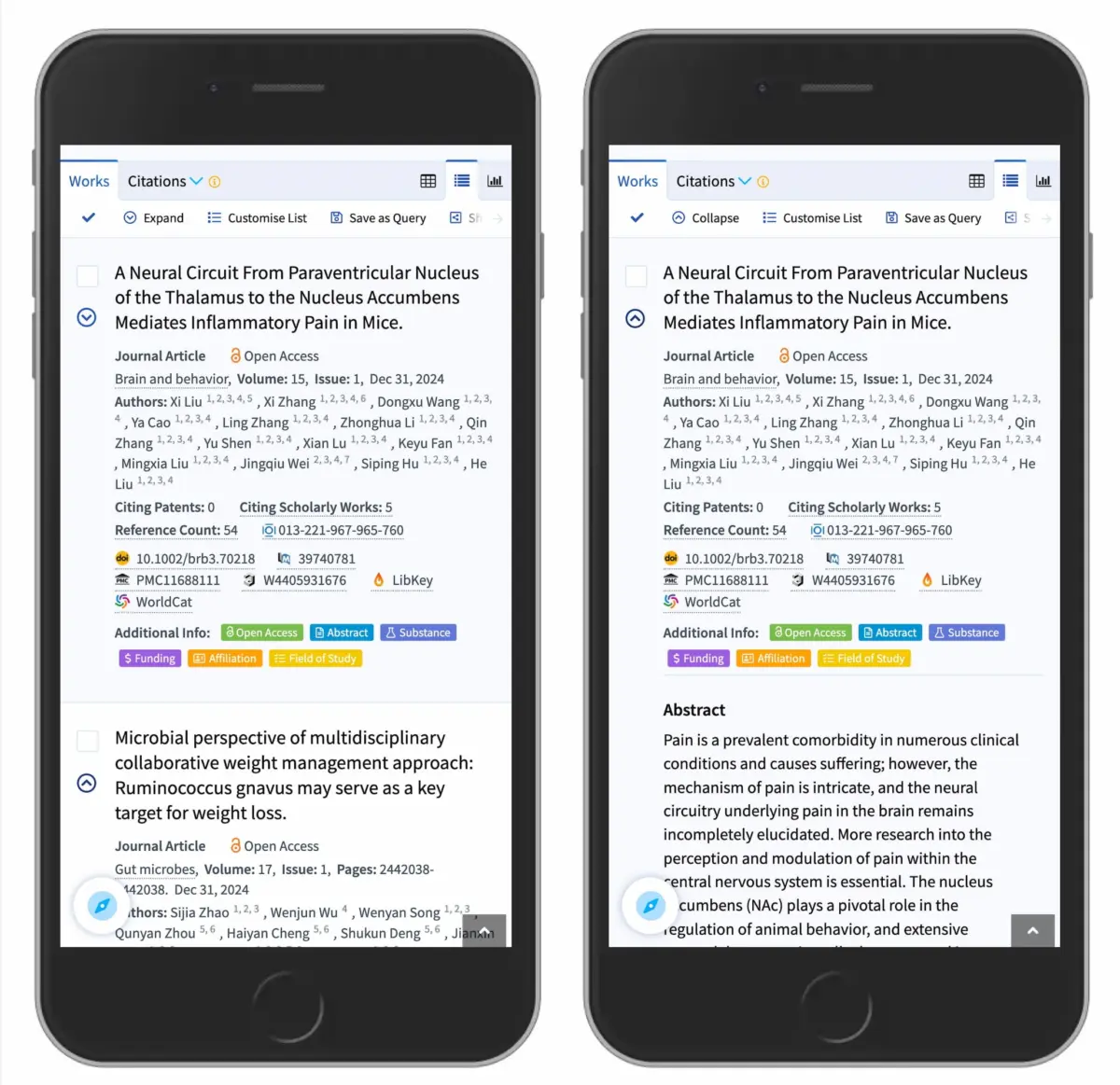
Abandon the split-button accordion pattern entirely. Do not configure a text label to navigate to a new page while forcing the user to hit an isolated icon to open the sub-menu. Instead, design a clean, unified accordion structure where tapping the main category row expands the drawer. To provide access to the primary category landing page, place a dedicated "Overview" link prominently at the very top of the newly exposed sub-menu (as successfully demonstrated by major enterprise implementations like DHL and modern scholarly search portals like Lens.org).

[ ▼ ] Menus & Categories (Tapping anywhere opens the accordion)
      ├── ➔ Overview (Direct link to main category page)
      ├── Sub-category Item A
      └── Sub-category Item B
Rule 3: Keep Page Links Clean and Plainly Underlined
If a navigation item is strictly a hyperlink designed to transport the user to a new URL, do not attach an arrow, caret, or custom icon to it.
The simplest, most effective, and universally recognized way to signal a text link is to underline it. While simple text underlines may lack flashy aesthetic flair, they communicate functionality flawlessly across every demographic and technical proficiency level, eliminating user hesitation.
Future Outlook: The Horizon of Accessible and Predictable Interface Design
As digital interfaces continue to evolve into complex cross-platform ecosystems spanning mobile apps, responsive web applications, foldable devices, and spatial computing environments, the fundamentals of human-computer interaction (HCI) remain anchored in predictability.
In the coming years, we can expect interface design systems to lean heavily away from custom, overly artistic micro-interactions in favor of standardized, highly accessible design primitives. Regulatory frameworks—such as the European Accessibility Act (EAA) and updated WCAG guidelines—are placing increasing emphasis on cognitive accessibility. Designing components that respect user mental models without requiring a learning curve is no longer just a matter of good UX; it is a compliance and inclusivity imperative.

Furthermore, the integration of design tokens and standardized component libraries (such as Shadcn, Radix, and material design frameworks) is automating the adoption of accessible patterns. As these libraries bake research-backed defaults—like proper caret usage and accessible hit targets—directly into their core components, developers will find it easier than ever to build intuitive experiences.
Ultimately, the lesson of modern accordion research is humbling for designers who strive to reinvent the wheel: simplicity wins. By respecting user mental models, discarding confusing split-menu patterns, utilizing plain underlined text for pure navigation, and relying on the trusty caret for expansion, designers can build cleaner, faster, and infinitely more usable digital products.