

Executive Overview
The design and product development communities have fallen into a trap of convenience known as conversational tunnel vision. Because Large Language Models (LLMs) are fundamentally trained on dialogue data, the tech industry has collectively and reflexively decided that the chat bubble is the natural, universal home for every conceivable AI capability.
While the chat interface is a powerful and viable option for many tasks, it is merely one tool in an expansive, multimodal toolkit. UX professionals and product teams must become deeply intentional about the modalities they choose—both for how users provide data and commands, and for how intelligent systems present their outputs.
Modality refers to the ways a person uses their senses to interact with a system: seeing, hearing, touching, speaking, or typing. To select the optimal interaction method, designers must analyze what the user wants to accomplish, where they are physically located, and how much cognitive effort they are already expending. This article explores how to break free from the "do-it-all chatbot" mentality by utilizing systematic evaluation frameworks, such as the Task Audit and the Input/Output Alignment Matrix, ensuring that technology adapts to human reality rather than forcing humans to adapt to machines.
Detailed Chronology: The Rise of the Chatbot Monoculture
The path toward conversational tunnel vision was paved by technological breakthroughs and commercial imperatives. Understanding how the industry arrived at this monoculture clarifies why a paradigm shift is urgently required.
1. The Generative AI Boom and the Path of Least Resistance
When foundational LLMs burst into the mainstream consciousness, product teams faced a massive rush to market. Companies needed to wrap user-friendly interfaces around complex neural networks almost overnight. The chat window—a text box paired with a scrolling history—offered the path of least resistance. It was a blank slate that signaled to users, "This system can handle anything you type."
2. The Standardization of Dialogue UI
As APIs matured, developers standardized around prompt-response loops. This standardized design pattern reduced early design overhead, but it inadvertently created an industry-wide blind spot. Instead of asking what interface best serves this specific user task, teams began asking how can we route this feature through our chat interface?
3. The Climax of Friction: Real-World Disconnect
The limits of this approach became glaringly obvious in high-stakes, fast-paced real-world environments. Consider a traveler jogging through a loud airport terminal after a sudden gate change, dragging a roller bag and balancing a coffee. To find their updated gate, they open an airline app powered by an AI assistant.
Instead of an intuitive experience, the app forces the traveler to stop walking, balance their coffee, and type a long booking reference into a tiny chat box. When they finally hit send, the AI returns a dense paragraph explaining the atmospheric weather patterns causing the delay, burying the actual gate number at the very bottom.
Although the traveler might make their flight, the anxiety-inducing interaction validates a common consumer fear: that software companies do not understand or care about the physical reality of using their products. The interface failed because the input required physical dexterity the traveler lacked, and the output demanded a level of reading focus they could not spare.
Supporting Context & Metrics: The Hidden Costs of Chat
To move beyond conversational design defaults, we must examine the hidden psychological and linguistic barriers imposed by text-heavy interfaces. When an interface relies exclusively on conversation, it creates a dual burden: a linguistic challenge for input and a cognitive challenge for output.

Input: The Linguistic Barrier and Choice Paralysis
A blank chat box creates a major hurdle for discoverability. In a standard graphical user interface (GUI), menus, buttons, and toggles provide clear visual cues signaling every available option. A chat box, however, frequently induces choice paralysis because users are forced to guess what the AI is capable of, recalling exact phrasing or technical terms to get the desired result.
- The Data Analyst Scenario: Finding a trend in a spreadsheet via a traditional tool requires clicking a filter or sort button. In a chat interface, the analyst must suddenly become a writer, describing complex logic in a grammatically correct sentence.
- The Creative Problem: Composing a prompt is a creative act that requires translating a vague thought into a specific command. For instance, a designer might know precisely how they want an image to look, but struggling to describe lighting or texture in a text prompt makes a slider or color picker a vastly superior input method.
Output: The Cognitive Tax of Sequential Reading
When an AI responds in long blocks of text, it transfers the burden of interpretive work directly to the user. Text is a serial medium—the human brain must read one word after the next to extract meaning.
While sequential reading is necessary for complex legal analysis or nuanced medical histories, teams create unnecessary friction when they default to text for data that visual formats communicate instantly. Visual methods allow parallel processing, enabling users to view a chart and spot a trend in under a second.
- The Status Update: Asking an AI for a project status update and receiving three paragraphs listing every completed task forces the user to manually read and summarize the text. A color-coded dashboard would achieve the same goal through glance verification, eliminating the "reading assignment" tax.
Input and Output Modality Taxonomy
| Modality | Best For | Example Contexts | Cognitive & Physical Rationale |
|---|---|---|---|
| Button / Tap | Single-step, binary actions | Launching features, confirming alerts | Eliminates recall overhead via recognition; maximizes execution speed. |
| Voice | Hands-busy / eyes-busy contexts | Field technician queries, driving navigation | Offloads physical interaction to speech; bounded by ambient noise and privacy. |
| Natural Language Chat | Ambiguous, exploratory queries | Researching options, open-ended ideation | Offers linguistic freedom, though it requires precise user phrasing. |
| Form / Wizard | Structured, multi-field data entry | Filling contracts, configuring reports | Prevents omitted information by breaking complex tasks into visual steps. |
| GUI (Filters, Sliders) | Complex parameter settings | Scheduling, data filtering, image editing | Prevents errors and supports direct manipulation of variables. |
| Multi-modal (Image + Text) | Visual input paired with text | Uploading design markups with notes | Reduces verbal description effort by referencing a shared visual artifact. |
| Gesture | Hands-free spatial interaction | Sterile operating rooms, industrial floors | Enables touch-free acknowledgment, keeping environments clean and safe. |
Official Guidelines: The Task Audit Framework
To choose the right interaction method, practitioners should complete a formal Task Audit before interface design begins. This framework moves teams from assumptions to empirical evidence by analyzing the physical, social, and cognitive contexts of work.
1. Contextual Inquiry and Observation
Going directly to the user’s actual workspace—whether a warehouse floor, field site, or office—captures hidden work, physical constraints, and environmental realities (such as glaring sunlight, loud ambient noise, or mandatory protective gear) that interviews often miss.

2. Focused Interviews
One-on-one sessions with end-users and stakeholders surface mental models, decision points, and verification anxieties. Researchers ask for stories of past successes and failures rather than general opinions.
3. Collaborative Workshops
Bringing designers, engineers, product managers, and business analysts together establishes a shared Task Inventory. Product managers ensure factual accuracy, while researchers apply audit criteria to every step of the workflow.
Future Outlook: Adaptive Modalities in Action
The future of AI interface design is a diverse, integrated ecosystem: visual, vocal, haptic, and ambient, all calibrated to user intent and environmental context.
Case Study: Adaptive Modality for Field Technicians
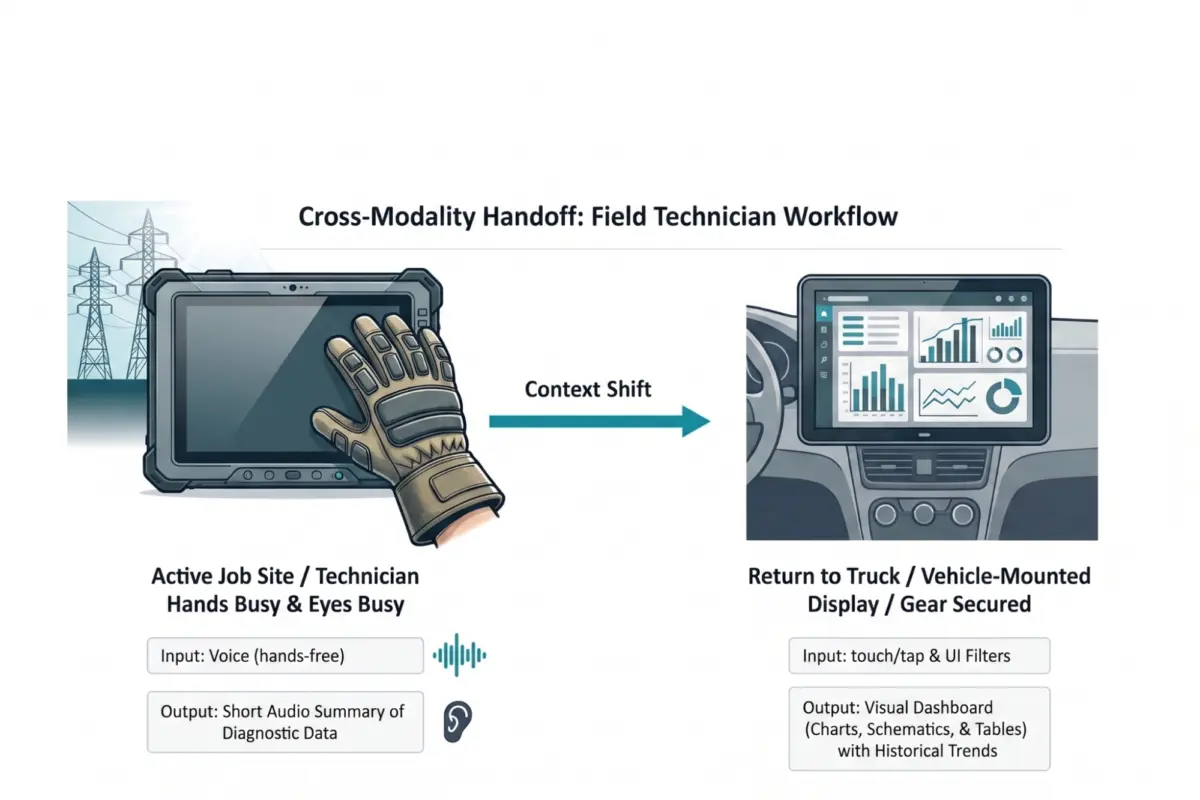
Field technicians servicing high-voltage electrical grids face severe physical and cognitive constraints. Wearing thick protective gloves makes touching ruggedized tablet screens nearly impossible, while direct sunlight causes extreme screen glare. Reading text-heavy diagnostic reports at height creates high cognitive load and safety risks.
- The Research: Contextual inquiry revealed "hands-busy, eyes-busy" states where manual input was impossible. Interviews confirmed the need for glance verification rather than long narratives.
- The Solution: A multi-modal handoff. On the job site, technicians use voice input and receive short audio summaries of diagnostic data, keeping their eyes on the grid. Once they return to their vehicle, workflows automatically hand off to a large 15-inch vehicle-mounted visual dashboard, allowing for parallel processing of historical trends and grid maps.
This adaptive approach reduced diagnostic time by 20% and significantly increased daily tool adoption.

Conclusion
Building a chatbot is fast and familiar, but building an interface that acts as a natural extension of how humans work requires rigor. By leaving behind conversational tunnel vision, conducting thorough task audits, and aligning input and output modalities with real-world user intent, product teams can build AI tools that are not only technologically brilliant, but profoundly human-centric.