

For years, the WordPress ecosystem has operated under a standardized architectural paradigm: websites are built inside restrictive boxes. Traditional page builders—while instrumental in democratizing web development and lowering the barrier to entry for millions—have long forced designers and developers into rigid rows, columns, and heavily nested DOM structures. These conventions often introduced significant trade-offs, including bloated codebases, over-reliance on a sprawling web of third-party plugins, and noticeable performance degradations that negatively impacted search engine optimization (SEO) and user conversion rates.
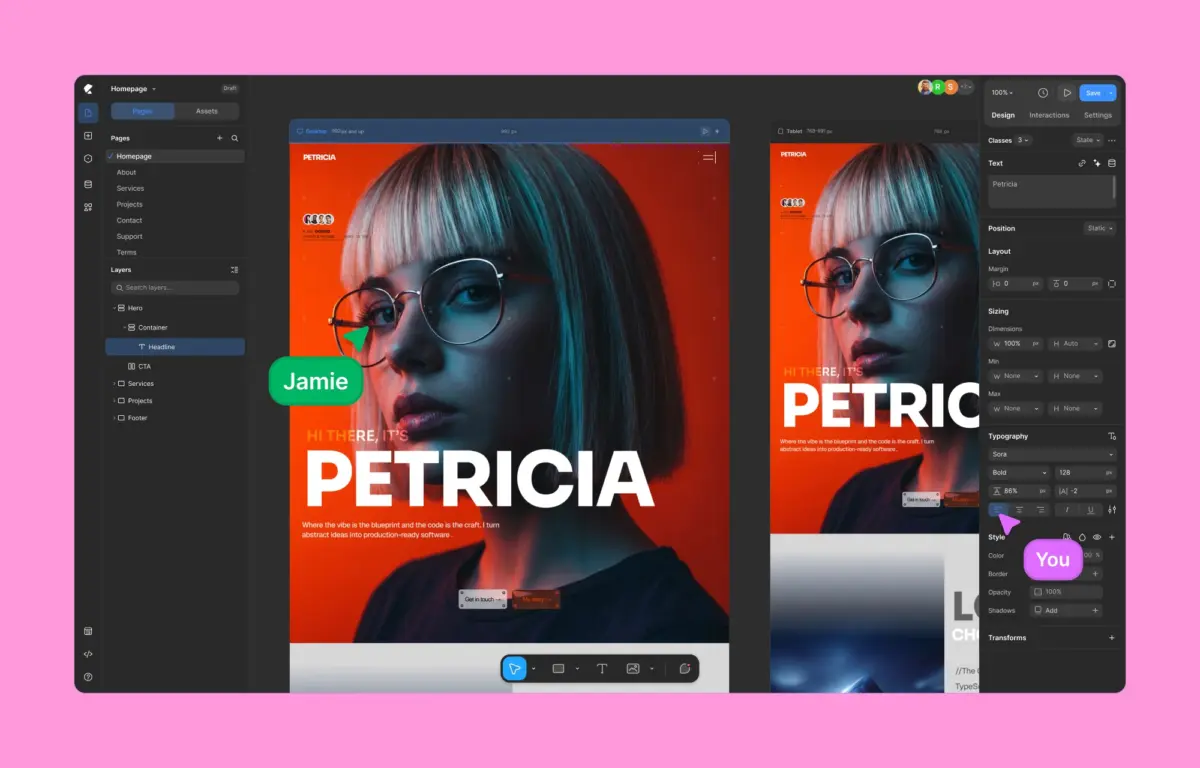
Enter Kirki, a groundbreaking no-code visual website builder for WordPress that fundamentally re-imagines how digital experiences are conceived, structured, and deployed. Departing radically from the orthodoxies of older page builders, Kirki introduces the ecosystem’s first freeform infinite canvas. By integrating an advanced Content Management System (CMS), native dynamic content handling, class-based reusable styling, timeline-based animations, and real-time multi-user co-editing into a unified core, Kirki bridges the gap between traditional WordPress utility and modern design tools like Figma and Webflow.
This comprehensive analysis investigates Kirki’s architectural foundation, its performance benchmarks against market incumbents like Elementor, its robust feature set, and its potential to redefine the future trajectory of WordPress site building.
Detailed Chronology & Evolution of WordPress Site Building
To understand the disruptive nature of Kirki, one must examine the historical arc of WordPress site building tools.

The Evolution of Layout Constraints
In the early days of WordPress customizability, theme development required intimate knowledge of PHP, HTML, and CSS. The subsequent explosion of page builders in the 2010s revolutionized this dynamic by introducing visual drag-and-drop interfaces. However, these tools were bound to standard box models. Users were required to establish rows, columns, and inner containers before placing elements. While functional, this methodology restricted artistic fluidity, often requiring complex negative margins or custom CSS hacks to achieve sophisticated, modern layouts.
The Shift Toward Modern Design Systems
Concurrently, standalone interface design tools like Figma and Webflow revolutionized digital design by embracing infinite canvases, vector-like freedom, and robust class-based styling systems. Designers grew accustomed to fluid layouts, precise positioning, and global design tokens. Bringing this level of granular control into WordPress without incurring severe performance penalties became the ultimate challenge for developers.

The Rise of Kirki
Kirki emerged from the recognition that WordPress needed a generational architectural reset. Rather than patching legacy frameworks, its creators built a visual builder from the ground up to leverage modern web standards. By discarding rigid structural wrappers, Kirki introduced an open, freeform canvas that processes layouts cleanly. This evolution marks a departure from traditional plugin-heavy stacks toward unified, performant, and natively integrated site architecture.
Supporting Context & Performance Metrics
Performance directly dictates user experience, bounce rates, and organic search visibility. To quantify how Kirki compares to established market giants, independent audits were conducted pitting Kirki against Elementor under strictly controlled laboratory conditions.

Benchmark Testing Methodology
- Environment: Clean WordPress installation utilizing the default Twenty Twenty-Five theme.
- Layout Structure: Identical visual layouts incorporating typography, imagery, call-to-action blocks, and spacing metrics.
- Evaluation Framework: Google Lighthouse performance audits measuring loading speeds, DOM size, responsiveness, and Core Web Vitals.
Empirical Findings: Performance and Code Output
The results of the comparative performance audits revealed stark architectural differences:
- DOM Complexity: Kirki generated a significantly cleaner Document Object Model (DOM) characterized by minimal structural wrappers and a drastically reduced count of
<div>elements. Elementor, by contrast, produced heavily nested markup and injected additional JavaScript libraries even on identical, lightweight layouts. - Core Web Vitals: Kirki consistently achieved superior scores across Largest Contentful Paint (LCP) and Total Blocking Time (TBT). Its streamlined rendering pipeline ensures that browsers parse the page faster without processing extraneous style sheets or scripts.
- Bloat Elimination: Because Kirki integrates features like dynamic content management, form builders, and pop-up systems natively, users are freed from the performance penalty of maintaining half a dozen auxiliary plugins.
Architectural Deep Dive: Features and Capabilities
Kirki differentiates itself not merely through its rendering speed, but through an expansive, all-inclusive feature set designed for modern design workflows.

1. The Freeform Infinite Canvas
Kirki’s core innovation is its infinite canvas. Designers can pan freely, zoom seamlessly, layer backgrounds, overlap sections, and position elements with absolute coordinate freedom. This visual interface eliminates the structural boxes of the past, offering an environment akin to dedicated vector design tools while outputting semantic, responsive HTML and CSS.
2. Concurrent Multi-Breakpoint Editing
Traditional workflows require developers to toggle sequentially between desktop, tablet, and mobile views to troubleshoot responsive design issues. Kirki disrupts this bottleneck by introducing concurrent multi-breakpoint editing. Desktop, tablet, landscape, and mobile views are rendered side-by-side on the canvas in real time. Modifications cascade intelligently down smaller breakpoints, allowing designers to resolve responsive anomalies instantly without breaking their creative momentum.

3. Native Figma-to-WordPress Handoff
For design agencies and professional teams, transitioning a UI/UX concept from a prototyping tool to a live CMS is often a tedious, manual process. Kirki solves this friction with an automated Figma import workflow. Complex designs crafted in Figma can be imported directly into Kirki, preserving responsive behaviors, layout structures, and custom breakpoints without requiring developers to rebuild pages from scratch.
4. Built-In Dynamic Content & Native Integrations
Historically, managing custom fields and dynamic data in WordPress demanded third-party additions such as Advanced Custom Fields (ACF). Kirki incorporates a native Dynamic Content Manager. Users can pull custom post types, user meta, and dynamic taxonomies directly into their designs without writing custom PHP or installing third-party plugins.

Furthermore, the Kirki Apps ecosystem centralizes integration management. CRMs, email marketing platforms, analytics tools, and support widgets can be connected directly within the editor interface through a guided visual setup.
5. Class-Based Styling & Global Variables
To maintain consistency across large-scale projects, Kirki utilizes a robust class-based styling architecture. Styling adjustments made to an element automatically generate reusable CSS classes. When paired with Global CSS Variables, developers can define system-wide design tokens (colors, typography scales, spacing units) that update globally across the entire site instantly. Advanced users retain the flexibility to write custom CSS per element or inject page-level JavaScript when necessary.

6. Timeline-Based Visual Animations
Interactive design in WordPress traditionally required heavy third-party animation libraries or custom JavaScript scripts. Kirki features a timeline-based visual interaction builder. Creators can orchestrate scroll-triggered effects, hover states, click interactions, and granular text animations (split by character, word, or block) within an intuitive timeline workspace.
7. Real-Time Co-Editing and Collaboration
Addressing a long-standing limitation in CMS-based web design, Kirki introduces multi-user real-time co-editing. Multiple team members can work within the same page simultaneously. Cursors are color-coded and track live edits as they happen. In-canvas commenting tools allow stakeholders to pin feedback directly to specific elements, optimizing workflows for agencies and distributed teams.

8. Built-in Quality Control Audits
Before publishing, Kirki’s integrated Page Audit tool scans the layout to ensure technical compliance. It automatically flags missing alt text, broken links, accessibility oversights, and performance bottlenecks, ensuring that every published page meets rigorous SEO and accessibility standards.
Pricing Ecosystem and Accessibility
Kirki operates on a transparent, value-driven pricing model designed to remove hidden upsells:

- Free Tier: Unlike restricted trial versions, Kirki’s free tier is available directly on WordPress.org and provides a fully functional infinite canvas experience suitable for building modern websites at zero cost.
- Starter Plan ($59/year): Unlocks all premium features, template kits, and professional tools for a single site, undercutting competitors while bundling essential add-ons into a single subscription.
- Lifetime Plan ($499): Offers perpetual access with zero recurring renewal fees, catering to agencies and power users seeking long-term cost predictability.
Future Outlook
As the web design landscape continues to converge toward high-performance, design-system-driven workflows, tools that rely on legacy box-model architectures face mounting pressure. Kirki represents a fundamental evolution in WordPress development. By harmonizing the visual freedom of modern design applications with the robust backend extensibility of WordPress, it sets a new benchmark for what a Content Management System builder can achieve.
For designers seeking pixel-perfect execution, developers demanding pristine code output, and enterprises requiring scalable performance, Kirki transcends the label of a mere alternative. It stands as a compelling vision for the future of WordPress development—one where speed, flexibility, and creative freedom coexist without compromise.