


Executive Overview
As Large Language Model (LLM) chat interfaces rapidly cement themselves as a ubiquitous paradigm across the modern web, ensuring their universal accessibility is no longer merely a technical afterthought—it is a fundamental imperative. From full-screen web applications like Claude, ChatGPT, GitHub Copilot, and Gemini to enterprise search tools and government portals, conversational interfaces are transforming how humanity accesses information, tools, and economic opportunities.
However, this explosive growth introduces a profound societal risk: the mass exclusion of individuals who rely on assistive technologies. Accessibility is a core component of any functional digital experience. When LLM chat patterns are deployed without accessibility built into their foundational architecture, they create systemic access barriers. In the context of modern web design, "exclusion" translates directly to real-world losses—the forfeiture of knowledge, utility, employability, entertainment, and essential public services.
Drawing from extensive career experience in auditing and improving immersive LLM chat applications, accessibility expert Eric Bailey has outlined a comprehensive blueprint for making these interfaces usable for everyone. By addressing inherent visual biases, utilizing robust live region announcements, implementing thoughtful landmark structures, and providing granular user preferences, developers can move beyond mere compliance to deliver genuinely equitable digital experiences.
Detailed Chronology: The Evolution and Accessibility Shortfalls of Conversational UIs
The conversational UI pattern has evolved at a dizzying pace over the past few years, transitioning from simple, isolated text-generation pop-ups and summarization widgets to sprawling, immersive full-screen applications. Today’s platforms function as operating systems unto themselves, supporting multi-file processing, code execution, real-time web searching, and complex iterative reasoning.
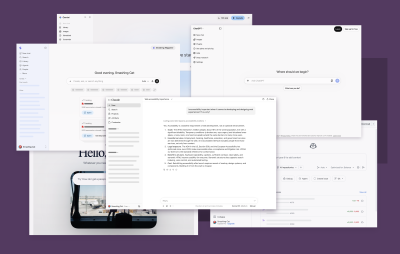
Despite this architectural maturation, the underlying software creation lifecycle has historically suffered from an overwhelming visual bias. Because human culture is deeply visual, digital outputs unconsciously reflect and reinforce that paradigm. When a sighted user interacts with an LLM chat interface, the flow is intuitive: they type a prompt, watch a loading indicator or streaming text appear in real time, and glance upward or downward to read the completed response. Visual positioning—such as right-aligned user bubbles and left-aligned agent responses—instantly establishes conversational context.
For screen reader users and individuals with low vision, however, this visual choreography is entirely absent. Historically, when a user submits a prompt, the newly generated LLM reply simply populates the Document Object Model (DOM) without triggering native assistive notifications. To a screen reader, the interface appears static, leaving the user with the false impression that the application has stalled or crashed.
Recognizing this gap, accessibility engineers have systematically broken down the LLM user journey into its core components:
- Navigating conversation histories and sidebars.
- Formulating and submitting prompts within input forms.
- Interpreting processing or loading states during complex computations.
- Reviewing streamed responses and multi-step agent actions.
Bridging the chasm between sighted and non-sighted experiences requires deliberate structural interventions, moving away from brittle assumptions and toward standardized, resilient design patterns.
Supporting Context & Metrics: Technical Implementations and Best Practices
To achieve experiential parity, developers must leverage specific web technologies and accessibility APIs carefully. Below is an examination of the foundational techniques required to build inclusive LLM chat applications.
1. Robust Live Region Announcements
Attempting to make streaming text accessible in real time is a recipe for cognitive overload; live-streaming words cause screen readers to stutter, creating an unintelligible auditory experience. Instead, best practices dictate waiting until the LLM response has completed streaming before announcing its content in full via a dedicated live region.
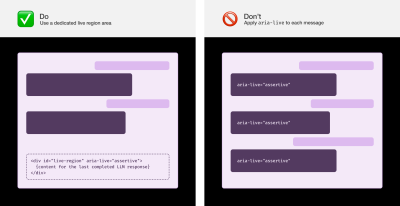
Rather than scattering aria-live attributes across individual message elements—a common anti-pattern that often fails across different screen reader and browser combinations—developers should place a single, dedicated live region at the very end of the DOM.
- Handling Loading States: Because LLM queries can take several seconds (or minutes) to process, applications must communicate progress. If text like "Thinking" or "Researching" appears visually, a matching live region announcement should fire simultaneously. If a text-less loading animation is used, implementing a timed loop—such as announcing "Loading" five seconds after prompt submission, repeated periodically—prevents the user from feeling abandoned by the interface.
2. Semantic Headings and Contextual Prefixes
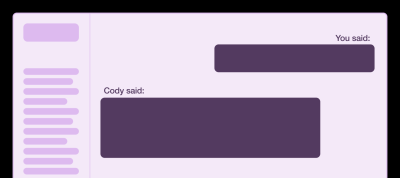
Headings remain the primary navigation mechanism for screen reader users. To replicate the contextual awareness that sighted users derive from visual alignment, developers should insert visually hidden heading elements (<hX class="sr-only">) before every chat message, complete with clear prefixes like "You said:" or "[Agent Name] said:".

<article>
  <h2 class="sr-only" aria-label="You said:" tabindex="-1">You said:</h2>
  <div>What are the strengths and drawbacks of using utility CSS?</div>
</article>

<article>
  <h2 class="sr-only" aria-label="Cody said:" tabindex="-1">Cody said:</h2>
  <div>Utility CSS trades cleaner global styling for faster, more explicit component styling...</div>
</article>
This simple addition allows users to scan through conversational histories efficiently, checking who said what and when, exactly as a sighted user would by scrolling through a visual transcript.
3. Strategic Landmark and Keyboard Navigation
Landmark regions (nav, main, form, aside) should be used sparingly to outline major layout areas. Overusing landmarks—such as wrapping every individual chat message in a section role—"pollutes" the screen reader’s landmark menu, rendering navigation tedious in long-running chat sessions.

To further assist keyboard-only and motor-impaired users:
- Skip Links: Implement a prominent skip link allowing users to jump directly to the active conversation area before encountering secondary navigation elements.
- Composite Widgets: Convert conversation history lists into composite widgets. This allows users to press
Tabonce to enter the list, and subsequently use theUpandDownarrow keys to cycle through sessions effortlessly, preventing fatigue for users with physical disabilities. - F6 Navigation: Recreate the traditional desktop app navigation pattern using
Control + F6andControl + Shift + F6, allowing users to hop rapidly between the sidebar, the prompt input, and the latest LLM response.
4. Special Content Handling: Tables and Code Blocks
Live regions strip away semantic HTML structures, flattening rich content into plain text strings. Unfiltered, a large code block or data table will read as incomprehensible gibberish. Developers must parse these elements for live announcements:

- Tables: Convert live announcements into concise summaries, such as: "Table containing a performance audit, with 4 columns and 36 rows. Audit is broken down by severity."
- Code Blocks: Summarize large blocks rather than reading them character-by-character: "settings.json, 738 lines."
(Note: The actual message body in the DOM should retain full semantic markup so users can examine the raw data in detail afterward).
Official Statements and Industry Expert Insights
Industry leaders and accessibility advocates have increasingly emphasized that accessibility in AI development cannot be treated as an optional enhancement or a post-launch patch.
Eric Bailey, drawing from his extensive work on immersive conversational interfaces, underscores the legal and moral dimensions of the issue:

"Accessibility is a core part of a functional digital experience. As the LLM chat pattern continues to spread like wildfire across the web, we risk excluding people if these experiences are not built with accessibility as a core consideration… Exclusion means the loss of knowledge, opportunity, utility, employability, and entertainment."
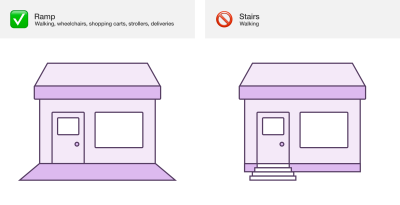
Furthermore, experts stress the importance of adopting the social model of disability—the principle that disability is created by barriers in the built or digital environment rather than by an individual’s physical or cognitive impairments. Just as a physical building requires a ramp alongside its stairs to be truly welcoming, digital architecture must accommodate diverse interaction models from its inception.

Contributions from researchers like Sarah Higley have been instrumental in shaping modern screen reader strategies for dynamic content, pushing engineering teams to evaluate their products against rigorous inclusive user research rather than automated compliance checklists alone.
Future Outlook
As artificial intelligence continues to redefine human-computer interaction, the standard for digital equity must evolve concurrently. Looking ahead, the integration of native platform primitives—such as the emerging ariaNotify() API—promises to streamline live region management, eventually reducing reliance on complex DOM workarounds once cross-browser compatibility and robust polyfills mature.
However, technology alone is insufficient. True progress requires organizations to institutionalize inclusive UX research, actively centering disabled individuals as the ultimate experts in their own lived experiences. By offering robust user preferences—such as adjustable announcement granularity for secondary LLM actions (reasoning, tool calls, file creation), reduced motion toggles respecting prefers-reduced-motion, and re-bindable keyboard shortcuts—developers can build flexible systems that adapt to human needs rather than forcing humans to adapt to rigid software.
The proliferation of LLM chat interfaces presents a historic crossroads. By embedding accessibility into the DNA of conversational AI development, the tech industry can ensure that the promise of the AI revolution remains open, empowering, and accessible to all.
