

Executive Overview
For the past several years, the technology landscape has been gripped by a singular, relentless pursuit: the "AI-first" revolution. Everywhere users turn, they are greeted by shiny new standalone applications, radical interface overhauls, and marketing campaigns promising that artificial intelligence will entirely redefine how they live, work, and create. From complex multi-turn chat windows that demand constant back-and-forth prompting to cryptic command-line interfaces resurrected from computing’s ancient history, the prevailing assumption across Silicon Valley has been that users are desperate for more tools.
Yet, a profound disconnect exists between what tech companies are aggressively building and what real-world users actually experience. In daily practice, modern knowledge workers, creatives, and casual consumers are suffering from severe tool fatigue. Juggling dozens of disparate applications, constantly context-switching between browser tabs, and wrestling with disconnected utilities does not enhance productivity; it fractures attention, spawns operational friction, and introduces costly errors.
The core thesis of modern interface design is shifting dramatically. Users do not want more tools to manage, monitor, and master. What they desperately need are seamless, contextual integrations of powerful capabilities that map cleanly onto established, long-standing mental models. By embedding intelligence directly into the native environments where work already happens—such as document folders, spreadsheets, and word processors—developers can achieve what industry experts call "Quiet AI." Rather than screaming for user attention, Quiet AI sits unobtrusively in the background, alleviating high-severity, high-frequency friction points precisely where it matters most.
Detailed Chronology: The Evolution from Standalone Disruption to Contextual Integration
Phase 1: The Era of Disruption and Standalone Silos (2022–2023)
When generative artificial intelligence burst into the mainstream consciousness, the immediate industry reflex was isolation. Tech startups and legacy giants alike rushed to construct walled gardens. To interact with an advanced large language model, users were forced to open a dedicated browser tab, navigate to a separate web application, copy text from their native workspace, paste it into a chat box, and then copy the resulting output back into their operational file.
This chat-centric paradigm dominated the early landscape. While it proved the raw capability of foundational models, it fundamentally violated established human-computer interaction (HCI) workflows. Users were forced to adapt their thinking to the constraints of the AI, rather than forcing the AI to adapt to the workflow of the user. The industry labeled this "AI-first," but to the end user, it felt like an administrative tax—an extra layer of operational overhead masquerading as innovation.
Phase 2: The Realization of Workflow Friction (Late 2023–2024)
As the novelty of standalone chat windows began to wear off, productivity metrics told a sobering story. While tasks could theoretically be accelerated inside isolated testing environments, real-world efficiency gains stalled. Ergonomic studies and UX research highlighted a phenomenon known as "attention residue"—the cognitive cost incurred when a user switches from one task or application context to another.
Every time a knowledge worker left Microsoft Excel to consult a separate AI window, or abandoned a folder structure to query a vector database via terminal commands, they lost valuable focus. The market began to push back against feature bloat. Designers and product architects realized that forcing users to learn entirely new interaction paradigms for every minor task was unsustainable. The conversation pivoted from what AI could generate to where that generation should physically and conceptually take place.
Phase 3: The Rise of Quiet AI and Native In-App Integration (2024–Present)
The current epoch of interface design is defined by invisibility. Rather than building towering monuments to artificial intelligence that demand user subservience, forward-thinking UX architects are embedding intelligence directly into the fabric of existing software.
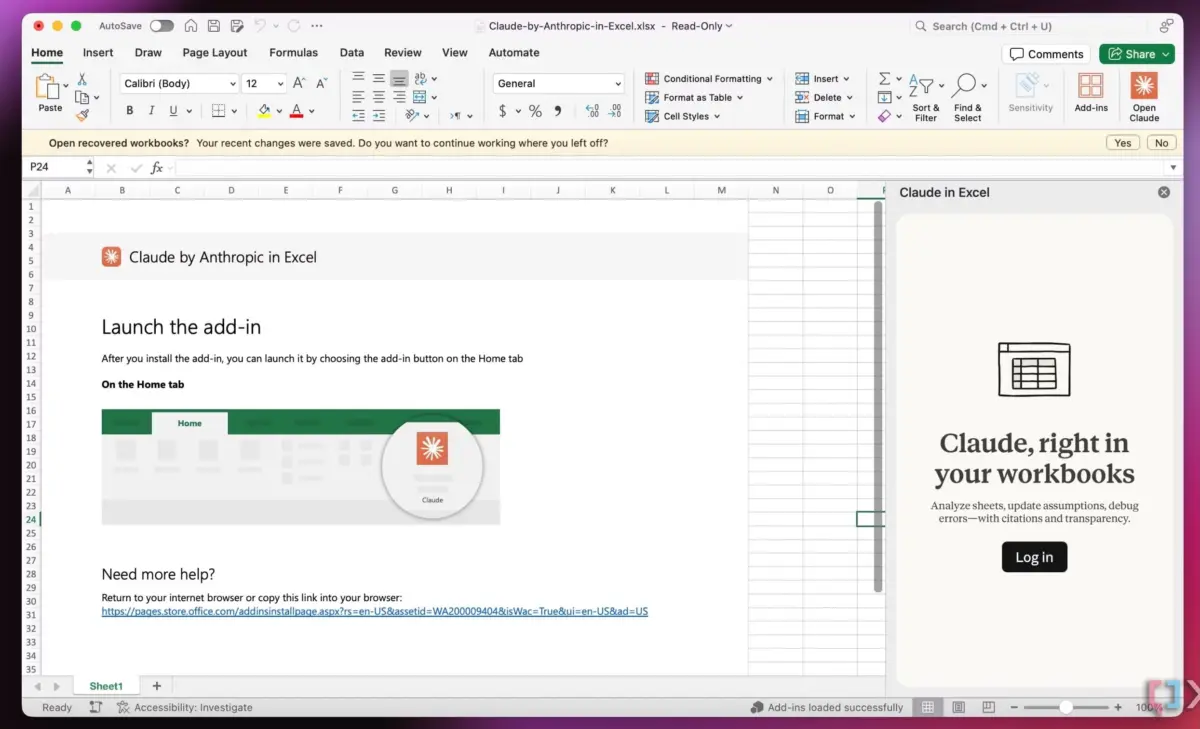
Landmark developments—such as Claude’s native integrations within Microsoft productivity suites (Excel, Word, and PowerPoint) and innovative system-level concepts like folder-based AI instructions—signal a mature turn in the industry. Intelligence is no longer a destination; it is an ambient property of the workspace itself. Users no longer "go to use AI." Instead, AI simply acts as an invisible co-pilot within the exact cells, rows, documents, and directories they have relied on for decades.
Supporting Context & Metrics: The Cognitive Cost of Tool Fatigue
To understand why seamless integration outperforms standalone tool proliferation, one must examine the empirical realities of modern digital work environments.
The Toll of Context Switching
According to workplace productivity research, knowledge workers toggle between applications and windows hundreds of times a day. Each switch incurs a cognitive penalty. Studies tracking professional workflows indicate that it can take upwards of 15 to 20 minutes to fully regain deep focus after being interrupted by a workflow shift or an external application prompt.
When an AI product demands that a user leave their primary workspace—be it a coding environment, a financial spreadsheet, or a document management system—it actively contributes to this fragmentation.
| Interface Paradigm | Primary Interaction Style | Cognitive Load | Error Rate | User Friction |
|---|---|---|---|---|
| AI-First Standalone | Dedicated chat windows, prompt engineering, manual copy-pasting | High (Requires context switching and translation of intent) | Elevated (Prone to transcription and formatting errors) | Severe (Adds a new tool to manage) |
| Command-Line AI | Text-based terminal inputs, custom scripts, syntax memorization | Extreme (Requires specialized technical knowledge) | Moderate (Strict syntax dependencies) | High (Alienating to non-technical users) |
| Quiet AI / Integrated | Contextual inline suggestions, automated folder rules, ambient helpers | Minimal (Matches existing mental models) | Low (Operates within verified structures) | Negligible (Zero new apps to learn) |
The High Severity, High Frequency Matrix
Successful product design does not solve imaginary problems; it targets pain points characterized by high severity, high frequency, and high frustration.
- High Severity: Tasks that consume hours of skilled labor, such as formatting inconsistent datasets, summarizing massive repositories of unstructured PDF reports, or organizing chaotic directory structures.
- High Frequency: Administrative chores that occur daily or hourly—renaming files, tagging documents, cross-referencing spreadsheet columns, and drafting routine correspondence.
- High Frustration: Activities where human error carries a steep penalty, yet the manual labor required to execute them is mind-numbing and repetitive.
When AI is integrated seamlessly into existing mental models—such as a folder that automatically organizes incoming receipts or a spreadsheet cell that instantly projects missing metrics based on surrounding context—it directly addresses this matrix without imposing a learning curve.
Deep Dive: System-Level Innovations and "Folder Instructions"
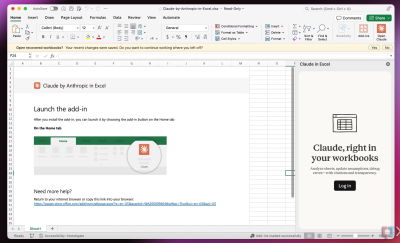
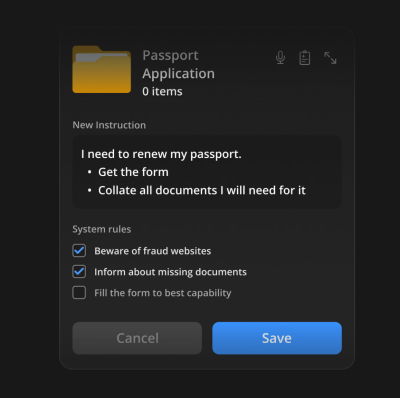
One of the most compelling manifestations of this philosophy is the concept of Folder Instructions for System-Level AI, pioneered by forward-thinking UX researchers like Karthikeya GS.
Bridging Intent and Execution
For decades, operating systems have treated folders as passive containers. A folder is simply a digital filing cabinet where humans must manually drag, drop, rename, and sort files. If a user wants files organized by theme, date, or priority, they must perform every action by hand.
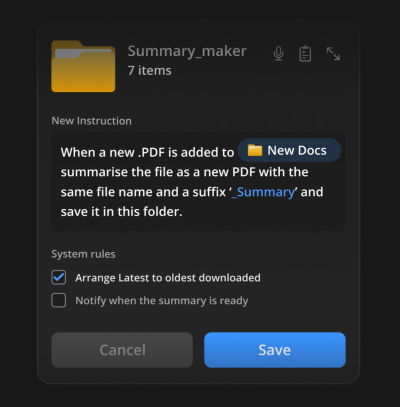
System-level AI reimagines the folder as an active, intelligent agent governed by user-defined intent. By assigning native "folder instructions," a user can imbue a specific directory with persistent operational logic:
- Automated Curation: A folder designated for "Tax Receipts" can automatically scan incoming PDFs, extract vendor names, categorize expenses, and rename files according to a strict corporate accounting standard.
- Dynamic Summarization: A folder dedicated to "Research Papers" can automatically generate a running executive summary document whenever a new academic paper is dropped into its directory.
- Scoped Permissions: Crucially, these actions are locally scoped. The AI helper operates only within the boundary of that specific folder, respecting user privacy and maintaining strict operational guardrails unless explicit, broader system-level permissions are granted.
This approach succeeds because it respects the mental model users have spent decades cultivating. Everyone understands what a folder is. By layering intelligence directly onto an object the user already comprehends intimately, the interface eliminates the need for specialized training. The user defines the outcome; the system handles the execution in the background.
Official Statements and Industry Perspectives
As the UX community grapples with the fallout of the initial generative AI boom, leading designers and educators are openly reassessing foundational design principles.
Vitaly Friedman, renowned UX consultant and creator of the educational framework Design Patterns For AI Interfaces, has been a vocal proponent of moving away from disruptive interface paradigms in favor of ergonomic, user-aligned design:
"We often hear about shiny new tools that change everything yet again. But in practice, most people don’t need more tools to deal with in their daily lives. What we actually need are better integrations of useful capabilities that neatly align with our existing and established mental models.
Users don’t get excited about shiny new ‘smart’ workflows, or navigating Terminal commands, or jumping between endless back-and-forth chat interactions. They need seamless integrations of useful features to address problems with high severity, high frequency, and a high level of frustration."
Highlighting the dichotomy between intrusive and ambient design, Friedman champions the concept of Quiet AI:
"I love the notion of ‘Quiet AI.’ These are tools that are mostly invisible, sit in the background, and do small tasks on the user’s behalf. They never scream for attention but happily assist in repetitive, frustrating tasks that can easily be automated or assisted with a smart helper."
Industry adoption bears out this philosophy. The integration of advanced models like Anthropic’s Claude directly into enterprise office suites—such as Excel and Word—illustrates a fundamental industry pivot. Rather than commanding users to abandon their preferred productivity suites to converse with an external chatbot, modern integrations bring the analytical power of large language models directly to the row, column, or paragraph where the user is actively working.
Future Outlook: The Next Generation of Ambient Interfaces
Looking toward the horizon, the trajectory of digital product design is clear. The era of the standalone application dashboard—where users must open a dozen different browser tabs and piece together fragmented outputs—is drawing to a close.
1. The Death of the Chat Window as a Default
While conversational interfaces will retain a vital role for open-ended brainstorming and exploratory discovery, they will cease to be the default interaction model for productivity software. Embedding intelligence directly into native UI controls (context menus, inline toolbars, drag-and-drop actions, and directory properties) will become the gold standard of enterprise and consumer software alike.
2. Hyper-Localized Agentic Workflows
Systems will increasingly rely on localized, scoped agents—similar to intelligent folders—that execute complex, multi-step workflows entirely behind the scenes. These agents will operate under strict user-defined governance models, ensuring safety, transparency, and predictability without demanding constant micromanagement.
3. A Return to Ergonomic Simplicity
Ultimately, the future belongs to products that respect human cognitive limits. By reducing friction, eliminating redundant application switching, and aligning digital tools with deeply ingrained mental models, the next wave of design innovation will deliver genuine, frictionless value.
As designers embrace frameworks that prioritize Quiet AI and seamless integration, the digital workspace will finally evolve into what it was always meant to be: an invisible, frictionless extension of human capability.
