

Executive Overview
For decades, the standard response to almost any front-end architectural challenge was predictable: "There’s a library for that." Need to format a timestamp into a human-readable string? Install a package. Want to send HTTP requests with interceptors, group items in an array, deep-clone objects, or build an accessible modal dialog? Reach into the npm registry and pull down another dependency. Over time, applications grew bloated, accumulating tens of kilobytes of third-party code in their package.json files.
Today, that paradigm is shifting dramatically. The modern web platform—driven by aggressive browser innovation and standardized through initiatives like Baseline—is rapidly closing the gap between what requires external tooling and what the browser handles natively. In a typical mid-sized JavaScript application, developers can reclaim between 60KB and 90KB of minified and gzipped dependencies (and two to three times that in uncompressed weight) simply by offloading common tasks to native browser APIs.
This transformation is not driven by developer laziness; rather, it stems from the sheer velocity of browser updates. While teams routinely audit their applications for security vulnerabilities using tools like npm audit, they rarely ask a more fundamental question: Is this library still doing something the browser can’t? This article explores a practical, repeatable framework for auditing your dependencies, leveraging Baseline standards, and systematically purging redundant code from your production bundles without breaking user experience.
Detailed Chronology: The Evolution of Web Standards vs. Dependencies
To understand how we arrived at an ecosystem where external libraries are frequently obsolete, it helps to examine how the web platform evolved from a fragmented landscape into a unified engine of native capabilities.
Phase 1: The Wild West of Polyfills (Early 2010s)
In the wake of HTML5 and the rise of single-page applications (SPAs), browser fragmentation was a daily pain point. Internet Explorer dominated enterprise environments, while Chrome, Firefox, and Safari raced to implement evolving specifications. During this era, third-party libraries flourished because they bridged massive feature gaps. Developers relied heavily on jQuery for DOM manipulation, Moment.js for date handling, and Underscore/Lodash for collection utilities. The prevailing consensus was that the browser was a primitive rendering engine, and the JavaScript framework layer was responsible for everything else.
Phase 2: The Component and Utility Explosion (Mid-to-Late 2010s)
As framework ecosystems (React, Angular, Vue) matured, the granularity of npm packages skyrocketed. Instead of monolithic libraries, developers began installing hyper-specific micro-packages: lodash.clonedeep, is-array, left-pad, and timeago.js. While this modularity aligned with the principles of tree-shaking, it also obscured the cumulative weight of dependencies. Accessibility primitives, focus traps, scroll-lock utilities, and localized formatting libraries became standard boilerplate in almost every web project.

Phase 3: The Rise of Baseline and Native Convergence (2020–Present)
The turning point arrived when browser vendors aligned their release cycles and developer tooling caught up. Spearheaded by the WebDX Community Group, the Baseline project emerged to provide a clear, objective signal of browser feature availability. By tracking when a feature transitions from "Newly available" across all major engines (Chrome, Edge, Firefox, and Safari) to "Widely available" (after 30 months of broad support), Baseline gave developers the confidence to drop polyfills and single-purpose utilities.
Features that once required heavy JavaScript abstractions—such as internationalized date formatting, structural grouping, deep cloning, and top-layer modal management—gradually became native primitives built directly into the browser engine.
Supporting Context & Metrics: The Cost of Redundant Dependencies
To quantify the impact of modern platform features, we must examine bundle metrics and operational overhead. In performance-constrained environments—such as emerging markets with slow 3G or 4G connections—every kilobyte of JavaScript directly impacts metrics like Time to Interactive (TTI) and First Contentful Paint (FCP).
Bundle Math Across Core Clusters
When auditing a standard production application, dependencies tend to cluster into four primary categories where native browser APIs now offer direct replacements:
-
Internationalization (Intl Namespace):
- Common Dependencies:
timeago.js,numeral,pluralize,humanize-duration. - Cumulative Weight: ~14 KB gzipped.
- Platform Replacement:
Intl.RelativeTimeFormat,Intl.NumberFormat,Intl.ListFormat, and the newly emergingIntl.DurationFormat.
- Common Dependencies:
-
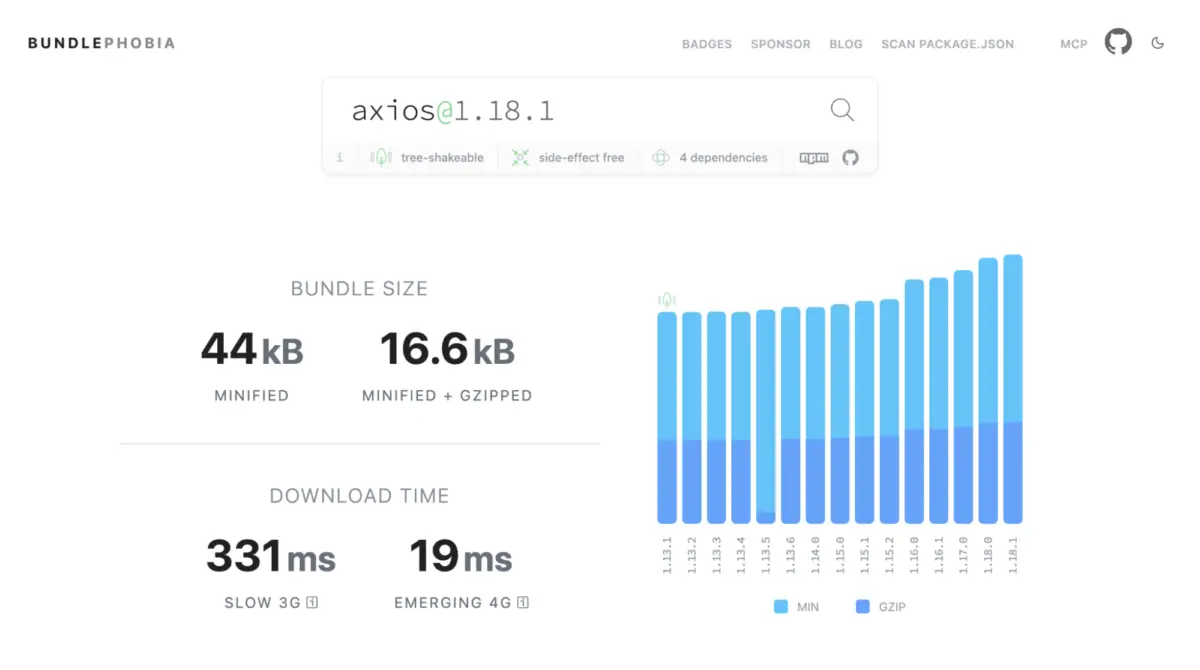
HTTP Clients:

- Common Dependencies:
axios,superagent. - Cumulative Weight: ~17 KB to 19 KB gzipped.
- Platform Replacement: Native
fetchcombined withAbortControllerandAbortSignal.timeout().
- Common Dependencies:
-
UI Primitives & Accessibility:
- Common Dependencies:
a11y-dialog,tippy.js(including Popper),focus-trap,body-scroll-lock. - Cumulative Weight: ~24 KB gzipped.
- Platform Replacement: The native
<dialog>element, the Popover API, and CSS anchor positioning.
- Common Dependencies:
-
Utility Libraries:
- Common Dependencies:
lodash(or standalone packages likelodash.clonedeepandlodash.groupby). - Cumulative Weight: ~8 KB to 25+ KB gzipped.
- Platform Replacement:
Object.groupBy(),Map.groupBy(),structuredClone(), and nativeSetoperations (intersection,union,difference).
- Common Dependencies:
In total, a typical mid-sized application can shed 60KB to 90KB of gzipped JavaScript (amounting to up to 250KB of uncompressed source code parsed by the JavaScript engine). This reduction directly decreases CPU parsing and evaluation time, freeing up main-thread resources for user interactions.
Official Statements and Architectural Frameworks
Dropping dependencies blindly can lead to broken user experiences. To prevent regressions, architects must establish a rigorous decision framework before removing code from a package.json file.
The Three-Question Audit Framework
Before deprecating any library in favor of a native web platform feature, engineering teams should evaluate three critical questions:
-
Is the replacement Baseline-safe for my specific audience?

- Abstract definitions of "Baseline" matter less than your real-world analytics. If a feature is Widely available, it is generally safe to adopt universally. If it is Newly available, check your
browserslistconfiguration and user analytics. B2B dashboards dominated by evergreen browsers present a very different risk profile than public-facing portals accessed via older mobile devices.
- Abstract definitions of "Baseline" matter less than your real-world analytics. If a feature is Widely available, it is generally safe to adopt universally. If it is Newly available, check your
-
What does the migration actually cost?
- Removing a library is only beneficial if its native replacement does not require an even heavier polyfill. For instance, attempting to replace lightweight date utilities with the nascent
TemporalAPI before full stable browser support requires loading a massive polyfill, thereby increasing bundle size rather than shrinking it.
- Removing a library is only beneficial if its native replacement does not require an even heavier polyfill. For instance, attempting to replace lightweight date utilities with the nascent
-
Does the platform feature cover my actual use case?
- Libraries often bundle complex convenience features that native APIs intentionally omit. For example, replacing
axioswithfetchis not a 1:1 drop-in replacement if your application relies heavily on request interceptors, automatic retries, or global configuration defaults. Always audit your actual usage patterns rather than assuming functional parity.
- Libraries often bundle complex convenience features that native APIs intentionally omit. For example, replacing
Future Outlook: What Lies Ahead for the Web Platform
As browser vendors continue to collaborate on standardization, the horizon for web platform capabilities is expanding rapidly. Several upcoming features promise to further reduce the dependency footprint of modern web applications:
- Advanced CSS Anchoring and View Transitions: As CSS anchor positioning matures across all engines, complex floating UI libraries will become entirely obsolete for the vast majority of tooltip, dropdown, and popover implementations. Furthermore, native view transitions will reduce the reliance on complex JavaScript-driven animation libraries.
- Native Temporal API Integration: While
Temporalis currently maturing across major engines (with stable Safari support anticipated soon), it will eventually eliminate the need for third-party date manipulation libraries likemomentordayjsfor modern applications, offering immutable data structures and native time-zone awareness out of the box. - Enhanced State and Collection Primitives: As built-in JavaScript data structures continue to absorb common utility operations (such as advanced Set mathematics and grouping methods), the necessity for utility-belt libraries will shrink to a handful of performance-critical functions like debouncing and throttling.
Conclusion: Building the Audit Habit
Optimizing bundle size is not a one-time migration project; it is an ongoing engineering discipline. The gap between "you need a library for this" and "the browser does this" is narrowing year by year. By establishing a quarterly review habit—listing production dependencies, cross-referencing them against Baseline specifications, and carefully evaluating platform replacements—engineering teams can maintain lean, high-performing applications.
Open your package.json today, pick a single cluster of dependencies, and discover how much of your application’s workload the modern web platform is already equipped to handle natively.