

Executive Overview
When front-end developers and UX engineers are tasked with building a web interface that feels tactile, bouncy, or destructive, the industry instinct is almost invariably the same: reach for a physics engine. Frameworks like Matter.js, Cannon.js, or custom WebGL solutions have long served as the gold standard for creating immersive, gamified websites. Yet, true innovation often demands challenging orthodoxy.
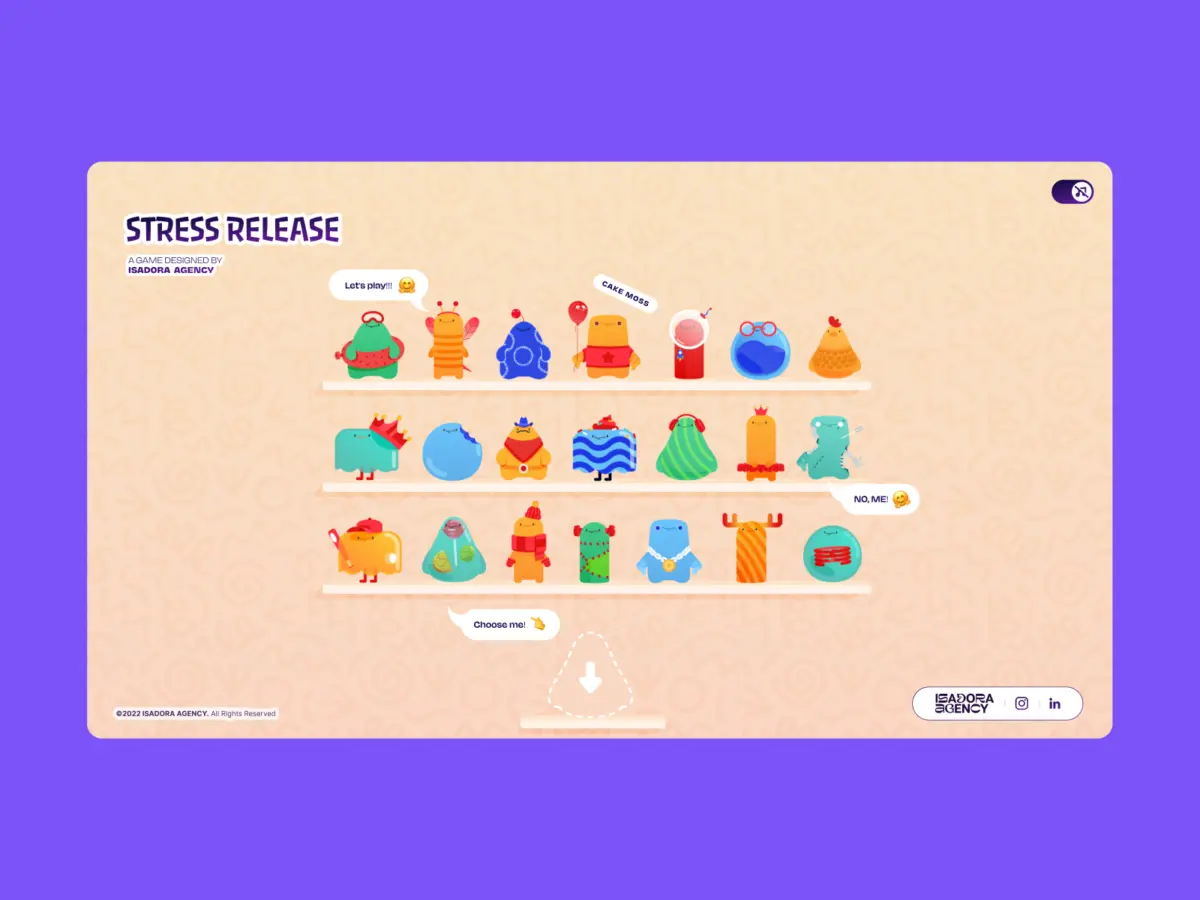
When the engineering team at Isadora Agency set out to build Stress Release—a digital stress-relief squeeze toy designed to let burnt-out creatives smash, stretch, and distort animated UI characters—they initially followed this well-trodden path. The ultimate objective was to build a deeply tactile experience where every user click yielded a satisfying, squishy reaction.
However, as the development team began prototyping, they realized a fundamental conflict in digital product design: physics engines produce plausible motion, but animators produce intentional motion.
Rather than relying on procedural algorithms to simulate realistic rubber balls bouncing uncontrollably across a canvas, the team needed characters to react in very specific, highly curated ways. To preserve the precise artistic vision of their animators, Isadora Agency made a bold architectural choice: they scrapped the physics engine entirely.
This deep-dive investigation examines how the team engineered a real-time, highly interactive digital stress toy without a single line of WebGL or Matter.js. By relying entirely on programmatic Lottie state controls, standard DOM manipulation, and distance-based mathematics, the developers achieved absolute deterministic control over their user interface—proving that architecture must always serve art direction, not the other way around.
Detailed Chronology: From Concept to Constraint-Driven Architecture
The journey of Stress Release began as a response to modern digital fatigue. The creative vision called for a collection of vibrant, illustrated characters resting on a digital shelf, each waiting to be poked, prodded, and squeezed by users seeking a momentary mental escape.
Phase 1: The Physics Mirage
In the early days of ideation, the development team evaluated traditional simulation frameworks. Matter.js and custom WebGL contexts appeared to be the logical choice for handling collisions, gravity, and elastic deformation. After all, if an object needs to squish under a cursor, surely a mass-spring-damper simulation is required?
As prototyping advanced, however, structural shortcomings emerged. Physics engines are fundamentally probabilistic and algorithmic. They calculate forces, velocities, and collisions on the fly. But the team’s animators had spent weeks handcrafting bespoke JSON Lottie files containing precise, frame-by-frame sequences. For instance, a signature "mega squeeze" reaction required an exacting 181-frame build-up followed by a meticulously choreographed release sequence.
An algorithmic physics simulation would inevitably override these handcrafted keyframes with approximations, diluting the emotional resonance and visual comedy of the character designs.
Phase 2: Embracing Deterministic Control
Recognizing that algorithmic approximation was incompatible with their creative goals, the team pivoted to a philosophy of absolute deterministic control. They decided to treat the DOM and Lottie’s native timeline API as the primary runtime environment.

By mapping Lottie’s vector animations directly to standard DOM elements, the development team could intercept user inputs, calculate exact hit metrics via geometry, and trigger pre-composed animation segments with surgical precision. This pivot eliminated heavy graphics pipelines, reduced unnecessary abstraction layers, and established a direct, unbroken line between user interaction and visual output.
Supporting Context & Metrics: The Mechanics of Tactile Web Design
Achieving a convincing "tactile feel" without actual physics requires substituting physical mass with clever mathematics and immediate visual feedback. Isadora Agency accomplished this through a combination of radial input mapping, the Pythagorean theorem, and targeted DOM manipulation.
Radial Input Mapping and Hit Detection
When a user clicks or taps a character on screen, the system must immediately determine where the impact occurred relative to the character’s core structure. Rather than relying on complex raycasting or multi-layered bounding box collisions, the team implemented a straightforward coordinate translation matrix.
First, the click coordinates from the browser page are translated into the character’s local coordinate space, measured against its center point:
// Character's center point in its own coordinate space
var x_center = parseFloat($("#playChar").width()  / 2);
var y_center = parseFloat($("#playChar").height() / 2);

// Click position relative to the character's top-left corner
var offset = $("#playChar").offset(); // document-relative position
var X = parseFloat(e.pageX - offset.left);
var Y = parseFloat(e.pageY - offset.top);

// Vector from center to click point
var a = parseFloat(X - x_center);
var b = parseFloat(Y - y_center);
Next, the straight-line distance from the center point to the click location is calculated using the standard Pythagorean theorem:

var distance = Math.hypot(a, b);This single numerical value drives the entire interaction loop: calculating score rewards, determining feedback intensity, and positioning impact effects. Distance zones mapped to concentric scoring rings—resembling a digital dartboard:
- Bullseye (Distance < 10px): Maximum points (100 pts)
- Inner Ring (Distance < 40px): High points (70–90 pts)
- Mid Ring (Distance < 70px): Moderate points (40–70 pts)
- Outer Ring (Distance < 100px): Lower points (20–40 pts)
- Periphery (Distance < 145px): Minimal points (1–10 pts)
- Miss (Distance ≥ 145px): Zero points (0 pts)
Critically, this same distance vector (a, b) is used to dynamically reposition an explosion Lottie animation directly onto the exact pixel where the player clicked. This spatial accuracy creates an instantaneous psychological sensation of physical impact—entirely driven by math and DOM positioning.
Managing Animation Narratives via Frame Ranges
Because rendering is handled directly by the Lottie runtime (playing JSON-based vector graphics as internal SVGs), individual characters maintain clearly defined animation sections stored as frame ranges.
const play_segments = [
  charId: 0,
  sections:
    idle:     [0,  40],   // looping idle state
    squeeze1: [41, 80],   // light reaction
    squeeze2: [81, 120],  // medium reaction
    squeeze3: [121, 160], // heavy reaction
  ,
  playOrder: ["squeeze1", "squeeze2", "squeeze3"],
  endAnimation: [161, 200]
];
Upon every valid click, the application steps through the predetermined play order, instantly halting current loops and firing the corresponding segment:
function stepAnim()
  let p         = play_segments[0];
  let i         = p["playOrder"][curr_order_play];
  let playNow   = p["sections"][i];

  playChar.stop();                      // halt current segment immediately
  playChar.loop = false;                // play once and stop
  playChar.playSegments(playNow, true); // jump to exact frames, force immediately

  curr_order_play++;
  canPlayAnim = 0;                      // lock out further clicks mid-animation

  if (curr_order_play > p["playOrder"].length - 1)
    curr_order_play = 0;                // cycle back to start of sequence
Once the targeted animation segment completes its run, native callback handlers unlock interaction inputs and seamlessly return the character to its looping idle state.

Official Statements and Engineering Insights
Reflecting on the project’s architectural rationale, the engineering team emphasizes that modern web development often suffers from over-engineering. When asked why the agency bypassed industry-standard physics frameworks, lead architectural spokespersons pointed directly to the importance of respecting artistic intent.
"By mapping Lottie’s native timeline capabilities to the DOM, you can deliver incredibly rich, tactile user experiences while maintaining absolute control over the art direction."
This perspective challenges the prevailing notion that complexity equals quality. In many gamified web applications, developers introduce WebGL contexts and physics engines out of habit rather than necessity. By stripping away these dependencies, Isadora Agency demonstrated that lightweight, math-driven DOM manipulation can yield superior artistic fidelity and snappier performance profiles.
Furthermore, building within the DOM yielded immediate responsive benefits. Traditional canvas-based or WebGL games often struggle with multi-device scaling, requiring complex matrix transformations to manage bounding boxes and collision vectors across disparate viewports. By contrast, Stress Release handled responsive resizing entirely through CSS custom properties:
const appHeight = () =>
  const doc = document.documentElement;
  doc.style.setProperty("--doc-height", `$window.innerHeightpx`);
  doc.style.setProperty("--doc-width", `$doc.clientWidthpx`);
;
window.addEventListener("resize", appHeight);
appHeight();
By recalculating CSS variables on window resize, the overall layout adapts organically, allowing Lottie SVGs to scale fluidly inside their containers without ever breaking state synchronization.

Future Outlook: Performance Optimization and the Lottie Paradigm
While programmatic state control successfully solved the art direction dilemma, it introduced a new engineering challenge common to modern web animation: payload and performance overhead.
Lottie JSON files are vector-heavy documents. With 21 distinct character animations and multiple explosion variants required across the application, file weight and CPU interpolation costs posed a tangible risk to mobile performance. To ensure butter-smooth frame rates across low-powered handheld devices, the engineering team deployed aggressive optimization strategies:
- Quality Scaling: For the character selection shelf—where 21 separate animations play simultaneously—the team instantiated Lottie with reduced fidelity settings (
lottie.setQuality(0.5);and lowered playback speeds) to minimize real-time interpolation overhead. - Resource Isolation: On the primary gameplay screen, where only a single character is active, full rendering quality (
lottie.setQuality(1);) is restored, ensuring crisp vector lines and uncompromised visual fidelity during high-intensity interactions.
The Broader Implications for Web UX
As web applications continue to evolve into deeply immersive, gamified ecosystems, the debate between procedural simulation (physics engines) and deterministic design (timeline and DOM control) will intensify.
Stress Release stands as a compelling proof-of-concept for the latter approach. It illustrates that developers do not always need to import massive, complex simulation libraries to make a web page feel "alive." By thoughtfully combining vector animation runtimes, straightforward geometric math, and native DOM event handling, engineering teams can honor the meticulous work of animators while delivering delightful, performant, and deeply tactile digital experiences.