In the realm of digital product design, few user interface (UI) components are as ubiquitous—or as frequently mishandled—as the accordion. Designed to efficiently manage screen real estate by collapsing and expanding content sections, accordions serve as a foundational building block for modern web and mobile applications. Yet, despite their widespread adoption, inconsistent implementation continues to plague user experience (UX) across the digital landscape.
Recent comprehensive usability research from the Nielsen Norman Group (NN/g) sheds light on a persistent design flaw: the misuse of expansion icons, navigation markers, and split menus. Designers frequently attempt to overcomplicate simple interaction patterns by introducing custom graphics, overloaded symbols, and fractured hit targets that force users to guess how an interface will respond.
This deep dive explores the psychological friction caused by ambiguous icon choices, investigates why split menus actively harm task completion rates, and provides authoritative guidance on why the humble caret remains the gold standard for expansion states. By aligning interface design with established user mental models, product teams can drastically reduce friction, enhance accessibility, and create more intuitive digital experiences.
Detailed Chronology: The Evolution of Accordion Patterns and Usability Research
To understand how modern UI design arrived at the current consensus regarding accordion mechanics, it is necessary to examine the historical trajectory of web navigation patterns.
The Early Web and the Rise of Disclosure Widgets
In the formative years of graphical user interfaces (GUIs) and early web development, disclosure triangles and tree views dominated desktop operating systems. Operating systems like Apple’s macOS and Microsoft Windows utilized distinct triangular indicators to denote hierarchical folder structures. When the web transitioned from static documents to dynamic, application-like interfaces in the late 1990s and early 2000s, developers sought ways to translate these desktop interaction models into HTML and JavaScript.
Early implementations relied heavily on custom JavaScript scripts to toggle CSS visibility. However, standardization lagged behind. Designers experimented with a vast array of visual signifiers to indicate hidden content:
The Plus/Minus Sign (+/-): Borrowed directly from traditional print publishing indexes and desktop file explorers.
The Folder Icon: Signaling a hierarchical collection of documents or pages.
Custom Graphics: Unique brand-aligned vectors that frequently lacked universal recognition.
The Mobile Revolution and the Collapse of Screen Space
The proliferation of smartphones in the late 2000s fundamentally altered information architecture. With screen real estate suddenly constrained to narrow vertical viewports, the accordion evolved from a secondary organizational tool into a primary mobile navigation mechanism.
Menus that once spanned broad desktop headers were compressed into vertical lists of expandable categories. This transition exposed significant flaws in legacy interaction models. On touch devices, hit targets became paramount, and the ambiguity of custom icons led to rampant misclicks. Users frequently tapped text labels expecting immediate page transitions, only to have a menu expand unexpectedly—or vice versa.
Empirical Usability Findings
Recognizing the growing friction in modern UI navigation, usability research organizations—most notably the Nielsen Norman Group—began conducting empirical eye-tracking and task-based studies to observe real user behavior.
These studies revealed a critical psychological insight: users do not evaluate icons in isolation. Instead, they form immediate assumptions based on visual proximity, typography, and historical convention. When an interface deviates from these subconscious expectations, cognitive load spikes, task completion times lengthen, and user frustration increases. The consensus emerging from these longitudinal studies points toward radical simplification: honoring established mental models through predictable, standardized iconography.
Supporting Context & Metrics: Why Iconography and Hit Targets Matter
To build intuitive interfaces, designers must understand how users perceive visual signifiers and how physical interaction areas influence behavior.
The Psychology of the Hit Target
A common misconception in web design is that users click or tap exclusively on the visual graphic of an icon. Eye-tracking and interaction studies demonstrate that users treat the icon and its adjacent text label as a unified hit region. When participants in UX studies interacted with navigation accordions, their click distribution was remarkably balanced between the text label and the icon itself—with the notable exception of the standard caret, which naturally drew slightly more direct interaction due to its strong directional signal.
Because users perceive the entire row as a single interactive zone, separating the actions of the text label from the icon introduces severe usability hazards.
The Danger of Split Menus
A "split menu" pattern occurs when a single accordion row is fractured into two distinct actions:
The Text Label: Links directly to a parent category landing page.
The Icon: Expands or collapses the accordion menu to reveal subcategories.
Usability testing consistently demonstrates that split menus are fundamentally harmful to the user experience. Users almost universally fail to distinguish between the micro-hit target of the icon and the larger hit target of the text label. When attempting to open a menu to view nested options, a user clicks the text label—only to be unexpectedly redirected to an entirely different URL. Conversely, when looking for an overview page, clicking the icon may trigger an unwanted expansion.
The Best Practice Alternative: Avoid split menus entirely. Instead, design the primary row (both text and icon) to control the expansion state of the accordion. To provide users with access to the parent category landing page, explicitly include an "Overview" or "All [Category Name]" link as the first item inside the expanded menu dropdown. This pattern removes ambiguity, respects user intent, and ensures predictable navigation behavior.
Decoding Icon Overload: Carets vs. Arrows vs. Plus/Minus
Not all expansion symbols are created equal. Different icons carry distinct semiotic baggage that can either clarify or confuse the user experience:
No Icon: When a menu item features no icon whatsoever, users overwhelmingly expect that tapping the item will immediately navigate them to a new page. Introducing hidden accordions behind text-only labels creates a "surprise" interaction that violates core usability heuristics. If a list item is a direct link to a page, the safest and most reliable signifier is not an icon at all—it is a simple, traditional text underline.
The Plus/Minus (+/-): While widely understood to indicate expansion and collapse, plus and minus symbols suffer from semantic overload. In modern digital interfaces, a plus sign can signify adding an item to a shopping cart, zooming in on an image, saving content for later, or adding a new record. In multi-level navigation structures where multiple accordions are expanded simultaneously, rows of plus and minus signs create visual clutter and cognitive fatigue.
Directional Arrows (→/↓ or ←/→): Right-facing arrows are traditionally associated with forward progression or page navigation, while down-facing arrows are intended to signal vertical revelation. However, research shows that users do not reliably associate down-arrows with accordion expansion. Furthermore, animating arrows between states (such as rotating a right arrow downward) often results in clunky visual transitions that fail to anchor the user’s understanding of the UI’s current state.
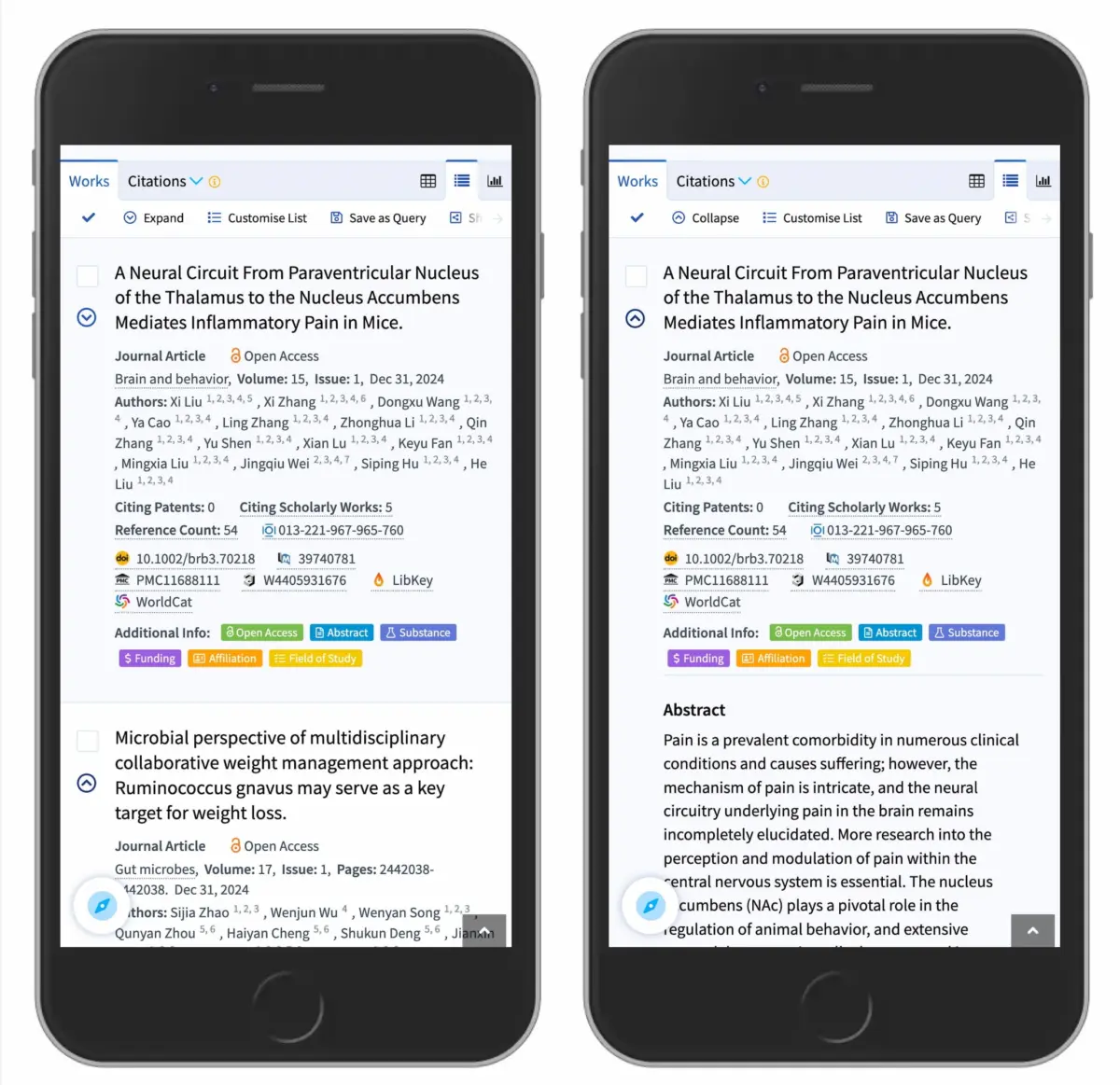
The Caret (⌄/⌃ or ►/▼): The clear victor in empirical testing is the caret (or triangle). A downward-pointing caret (▼) universally communicates that hidden content exists below and can be revealed upon interaction. Upon activation, rotating or swapping the caret to point upward (▲) or sideways (▶) provides immediate, unambiguous feedback regarding the active state of the component.
Official Industry Insights & Expert Perspectives
Leading UX authorities and enterprise design systems have increasingly codified these research findings into strict accessibility and interaction guidelines.
The Nielsen Norman Group Perspective
In their definitive guidelines on accordion interaction design, NN/g researchers emphasize the critical separation between navigation and disclosure.
"If it’s a link, underline it. If it opens an accordion, use a caret. It’s that simple."
This straightforward maxim encapsulates years of empirical observation. When design teams attempt to reinvent foundational UI patterns by introducing bespoke custom graphics, they invariably tax the user’s cognitive bandwidth. Enterprise applications and e-commerce giants—such as DHL and scholarly platforms like Lens.org—have successfully streamlined their mobile and desktop navigation by embracing this minimalist paradigm: utilizing standard carets for collapsible containers and reserving traditional underlines for direct hyperlinks.
Accessibility and Assistive Technologies
Beyond visual clarity, the choice of accordion iconography directly impacts digital accessibility (a11y). Screen readers and assistive technologies rely on proper semantic markup (such as WAI-ARIA aria-expanded and aria-controls attributes) to communicate component states to visually impaired users.
When an interface relies on confusing visual metaphors or split menus, screen reader users often experience a disconnect between what is announced and how the visual interface behaves. Standardizing on a clear caret icon—paired with robust keyboard navigation (allowing users to toggle accordions via the Enter or Space keys)—ensures that the component remains fully accessible across all assistive devices.
Future Outlook: Simplicity as the Ultimate Sophistication
As digital product design matures, the industry is experiencing a collective shift away from gratuitous visual styling in favor of uncompromising functional clarity. The trend toward hyper-minimalist design systems underscores a fundamental truth: users do not visit websites to admire clever icon animations; they visit to accomplish tasks efficiently.
The Move Toward Standardized Design Systems
Major design systems—including Material Design, Apple’s Human Interface Guidelines (HIG), and the U.S. Web Design System (USWDS)—are increasingly restricting custom accordion implementations. By providing pre-built, highly tested components that enforce standard caret behaviors and eliminate split-menu anti-patterns, these frameworks protect junior and senior designers alike from reinventing broken wheels.
Context-Aware and Adaptive Interfaces
Looking ahead, artificial intelligence and adaptive design engines may begin dynamically altering interface layouts based on user behavior. However, even in highly personalized environments, foundational interaction primitives must remain stable. Whether a user is browsing an international logistics portal, an academic research database, or a high-traffic e-commerce storefront, the mental model of the disclosure widget remains anchored to the caret.
Conclusion
The data is unambiguous: complexity is the enemy of usability. By discarding overcomplicated arrow variations, eliminating harmful split menus, reserving text underlines strictly for direct navigation links, and embracing the humble caret for expansion states, product designers can build interfaces that feel effortless. In the end, good design is invisible—and simplicity remains the ultimate sophistication.