

Executive Overview
When front-end developers, UX engineers, and creative technologists are tasked with constructing a web interface that feels genuinely tactile—bouncy, squishy, responsive, or delightfully destructive—the industry-standard reflex is almost always identical: reach for a physics engine. Frameworks like Matter.js, Cannon.js, or customized WebGL pipelines have long reigned supreme as the gold standards for generating immersive, gamified web applications. They offer rapid prototyping for gravity, momentum, and collision detection.
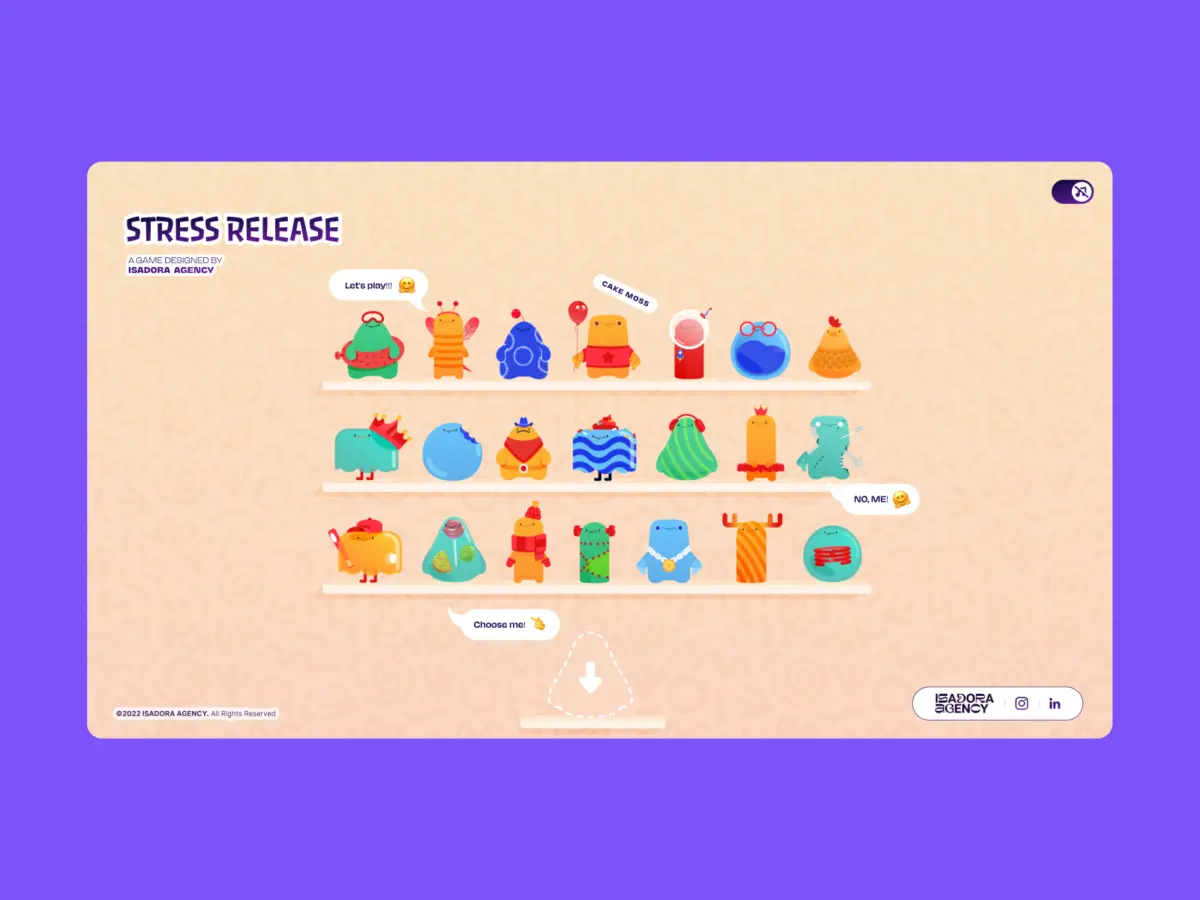
However, procedural physics are not always the right tool for the job. When the engineering team at the Isadora Agency set out to build Stress Release—a digital, stress-relief squeeze toy application engineered to let burnt-out creatives smash, stretch, and distort animated user interface characters—they initially experimented with standard physics frameworks. Their ultimate goal was to deliver a highly tactile experience where every single click or tap yielded a deeply satisfying, squishy reaction.
Yet, as development and prototyping commenced, the team realized a fundamental truth about digital art direction: Physics engines produce plausible motion, but exceptional animators produce intentional motion.
The agency did not need their custom-designed UI characters to act like random, chaotic rubber balls bouncing unpredictably across a canvas. Instead, they required these characters to react in hyper-specific, meticulously designed ways that honored the art direction above all else. Consequently, the team abandoned physics engines entirely.
In this exhaustive look at modern front-end architecture, we break down how Isadora Agency built a real-time, interactive stress-relief squeeze toy without a single line of WebGL or Matter.js, relying purely on programmatic Lottie state controls, standard DOM manipulation, and distance-based mathematics.
Detailed Chronology: From Concept to Deterministic Control
1. The Genesis of Stress Release
The project began as an exploratory internal venture at Isadora Agency to combat modern digital fatigue. The concept was simple yet demanding: present users with a "shelf" of colorful, personality-driven animated characters that they could interact with to vent frustration. Each character needed to possess unique visual traits, speech bubbles, and emotional ranges.
When user interactions involve rapid feedback loops (Click $rightarrow$ Squish $rightarrow$ Score), the illusion of tactility depends entirely on frame precision. The team quickly discovered that if a user clicks an animated character, the visual confirmation must be instantaneous and mathematically synchronized with the score calculation.
2. Bypassing Procedural Simulation for Deterministic Architecture
Animators had spent weeks handcrafting bespoke JSON Lottie files. These files relied on exact, frame-by-frame sequencing. For example, the application’s signature "mega squeeze" reaction featured a precisely timed 181-frame build-up phase followed by a specific, dramatic release sequence.

Allowing a physics engine to dictate how a character deformed would have overwritten the subtle, hand-drawn keyframes with cold, algorithmic approximations. To preserve the artistic integrity of the animations, the engineering team chose programmatic state control utilizing Lottie’s native API. This ensured that the interaction layer acted as a pristine, flawless trigger for the vector animation layer, guaranteeing absolute deterministic control.
3. Engineering Tactile Feedback via Radial Input Mapping
Because the architecture relied on Lottie and the standard DOM, rendering was handled directly by the Lottie runtime, which interprets vector animations as SVGs internally. Elements were selected directly by ID and CSS class, driving their behavior using a hybrid of Lottie animation segments, CSS transforms, and targeted click-event math.
To achieve a satisfying, physical "hit" feeling, the team implemented radial input mapping. The first step required converting raw click coordinates from page space into the character’s local coordinate space. Every click was measured against the character’s exact center point, translating that data into a score, feedback intensity rating, and an explosion visual effect placement:
// Character's center point in its own coordinate space
var x_center = parseFloat($("#playChar").width()  / 2);
var y_center = parseFloat($("#playChar").height() / 2);

// Click position relative to the character's top-left corner
var offset = $("#playChar").offset(); // document-relative position
var X = parseFloat(e.pageX - offset.left);
var Y = parseFloat(e.pageY - offset.top);

// Vector from center to click point
var a = parseFloat(X - x_center);
var b = parseFloat(Y - y_center);
Next, the straight-line distance from the center of the click was calculated using the classic Pythagorean theorem:

var distance = Math.hypot(a, b);This single numerical value dictates multiple application behaviors simultaneously: the point reward, the visual feedback intensity, and the exact coordinates where the particle or explosion animation renders:
// Distance zones map to point rewards
if      (distance < 10)  givePts = 100; // bullseye
else if (distance < 40)  givePts = getRndInteger(70, 90);
else if (distance < 70)  givePts = getRndInteger(40, 70);
else if (distance < 100) givePts = getRndInteger(20, 40);
else if (distance < 120) givePts = getRndInteger(10, 20);
else if (distance < 145) givePts = getRndInteger(1,  10);
else givePts = 0; // miss

// Explosion Lottie repositioned to the exact click point
var shiftPosition = window.innerWidth < 1023 ? -20 : 200;
$("#explosionChar").css(
  "margin-left": a + shiftPosition + "px",
  "margin-top":  b + shiftPosition + "px",
);

// Fire the squish animation instantly
explosion.goToAndPlay(0);
This establishes a concentric zone system—resembling a traditional dartboard surrounding the character’s center. The visual complexity of the Lottie SVG becomes entirely irrelevant to hit detection because the hitbox is always treated as a clean mathematical circle. Crucially, the explosion Lottie is repositioned precisely to vector (a, b), ensuring it appears exactly where the user clicked, selling the tactile illusion entirely through math and DOM positioning.
Supporting Context & Metrics: Performance and Responsiveness
Managing Narrative States and Animation Segments
By leveraging DOM-managed SVG elements, desktop clicks and mobile touches were handled cleanly via native event listeners. This eliminated the need for complex raycasting or coordinate-remapping layers while keeping the interaction model completely aligned with vector rendering.
Lottie handled all squash-and-stretch feedback internally through predefined animation curves. Each character stored its animation sections (idle loops, light reactions, heavy reactions, and end states) as explicit frame ranges:

// Animation sections defined as frame ranges per character
const play_segments = [
  charId: 0,
  sections:
    idle:     [0,  40],   // looping idle state
    squeeze1: [41, 80],   // light reaction
    squeeze2: [81, 120],  // medium reaction
    squeeze3: [121, 160], // heavy reaction
  ,
  playOrder: ["squeeze1", "squeeze2", "squeeze3"],
  endAnimation: [161, 200]
];
Upon every interaction, the system steps through the predefined play order to trigger the correct sequence:
function stepAnim()
  let p         = play_segments[0];
  let i         = p["playOrder"][curr_order_play];
  let playNow   = p["sections"][i];

  playChar.stop();                    // halt current segment immediately
  playChar.loop = false;              // no looping - play once and stop
  playChar.playSegments(playNow, true); // jump to exact frames, force immediately

  curr_order_play++;
  canPlayAnim = 0;                    // lock out further clicks mid-animation

  if (curr_order_play > p["playOrder"].length - 1)
    curr_order_play = 0;              // cycle back to start of sequence
When segments conclude, the state machine reverts control back to the idle loop:
playChar.onComplete = function()
  canPlayAnim = 1;          // unlock clicks again
  if (!playEnd) playIdleState();
;

function playIdleState()
  playChar.playSegments([0, 40], true); // return to idle loop
  playChar.loop = true;
The Responsive Advantage of DOM Elements
Building Stress Release natively in the DOM bypassed the complexities of scaling bounding boxes and collision vectors across diverse screen sizes. Responsiveness was managed entirely through CSS custom properties (CSS variables). By recalculating viewport parameters on resize events, the interface smoothly adapts, allowing Lottie SVGs to scale fluidly within containers without state corruption:
const appHeight = () =>
  const doc = document.documentElement;
  doc.style.setProperty("--doc-height", `$window.innerHeightpx`);
  doc.style.setProperty("--doc-width", `$doc.clientWidthpx`);
;
window.addEventListener("resize", appHeight);
appHeight();
Optimizing for Mobile Performance
While this architecture granted total creative control, it introduced performance hurdles: file weight and rendering overhead. Managing 21 distinct character animations alongside multiple explosion variants required strict mobile optimization strategies.

To maintain high frame rates on resource-constrained mobile devices, the development team implemented fine-tuned quality controls:
// Shelf screen - 21 animations playing simultaneously
shelf = lottie.loadAnimation(
  container: document.getElementById("charShelf" + i),
  renderer: "svg",
  loop: true,
  autoplay: true,
  path: "assets/shelf/" + shelfFolders[i] + "/" + shelfFolders[i] + ".json",
);
lottie.setQuality(0.5); // 50% quality - reduces interpolation calculations
shelf.setSpeed(0.6);    // 60% speed - fewer frame calculations per second

// Play screen - single focused character
playChar = lottie.loadAnimation(
  container: document.getElementById("playChar"),
  renderer: "svg",
  loop: true,
  autoplay: true,
  path: chosenChar.url,
);
lottie.setQuality(1); // full quality - only one animation at a time
Official Statements and Industry Perspectives
Engineering leads involved in the project emphasize that technical selection must always be subordinate to design intent. When asked about the architectural pivot away from WebGL, representatives from Isadora Agency noted:
"When your interface demands bespoke, hyper-tailored visual storytelling, forcing characters into procedural physics engines often strips away the character’s soul. By mapping Lottie’s native timeline capabilities directly to DOM events and mathematical hitboxes, developers can achieve absolute fidelity to the animator’s original vision without sacrificing web performance."
Industry analysts observing the trend point out that as browser runtimes become increasingly capable of handling complex SVG and vector operations, developers no longer need to default to heavy graphics frameworks for 2D interactive experiences. Thoughtful state management paired with mathematical precision can often outperform generalized simulation engines in user satisfaction and artistic authenticity.

Future Outlook: The Evolution of Tactile Web Experiences
As web standards evolve and users increasingly expect desktop-grade interactivity inside browser windows, the debate between procedural simulation and deterministic art direction will continue to shape front-end engineering.
The success of projects like Stress Release proves that compelling tactile feedback does not require complex 3D rendering pipelines or heavy physics libraries. By embracing lightweight vector runtimes like Lottie, leveraging straightforward vector math for coordinate mapping, and letting creative direction dictate the code architecture, front-end developers can build richer, more expressive, and deeply memorable digital experiences.
Ultimately, the blueprint is clear: when the goal is to honor intentional design, let the code do what it does best—listen, calculate precisely, and execute without interference.