

Executive Overview
For over a decade, the tech industry’s default response to almost any user friction has been straightforward: build another app.
If spreadsheets become cluttered, launch a dedicated dashboard. If document management gets tedious, download a specialized productivity utility. If a new capability emerges—most notably artificial intelligence—market the disruption by demanding that users migrate their routines entirely into a flashy, standalone chat box or an intimidating "AI-first" interface.
Yet, a profound reality check is quietly reshaping product design. Users do not suffer from a lack of tools; they suffer from tool fatigue. Juggling endless applications, navigating complex terminal commands, and enduring tedious back-and-forth chat threads do not make people feel empowered—they slow them down, fracture attention, and invite costly errors.
The industry is arriving at a critical consensus: real value does not emerge from forcing people to learn shiny new workflows. True utility comes from seamless integrations that quietly respect established mental models, addressing high-frequency, high-frustration tasks right where the work is already happening. This paradigm shift—moving away from loud, disruptive "AI-first" software toward invisible, context-aware "Quiet AI"—is redefining how we interact with digital environments.
Detailed Chronology: The Evolution of Interface Design and AI Integration
To understand why the software industry has reached this crossroad, it helps to examine the historical trajectory of user interfaces over the past twenty years.
Phase 1: The Era of Specialization (Early 2000s–2010s)
As cloud computing and web applications matured, the prevailing philosophy was modularity. Companies unbundled monolithic software suites into micro-tools. Need to take notes? Use App A. Need to manage tasks? Switch to App B. While this allowed individual products to excel at single tasks, it birthed the modern phenomenon of context switching. Knowledge workers began spending hours every day simply navigating between open tabs and disparate platforms.
Phase 2: The Chat-Bot Gold Rush and "AI-First" Disruption (2022–2023)
With the explosive public release of large language models (LLMs), the pendulum swung violently toward centralization. Tech companies rushed to build "AI-first" products. The assumption was that users would gladly abandon traditional graphical user interfaces (GUIs) in favor of conversational text prompts.
However, this created a massive friction point. Asking users to constantly copy-paste data out of spreadsheets, paste it into a web-based chat interface, parse the output, and manually port it back proved counterproductive. For routine, repetitive tasks, conversational AI often required more steps than traditional UI patterns, clashing directly with human mental models built around direct manipulation.
Phase 3: The Rise of Quiet AI and Contextual Embedding (Present Day)
Recognizing the limitations of conversational isolation, product designers have begun shifting toward Quiet AI. Instead of demanding that users enter a new domain, AI is now being woven directly into native software layers.
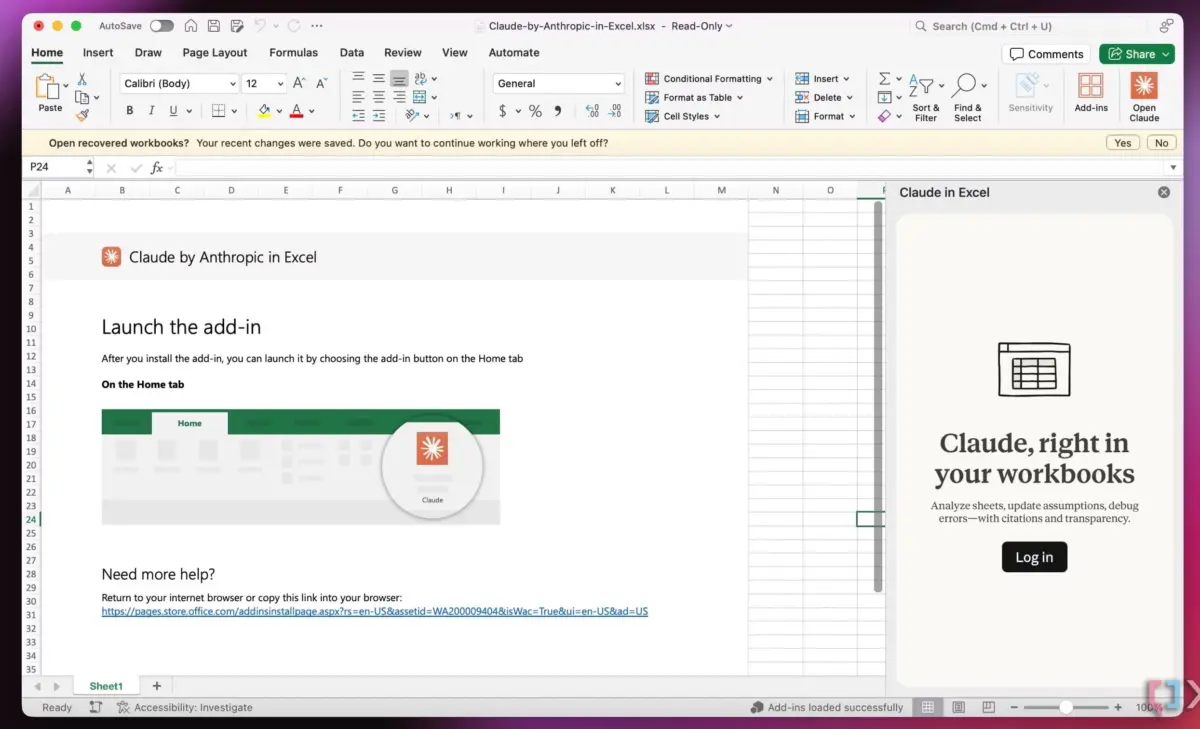
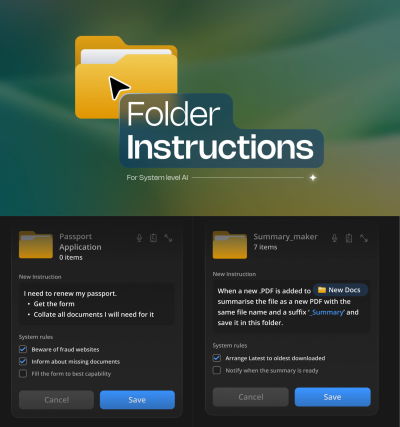
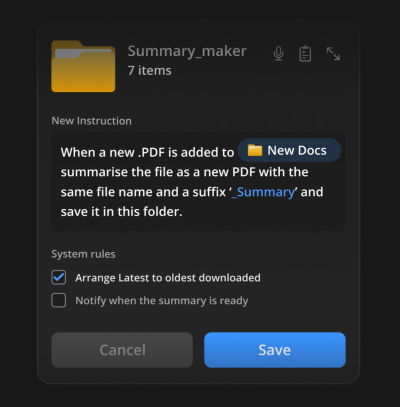
Innovations like Claude’s deep integrations into Microsoft Excel, Word, and PowerPoint, alongside advanced file-system concepts like folder-level instructions, mark this turning point. AI is no longer a destination; it is an invisible infrastructural helper that operates quietly in the background, matching decades-old human habits of document organization and data analysis.
Supporting Context & Metrics: The Cost of Context Switching and Tool Fatigue
The urgency behind seamless integration is not merely aesthetic—it is rooted in cognitive science and workplace productivity metrics.
- The Switching Penalty: Psychological research consistently demonstrates that frequent context switching between disparate applications drains cognitive bandwidth. Studies on workplace productivity indicate that knowledge workers lose up to 20% to 40% of their productive time merely orienting themselves after switching tasks or tools.
- Error Rates in Fragmented Workflows: When users are forced to juggle multiple views, copy data across applications, and manually translate outputs, the margin for human error widens exponentially. Automated, contextual assistance reduces these mechanical steps.
- The Adoption Gap: Despite massive venture capital investments in standalone AI productivity apps, retention metrics for single-purpose chat wrappers often plummet after the initial novelty wears off. In contrast, feature integrations embedded inside established tools (such as native spreadsheet helpers or operating system file utilities) boast significantly higher long-term daily active usage (DAU).
The Power of "Quiet AI" and Mental Models
Human beings rely heavily on mental models—internal cognitive representations of how the world and digital tools work. For instance, people understand that physical folders contain specific documents, that spreadsheets organize data in rows and columns, and that word processors format text pages.
When an AI tool respects these pre-existing mental models, the learning curve flattens to zero. "Quiet AI" thrives precisely because it does not ask the user to learn a new paradigm. It sits patiently behind the scenes, automating repetitive drudgery without demanding center stage.
Consider the groundbreaking concept of Folder Instructions for System-Level AI. Instead of opening a separate app to process documents, a user can assign contextual instructions directly to a desktop folder—such as "Monitor incoming PDF invoices, extract key financial figures, and summarize them into a monthly ledger."
[Local Folder: "Passport Renewal"]
 ├── System Rule 1: Scan uploaded PDFs for expiration dates.
 ├── System Rule 2: Verify eligibility requirements against local guidelines.
 └── Action: Automatically organize confirmed documents into sub-folders.
The user interacts with a familiar object—a folder—while advanced system-level intelligence silently executes the heavy lifting. Permissions remain locally scoped, privacy is maintained, and no new application needs to be installed, launched, or learned.
Official Industry Perspectives and Expert Insights
Design leaders and educators are increasingly vocal about the dangers of over-tooling and the urgent need for interface restraint.

"We often hear about shiny new tools that change everything (yet again). But in practice, most people don’t need more tools to deal with in their daily lives. What we actually need are better integrations of useful capabilities that neatly align with our existing and established mental models."
— Vitaly Friedman, UX Consultant and Creator of Design Patterns For AI Interfaces
Industry analysts point out that the next generation of software winners will not be companies that build the loudest models, but those that design the quietest delivery mechanisms. By burying complexity beneath intuitive, context-aware integrations, developers can solve high-severity user frustrations without adding to cognitive clutter.
Furthermore, design thinkers emphasizing system-level automation—such as Karthikeya GS in pioneering explorations of folder-level AI mechanics—stress that automation should live precisely where work physically happens. Whether it is generating summaries on the fly or auto-tagging assets upon creation, the interface should dissolve into the background.
Future Outlook: Designing for the Invisible Interface
As artificial intelligence matures from an experimental novelty into an essential utility, the trajectory of product design points toward absolute invisibility.
1. The Death of the Standalone Chat Interface for Routine Tasks
While conversational AI will always hold a vital place for open-ended brainstorming, creative exploration, and complex inquiry, it will largely recede from day-to-day data entry and file management workflows. Users want execution, not conversation, when dealing with repetitive administrative tasks.
2. Context-Aware Operating Systems
Future desktop and mobile operating systems will treat AI not as an app icon in a dock, but as a fabric woven across the entire file system. Folders, documents, and native applications will possess innate, customizable behaviors guided by simple natural language rules set up by the user.
3. A Return to Ergonomic Simplicity
Software companies will be judged less by how many features they can pack into a release cycle and more by how much cognitive friction they remove. The ultimate metric of success for modern software design will be subtraction: removing steps, eliminating redundant apps, and making powerful capabilities feel entirely natural.
Conclusion
The takeaway for product creators, developers, and UX designers is unmistakable. Stop building solutions in search of problems. Stop demanding that users abandon their comfortable, established habits to inhabit foreign digital ecosystems.

By embracing Quiet AI, respecting human mental models, and engineering seamless integrations, we can build a digital landscape that truly serves us—one where technology does the heavy lifting while quietly fading into the background.
Brought to you by Design Patterns For AI Interfaces, a comprehensive video course featuring hundreds of real-life examples and UX guidelines designed to help creators build AI features that people genuinely use and love.
