

Executive Overview
The design and product development communities have fallen into a deep trap of conversational tunnel vision. Because Large Language Models (LLMs) are natively trained on dialogue, the tech industry has collectively decided that the chat bubble is the natural, default home for every conceivable AI capability. While the conversational text interface is a viable and undeniably powerful option for many open-ended tasks, it is merely one tool in an expansive and multifaceted UX toolkit.
UX and product teams must move away from lazy interface defaults and become deeply intentional about the modalities they choose. Modality—the way a person uses their senses (seeing, hearing, touching, speaking, or typing) to interact with a system—must adapt to the user, rather than forcing the user to adapt to the machine.
To pick the correct method, teams must evaluate the user’s immediate intent, physical environment, and cognitive load. This article explores the limitations of the "do-it-all" chatbot, presents a comprehensive taxonomy of input and output modalities, outlines a rigorous Task Audit framework, and examines a real-world case study demonstrating how adaptive modality design fundamentally transforms high-stakes enterprise workflows.
Detailed Chronology: The Evolution of Conversational Tunnel Vision
To understand how the tech industry arrived at the current era of ubiquitous chat boxes, one must trace the rapid evolution of generative artificial intelligence over the past decade.
- The Paradigm Shift (2018–2022): The introduction and mainstream scaling of transformer-based LLMs revolutionized natural language processing. Systems like GPT-3 and its successors proved that machines could converse, reason, and generate text at a human-like level. Because these foundational models were fed vast corpuses of text dialogue, their primary interface—out of pure technical convenience—was a command-line-style text box wrapped in a web browser.
- The Chat Bubble Standardization (2023): As companies rushed to integrate generative AI into enterprise tools, productivity apps, and consumer software, the "blank slate" chat window became the universal pattern. Product teams across industries adopted the chat bubble as a one-size-fits-all solution, assuming that natural language could solve any interaction problem.
- The User Friction Crisis (2024–Present): As generative AI matured from a novelty into mission-critical software, users began experiencing profound psychological fatigue and physical friction. Forcing high-speed professionals, field technicians, and multitasking consumers to type out long prompts and read dense blocks of text exposed the deep limitations of conversational tunnel vision. The industry is now undergoing a necessary correction, pivoting toward context-aware, multi-modal interface design.
The Myth of the Do-It-All Chatbot
The allure of the chatbot is easy to understand from a product development standpoint. It offers a blank slate, signaling that the system can handle virtually any request a user inputs. However, a text-heavy interface creates a massive adaptation load. This load increases cognitive demands on users, turning into a psychological tax paid when people are forced to alter their natural thought processes to accommodate a machine.

When an interface relies solely on conversation, it imposes a dual burden: a linguistic challenge for input and a cognitive challenge for output.
Input: Why a Text Box is a Linguistic Barrier
A blank chat box creates a major obstacle for users trying to discover what a tool can actually do. In a traditional graphical user interface (GUI), menus, buttons, and drop-downs provide clear visual cues that signal every available option. A chat box, by contrast, leads directly to choice paralysis. Users are forced to guess what the AI is capable of and must remember the exact phrasing or technical nomenclature required to trigger the desired result.
- Example: Consider a data analyst seeking a specific trend within a spreadsheet. In a traditional application, they click a filter or sort button. In a chat interface, they must suddenly become a writer, translating complex data logic into a complete, grammatically correct sentence.
- Example: A manager trying to reorganize a team schedule. Dragging and dropping blocks on a visual calendar is intuitive; describing those same scheduling shifts in a text prompt adds unnecessary cognitive overhead, making a simple task feel arduous.
Designing input means recognizing that composing a prompt is a creative act. For many professionals, this creates a severe linguistic barrier. A graphic designer might know precisely how they want an image to look, but struggling to describe lighting, color temperature, and texture in a text prompt is inefficient. In such cases, a slider or color picker is objectively superior to a text box.
Output: The Cognitive Cost of Reading Long Text
When an AI responds in long blocks of continuous text, it transfers the burden of interpretive work directly to the user. Text is a serial medium: the human brain must read one word after the next to extract meaning. This takes valuable time.
While sequential reading is necessary for complex legal analysis or reviewing nuanced medical histories, teams introduce unnecessary friction when they default to text for data that visual formats communicate exponentially faster. Visual methods allow parallel processing; a user can view a chart and spot an anomaly or pattern in under a second.

Linear Text Loop (High Anxiety)
[User Reads Paragraph 1] ➔ [Reads Paragraph 2] ➔ [Mentally Summarizes] ➔ [Exhaustive Verification]

Graphical Selection Grid (Low Effort)
[Instant Glance Verification] ➔ [Immediate Decision]
The cognitive tax of this serial reading compounds rapidly in high-stakes environments:
- A physician asking for a patient’s vital signs requires a clear numerical display, not a narrative paragraph describing fluctuations.
- A financial trader looking for a sudden price spike needs a real-time line graph, not a written retrospective of asset movement over the past hour.
In both scenarios, a text response forces professionals through a slow, error-prone extraction process precisely when speed and accuracy are paramount.
Supporting Context & Metrics: A Taxonomy of Modalities
Before selecting an interaction method, practitioners must establish a shared vocabulary for input and output options. Modality choices should multiply pathways to information, ensuring robust accessibility for users with diverse physical and cognitive needs.
Input Modalities
- Button / Tap: Best for single-step, binary actions (launching features, confirming alerts). Eliminates recall overhead through recognition, maximizing execution speed.
- Voice: Best for hands-busy or eyes-busy contexts (field technician queries, navigation). Offloads physical interaction to speech, though bounded by ambient noise and privacy norms.
- Natural Language Chat: Best for ambiguous or exploratory queries (researching options, follow-up questions). Offers freedom of expression, though users bear the burden of clear phrasing.
- Form / Wizard: Best for structured, multi-field data entry (contracts, report configuration). Prevents missed information by breaking complex tasks into step-by-step visual sections.
- GUI (Filters, Sliders, Drag-and-Drop): Best for complex parameter settings or spatial tasks (scheduling, image editing). Prevents errors through direct manipulation.
- Multi-modal (Image + Text): Best for visual inputs paired with descriptions (uploading design mockups with annotations). Reduces the effort of verbalizing complex visual concepts.
- Gesture: Best for hands-free spatial interaction (acknowledging alerts in sterile operating rooms). Keeps users safe and clean in contaminated environments.
Output Modalities
- Push Notification / Alert: Best for time-sensitive, ambient awareness (price spikes, task completion notices). Delivers updates processable at a glance without breaking primary focus.
- Audio Summary: Best for hands-busy or eyes-busy contexts (status updates while moving). Delivers information directly to the ear, maintaining physical safety and situational awareness.
- Short Text Summary: Best for focused queries needing brief answers (definitions, single-metric status). Provides fast answers without the fatigue of scanning long paragraphs.
- Visual Dashboard: Best for high-density comparative analysis (project status, resource allocation). Enables rapid trend and outlier detection via parallel processing.
- Interactive Canvas: Best for generative or iterative creative tasks (design iteration, layout adjustment). Allows direct manipulation rather than indirect text instructions.
- Inline Confirmation: Best for guided task flows (step-by-step wizards). Provides visual proof that the system recorded a choice correctly, eliminating user anxiety.
Official Case Study: Adaptive Modality for Field Technicians
To understand how these principles apply in the real world, examine a field study conducted with a national utility provider servicing high-voltage electrical grids.
The Problem: Cognitive Overload in High-Risk Environments
Field technicians working on high-voltage grids traditionally relied on ruggedized tablets to access technical manuals and log status updates. However, the physical constraints of the job—wearing heavy protective gloves and working in bucket trucks at significant heights—made interacting with a standard touch interface nearly impossible. Furthermore, attempting to read complex, text-heavy diagnostic reports on a glare-heavy screen while maintaining situational awareness created dangerous cognitive overload.

Research Methods: Capturing Field Reality
Researchers deployed a formal Task Audit utilizing three core methods:
- Contextual Inquiry and Observation: Researchers shadowed technicians in bucket trucks, observing "hands-busy, eyes-busy" states. Thick gloves made screen taps erratic, direct sunlight washed out displays, and balancing a heavy tablet created severe fall risks.
- Focused Interviews: Interviews with veteran technicians confirmed that text-heavy diagnostic reports were dangerous in the field. Crews required immediate, unambiguous verification ("Is this safe?" or "Where is the fault?"), not lengthy narratives.
- Collaborative Workshops: Product managers and engineers worked alongside researchers to map a unified task inventory, identifying environmental constraints as core design requirements rather than edge cases.
The Resolution: A Multi-Modal Handoff Solution
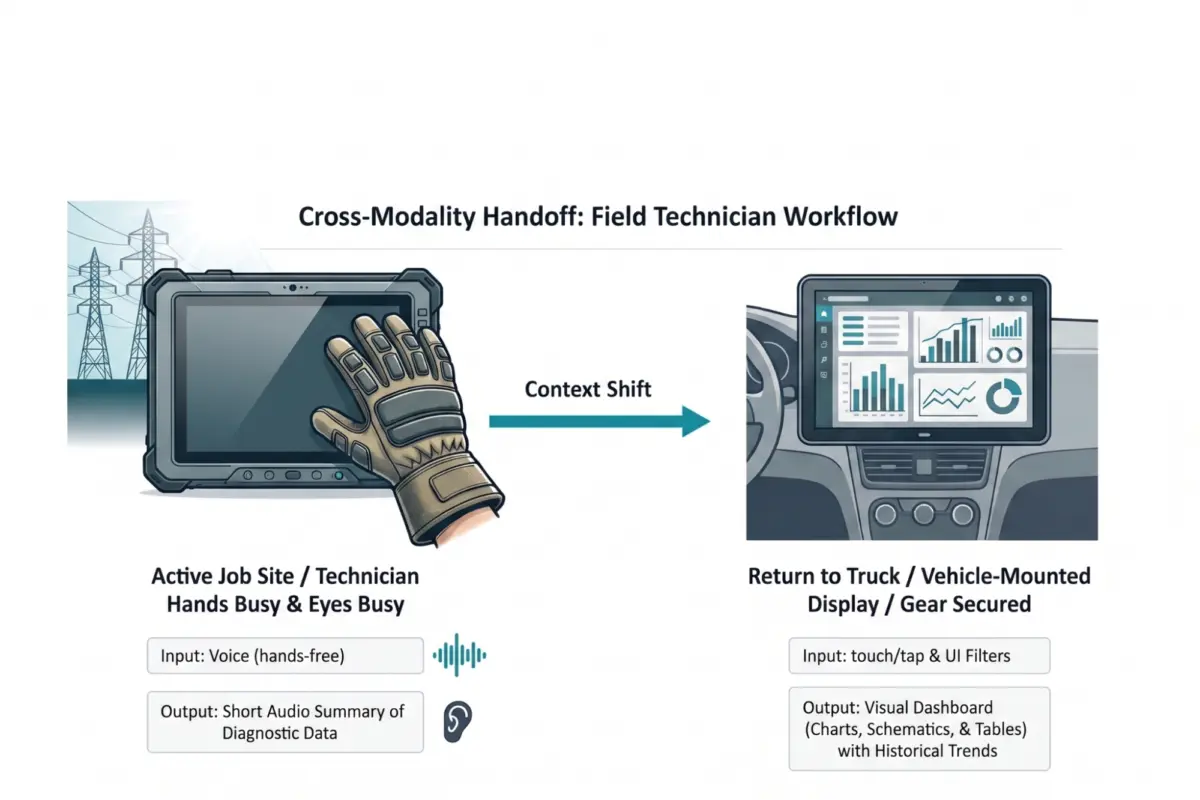
The resulting architecture implemented an adaptive modality handoff:
- On the Job Site: Technicians use voice input to query the system, bypassing the barrier of thick protective gloves. The AI responds with a short audio summary, eliminating screen glare issues and allowing technicians to keep their eyes on live wires.
- Inside the Vehicle: Once technicians return to a truck and remove safety gear, the system automatically hands off workflows to a 15-inch vehicle-mounted visual dashboard, supporting parallel processing of complex electrical grid maps and historical trend data.
Impact: Implementing this adaptive approach reduced diagnostic time by 20% and significantly increased daily tool adoption among field crews.
Future Outlook: Designing for the Environment
An AI capability is only as usable as the interface that delivers it. Product teams must resist the path of least resistance. Building a chatbot is fast and familiar, but building an interface that feels like a natural extension of human workflow requires rigorous, empathetic design.
The future of AI interface design is a diverse, harmonious ecosystem: visual, vocal, haptic, and ambient, meticulously calibrated to user intent and environmental context. The chat window will remain a valuable tool in that ecosystem, but it must be deployed selectively rather than reflexively.

To create the highest likelihood of user adoption and long-term success, design and product leaders must commit to a fundamental truth: always fit the modality to the person, the task, and the place.
