

Executive Overview
For over a decade, frontend engineering operated under a singular, overarching assumption: the screen viewport is the ultimate source of truth for responsive web design. Media queries governed our layouts, determining how grids shifted, text scaled, and components restructured based entirely on whether a user was browsing on a pocket-sized mobile device or an ultra-wide desktop monitor.
Yet, as the modern web evolved toward modular architecture, design systems, and hyper-reusable components, this viewport-centric paradigm began to crack. Enter CSS Container Queries—a transformative feature that boasts robust, near-universal browser support hovering around 94%. Despite this technical green light, adoption rates remain remarkably sluggish. According to the State of CSS 2025 survey, while 86% of developers are fully aware of container queries, only 41.4% actively use them in production environments.
This paradox—high awareness paired with tepid implementation—stems from a fundamental misapplication. Developers frequently treat container queries as mere drop-in replacements for traditional media queries. Because the syntax looks deceptively similar, they are often used incorrectly, leading to frustration and abandonment.
This article investigates the architectural divide between media queries and container queries. By dissecting macro versus micro layouts, examining practical applications like fluid typography and flexbox wrap detection, and addressing inherent limitations, we will establish a definitive framework for when—and how—to harness the true potential of component-driven responsiveness.
Detailed Chronology: The Evolution of Modern Responsiveness
To understand why container queries are so widely misunderstood today, it is helpful to trace how we arrived at this architectural crossroads.
The Media Query Era and the Viewport Proxy
When Ethan Marcotte coined "Responsive Web Design" in 2010, media queries became the undisputed bedrock of adaptive interfaces. They gave developers the power to ask the browser a single, isolated question: How wide is the screen right now?
@media (min-width: 1024px)
  .card
    display: flex;
For years, this served us well. However, web design quickly shifted from monolithic page builds to component-driven development (fueled by React, Vue, Svelte, and modern design systems). Suddenly, a .card component designed to switch to a horizontal layout at 1024px could be dropped into a narrow desktop sidebar that measured only 300px wide.
Even though the viewport was a sprawling 1920px, the card’s local environment was cramped. Yet, the media query, blind to its internal context, fired anyway. The card deformed, text clipped, and layouts broke. The viewport had become a flawed proxy for component health.
The Long Road to Standardization
Recognizing this architectural limitation, the CSS Working Group spent years drafting specifications for an internal query mechanism. The developer community loudly echoed this need; for consecutive years, contextual component responsiveness sat near the absolute top of the CSS Wishlist surveys.
When container queries finally shipped, they arrived quietly. Many developers missed the initial announcement, only discovering them later and asking the inevitable question: “Why do we need this when media queries already exist?”
As Kevin Powell bluntly noted at SmashingConf Amsterdam 2026, container query adoption has been dismal relative to its utility. The capability to let components adapt natively to their outer containers was desperately wanted, yet deployment lags severely behind anticipation.
Supporting Context & Metrics: The Adoption Gap
To quantify the state of modern CSS layout engineering, industry telemetry provides a clear picture of both fragmentation and developer hesitation.
The Fragmentation Crisis
According to data compiled across major viewport monitoring studies, there are currently over 2,300 unique viewport sizes actively accessing the modern web. The illusion that developers can successfully map out discrete breakpoints (such as 320px, 768px, 1024px, and 1440px) to cover every conceivable user experience is mathematically obsolete.
When layout logic relies solely on the outer screen, applications break down under the weight of infinite form factors—folding phones, split-screen browser windows, smartwatches, and ultra-wide curved monitors.
The Developer Sentiment Divide
The State of CSS metrics highlight a deep psychological barrier. While developer literacy is high (86% awareness), practical integration sits at roughly 41%. Interviews with senior architects reveal three primary reasons for this lag:
- Syntax Familiarity: Because
@containermimics@media, developers assume the execution model is identical. - Contextual Configuration Error: Failing to properly declare container contexts (
container-typeandcontainer-name) results in broken queries that fail silently. - Fear of Layout Collapses: Misunderstanding how block-size containment can collapse element heights without explicit dimension declarations.
Official Statements and Architectural Analysis
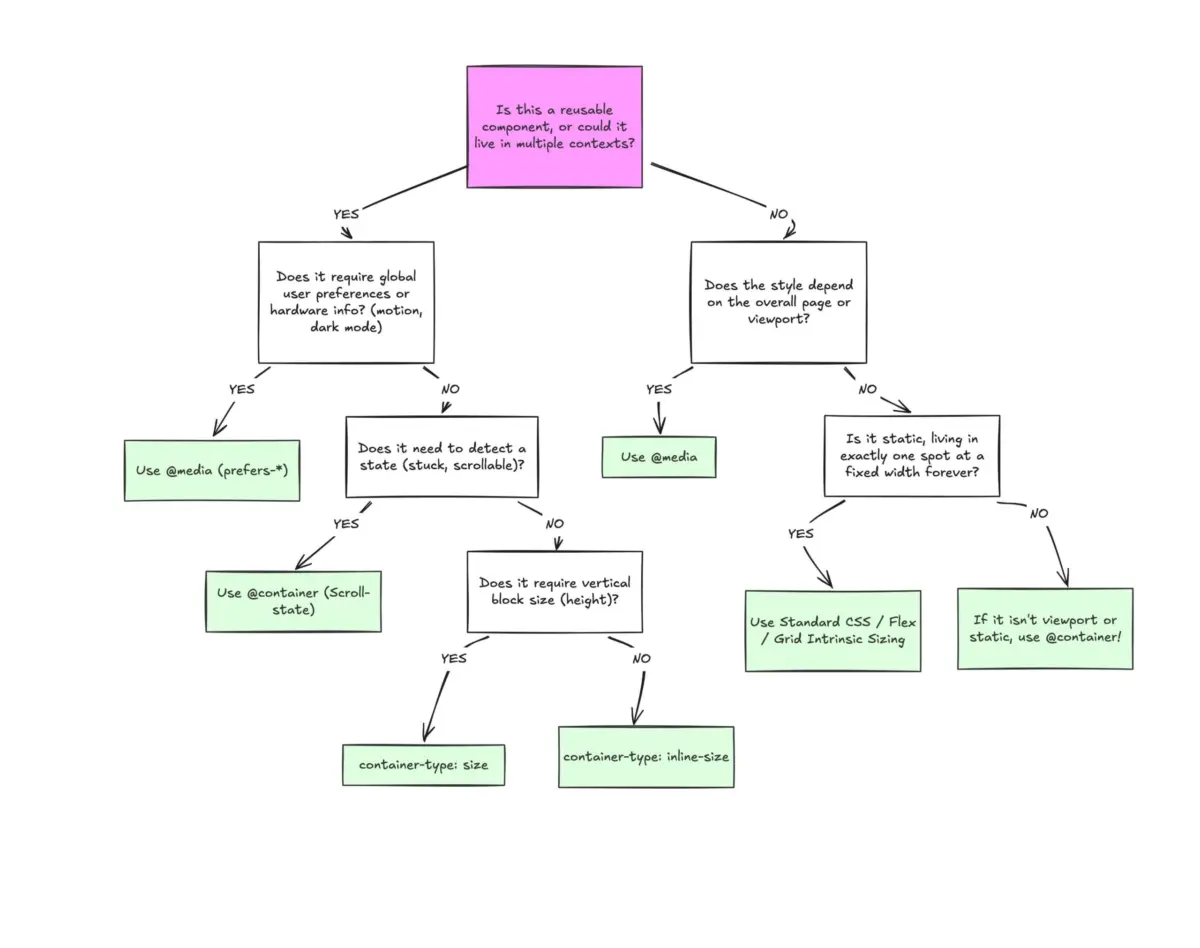
Industry leaders and specification authors emphasize that container queries are not meant to entirely eradicate media queries. Instead, they require a paradigm shift in how we categorize layout responsibilities: Macro Layouts versus Micro Layouts.

Macro Layouts (Media Queries)
Media queries look outward. They are designed for macro-level structural decisions that govern the entire page or system environment.
- Use Cases: Global page grids, header and footer structures, device capabilities (
pointer: coarse), and user system preferences (prefers-color-scheme). - Reference Point: The browser window (viewport).
Micro Layouts (Container Queries)
Container queries look inward. They make responsive design reliant on the local environment inside a component rather than the global viewport.
- Use Cases: Cards, widgets, navigation drawers, form modules, and isolated UI components that may be rendered across multiple distinct containers (e.g., a main content area versus a tight sidebar).
- Reference Point: The immediate parent container.
As Kevin Powell aptly observed:
"Media queries are dumb. Not dumb in terms of the concept, but dumb in that they don’t know very much. In fact, most people assume that they know more than they do."
Practical Implementations: Beyond the Basics
To successfully leverage container queries, developers must master two advanced patterns: fluid typography scaling and flexbox wrap detection.
1. Fluid Typography Inside Components
Traditionally, fluid typography relied on viewport-relative units (vw, vh) paired with CSS clamp() functions. While effective for full-screen text, these units fail when a component is relocated to a sidebar.
/* Old approach: Tied to viewport, breaks in sidebars */
.card-title
  font-size: clamp(100%, 1rem + 2vw, 24px);
Container queries introduce dedicated container units (cqi, cqw, cqb), which measure relative to the container’s inline or block dimensions. By combining container queries with clamp(), typography scales relative to the component’s actual environment:
.card-wrapper
  container-type: inline-size;
  container-name: card;


.card-title
  font-size: clamp(1rem, .5rem + 3cqi, 2rem);
2. Solving Flexbox Wrap Detection Without JavaScript
One of the most profound limitations of traditional media queries is their inability to detect internal layout states, such as when flex items wrap onto a new line. Historically, developers relied on cumbersome JavaScript ResizeObserver implementations to achieve this.

By nesting container queries inside flex items, we can detect wrapping events purely in CSS:
/* The flex parent container */
.flex-layout
  display: flex;
  flex-wrap: wrap;


/* Register individual flex item as a container */
.flex-item
  container-type: inline-size;
  flex: 1 1 390px; /* Expands to fill space, wraps at 390px */


/* Default state (stacked/narrow) */
.card
  display: flex;
  flex-direction: column;
  background: #f4f4f4;


/* Triggered natively when the item container expands past 600px */
@container (min-width: 600px)
  .card
    flex-direction: row;
    align-items: center;
    background: #e2f0d9;
Navigating Pitfalls and Caveats
Container queries introduce unique constraints that developers must respect:
- Self-Containment Limitation: An element cannot query itself. To style
.card-contentbased on.card‘s size,.cardmust be registered as a container, and its child elements must respond to that outer wrapper. - Size Containment Collapses: Declaring
container-type: sizequeries both inline and block dimensions. If an explicit height or aspect ratio is omitted, block containers will collapse to0px. Best practice dictates defaulting toinline-sizeunless block-axis queries are strictly required. - Custom Property Exclusion: At present, container queries cannot directly accept CSS custom properties (e.g.,
@container (min-width: var(--breakpoint))) due to recursive evaluation risks within the DOM tree.
Future Outlook
The slow adoption curve of CSS Container Queries is reminiscent of the early days of Flexbox or Grid—powerful paradigms that required developers to unlearn decades of rigid layout habits.
As design systems scale and applications become increasingly modular, the dependency on viewport-bound media queries will inevitably recede. Container queries represent a maturation of web standards, aligning CSS logic directly with component architecture.
By treating components as autonomous entities capable of interrogating their immediate surroundings, developers can build truly resilient, future-proof interfaces that render flawlessly regardless of where they live on the screen. The tools are mature, browser support is ubiquitous, and the mandate for smarter, content-driven layouts has never been clearer.