In the modern landscape of digital product development, the line separating a functional application from a static prototype is the single greatest determinant of qualitative research validity. In almost every usability testing session—particularly within heavily regulated and functionally complex sectors like financial technology—there arrives an unmistakable, critical juncture. A participant pauses at the login screen, inputs a sequence of alphanumeric characters, and glances up, their eyes silently interrogating the facilitator: Am I doing this right?
That momentary hesitation is a profound diagnostic signal. It reveals that the user has consciously registered a fundamental reality: this is not a real application. Consequently, every subsequent data point, behavioral observation, and usability metric collected for the remainder of the session becomes inherently skewed, filtered through the subtle yet pervasive lens of artificiality.
For FinTech product teams, this fidelity gap represents a silent threat to product-market fit. Financial services consumers are psychologically conditioned to possess a heightened awareness of security, data integrity, and feedback loops. They are trained to notice when something feels fundamentally "off"—a balance that refuses to reconcile, a form field that nonchalantly accepts arbitrary or malformed data, or a frictionless authentication sequence that bypasses core security checks entirely. When a banking prototype skips proper credential validation, participants do not merely suspend their disbelief; they frequently halt mid-session to explicitly flag the discrepancy. Ultimately, the product team walks away with a suite of findings that reflect how users behave in a controlled demonstration, rather than how they navigate high-stakes financial environments in the wild.
The solution, however, is far more surgical and precise than a complete, end-to-end backend build. Product designers and researchers do not need to construct a fully functioning database architecture to salvage user trust. Instead, they must identify the precise friction point where user trust is established and make that specific interaction unequivocally real. In the context of mobile banking and financial platforms, that foundational trust anchor is the login flow.
By leveraging advanced prototyping tools like ProtoPie—integrated seamlessly with design ecosystems like Figma—designers can construct fully interactive authentication mechanisms complete with real-time credential validation, dynamic error states, and native-grade biometric animations without writing a single line of production code. This journalistic investigation and comprehensive technical breakdown explore why login fidelity matters, how modern FinTech teams are bridging the prototype-reality divide, and a granular, step-by-step methodology for building a production-grade login flow in ProtoPie.
Detailed Chronology: Building a Production-Grade Login Prototype
To eliminate the "prototype effect" during user testing sessions, modern product teams are turning to no-code fidelity engineering. Using "Pie Bank," a conceptual mobile banking prototype, we can trace the exact architectural steps required to construct a login experience that is entirely indistinguishable from a shipped App Store release.
Step 1: Strategic Figma Import and Layer Architecture
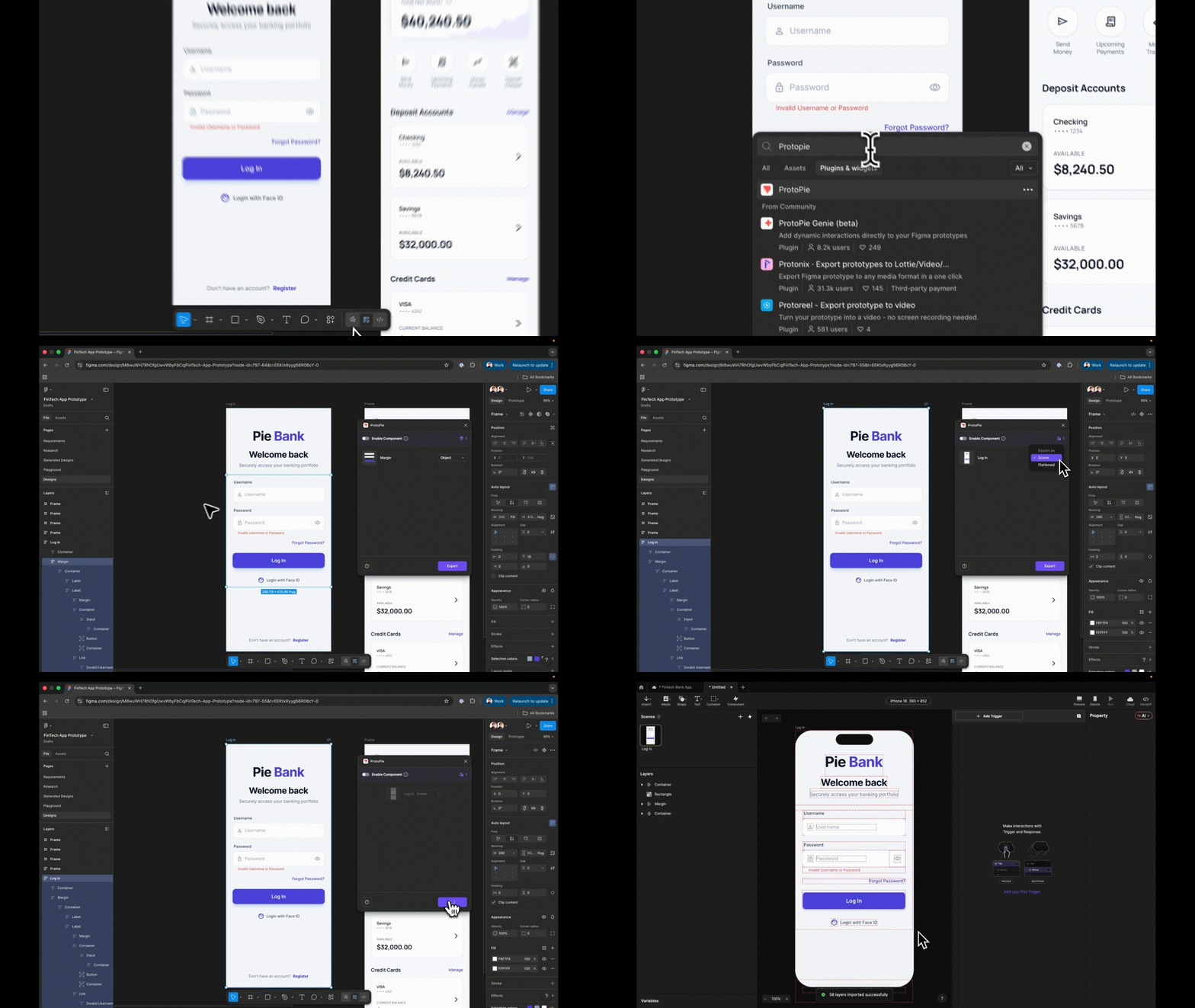
The fidelity pipeline begins long before animation triggers are set; it originates in the vector design environment. When importing a design frame from Figma into ProtoPie via the native plugin, designers must deliberately choose Scene rather than Flattened.
A flattened export collapses the entire visual hierarchy into a single, static raster image, destroying interactivity at the pixel level. Conversely, choosing Scene preserves the granular layer hierarchy. Every individual text field, container, button, and icon arrives in ProtoPie as a separate, fully targetable layer.
Before introducing any interaction logic, disciplined layer hygiene is mandatory. Vague, auto-generated design labels—such as replacing "Rectangle 14" with "Input Username"—are critical. In subsequent steps, these layers will be referenced directly within complex conditional formulas; ambiguous naming conventions compound exponentially, leading to severe debugging friction later in the workflow.
Step 2 & 3: Native Text Inputs and Dynamic Password Masking
Static placeholder text—where tapping a field merely cycles to a pre-recorded state—is a primary trigger for user skepticism. ProtoPie addresses this through native Input layers that accept genuine keyboard input, enabling participants to type actual strings rather than simulating them.
By dragging an Input layer from the Text menu and nesting it inside the username field group, designers establish real-time text entry. This is matched visually to the design system using appropriate placeholders, background fills, and typography. Duplicating this layer for the password field and modifying a single property—changing the field Type to Text Password—instantly enables native system-level character masking (dots or asterisks). Suddenly, username fields accept raw text while password fields securely mask input, achieving core functional realism without a shred of conditional logic.
Step 4 & 5: Establishing Destination Scenes and Guarded Navigation
A common sequencing error in iterative prototyping is attempting to wire navigation responses before the destination scene exists. Designers must construct the destination dashboard scene first.
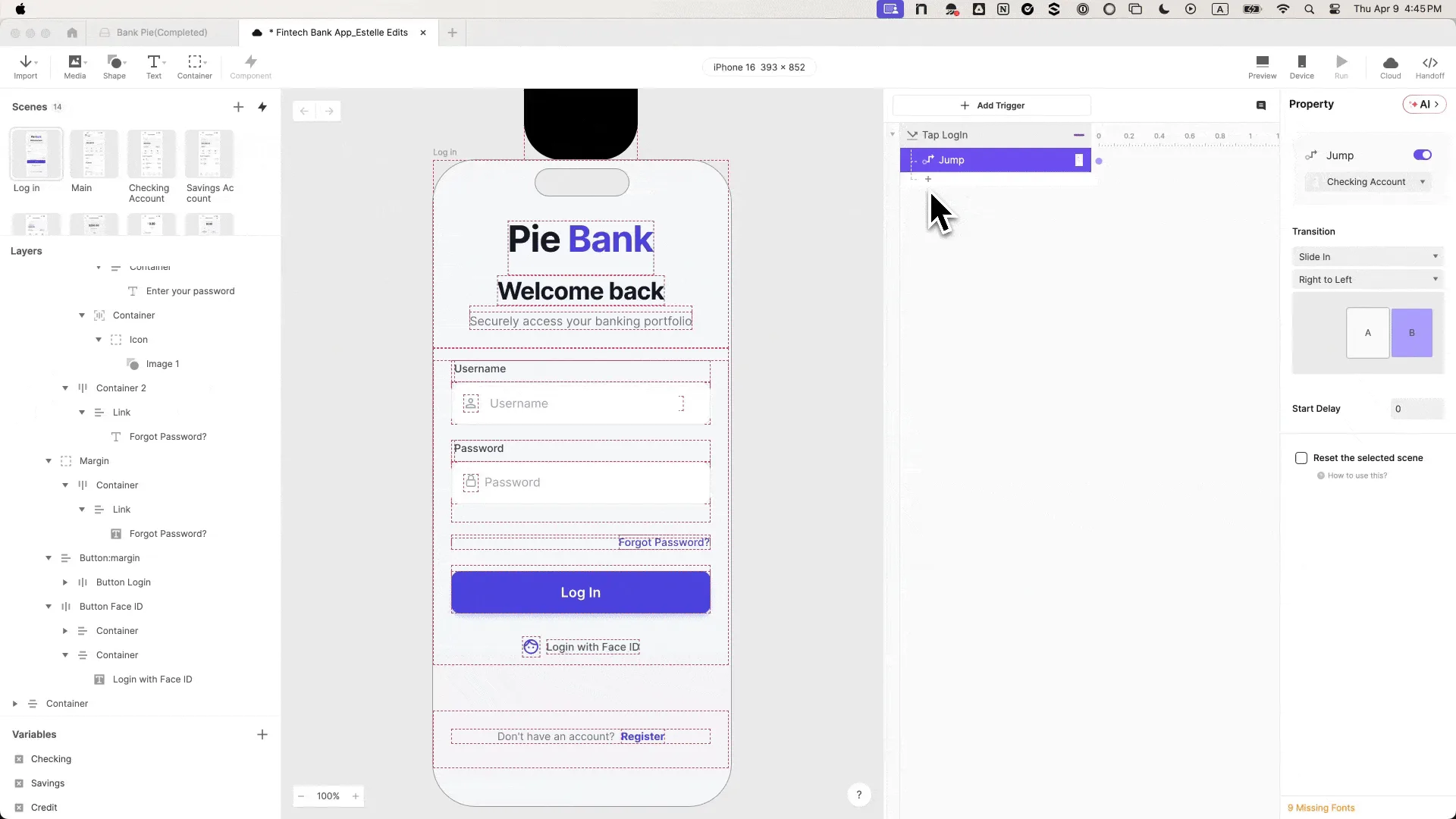
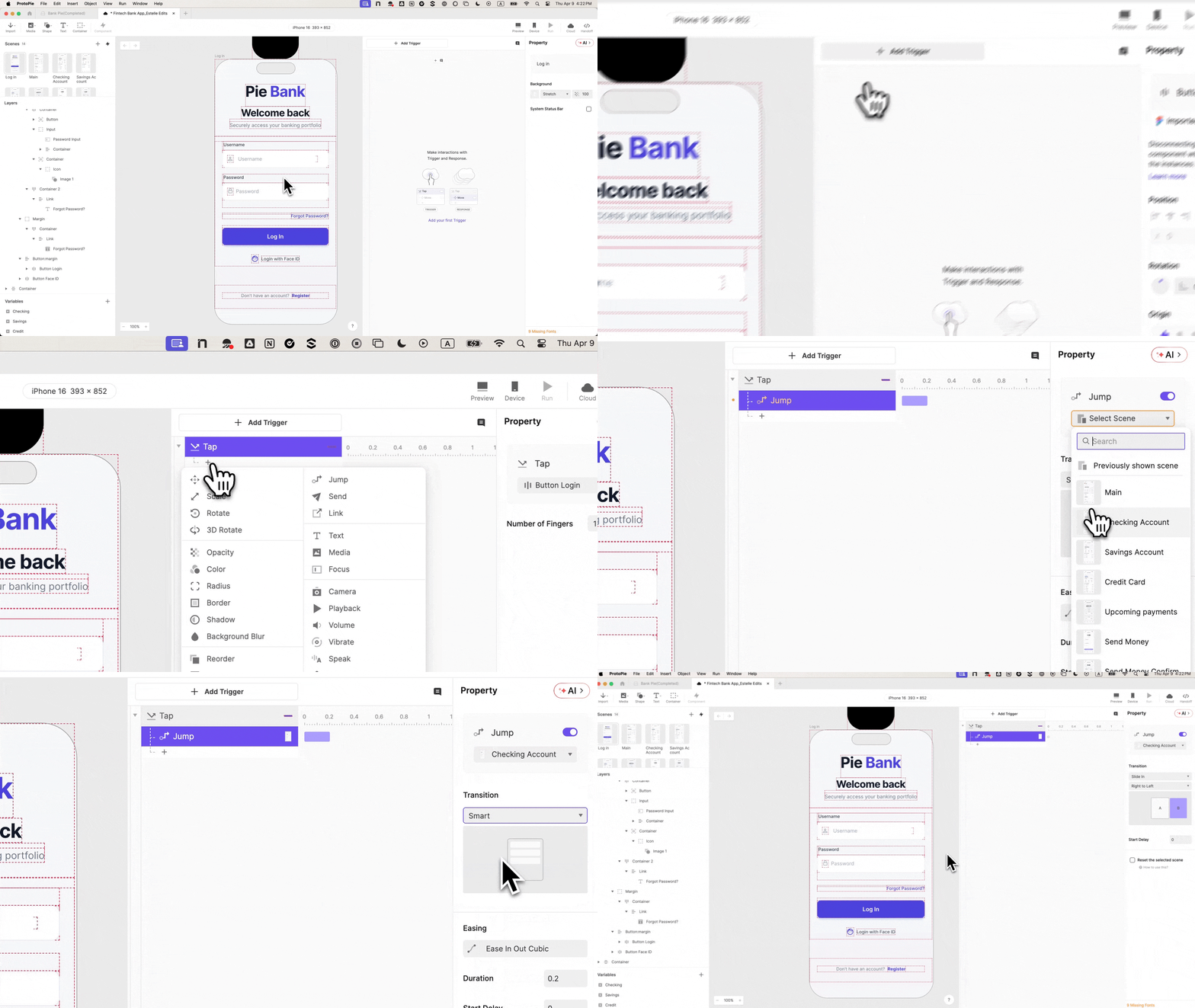
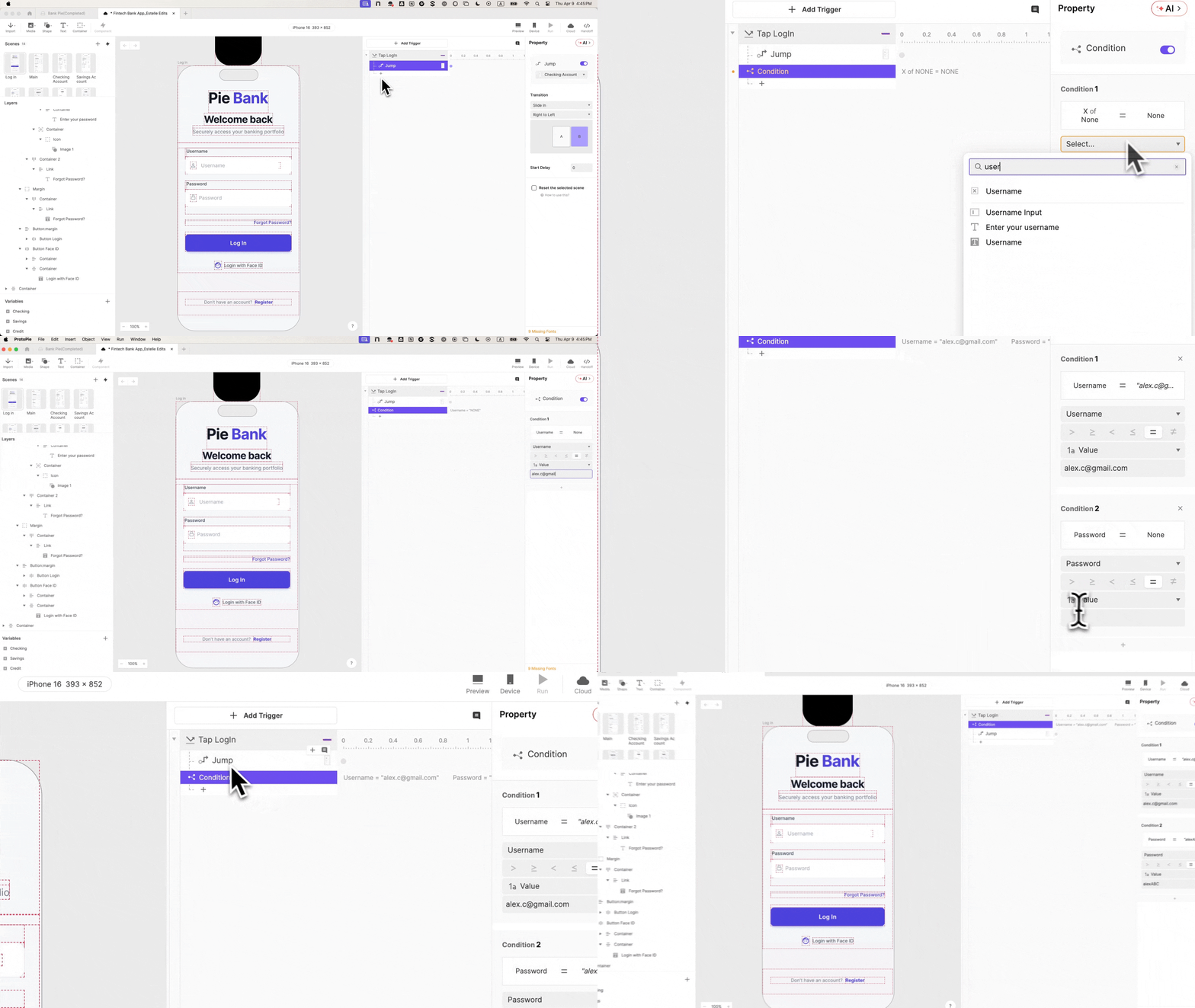
When wiring the primary Log In button using a Tap trigger paired with a Jump response (transitioning via a right-to-left slide), a fundamental flaw immediately emerges: the prototype dutifully navigates to the dashboard regardless of what the user has typed—even if the fields are entirely empty. The interface is still deceiving the participant. To achieve genuine testability, authentication logic must govern navigation.
Step 6 & 7: State Management, Variables, and Conditional Logic
To ensure the prototype actively evaluates user input, developers must introduce state management via variables. By creating two Text-type variables (username and password) and binding them to their respective input layers using real-time formulas:
Designers can track keystrokes in real time by enabling ProtoPie’s debug overlays (visualized as green indicators displaying live variable values).
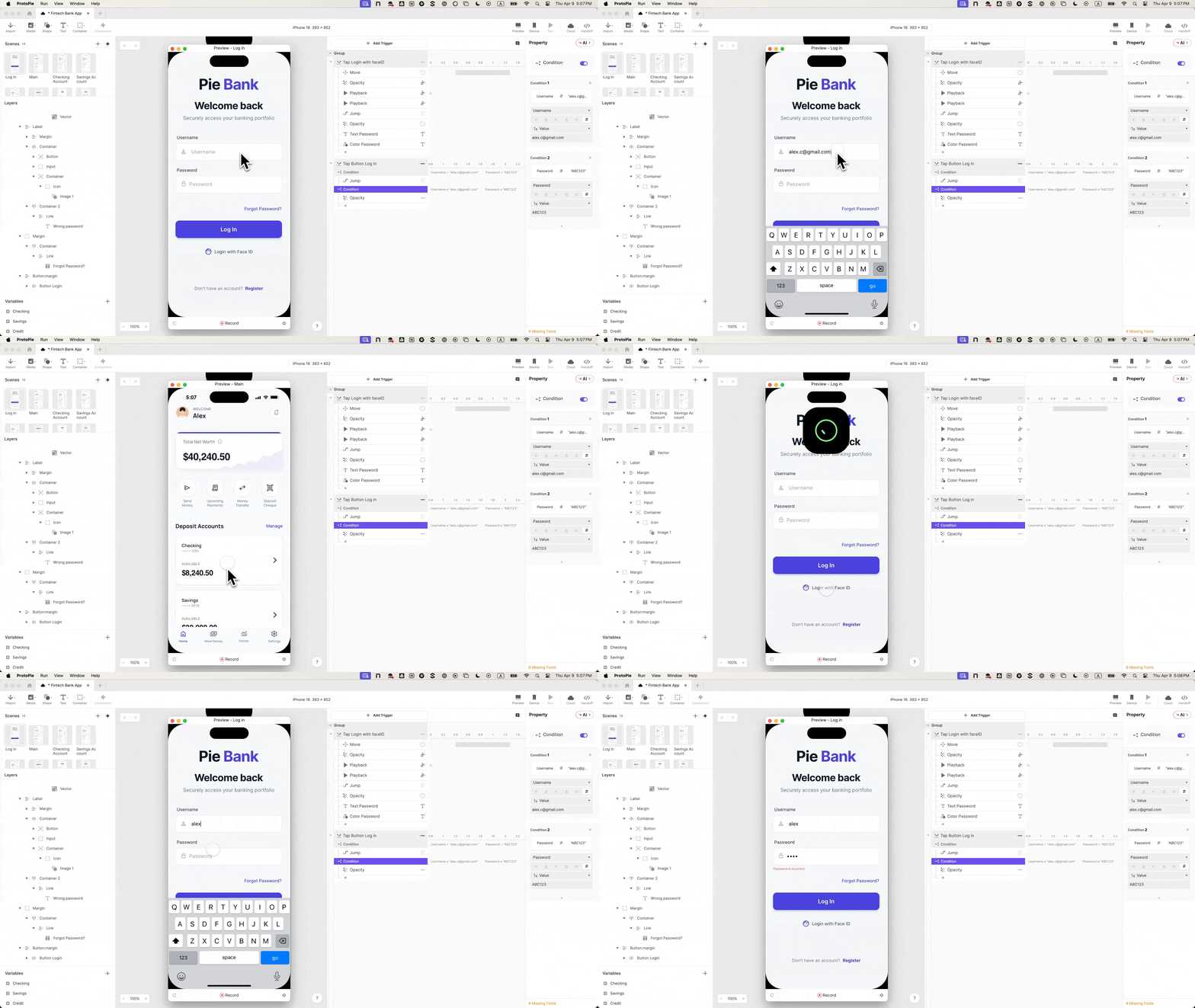
With variables actively capturing input data, the next critical phase involves updating the Tap trigger on the login button with a strict Condition block. The navigation action (Jump) is moved inside this condition, which dictates that navigation can only occur if specific, valid credentials are provided. Any malformed input, incorrect combination, or blank field halts progression, forcing the participant to actively engage with the authentication requirements.
Step 8: Engineering the Error State
Most prototypes completely omit negative paths, focusing exclusively on the "happy path." However, error handling is often where usability issues are most pronounced.
By designating an error message layer (Error Text), setting its initial opacity to 0, and establishing a secondary, inverse condition, the prototype gains the ability to react intelligently to incorrect credentials. If valid credentials fail, a Change Property response dynamically shifts the opacity of the Error Text layer to 100. The prototype now features two distinct, deterministic outcomes—success or failure—transforming the usability session into a genuine diagnostic exercise.
Modern mobile banking relies heavily on biometric authentication. Simulating Face ID requires integrating vector animation formats via ProtoPie’s Lottie media integration.
By positioning a Lottie Face ID animation file off-screen above the device frame and assigning a Tap trigger to the biometric button (Tap Face ID), designers orchestrate a sequence of four distinct responses:
Move: Repositioning the Lottie container into view.
Seek: Setting the initial frame of the biometric scan.
Play: Initiating the animation sequence.
Jump: Transitioning to the dashboard upon successful scan verification.
To prevent the animation from clipping or firing prematurely, precise millisecond delays (staggering the Play response by 0.5s and the Jump response by 1.0s) establish a native-grade rhythm. Enabling Reset selected scenes on the jump response ensures that returning to the login screen does not leave the biometric asset stranded in its final state. The result is a biometric authentication flow visually and temporally indistinguishable from a native iOS application.
Supporting Context & Metrics: The ROI of High-Fidelity Prototyping
To contextualize why leading product organizations invest heavily in foundational fidelity—even for peripheral workflows like authentication—it is essential to analyze the quantifiable impact of usability friction on research data integrity.
Industry UX benchmarks consistently demonstrate that user behavior shifts dramatically when a digital artifact is perceived as a "toy" versus a "production tool." According to internal design systems research aggregated across enterprise FinTech case studies:
Session Interruption Rates: Usability sessions featuring unvalidated, static prototypes experience a 42% higher rate of participant derailment (instances where users stop testing core feature hypotheses to explicitly point out prototype limitations or bugs).
Data Distortion: Qualitative feedback collected under low-fidelity constraints exhibits a 35% false-positive rate regarding user confidence in system security and error recovery. Users frequently claim they understand error states that, in reality, failed to register due to a lack of immediate visual feedback.
Engineering Handoff Efficiency: Prototypes engineered with explicit variable bindings, conditional logic, and documented timing structures reduce engineering clarification cycles by nearly 60%, as development teams review fully articulated behavioral intent rather than static visual interpretations.
Prototyping Fidelity Level
Credential Validation
Error State Handling
Participant Trust Index
Engineering Alignment
Low-Fidelity (Static/Wireframe)
None (Bypasses via Tap)
None or Manual Trigger
Very Low (Constant Second-Guessing)
Poor (Requires extensive verbal specs)
Medium-Fidelity (Click-Through)
Hardcoded single-path
Static screen swap
Moderate (Breaks upon unexpected input)
Moderate (Visual layout clear, logic vague)
High-Fidelity (ProtoPie No-Code)
Dynamic (Variables & Conditions)
Live, State-Driven
High (Indistinguishable from Production)
Exceptional (Fully documented behavior)
Official Industry Perspectives
The movement toward high-fidelity interaction modeling reflects a broader paradigm shift within product design leadership. No longer viewed as merely a late-stage visual polish exercise, prototyping is increasingly recognized as a core data-gathering instrument.
"When a user pauses at a login screen, they aren’t just checking their memory for a password—they are testing the system’s authority. If the system accepts ‘abcde’ as a valid banking username without batting an eye, the psychological contract between user and platform is broken. The user transitions from an authentic experiential mindset to an analytical QA mindset. At that exact moment, your qualitative research data is compromised."
— Lead Product Design Strategist, Enterprise Financial Solutions
Furthermore, engineering leadership emphasizes the value of behavioral specification over static design handoffs:
"Designers often hand over artboards and expect developers to reverse-engineer the temporal dynamics of a biometric scan or an error state transition. When a prototype incorporates actual variables, conditional branching, and precise easing curves, it ceases to be a picture of an app. It becomes a working specification. Our engineering teams can look directly at the interaction panel in ProtoPie and translate exact milliseconds and variable states straight into production architecture."
— Head of Mobile Engineering, Digital Banking Sector
Future Outlook: The Convergence of Prototyping and Production Code
As design tools continue to evolve, the historical boundary separating prototyping environments from production codebases is steadily dissolving. The methodology of building high-fidelity authentication flows without writing code points toward a future where interaction design and software engineering operate within unified semantic frameworks.
Looking ahead, several key trends are poised to redefine FinTech product development:
AI-Driven State Generation: Emerging capabilities within advanced prototyping tools will soon allow designers to prompt natural language engines to auto-generate complex conditional variables and database simulations, reducing the manual wiring of error states and validation rules.
Design System Token Synchronization: Direct, real-time synchronization between design system tokens in repositories like GitHub and interactive prototyping canvases will ensure that micro-interactions, typography scales, and biometric animation timings remain perpetually aligned with live codebases.
Synthetic User Testing Integration: High-fidelity prototypes featuring robust conditional logic will increasingly be paired with AI-driven synthetic user testing models, allowing teams to run thousands of automated accessibility and navigation simulations against realistic login flows before human participants ever step into a usability lab.
Ultimately, investing in the fidelity of foundational touchpoints like the login screen is not an exercise in aesthetic perfectionism. It is a rigorous scientific imperative. By ensuring that participants encounter a system that behaves with authentic integrity from the very first tap, product teams protect the validity of their research, secure stakeholder alignment, and ensure that every downstream insight yields a safer, more intuitive financial product.