

Executive Overview
When front-end developers, UX engineers, and creative technologists are tasked with building a web interface that feels tactile, bouncy, or destructive, the prevailing industry instinct is almost always the same: reach for a physics engine. Frameworks like Matter.js, Cannon.js, or complex custom WebGL shaders have long stood as the gold standard for creating immersive, gamified web experiences. These libraries excel at simulating gravity, mass, collision momentum, and elastomeric deformation.
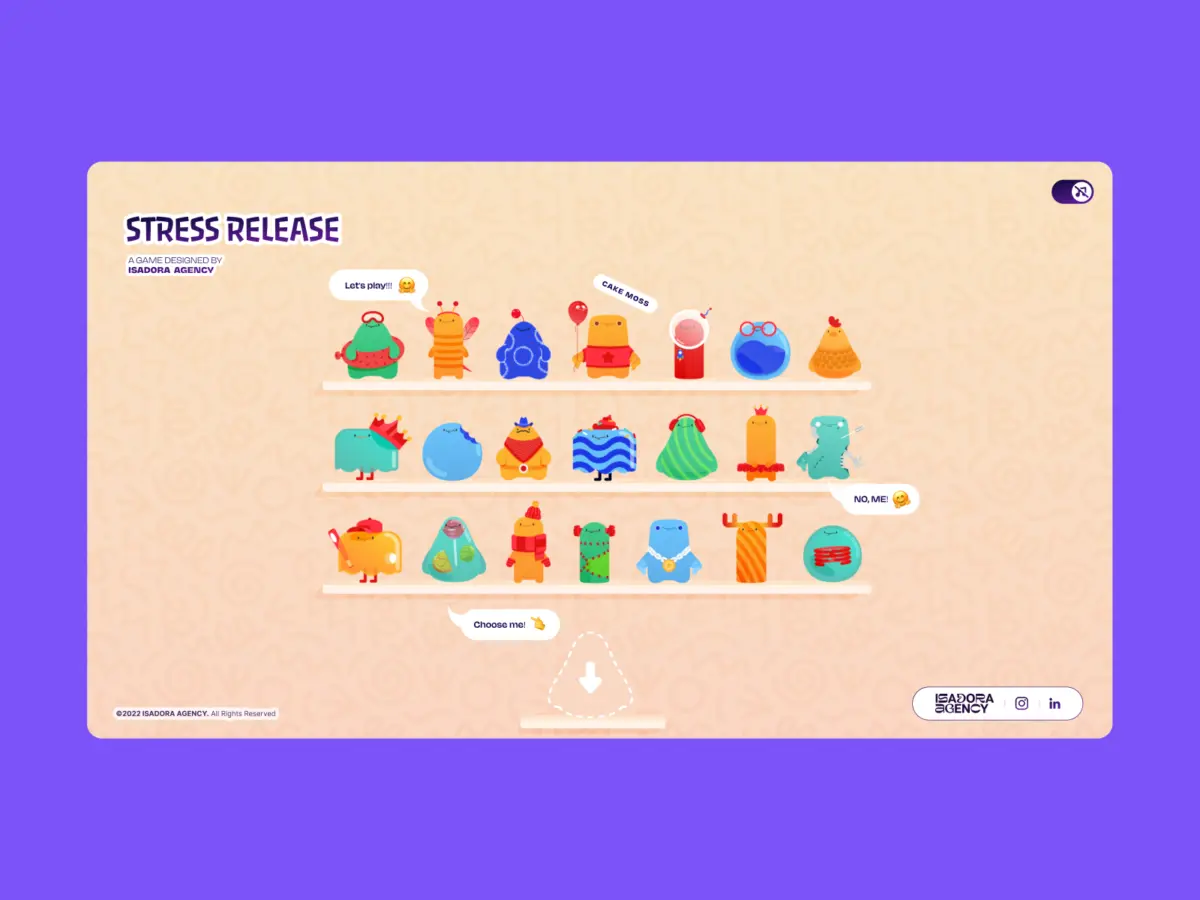
However, when the multidisciplinary team at Isadora Agency set out to build Stress Release—a digital, stress-relief squeeze toy application designed to let burnt-out creatives smash, stretch, and distort animated UI characters—they quickly realized that simulated physics were the wrong tool for the job.
The core goal was to build a deeply satisfying, hyper-tactile experience where every click yielded an immediate, squishy reaction. But as prototyping commenced, a fundamental philosophical friction emerged between computational physics and creative art direction: Physics engines produce plausible motion, whereas animators produce intentional motion.
Rather than allowing characters to act like randomized rubber balls bouncing unpredictably across a canvas, the team needed characters to react in hyper-specific, meticulously designed ways. To maintain absolute, deterministic control over their designers’ frames, Alexey Kopytin and the Isadora team scrapped physics frameworks entirely.
This article explores their architectural rationale: a production-proven roadmap for building a real-time, interactive web toy without a single line of WebGL, Matter.js, or Cannon.js, relying exclusively on programmatic Lottie state controls, native DOM manipulation, and fundamental distance-based mathematics.
Detailed Chronology: From Physics Frameworks to DOM-Driven Architecture
Phase 1: Prototyping and the Collision with Reality
In the early conceptual stages of Stress Release, the development team pursued traditional web physics paths. They spun up instances of rigid-body physics engines to calculate the exact deformation coordinates of characters when a user clicked or dragged across them.
The initial tests technically worked, but they failed the qualitative "feel" test. Animators had spent weeks hand-crafting bespoke JSON Lottie files containing precise, multi-stage squash-and-stretch reactions. For instance, the signature "mega squeeze" reaction required a tightly timed 181-frame build-up followed by an explosive release sequence.
When forced through an algorithmic physics approximation, those hand-tuned keyframes were distorted, flattened, or overridden. The organic timing—the distinct acceleration and deceleration curves crafted by animators—lost its personality. The team faced a critical crossroad: compromise the art direction for the sake of programmatic physics, or discard the physics engine to honor the design. They chose the latter, pivoting entirely to Lottie’s native runtime API married with vanilla DOM elements.

Phase 2: Mathematical Mapping of Tactile Feedback
By routing rendering through the standard DOM and Lottie’s SVG runtime, the team bypassed complex raycasting layers. Instead, they leveraged standard click and touch events, mapping them directly to radial input spaces.
To create the illusion of physically striking a character, every interaction had to be translated from raw browser coordinates into the character’s local coordinate system. The team established a precise mathematical pipeline using the Pythagorean theorem to calculate the straight-line distance from the center of the asset to the user’s cursor or fingertip:
// Character's center point in its own coordinate space
var x_center = parseFloat($("#playChar").width() / 2);
var y_center = parseFloat($("#playChar").height() / 2);

// Click position relative to the character's top-left corner
var offset = $("#playChar").offset();
var X = parseFloat(e.pageX - offset.left);
var Y = parseFloat(e.pageY - offset.top);

// Vector from center to click point
var a = parseFloat(X - x_center);
var b = parseFloat(Y - y_center);

// Straight-line distance calculation
var distance = Math.hypot(a, b);
This single calculated integer (distance) became the nervous system of the interaction loop. It simultaneously drove three critical outputs:
- The Score: Mapped to concentric scoring zones, acting precisely like a virtual dartboard.
- The Feedback Intensity: Determining whether the character suffered a minor flinch or a heavy distortion.
- The Explosion Placement: Dynamically repositioning an overlay Lottie explosion asset directly to the $(a, b)$ vector coordinates where the user’s click landed.
// Distance zones map to point rewards
if      (distance < 10)  givePts = 100; // Bullseye
else if (distance < 40)  givePts = getRndInteger(70, 90);
else if (distance < 70)  givePts = getRndInteger(40, 70);
else if (distance < 100) givePts = getRndInteger(20, 40);
else if (distance < 120) givePts = getRndInteger(10, 20);
else if (distance < 145) givePts = getRndInteger(1,  10);
else givePts = 0; // Miss

// Reposition explosion Lottie to exact click coordinates
var shiftPosition = window.innerWidth < 1023 ? -20 : 200;
$("#explosionChar").css(
  "margin-left": a + shiftPosition + "px",
  "margin-top":  b + shiftPosition + "px",
);

// Trigger squish animation instantly
explosion.goToAndPlay(0);
This spatial accuracy completely eliminated the need for complex polygon collision meshes. The hitbox remained a clean, predictable circle, while the visual feedback matched the user’s physical input point down to the pixel.

Phase 3: Programmatic Narrative and State Management
With hit detection secured, the next challenge was orchestrating the narrative flow of the character animations. Because Lottie renders vector animations internally as SVGs via its runtime, developers can programmatically target specific frame ranges rather than playing monolithic files blindly.
The team structured character animation states into declarative frame segments:
const play_segments = [
  charId: 0,
  sections:
    idle:     [0,  40],   // Looping idle state
    squeeze1: [41, 80],   // Light reaction
    squeeze2: [81, 120],  // Medium reaction
    squeeze3: [121, 160], // Heavy reaction
  ,
  playOrder: ["squeeze1", "squeeze2", "squeeze3"],
  endAnimation: [161, 200]
];
When a click event registered, the application advanced sequentially through the predefined play order, locking out subsequent inputs until the active segment resolved:
function stepAnim()
  let p         = play_segments[0];
  let i         = p["playOrder"][curr_order_play];
  let playNow   = p["sections"][i];

  playChar.stop();                      // Halt current segment immediately
  playChar.loop = false;                // Play once and stop
  playChar.playSegments(playNow, true); // Jump to exact frames, force immediately

  curr_order_play++;
  canPlayAnim = 0;                      // Lock out clicks mid-animation

  if (curr_order_play > p["playOrder"].length - 1)
    curr_order_play = 0;                // Cycle back to start of sequence
Upon completion of the animation segment, native event handlers gracefully returned the character to its baseline idle loop:

playChar.onComplete = function()
  canPlayAnim = 1;          // Unlock user input
  if (!playEnd) playIdleState();
;

function playIdleState()
  playChar.playSegments([0, 40], true); // Return to idle loop
  playChar.loop = true;
Supporting Context & Metrics: Overcoming the Lottie Performance Tax
While programmatic DOM manipulation and Lottie timelines granted Isadora Agency absolute aesthetic authority, they introduced a well-documented technical hurdle: file weight and parsing overhead.
Lottie JSON files, particularly those containing complex vector paths, nested pre-comps, and high keyframe densities, can quickly bloat a web application’s bundle and memory footprint. In the case of Stress Release, the platform featured 21 distinct characters alongside multiple explosion variants. Loading all assets simultaneously without optimization would have crippled mobile performance.
To guarantee a buttery-smooth 60 frames-per-second experience across diverse viewport hardware, the engineering team introduced an aggressive, tiered optimization matrix:
- Dual-Tiered Quality Scaling: On the character selection shelf—where 21 heavy animations played simultaneously in a grid—the engineering team throttled quality settings to reduce CPU interpolation overhead. Conversely, on the active gameplay screen where only a single character was rendered, full fidelity was restored.
- Speed and Interpolation Tweaks: By globally adjusting Lottie’s internal rendering quality (
lottie.setQuality(0.5)) on heavy views and dropping playback speeds marginally (shelf.setSpeed(0.6)), mathematical calculations per frame were halved without degrading the visual illusion.
// Shelf screen - 21 simultaneous background animations
shelf = lottie.loadAnimation(
  container: document.getElementById("charShelf" + i),
  renderer: "svg",
  loop: true,
  autoplay: true,
  path: "assets/shelf/" + shelfFolders[i] + "/" + shelfFolders[i] + ".json",
);
lottie.setQuality(0.5); // 50% quality reduces interpolation overhead
shelf.setSpeed(0.6);    // Reduced speed lowers frame calculations per second

// Play screen - single focused character instance
playChar = lottie.loadAnimation(
  container: document.getElementById("playChar"),
  renderer: "svg",
  loop: true,
  autoplay: true,
  path: chosenChar.url,
);
lottie.setQuality(1);   // Full uncompromised fidelity for the active user view
Furthermore, by anchoring responsiveness entirely within CSS custom properties (--doc-height and --doc-width), layout adjustments happened instantly on window resize events without triggering expensive JavaScript canvas re-calculations or bounding-box recalculations.

Official Statements & Industry Perspective
Reflecting on the architecture of Stress Release, the engineering philosophy champions a return to disciplined craftsmanship over blind framework adoption.
"When building a highly interactive, tactile web experience, the architecture must serve the art direction. By mapping Lottie’s native timeline capabilities to the DOM, you can deliver incredibly rich, tactile user experiences while maintaining absolute control over the art direction."
— Alexey Kopytin, Isadora Agency
In an era where web development is frequently dominated by heavy game engines (like Three.js or Pixi.js) ported hastily to marketing and promotional microsites, Isadora’s case study serves as a timely reminder. When user interactions are bounded, predictable, and heavily reliant on bespoke artistic direction, lightweight DOM structures paired with programmatic vector runtimes often outperform heavy physics simulations in both development velocity and user satisfaction.
Future Outlook: The Evolution of Tactile Web UX
As web browsers continue to optimize vector graphics rendering pipelines and vector animation runtimes become more deeply integrated with native browser compositing layers, the boundary between static UI and immersive tactile feedback will continue to blur.

Projects like Stress Release point toward an exciting future for creative agencies and product designers alike. They prove that crafting emotional resonance—such as the stress-relieving satisfaction of squeezing a digital character—does not require massive 3D graphics pipelines or complex WebGL boilerplate.
Instead, by respecting the synergy between designer intent and developer execution, engineering teams can leverage lightweight, accessible web primitives to build experiences that feel remarkably alive. For front-end developers looking to elevate their next gamified interface, the lesson is clear: before importing a heavy physics engine, check whether your animators’ vision can be unlocked simply by mastering the timeline, the DOM, and the Pythagorean theorem.
