

Executive Overview
For decades, the standard operating procedure for frontend web development was simple: if a feature did not exist natively out of the box, you reached for a library. Need to format a relative timestamp? Install timeago.js. Need to deep clone a nested object? Pull in lodash.clonedeep. Require an accessible modal dialog or a quick HTTP request wrapper? Load focus-trap, body-scroll-lock, and axios.
Most developers install a dependency once and never look at it again. It does its job, the automated test suites pass, and the team moves on. However, this "set-and-forget" mentality has left countless codebases bloated with redundant code. While development teams religiously run npm audit to check for security vulnerabilities, they rarely ask a more fundamental question: Is this library still doing something the browser cannot?
The web platform has evolved at a breathtaking pace. Thanks to coordinated efforts across the industry, capabilities that once required heavy JavaScript workarounds are now natively baked into modern browsers. In a typical mid-sized web application, developers can often shed between 60KB and 90KB of minified and gzipped dependencies—and upwards of 200KB to 300KB uncompressed—simply by offloading tasks back to the browser.
This article explores a comprehensive, systematic approach to auditing dependencies using the concept of Baseline, evaluating real-world optimization clusters, and adopting a practical framework to safely ship less JavaScript without compromising user experience.
Detailed Chronology: The Closing Gap Between Libraries and the Browser
The friction between native web capabilities and third-party ecosystems has historically defined eras of web development.
- The Polyfill Era (Early 2010s): Developers relied heavily on jQuery, Underscore, and massive polyfill scripts to bridge the vast chasms between Internet Explorer, early Firefox, and WebKit. The browser was viewed primarily as a raw rendering engine rather than a feature-rich application runtime.
- The Modular Explosion (Late 2010s – Early 2020s): As ES6 and module bundlers like Webpack gained dominance, the ecosystem fragmented into thousands of micro-packages. Packages solving single, hyper-specific problems—such as left-padding a string or checking if an array includes a value—became standard practice, exponentially increasing
node_modulesweight. - The Platform Convergence (2024–Present): Driven by the WebDX Community Group and the standardization of the Baseline initiative, major browser vendors (Google, Apple, Microsoft, and Mozilla) have synchronized their feature release pipelines. Essential utility features, internationalization primitives, layout APIs, and state containers are now landing simultaneously across all modern engines, fundamentally shifting the cost-benefit analysis of third-party libraries.
Supporting Context & Metrics: Understanding "Baseline"
Before ripping packages out of a package.json file, developers must understand how browser compatibility is tracked today. Baseline is an industry initiative from the WebDX Community Group that provides clear, unambiguous data on whether a web platform feature is safe to use in production across major engines (Chrome, Edge, Firefox, and Safari).

Baseline categorizes features into two primary states:
- Newly Available: A feature has recently landed in all major browser engines, but has not yet been universally supported for 30 months. These features are generally safe for modern audiences, but require traffic analysis or graceful degradation for legacy environments.
- Widely Available: A feature has been supported across all major browsers for at least 30 months. These features can be adopted universally without fear of regression.
By leveraging tools like webstatus.dev, MDN documentation badges, or programmatic checks via the web-features npm package, engineering teams can align their dependency pruning strategies with empirical data rather than guesswork.
The Three-Question Decision Framework
Before executing a single npm uninstall, teams should apply a rigorous three-step evaluation framework:
- Is the native replacement Baseline-safe for my audience?
Evaluate your actual analytics andbrowserslistconfiguration. A B2B enterprise dashboard utilized exclusively on modern corporate workstations has a vastly different risk profile than a public-facing e-commerce site catering to older mobile devices in emerging markets. - What does the swap actually cost?
Verify whether replacing a native feature requires a heavy polyfill. If the required polyfill outweighs the library you are removing, your bundle size will actually increase unless loaded conditionally. - Does the platform feature cover my specific use case?
Libraries often perform heavy lifting behind the scenes. For instance,axiosprovides interceptors, automatic retries, and request cancellations thatfetchdoes not handle out of the box. Ensure you aren’t forced to write hundreds of lines of boilerplate code to replicate advanced library behaviors.
Cluster Analysis: Where to Find Immediate Wins
Optimization yields the highest returns when approached in clusters. Let us examine four primary domains where native browser capabilities render external packages obsolete.
Cluster 1: Internationalization (The Biggest Immediate Win)
The internationalization (Intl) namespace built into modern browsers represents the single largest volume of detachable JavaScript weight in most applications.
- Relative Time: Instead of relying on packages like
timeago.js, developers can utilizeIntl.RelativeTimeFormat, which is Baseline Widely available.const rtf = new Intl.RelativeTimeFormat("en", numeric: "auto" ); rtf.format(-1, "day"); // "yesterday" rtf.format(3, "hour"); // "in 3 hours" - Numbers, Currency, and Lists: Formatter libraries can be entirely replaced by
Intl.NumberFormatandIntl.ListFormat, providing native support for currency symbols, compact notation (e.g., "1.2M"), and Oxford-comma list joining. - The Duration Caveat: While
Intl.DurationFormathandles humanized time intervals effortlessly, it is currently Baseline Newly available. B2B applications can adopt it immediately, while consumer-facing apps should guard it with feature checks.
Cluster 2: HTTP Clients
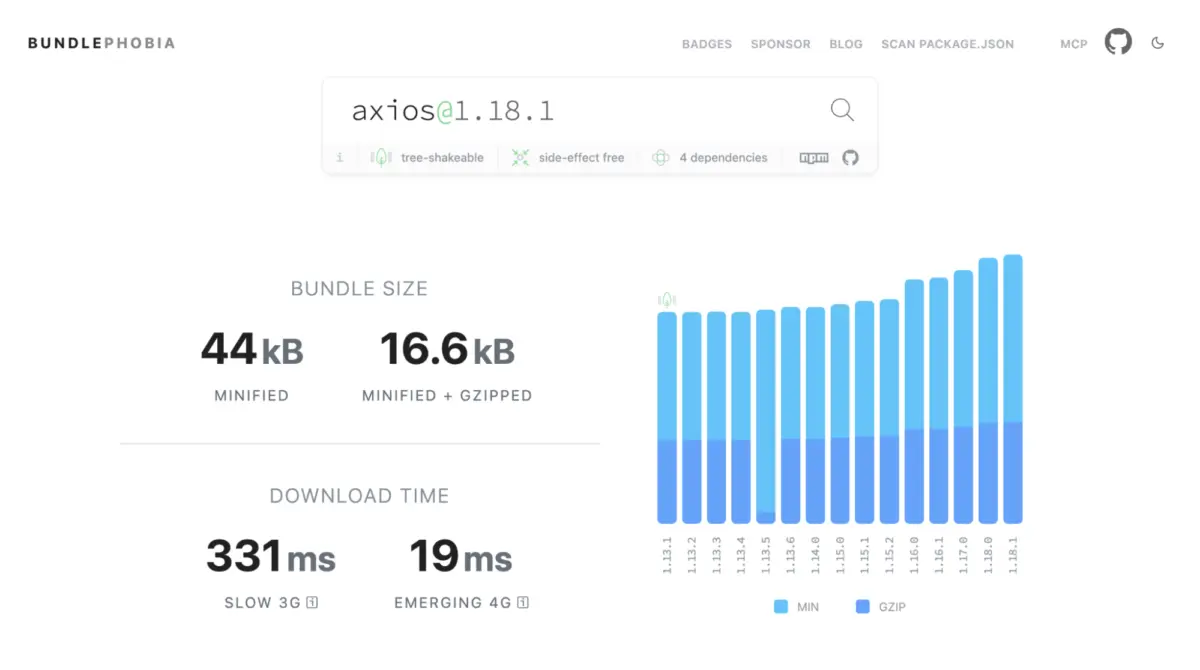
Heavy network abstraction libraries like axios (approx. 17 KB gzipped) and superagent are frequently deployed for basic REST interactions. For standard applications performing CRUD operations, native fetch combined with AbortController handles timeouts and requests natively.

const res = await fetch("/api/users",
  signal: AbortSignal.timeout(5000), // Native timeout after 5 seconds
);
const data = await res.json();
Note: If your application relies extensively on global request interceptors, automatic token refresh loops, or upload progress events, retaining a lightweight HTTP client or a custom wrapper class may still be warranted.
Cluster 3: UI Primitives and Layout
Historically, implementing accessible modals, tooltips, popovers, and focus traps required stitching together disparate packages like a11y-dialog, tippy.js, focus-trap, and body-scroll-lock. Today, three platform primitives solve these challenges natively:
- The
<dialog>Element: Provides native top-layer rendering, automaticEscape-key handling, focus management, and background inertness without manual scripting. - The Popover API: Enables light-dismiss dropdowns and tooltips with zero JavaScript overhead.
- CSS Anchor Positioning: Eliminates the need for JavaScript positioning libraries (like Popper) by letting developers tether elements directly to anchor names in stylesheets.
Adopting these platform primitives can easily eliminate 24 KB or more of gzipped layout code while significantly improving accessibility compliance.
Cluster 4: Lodash and Core Utilities
While few developers import the monolithic lodash package in modern tree-shaking environments, individual utility sub-packages frequently accumulate in codebases.
- Grouping Arrays:
lodash.groupbycan be fully replaced by nativeObject.groupByorMap.groupBy. - Deep Cloning:
lodash.clonedeepis rendered redundant by the universally supportedstructuredClone()API, which correctly preserves dates, maps, sets, and circular references for plain data objects. - Set Operations: Native
Setobjects now support built-in mathematical methods including.intersection(),.union(), and.difference().
Future Outlook: Features on the Horizon
While the web platform continues to swallow common utility libraries, development teams must remain vigilant and forward-looking.
One prominent example is Temporal, the long-awaited successor to JavaScript’s legacy Date object. Bringing immutable objects, robust time zone handling, and zero-indexed month sanity to the language, Temporal reached TC39 Stage 4 and is part of the ES2026 specification. However, because Safari has yet to ship stable native support, depending on Temporal today requires a heavy polyfill (ranging from 19KB to 44KB gzipped), making it counterproductive to replace lightweight date libraries like dayjs just yet.

As Safari finalizes its implementation and Temporal reaches full Baseline status, date formatting libraries will become prime candidates for deprecation.
Conclusion: Executing Your Quarterly Dependency Audit
Pruning your package.json should not be a one-time cleaning event; it should be integrated into your engineering organization’s quarterly review cycle.
To execute your own audit:
- List production dependencies using
npm ls --omit=dev --depth=0. - Measure actual bundle impact via tools like Bundlephobia,
source-map-explorer, or Vite bundle visualizers. - Cross-reference against Baseline statuses using
webstatus.devor MDN documentation. - Apply the Three-Question Framework to evaluate audience safety, replacement costs, and functional parity.
- Progressively enhance your codebase by guarding newly available platform features with simple feature detection.
By systematically returning responsibilities back to the modern web browser, engineering teams can dramatically reduce payload sizes, accelerate time-to-interactive metrics, and deliver cleaner, more maintainable codebases for the future.
