

For years, the WordPress ecosystem has operated under a familiar set of technical constraints. Millions of site owners, designers, and developers have built websites using conventional page builders constrained by rigid grid systems, heavily nested wrapper elements, and a persistent reliance on sprawling arrays of third-party plugins. While these legacy tools successfully democratized web publishing by eliminating the immediate need for hard-coded HTML and CSS, they introduced a silent tax: bloated codebases, compromised Core Web Vitals, fragmented user experiences, and frustrating performance trade-offs.
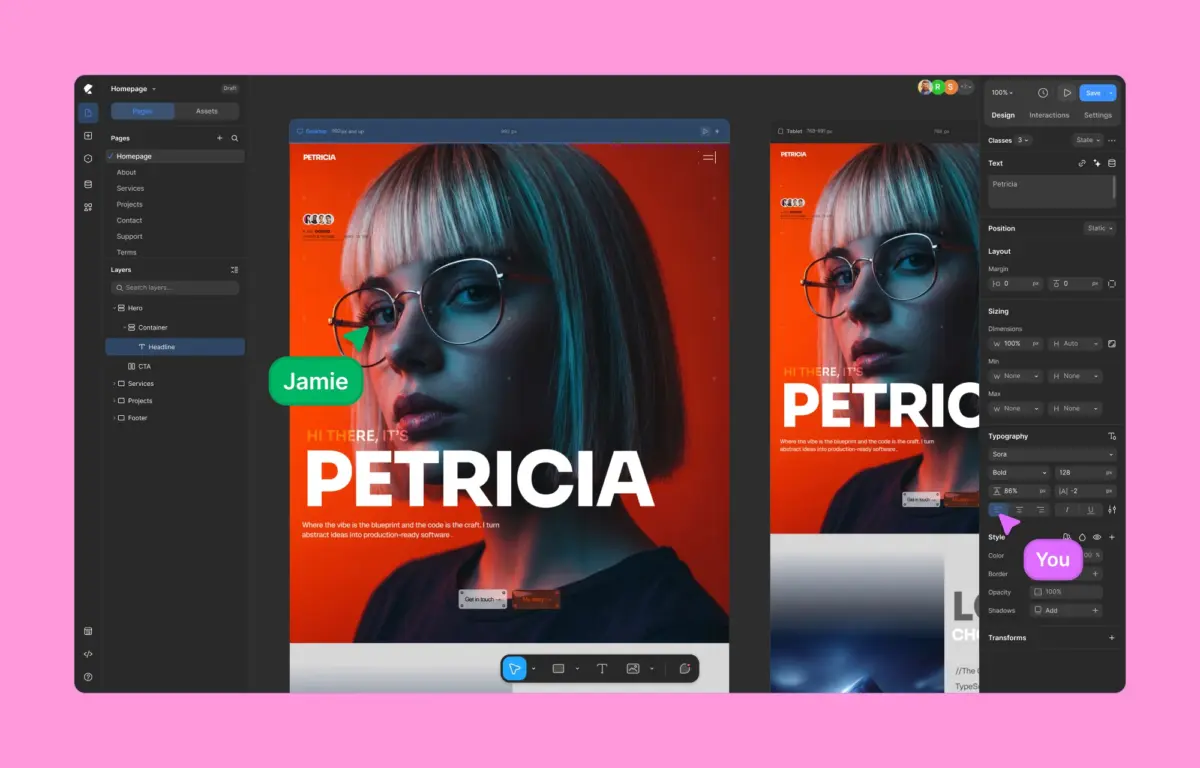
Enter Kirki, a paradigm-shifting visual website builder for WordPress that challenges the foundational assumptions of legacy layout tools. Designed to bridge the historical divide between high-end vector design tools (like Figma and Webflow) and the world’s most popular Content Management System, Kirki introduces the ecosystem’s first freeform visual builder featuring an infinite canvas. By offering deep native functionality—including a built-in Dynamic Content Manager, a timeline-based animation engine, real-time multi-user co-editing, and a class-based CSS architecture—Kirki operates with zero third-party plugin dependency.
This comprehensive review explores how Kirki redefines the WordPress site-building experience. By analyzing empirical performance benchmarks, structural code outputs, pricing transparency, and advanced developer capabilities, we examine whether Kirki represents the long-awaited evolution of WordPress development or a disruptive force reshaping the industry standard.
Detailed Chronology: The Evolution of WordPress Page Building
To understand the disruptive nature of Kirki, it is vital to trace the historical progression of WordPress design tools and the compounding issues that necessitated a ground-up reinvention.

Phase 1: The Era of Strict Themes and Shortcodes
In the early days of professional WordPress adoption, site creation was strictly divided between theme development and content writing. Custom designs required custom PHP templates, raw CSS modifications, and child themes. As demand for non-coder accessibility grew, shortcode-based layout plugins emerged. While these allowed users to insert columns, sliders, and buttons, they frequently suffered from "shortcode lock-in," where disabling a plugin would instantly break a site’s layout and leave raw, unrendered code tags strewn across pages.
Phase 2: The Proliferation of DOM-Heavy Visual Builders
By the mid-2010s, first-generation visual builders transformed the landscape. By introducing frontend drag-and-drop interfaces, they enabled rapid prototyping and visual site construction. However, these tools were structurally built upon legacy web layout paradigms—specifically rigid rows, columns, and absolute container constraints.

To achieve complex visual positioning within these rigid bounds, builders often generated heavily nested Document Object Models (DOMs). A simple button or text block could easily be wrapped in three to five redundant <div> elements. Combined with the necessity of installing external plugins for forms, pop-ups, dynamic fields, and animations, websites quickly bloated, hurting server response times and tanking Google Lighthouse scores.
Phase 3: The Block Editor and the Rise of Modern Design Tools
While the introduction of the native WordPress Block Editor (Gutenberg) aimed to streamline code output, its initial iterations lacked the fine-grained design controls required by professional agencies and visual designers. Meanwhile, standalone design platforms like Figma and Webflow demonstrated the immense power of infinite canvases, fluid layout management, CSS variables, and true design freedom.

Kirki emerges directly from this technological convergence. Recognizing that WordPress users should not have to choose between the powerful extensibility of an open-source CMS and the cutting-edge UX of a modern design tool, Kirki’s architects engineered a native WordPress solution built around an infinite canvas, modern CSS frameworks, and an all-in-one ecosystem approach.
Supporting Context & Metrics: Performance and Code Output Benchmarking
Performance directly impacts search engine optimization (SEO), user retention, bounce rates, and conversion metrics. To evaluate how Kirki’s architectural approach translates into real-world efficiency, independent benchmarking tests were conducted comparing Kirki directly against legacy heavyweight builders like Elementor under strictly controlled conditions.

Benchmark Methodology and Test Environment
- Core Setup: Clean WordPress installation utilizing the default Twenty Twenty-Five theme.
- Layout Structure: Identical multi-section landing page layouts featuring hero banners, feature grids, testimonial sliders, and call-to-action buttons built using comparable design elements.
- Auditing Tool: Google Lighthouse performance audits measuring First Contentful Paint (FCP), Largest Contentful Paint (LCP), Total Blocking Time (TBT), and Cumulative Layout Shift (CLS).
Empirical Performance Findings
- Kirki’s Performance Profile: Generating a streamlined DOM with minimal structural wrapper elements, Kirki consistently achieved near-perfect Lighthouse performance scores. Its lightweight script loading and efficient asset management resulted in instantaneous page responsiveness and top-tier Core Web Vitals ratings.
- Legacy Builder Performance Profile: The comparative builder, when rendering the identical visual layout, introduced significant script overhead and deeply nested HTML structures. This additional weight depressed performance metrics, highlighting the performance cost of rigid container architectures.
Code Output Analysis
The divergence in performance stems directly from how each platform writes code to the browser:
- Kirki Code Output: Delivers clean, semantic HTML and efficient CSS. By utilizing modern layout mechanics and class-based styling without unnecessary wrapper divs, the browser parses the DOM significantly faster.
- Legacy Code Output: Frequently produces heavily nested markup, injecting numerous redundant
<div>tags and auxiliary JavaScript libraries even for basic aesthetic treatments.
For developers and enterprise businesses where technical efficiency and speed are paramount, Kirki’s optimized code output establishes a decisive advantage.

Feature Deep Dive: What Sets Kirki Apart?
Kirki’s feature set is distinguished not merely by the variety of tools it offers, but by its refusal to lock essential features behind paywalls or rely on third-party integrations.
1. Freeform Infinite Canvas & Responsive Workflows
Moving away from rigid rows and columns, Kirki introduces an infinite canvas where creators can pan, zoom, layer backgrounds, overlap sections, and position elements with pixel-level precision. Furthermore, Kirki solves one of responsive design’s most persistent bottlenecks: concurrent multi-view editing.

Instead of toggling back and forth between isolated desktop, tablet, and mobile preview windows, Kirki displays all responsive viewports side by side simultaneously. Changes made at broader breakpoints cascade downward through an intelligent inheritance system, while mobile- or tablet-specific tweaks can be applied instantly without disrupting the global design flow.
2. Instant Figma-to-Kirki Handoff
For design agencies and professional UX/UI teams, Kirki bridges the gap between wireframing and deployment. Designers can take a fully realized layout from Figma and import it directly into Kirki. The system automatically maps design tokens, assets, and structures into a responsive WordPress environment, drastically cutting development time.

3. Native Dynamic Content and Form Management
Historically, building a dynamic WordPress site meant juggling Advanced Custom Fields (ACF), a separate form plugin, a popup builder, and a submission manager. Kirki internalizes this entire stack. Its native Dynamic Content Manager allows users to hook custom post types, user meta, and database fields directly into visual elements without writing a line of code or installing third-party extensions.
4. Advanced CSS Architecture and Global Variables
Kirki uses a class-based styling system. When an element is styled, those attributes are saved as reusable CSS classes, bringing true modular scalability to WordPress. This is paired with Global Variables, allowing developers and designers to define centralized design tokens (colors, typography scales, spacing units) that update dynamically across the entire web property. Advanced users retain full flexibility via custom CSS injection and granular JavaScript hooks.

5. Visual Timeline-Based Animations
Rejecting simple pre-canned entrance effects, Kirki features a timeline-based visual animation editor. Creators can build complex, scroll-linked interactions, hover micro-animations, and precise typographic transformations (animating text by character, word, or block) entirely within a visual timeline interface.
6. Kirki Apps and Real-Time Co-Editing
Addressing the needs of modern remote teams, Kirki introduces the industry’s first true multi-user co-editing experience in a WordPress builder. Team members can work on the same page simultaneously, viewing color-coded live cursors and pinning contextual comments directly onto canvas elements. Additionally, the centralized Kirki Apps dashboard manages external integrations (analytics, CRMs, email marketing platforms) directly within the editor interface.

7. Built-In Quality Control Audit
Before publishing, Kirki’s automated Page Audit tool scans the layout for missing image alt text, broken links, accessibility flags, and SEO vulnerabilities, ensuring that published pages meet rigorous digital standards.
Official Statements & Pricing Transparency
A recurring pain point in the WordPress plugin ecosystem is aggressive upselling and fragmented tier structures. Kirki addresses this with a transparent, highly competitive pricing model:

- The Free Version: Unlike restricted "freemium" teasers designed merely as upgrade prompts, Kirki’s free tier—available directly on WordPress.org—is fully functional, allowing users to build modern websites on an infinite canvas at zero cost.
- The Starter Plan: Priced at $59 per year for a single site, this tier unlocks all premium features, dynamic tools, and template libraries. Compared to competitors like Elementor Pro (where essential features are frequently tiered across higher subscription levels), Kirki delivers its complete feature set from day one.
- The Lifetime Plan: Available for a one-time investment of $499, this option provides unlimited lifetime usage with zero recurring renewal fees or surprise upcharges.
"We built Kirki to solve the structural fatigue felt by modern web creators," notes the core development team. "WordPress users deserved a tool that respects their technical standards, supercharges their page speed, and removes the artificial boundaries of legacy box-building."
Future Outlook
As the web design industry increasingly shifts toward high-performance, design-system-driven workflows exemplified by modern web applications, legacy WordPress builders face an existential reckoning. The market demand is clear: users want the robust, open-source content management power of WordPress combined with the speed, agility, and aesthetic freedom of tools like Figma and Webflow.

Kirki occupies a unique vanguard position in this transition. By successfully decoupling WordPress layout design from bloated DOM structures, eliminating third-party plugin bloat, and introducing cutting-edge capabilities like real-time co-editing and infinite canvas architecture, Kirki has set a new benchmark for what is possible within the CMS.
For freelancers, design agencies, and enterprise businesses evaluating their technical stack for upcoming digital projects, Kirki is no longer just an alternative choice—it represents the future of professional WordPress development.
