

Executive Overview
For over two decades, the WordPress ecosystem has operated under a familiar architectural paradigm: building websites inside boxes. Traditional page builders have long democratized web design, allowing millions of users to bypass raw code and construct functional digital experiences. Yet, this accessibility has historically come with a steep technical tax—rigid grid constraints, heavy reliance on third-party plugins, bloated Document Object Models (DOMs), and sluggish performance metrics that frustrate developers and compromise SEO.
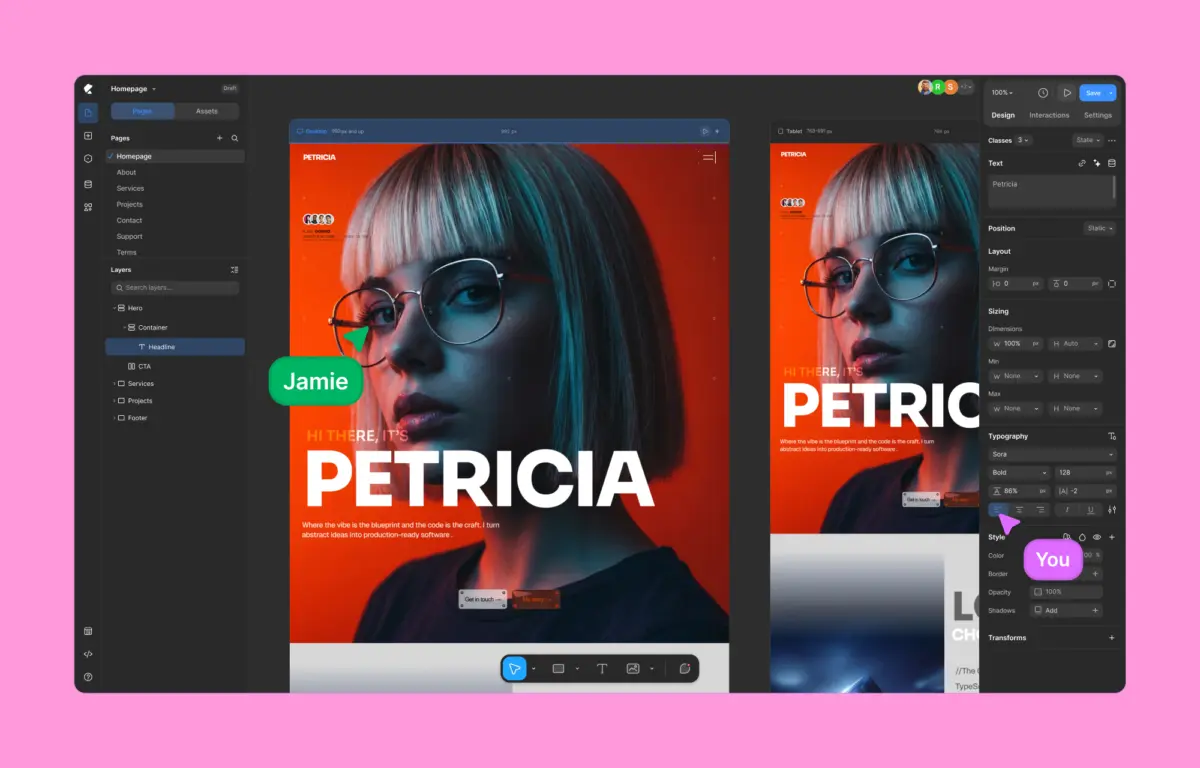
Enter Kirki, a groundbreaking no-code visual website builder that fundamentally challenges the status quo. Positioned as the first freeform visual builder on WordPress featuring an infinite canvas, Kirki merges the creative fluidity of modern design tools like Figma and Webflow with the robust content management backbone of WordPress.
This comprehensive review explores Kirki’s architectural innovations, performance benchmarks against legacy titans like Elementor, its robust feature set—ranging from native dynamic content to timeline-based visual animations—and its potential to reshape the future of WordPress development.
Detailed Chronology: The Evolution of WordPress Page Building
To understand the significance of Kirki’s market arrival, one must trace the evolutionary arc of WordPress page construction.

Phase 1: The Shortcode and Meta-Box Era
In the early days of advanced WordPress development, customization required deep PHP knowledge, custom post types, and inflexible meta-boxes. The introduction of shortcode-based page builders attempted to bridge the gap, but editing remained a disjointed experience of guessing how a backend code snippet would render on the frontend.
Phase 2: The Grid-Locked Visual Builders
The mid-2010s brought about the golden age of drag-and-drop visual builders. Platforms like Elementor and Divi revolutionized the industry by introducing WYSIWYG (What You See Is What You Get) editing. However, these tools were fundamentally tethered to strict container models—rows, columns, and sections. While effective for standard corporate websites, they struggled to support the overlapping, asymmetrical layouts demanded by modern digital design trends. Furthermore, their reliance on deeply nested <div> wrappers began to extract a heavy toll on site performance.

Phase 3: The Block Editor and the Rise of Modern Frameworks
As Gutenberg (the WordPress Block Editor) matured, developers increasingly sought solutions that balanced native core architecture with advanced design control. Concurrently, standalone design tools like Webflow proved that creators preferred spatial, freeform freedom over rigid grid boxes. Kirki emerges from this exact lineage—acting as the bridge that brings spatial design paradigms directly into the WordPress ecosystem without sacrificing the CMS’s inherent extensibility.
Supporting Context & Performance Benchmarks
Performance is no longer just a technical metric; it is a primary driver of user engagement, conversion rates, and search engine visibility. To evaluate whether Kirki’s architectural promises translate into real-world efficiency, independent performance audits were conducted comparing Kirki against traditional market alternatives.

The Testing Methodology
Both Kirki and Elementor were installed on identical, clean WordPress environments utilizing the default Twenty Twenty-Five theme. To ensure parity, identical layouts comprising comparable design elements—hero sections, feature grids, testimonial blocks, and calls to action—were constructed. Lighthouse performance audits were then executed to measure load times, script execution weights, and Core Web Vitals.
Empirical Findings: DOM Weight and Code Output
The performance divergence between the two builders was stark:

- Kirki’s Code Output: Kirki generated a streamlined, semantic HTML structure. The resulting DOM was remarkably lean, featuring minimal wrapper elements and zero unnecessary script bloat.
- Elementor’s Code Output: Even on a basic layout, Elementor introduced heavily nested markup structures and auxiliary JavaScript libraries, resulting in increased DOM depth and slower First Contentful Paint (FCP) metrics.
| Performance Metric | Kirki Builder | Traditional Builder (Elementor) |
|---|---|---|
| DOM Tree Depth | Shallow & Optimized | Deeply Nested |
| Superfluous Wrappers | Minimal / None | High (<div> heavy) |
| Lighthouse Score (Performance) | Superior | Moderate |
| Third-Party Dependency | Zero (All-in-One) | High (Requires Add-ons) |
For developers prioritizing technical efficiency, pristine code semantics, and optimal Core Web Vitals scores, Kirki decisively outperforms legacy alternatives.
Feature Deep-Dive: What Sets Kirki Apart?
Kirki’s value proposition extends far beyond performance metrics. It offers a comprehensive suite of native tools designed to eliminate the friction points typically associated with WordPress site building.

1. The Freeform Infinite Canvas
Breaking free from the traditional "box" model, Kirki’s infinite canvas allows creators to pan freely, zoom in and out, layer backgrounds, and overlap elements with pixel-level precision. Modeled after professional design applications like Figma, the workspace supports both light and dark modes, creating a frictionless environment for visual thinkers.
2. Simultaneous Multi-Breakpoint Editing
Traditional builders require users to manually toggle between desktop, tablet, and mobile views to adjust layouts. Kirki introduces concurrent editing across all responsive views. Desktop, tablet, landscape, and mobile canvases are visible simultaneously. Adjusting a layout parameter automatically cascades down through responsive breakpoints via an intelligent inheritance system, drastically reducing development time.

3. Instant Figma-to-Kirki Workflow
For agencies and UI/UX designers who conceptualize in Figma, Kirki offers a seamless design handoff. Figma designs can be imported directly into the builder, converting static design files into fully responsive, functional WordPress pages instantly without manual rebuilding.
4. Native Dynamic Content Management
Historically, building advanced custom post-type archives or dynamic fields in WordPress required integrating third-party plugins like Advanced Custom Fields (ACF) or Toolset. Kirki integrates a robust, native Dynamic Content Manager. Users can pull custom fields, dynamic post meta, and user data directly into their designs without writing custom PHP or adding external software dependencies.

5. Class-Based Styling and Global CSS Variables
To maintain scalability across enterprise-level builds, Kirki employs a class-based styling system. Styling an element automatically saves those parameters as reusable CSS classes. When paired with Global Variables (design tokens for colors, typography, and spacing), updates made at the global level propagate instantly across the entire site architecture. Advanced users retain the flexibility to inject custom CSS or page-level JavaScript when required.
6. Visual Interactions and Timeline Animations
Moving beyond standard CSS hover effects, Kirki features a timeline-based visual interaction builder. Creators can orchestrate complex, scroll-based animations, micro-interactions, and split-text animations (triggering by character, word, or block) directly on the canvas without touching JavaScript libraries like GSAP manually.

7. Real-Time Team Collaboration
In a milestone feature for WordPress site building, Kirki enables true multi-user co-editing. Multiple team members can work within the same page simultaneously. Cursors are color-coded and tracked in real-time, accompanied by a native pin-point commenting system that allows stakeholders to leave contextual feedback directly on specific canvas elements.
8. Built-In Quality Control (Page Audits)
Before deployment, Kirki’s built-in Page Audit tool scans the project layout for common oversights, including missing image alt text, broken links, accessibility flaws, and SEO vulnerabilities, ensuring that shipped pages meet rigorous digital standards.

Pricing Models: Transparent and Value-Driven
Kirki’s pricing strategy disrupts an industry known for aggressive tier gating and hidden add-on costs.
- The Free Version: Unlike restricted "lite" plugins, Kirki offers a remarkably powerful free version directly via WordPress.org, enabling users to leverage the infinite canvas and core design features at zero cost.
- Starter Plan ($59/year): Unlocks all premium features, dynamic content tools, templates, and priority support for a single site.
- Lifetime Plan ($499 one-time): A perpetual license offering unlimited site usage with zero future renewals or surprise upcharges.
Every feature—including pop-up builders, form management systems, and the growing template library—is bundled into every plan from day one.

Future Outlook: Is Kirki the Future of WordPress?
The release of Kirki marks a philosophical shift within the WordPress community. For years, the platform has battled perceptions of architectural bloat as competing CMS platforms and static site generators gained traction among designers accustomed to freeform spatial workflows.
By successfully merging the visual flexibility of modern design tools with the deep content ecosystem of WordPress, Kirki proves that the world’s most popular CMS can evolve to meet the demands of modern web design. While traditional builders will retain a market share for simple, rapid prototyping, Kirki establishes a new benchmark for performance-conscious developers, modern design agencies, and power users seeking uncompromising creative freedom.

As the ecosystem adapts to real-time co-editing, native dynamic management, and performance-first code generation, Kirki stands not merely as an alternative to legacy page builders, but as a compelling blueprint for the future of WordPress site architecture.
