

Executive Overview
For years, modern web development has operated under an implicit, often unquestioned assumption: if you need a feature, you install a package. Whether formatting a timestamp, opening a modal, making an HTTP request, or deep-cloning an array, the standard reflex has been to reach into the npm registry and pull down third-party code. Over time, these dependencies compound silently within package.json. They pass tests, they satisfy builds, and they become permanent architectural fixtures.
Yet, the web platform itself has not stood still. Driven by coordinated efforts across browser vendors and organizations like the WebDX Community Group, modern browsers are shipping native, highly optimized APIs at an unprecedented velocity. Features that once required heavy external libraries—such as internationalization, layout positioning, data structuring, and DOM accessibility traversal—are now built directly into the browser engine.
In a typical mid-sized JavaScript application, developers can routinely uncover between 60 KB and 90 KB of minified and gzipped dependencies (translating to hundreds of kilobytes uncompressed) that the modern web platform can now handle natively. This article provides a comprehensive, investigative audit of your dependencies, introducing a strategic decision-making framework to safely prune redundant code, capitalize on the concept of "Baseline" browser support, and systematically reclaim control over your application’s bundle size.
Detailed Chronology: The Evolution of "You Need a Library for This"
To understand why our codebases are bloated with redundant libraries, we must examine the historical gap between developer needs and platform capabilities.
The Era of Polyfills and Gaps (Early 2010s to Late 2010s)
A decade ago, browser fragmentation and lagging standards bodies forced developers to rely heavily on user-land code. JavaScript lacked native data structures for robust grouping, strings required complex regex manipulation for internationalization, and HTML elements like <dialog> were merely proposals or restricted to unstable flags.
During this era, libraries like moment.js, lodash, axios, and custom jQuery plugins were essential productivity multipliers. They shielded developers from cross-browser inconsistencies and granted missing abstractions. However, as standards stabilized, many developers maintained these architectural patterns out of habit rather than necessity.
The Rise of Web Baseline and Interoperability (2023–Present)
The turning point arrived with the formalization of Baseline—an initiative that categorizes web features into clear, predictable states based on their cross-browser availability. Spearheaded by the WebDX Community Group, Baseline evaluates features across the four core browser engines (Chrome, Edge, Firefox, and Safari) and places them into two primary operational statuses:
- Baseline Newly Available: The feature is supported across all major browser engines for less than 30 months. It is safe to use with minor audience caveats or progressive enhancement.
- Baseline Widely Available: The feature has been supported across all major engines for 30 months or more. It can be safely deployed universally without polyfills or defensive fallbacks.
This structural clarity has drastically shortened the lifecycle of utility packages. As features transition from "Newly Available" to "Widely Available," developers are granted a green light to systematically deprecate entire classes of external dependencies.
Supporting Context & Metrics: Auditing the Core Dependency Clusters
Rather than approaching a dependency audit as an isolated, package-by-package chore, engineering teams achieve the highest efficiency by evaluating dependencies in functional clusters.
Cluster 1: Internationalization (Intl Namespace)
One of the most immediate opportunities for bundle reduction lies in internationalization. Historically, formatting dates, relative times, currencies, and lists required bloated libraries like timeago.js, numeral, pluralize, and humanize-duration.
Today, the native Intl object offers extensive, high-performance equivalents:
- Relative Time:
Intl.RelativeTimeFormatprovides localized strings (e.g., "3 hours ago" or "yesterday") with nativenumeric: "auto"configurations. - Numbers and Currency:
Intl.NumberFormathandles thousands separators, currency symbols, percentages, and compact notation (1.2M). - Lists:
Intl.ListFormathandles array-to-sentence conversions (including complex locale-aware Oxford commas).
By removing packages like timeago.js and numeral, developers routinely shed upwards of 14 KB gzipped of redundant code while leveraging hardware-accelerated, locale-aware browser engines.

Cluster 2: HTTP Clients (fetch vs. axios)
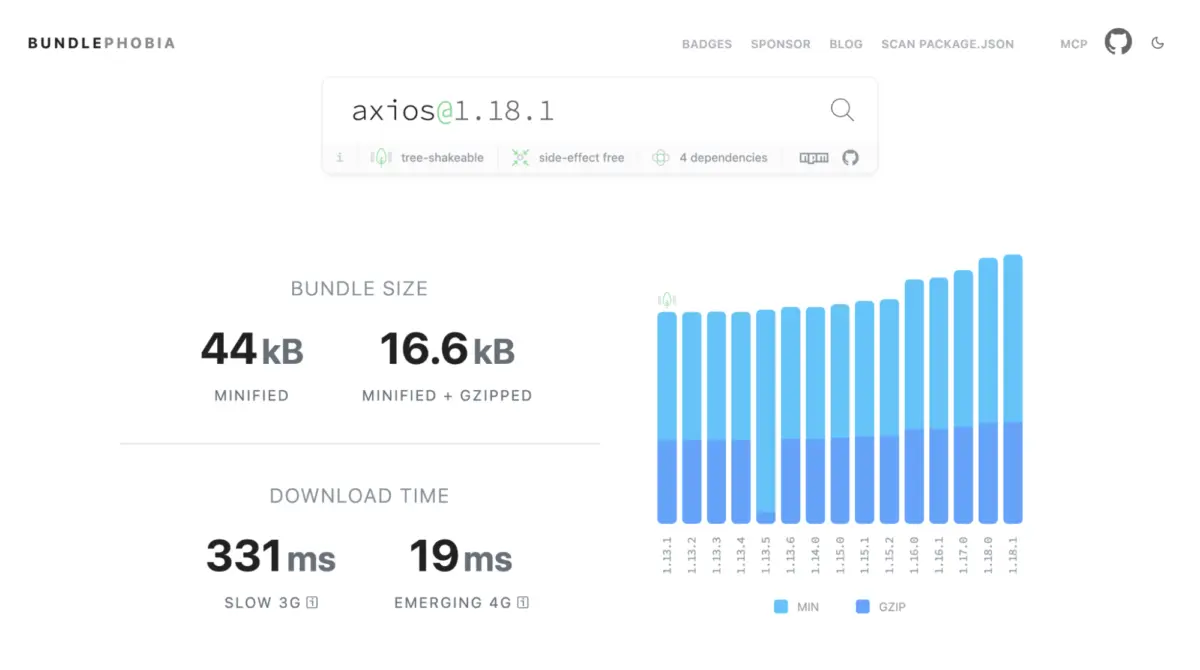
The debate between native fetch and third-party HTTP clients like axios (17 KB gz) or superagent (19 KB gz) centers on convenience versus architectural weight. While axios abstracts JSON parsing, timeouts, and request cancellation out of the box, modern native fetch combined with AbortController and AbortSignal.timeout() closes the feature gap significantly:
// Native fetch with timeout and explicit parsing
const res = await fetch("/api/users",
  signal: AbortSignal.timeout(5000),
);
const data = await res.json();
While advanced patterns like interceptors and automatic retries still require minor wrapper classes if migrating away from axios, standard CRUD applications can safely eliminate heavy HTTP dependencies for straightforward REST communication.
Cluster 3: UI Primitives (Modals, Popovers, and Anchors)
UI-related packages—such as modal managers, focus traps (focus-trap), body scroll lockers (body-scroll-lock), and tooltip positioning utilities (tippy.js)—collectively consume substantial bundle weight.
The web platform now provides three structural pillars to replace these tools:
- The
<dialog>Element: Native modal dialogs handle accessibility out of the box. Callingdialog.showModal()moves focus inside the element, renders a backdrop via::backdrop, locks out background interactivity, and listens for theEscapekey automatically. Background scrolling can be halted with a single line of modern CSS:body:has(dialog:modal) overflow: hidden; - The Popover API: Managing light-dismiss dropdowns and transient panels no longer requires custom DOM listeners. The native
popoverattribute handles top-layer rendering and dismissal behavior declaratively. - CSS Anchor Positioning: Replacing external positioning libraries like Popper, CSS anchor positioning allows developers to tie floating elements directly to their triggers purely through stylesheets.
Combined, replacing legacy UI primitive libraries can reclaim approximately 24 KB gzipped while delivering superior accessibility defaults.
Cluster 4: Lodash and Utility Sub-Packages
While importing full Lodash packages is largely deprecated in modern tree-shaking environments, standalone utility imports (lodash.clonedeep, lodash.groupby) remain common. The platform now includes direct native equivalents:

- Grouping:
Object.groupBy()andMap.groupBy()organize collections natively. - Deep Cloning:
structuredClone()replaceslodash.clonedeep, correctly handlingDate,Map,Set,ArrayBuffer, and circular references for plain data. - Set Operations: Native
Setobjects now support.intersection(),.union(),.difference(), and other relational operations without auxiliary libraries.
Pruning lodash.clonedeep and lodash.groupby instantly saves roughly 8 KB gzipped.
Official Statements & The Decision Framework
Pruning dependencies should never be executed blindly. Introducing a disciplined decision framework protects teams from regressions while optimizing bundle metrics. Before deprecating any library, engineering teams must evaluate three core questions:
- Is the native replacement Baseline-safe for my specific audience?
Evaluate your application’s analytics orbrowserslistconfiguration. B2B dashboards targeting modern enterprise browsers can adopt Newly Available features rapidly, whereas public-facing portals serving legacy mobile devices require conservative gating or polyfill strategies. - What does the swap actually cost in overhead?
Some native specifications require heavy polyfills if support is not yet ubiquitous. For instance, attempting to prematurely replace date libraries with the bleeding-edgeTemporalAPI before stable Safari support requires introducing a substantial polyfill, temporarily increasing bundle size rather than reducing it. - Does the platform feature cover my actual use case?
Verify whether your codebase utilizes advanced edge-case methods within a library that the native API deliberately omits. A superficial swap without verifying functional parity will inevitably introduce runtime regressions.
Future Outlook: What Lies Ahead for Web Standards
As the gap between user-land libraries and platform capabilities continues to narrow, the architectural profile of modern JavaScript applications is shifting toward lean, platform-native codebases.
Looking forward, developers should monitor several upcoming platform milestones:
- The
TemporalAPI: Set to redefine native date and time manipulation with immutable objects and robust time-zone management, currently progressing toward universal Baseline status. - Advanced CSS Anchor Positioning Features: Continued maturation of fallback positioning states will completely phase out remaining floating-UI script dependencies.
- Native State Management & Component Models: Ongoing explorations within standards bodies suggest web components and reactive primitives will continue absorbing common architectural patterns.
Actionable Next Steps for Engineering Teams
To operationalize this audit, run a routine quarterly review:
- Generate your production dependency inventory using
npm ls --omit=dev --depth=0. - Measure actual asset sizes using bundle analyzers (
source-map-exploreror Vite visualization tools) alongside Bundlephobia. - Cross-reference candidate replacements against
webstatus.devor MDN Baseline badges. - Apply progressive enhancement guards (
typeof feature === "function") for Newly Available APIs to ensure zero regressions for legacy clients.
By treating dependency management as an ongoing maintenance loop rather than a set-and-forget setup, development teams can deliver faster, more resilient web experiences while returning ownership back to the browser platform.
