

Executive Overview
For over two decades, the WordPress ecosystem has operated under a standardized architectural paradigm: building websites inside rigid boxes. Traditional page builders—while instrumental in democratizing web design and eliminating the barrier to entry of hard-coded HTML and CSS—have long forced developers, agencies, and designers into linear rows, predefined columns, and strictly structured containers. While these conventions enabled millions of non-technical users to launch sites, they frequently introduced severe compromises: bloated Document Object Models (DOMs), heavy reliance on third-party add-ons, sluggish load times, and performance trade-offs that directly harmed Search Engine Optimization (SEO) and user retention.
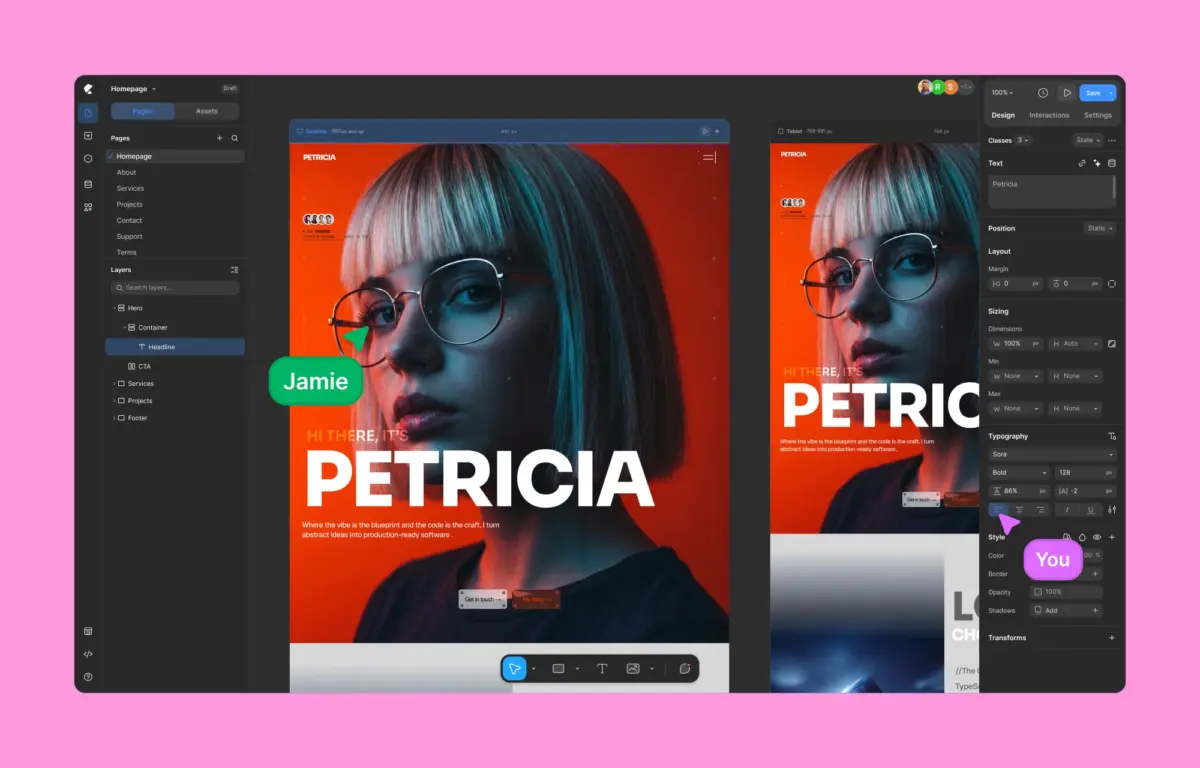
Enter Kirki, a revolutionary no-code visual website builder that shatters these long-standing limitations. Hailed as the first true freeform visual builder with an infinite canvas for WordPress, Kirki bridges the conceptual gap between traditional CMS workflows and modern design tools like Figma and Webflow. By combining an integrated content management system, native dynamic content capabilities, real-time multi-user co-editing, and a performance-first code architecture, Kirki offers a compelling glimpse into the next generation of WordPress site development.
This exhaustive review examines how Kirki stacks up against legacy alternatives like Elementor, breaks down its core technical differentiators, analyzes performance metrics under standardized test conditions, and evaluates its viability for professional web agencies and modern enterprises.
Detailed Chronology & Industry Context
The Evolution of WordPress Site Building
To understand the significance of Kirki’s market entry, one must look at the historical trajectory of WordPress design tools:

- The Early Era (Pre-2015): Custom themes built with raw PHP, HTML, and CSS dominated. Child themes and theme frameworks (like Genesis) ruled the landscape, requiring heavy developer intervention for even minor layout tweaks.
- The Page Builder Revolution (2015–2020): Tools like Elementor, Divi, and Beaver Builder emerged. They introduced drag-and-drop interfaces directly to the front end, making design accessible to millions. However, their reliance on shortcodes and heavily nested
<div>wrappers frequently created technical debt and performance bottlenecks. - The Block Editor Era (2018–Present): WordPress introduced Gutenberg, shifting toward a native block-based editing experience. While fast and deeply integrated into core, native blocks struggled to match the advanced design freedom required by high-end creative agencies.
- The Modern Design Tool Convergence (Present): Designers increasingly favored vector-first, coordinate-based systems (Figma) and high-performance layout engines (Webflow). Kirki arrives directly at this intersection, bringing freeform canvas dynamics natively into the WordPress environment.
The Problem with Traditional Constraints
Legacy page builders rely fundamentally on grid systems inherited from print design and early responsive web frameworks (like Bootstrap). While effective for basic columns, these frameworks break down when developers attempt complex layering, overlapping interactions, and asymmetrical, boundary-pushing layouts. Achieving these effects previously required injecting custom CSS overrides, destabilizing responsive breakpoints, or installing auxiliary plugins that compounded script bloat. Kirki’s architectural thesis is simple: remove the box entirely and let the canvas dictate the layout.
Supporting Context & Performance Metrics
Performance is no longer just a technical metric; it is a primary driver of conversion rates, user engagement, and search engine visibility. To evaluate how Kirki’s architectural approach translates to real-world performance, a rigorous benchmark test was conducted against traditional competitors.

Comparative Performance Methodology
Both Kirki and Elementor were installed on identical, clean WordPress installations utilizing the default Twenty Twenty-Five theme. Identical layouts—featuring complex headers, multi-column feature grids, media elements, and typography styling—were constructed using comparable native components. Lighthouse performance audits were subsequently executed under throttled network and CPU conditions.
+--------------------+-----------------------+------------------------+
| Metric / Parameter | Kirki Test Output     | Elementor Test Output  |
+--------------------+-----------------------+------------------------+
| DOM Element Count  | Exceptionally Low     | High (Heavy Nesting)   |
| Extra Wrapper Divs | Minimal / Optimized   | Extensive              |
| Core Web Vitals    | Superior (Green Tier) | Moderate (Yellow Tier) |
| Script Payload     | Lightweight & Native  | Heavy (External JS)    |
+--------------------+-----------------------+------------------------+
Analyzing Code Output and DOM Complexity
The performance audit revealed a stark contrast in code generation:

- Kirki’s Code Output: Generates lean, semantic HTML with a dramatically smaller DOM tree. Because layout positions are handled via modern CSS layout properties (such as grid and absolute/relative freeform coordinates) without redundant wrapper elements, browsers render the page significantly faster.
- Elementor’s Code Output: Produced heavily nested markup containing layers of wrapper
<div>tags and auxiliary styling scripts. Even on simplified layouts, this excess payload dragged down First Contentful Paint (FCP) and Time to Interactive (TTI) scores.
For organizations where Core Web Vitals directly dictate revenue, Kirki’s lightweight code emission provides an immediate competitive advantage.
Architectural Deep Dive: Features That Matter
Kirki’s value proposition extends far beyond raw speed; it introduces a comprehensive suite of professional features designed to replace fragmented plugin stacks.

1. Freeform Infinite Canvas and True Design Freedom
Moving away from rigid columns, Kirki provides an infinite canvas where creators can pan, zoom, layer backgrounds, and position elements with absolute coordinate precision. This workflow mirrors professional design software like Figma, allowing for complex overlaps and spatial design without writing custom CSS. Furthermore, the editor supports seamless light and dark mode workspaces, reducing eye strain during extended development sessions.
2. Concurrent Multi-Breakpoint Editing
Traditional builders require developers to toggle awkwardly between desktop, tablet, and mobile views to troubleshoot responsive design issues. Kirki solves this via concurrent editing across all responsive views, displaying Desktop, Tablet, Landscape, and Mobile layouts side-by-side on the same canvas in real time. Changes cascade intelligently through a robust global inheritance system, ensuring adjustments made at larger breakpoints flow down smoothly while allowing precise granular overrides where necessary.

3. Instant Figma-to-Kirki Workflow
For design-forward agencies, the handoff phase between UI/UX designers and front-end developers is notoriously friction-heavy. Kirki features a direct Figma import workflow that translates vector designs into fully functional, responsive WordPress layouts instantly, preserving hierarchy and layout behavior without requiring manual rebuilding.
4. Native Dynamic Content Management
Historically, dynamic WordPress sites required separate third-party plugins like Advanced Custom Fields (ACF) or Toolset. Kirki integrates a robust Dynamic Content Manager natively into its core architecture. Users can map custom post types, taxonomy fields, user meta, and relational data directly to visual elements without writing a single line of PHP or relying on third-party dependencies.

5. Class-Based Styling and Global Variables
Promoting design scalability, Kirki adopts a class-based styling system. When an element is styled, those rules automatically compile into reusable CSS classes. Coupled with Global CSS Variables (design tokens for colors, spacing, typography, and sizing), global updates propagate instantly across the entire site ecosystem. Advanced users retain total flexibility via custom CSS injection and granular JavaScript hooks.
6. Timeline-Based Visual Animations
Interactive design traditionally required complex JavaScript libraries or premium animation plugins. Kirki incorporates a dedicated timeline-based visual interaction builder. Creators can construct scroll-based triggers, hover/click transformations, and complex text animations (split by character, word, or block) directly within the interface, bringing immersive web experiences within reach of non-developers.

7. Real-Time Team Collaboration & Quality Control
Bridging the gap for collaborative agencies, Kirki introduces the first true multi-user co-editing environment on WordPress. Team members can view live cursor movements, observe real-time edits, and leave context-pinned comments directly on the canvas. Before publication, the built-in Page Audit tool scans the layout for accessibility violations, missing image alt text, broken links, and SEO misconfigurations.
Official Statements & Value Pricing
Pricing transparency has historically been a sore point in the WordPress plugin ecosystem, with foundational features frequently locked behind exorbitant tier upgrades. Kirki disrupts this model with an aggressive, transparent pricing strategy:

- The Free Version: Available directly from the WordPress.org repository, Kirki’s free tier is uncommonly robust, offering access to the infinite canvas and core design tools without artificial limitations or trial caps.
- Starter Plan ($59/year): Unlocks all premium features for a single site, delivering complete parity with expensive competitor tiers (such as Elementor Pro’s entry-level plans) without gating essential functionality.
- Lifetime Plan ($499 one-time): Provides unlimited lifetime site usage, eliminating recurring renewal costs and shielding agencies from future subscription hikes.
"We designed Kirki to eliminate the tax of technical debt that WordPress users have paid for over a decade," notes the product development team. "By unifying dynamic data, freeform design, and clean code output into a single platform, we are giving professionals the tools they need without the plugin bloat."
Future Outlook
As the web design market increasingly converges around high-performance design tools, traditional WordPress page builders face an existential reckoning. Platforms like Webflow and Framer have proven that users crave infinite canvas flexibility and clean, uncompromised code output.

Kirki successfully brings this philosophy directly into the WordPress ecosystem, proving that power and performance do not have to be mutually exclusive. For freelance designers transitioning from Figma, agencies seeking to cut down on plugin dependencies, and enterprises demanding strict adherence to Core Web Vitals, Kirki represents more than just another alternative—it establishes a new benchmark for WordPress site building.
As the template library expands, multi-user collaboration features mature, and the community adoption curve accelerates, Kirki is well-positioned to shape the architectural future of WordPress for the next decade. Whether building simple landing pages or complex, data-driven web applications, adopting a freeform, performance-optimized approach is no longer a luxury—it is the new standard.