

Executive Overview
For decades, the trajectory of digital productivity has been defined by an unwritten, exhausting rule: more problems require more tools. Whenever a new bottleneck emerged—whether in project management, data analysis, or document collaboration—the tech industry responded by minting a fresh category of software. The result is a modern professional landscape choked with fragmented applications, endless browser tabs, context-switching fatigue, and perpetual notification overload.
We are living through a paradox of productivity. While artificial intelligence promises to liberate us from tedious labor, the current market rush to deploy "AI-first" standalone platforms often exacerbates the problem. Users do not want to navigate yet another complex interface, master unfamiliar terminal commands, or engage in endless back-and-forth chat prompts just to complete basic operational tasks.
What the modern digital ecosystem requires is not a proliferation of new tools, but the seamless integration of useful capabilities into established mental models. This foundational shift relies on a philosophy known as "Quiet AI"—systems that operate invisibly in the background, matching where users naturally work, such as within the file structures of an operating system or inside legacy enterprise applications like Microsoft Excel. By reducing friction, honoring decades of established design patterns, and automating high-severity, high-frequency frustrations directly at the point of execution, software design is finally pivoting away from flashy disruption and toward invisible empowerment.
Detailed Chronology: The Evolution from Standalone Tools to Ambient Intelligence
To understand why the software industry has reached an inflection point regarding tool fatigue, it is helpful to trace the chronological evolution of digital productivity interfaces over the last forty years.
1. The Siloed Era of Desktop Computing (1980s–1990s)
In the early days of personal computing, software applications were massive, self-contained silos. A user opened a word processor to write, a spreadsheet for calculations, and a database manager to track inventories. Because processing power and memory were constrained, these applications maintained strict boundaries. The mental model was explicitly physical: applications mirrored tools on an office desk, and files mirrored paper documents stored in metal filing cabinets.
2. The Cloud and SaaS Explosion (2000s–2010s)
As broadband internet matured and cloud computing took over, the desktop silo gave way to the Software-as-a-Service (SaaS) boom. Companies unbundled monolithic software suites into hyper-specialized micro-tools. Suddenly, teams had dedicated applications for real-time chat, asynchronous video updates, kanban boards, customer relationship management (CRM), and advanced vector design. While this era unlocked unprecedented remote collaboration, it inadvertently birthed SaaS sprawl—forcing knowledge workers to constantly context-switch across dozens of tabs, leading to severe cognitive fragmentation.
3. The Generative AI Gold Rush (2022–2024)
Following the widespread public release of generative language models and advanced machine learning APIs, the tech sector entered a frantic gold rush. Hundreds of startups—and established tech giants alike—rushed to market with "AI-first" applications. These tools demanded that users leave their native workflows to visit dedicated web wrappers, chat interfaces, or custom dashboards. While impressive in demonstrations, these solutions frequently ignored established UX patterns, imposing a heavy cognitive tax on users who had to learn how to prompt, troubleshoot, and migrate data back and forth between silos.
4. The Emergence of Ambient and "Quiet AI" (Present Day)
We are currently crossing a crucial threshold into the era of ambient intelligence. Recognizing that users suffer from severe fatigue, forward-thinking designers and product architects are moving away from standalone AI wrappers. Instead, intelligence is being embedded directly into the foundational fabric of existing operating systems, enterprise suites, and file structures. Rather than asking users to come to the AI, modern architecture brings the AI directly to where the work is already happening.

Supporting Context & Metrics: The Hidden Costs of Context-Switching
The urgency behind seamless integration is not merely an aesthetic preference for minimal design; it is grounded in hard cognitive and operational data regarding human productivity.
The True Toll of Context-Switching
According to extensive workplace productivity research, knowledge workers switch between different apps and websites nearly 1,200 times a day. Every time a user abandons a primary task—such as analyzing a spreadsheet—to open an external chat tool, fetch a summary, and copy-paste the results back, they trigger a cognitive transition penalty. Research shows that it can take upwards of 15 to 23 minutes to return to a deep state of focused work after a single interruption.
[Primary Workflow: Excel / Document Editor]
       │
       ├──► (Old Paradigm): Open External AI Chat ──► Write Prompt ──► Copy Output ──► Return to App (High Friction)
       │
       └──► (Quiet AI Paradigm): Inline Contextual Assistance / Folder-Level Rules (Zero Context-Switching)
When "AI-first" products force users out of their native environments, they inadvertently increase error rates, lower creative output, and generate widespread digital burnout. Users do not judge software by how many advanced parameters it possesses; they judge it by how effortlessly it solves high-frequency, high-frustration problems with minimal intervention.
Mental Models vs. Novelty Interfaces
Human-computer interaction (HCI) theory emphasizes the power of mental models—the internal representations that users build of how a system works based on past experience.

- The Folder Paradigm: For over forty years, the concept of the "folder" has anchored digital file management. Users instinctively understand that folders contain related files, organize clutter, and establish boundaries.
- The Disruption: Introducing a novel, AI-driven interface that replaces traditional file trees with abstract conversational agents forces users to abandon decades of deeply ingrained muscle memory.
- The Integration: Conversely, treating folders as containers that can hold system-level instructions honors the existing mental model while supercharging its utility.
Official Industry Perspectives: Redefining UX for AI
Design leaders and educators are increasingly vocal about the need to pivot away from intrusive, standalone AI architectures toward contextual, embedded solutions.
Vitaly Friedman on Interface Design and "Quiet AI"
Design strategist and educator Vitaly Friedman, creator of the Design Patterns For AI Interfaces curriculum, has consistently argued that the most successful technological integrations are those that fade into the background.
"We often hear about shiny new tools that change everything. But in practice, most people don’t need more tools to deal with in their daily lives. What we actually need are better integrations of useful capabilities that neatly align with our existing and established mental models," Friedman notes.
Highlighting the concept of Quiet AI, Friedman points to tools that act as silent partners rather than demanding master-servant interactions via chat boxes.

"Quiet AI tools are mostly invisible, sit in the background, and do small tasks on the user’s behalf. They never scream for attention but happily assist in repetitive, frustrating tasks that can easily be automated or assisted with a smart helper."
The Practical Realization: In-Context Integration
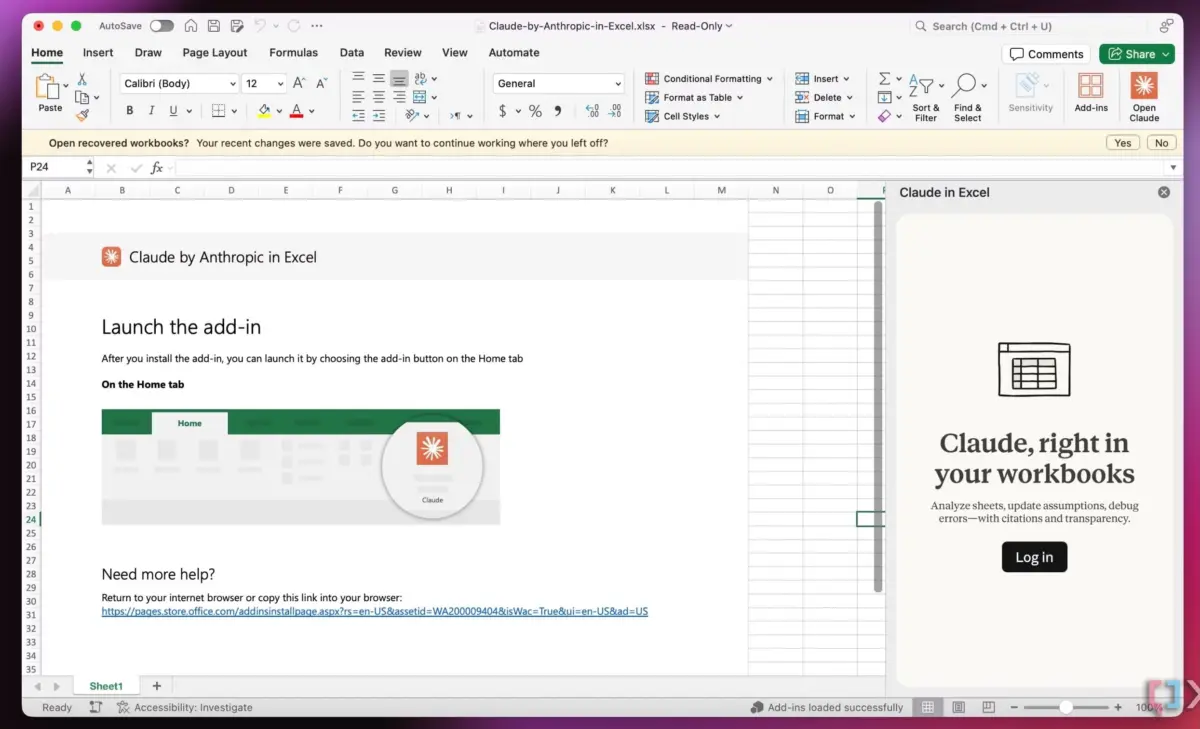
Industry adoption of this philosophy is already visible in major enterprise software rollouts. The integration of advanced language models directly inside staple productivity suites—such as Claude’s native integration within Microsoft Excel, Word, and PowerPoint—exemplifies this shift. Users can analyze specific rows, columns, or document sections inline, entirely eliminating the need to toggle between external browser windows and local applications.
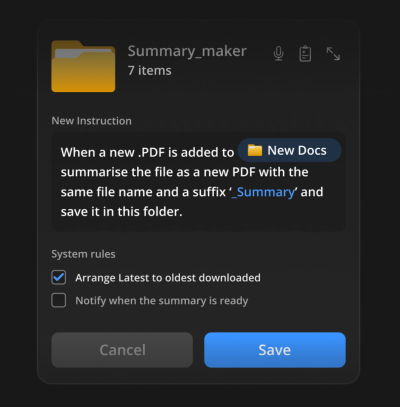
Furthermore, innovative UI concepts like Folder Instructions for System-Level AI (pioneered in conceptual UX design by practitioners like Karthikeya GS) demonstrate how operating systems can evolve. By allowing users to assign specific behavioral rules, automated summarization protocols, or formatting guidelines directly to a localized directory, the file system itself becomes an active, intelligent collaborator without altering the fundamental way humans interact with files.
Future Outlook: Where Product Design Goes From Here
As the software market matures beyond the initial hype cycle of generative artificial intelligence, several clear trends are poised to shape the next decade of user experience design.
1. The Death of the Generic Chat Window
The universal chat box—typified by a blank text field bearing the prompt "What can I help you with today?"—will increasingly be viewed as a lazy, transitional design pattern. While flexible, it places an unfair cognitive burden on the user to articulate complex requirements from scratch. Future interfaces will replace open-ended chat with context-aware, inline affordances that anticipate needs based on immediate user actions.
2. Hyper-Localized, Privacy-First Automation
As demonstrated by folder-level instruction systems, users demand granular control over where and how automation executes. Moving forward, system-level AI will operate under strict local scopes—processing data within designated project folders or application layers—unless the user explicitly grants broader permissions. This balances powerful automation with uncompromising data privacy and predictable behavior.
3. The Consolidation and Subsumption of Single-Feature Apps
We are likely to see a massive contraction in the standalone micro-SaaS market. Features that previously justified entire standalone applications (such as basic PDF summarizers, isolated transcription tools, or simple text-formatting utilities) will be swallowed up as quiet, native capabilities within core operating systems and primary productivity suites.
Conclusion: Simplicity as the Ultimate Feature
Ultimately, the future of digital product design belongs not to those who build the loudest, most feature-laden applications, but to those who master the art of invisibility. By anchoring AI capabilities to established mental models, honoring existing workflows, and ruthlessly eliminating unnecessary context-switching, designers can finally deliver on technology’s oldest promise: making human work simpler, faster, and profoundly less frustrating.