

Executive Overview
The contemporary design and product development ecosystem suffers from a pervasive malady: conversational tunnel vision. Because Large Language Models (LLMs) are natively trained on dialogue data, the tech industry has collectively fallen into the trap of defaulting every advanced AI capability into a chat-based interface. The chat bubble has become the unquestioned, ubiquitous home for everything from deep-data analysis to high-stakes industrial troubleshooting.
However, great User Experience (UX) is not about forcing users to adapt to a single, monolithic interaction paradigm. Rather, it is about meticulously matching modality to user context, intent, and cognitive load. The interface must adapt to the user—not the other way around.
Modality refers to the channels through which a person interacts with a system using their senses: seeing, hearing, touching, speaking, and typing. When product teams rely lazily on the text box, they impose a severe psychological and physical tax on their users, forcing them to translate natural workflows into clunky linguistic prompts and exhausting sequential readings. To build truly effective AI-powered products, designers must break free from conversational tunnel vision, execute rigorous task audits, and align input and output modalities with the realities of the human environment.
Detailed Chronology of the Conversational Paradigm Shift
The Genesis of the LLM Chat Interface
The rapid democratization of generative artificial intelligence, catalyzed by the public release of transformer-based architectures, sparked an unprecedented gold rush in product design. In the early days of LLM deployment, engineering feasibility dictated UX direction. Because models accepted tokenized text strings and emitted tokenized text strings, the chat window—historically reserved for customer support bots and messaging apps—was the path of least resistance.
Product teams rapidly adopted the blank chat slate because it offered a universal container capable of handling theoretically infinite inputs. It signaled to the user that the system "could do anything." Yet, this technical convenience quickly calcified into dogmatic design convention. Over successive product cycles, the chat interface transitioned from a clever prototyping container into an unexamined orthodoxy.
The Real-World Friction
As AI transitioned from consumer toys to enterprise-grade tools deployed in complex, high-stakes environments, the cracks in the chat-only paradigm began to show. Users across industries—from data analysts and stock traders to high-voltage electrical field technicians—encountered severe friction.
The mismatch became starkly apparent in mobile and field environments. For instance, consider a traveler rushing through a loud, crowded airport terminal after a sudden gate change, balancing a roller bag and a cup of coffee. When forced to interact with an airline’s AI assistant via a chat interface, the user must stop walking, balance their belongings, and type a long booking reference number into a microscopic text box. Upon hitting send, the system responds with a dense paragraph explaining the atmospheric weather phenomena causing the delay, burying the critical gate number at the very bottom.
While the traveler may ultimately make their flight, the encounter leaves a lasting mark of acute anxiety—a textbook example of an interface failing to match the user’s physical and cognitive reality.
Supporting Context & Metrics: The Cost of Conversational Mismatches
The persistence of the do-it-all chatbot is rooted in its low barrier to development, but it exacts a high toll on user productivity and psychological well-being. This burden manifests in two distinct ways: the linguistic barrier of input and the cognitive cost of textual output.
Input: The Linguistic Barrier of the Text Box
In a traditional Graphical User Interface (GUI), menus, buttons, and toolbars provide clear visual affordances that signal every available system action. Conversely, a blank chat box creates severe choice paralysis. Users are forced to guess what the AI is capable of, remembering precise phrasing or technical nomenclature to elicit the desired outcome.
- The Data Analyst’s Dilemma: In a traditional dashboard, an analyst might apply a filter or sort dataset via a button click. In a chat interface, they must suddenly become a writer, translating complex data logic into a grammatically complete sentence.
- The Creative’s Bottleneck: Composing a prompt is a creative act. A designer might possess a clear vision of lighting and texture for an image generation tool, but translating that mental image into descriptive text is notoriously difficult. Here, sliders or color pickers serve as vastly superior input modalities.
Output: The Cognitive Tax of Serial Reading
When an AI responds in long, unbroken blocks of text, it offloads interpretive work onto the user. Text is a serial medium; the human brain must process words sequentially to extract meaning. This process demands sustained reading focus and time.
Conversely, visual formats permit parallel processing. A user can inspect a color-coded dashboard and identify an outlier in under a second. Forcing a doctor to read a narrative description of a patient’s vital signs, or a stock trader to parse a written summary of price movements over the last hour, introduces slow, error-prone extraction steps precisely when speed and accuracy are paramount.

A Taxonomy of Modalities
To move beyond the chat paradigm, practitioners must utilize a shared vocabulary of input and output modalities, matching each to its optimal context:
-
Input Modalities:
- Button / Tap: Best for single-step, binary actions (execution speed, recognition over recall).
- Voice: Best for hands-busy or eyes-busy environments (field operations, driving).
- Natural Language Chat: Best for ambiguous, exploratory queries where user freedom outweighs precision requirements.
- Form / Wizard: Best for structured, multi-field data entry, preventing omissions through step-by-step guidance.
- GUI (Filters, Sliders, Drag-and-Drop): Best for complex parameter settings and spatial tasks.
- Multi-Modal (Image + Text): Best for visual inputs paired with annotations, reducing descriptive friction.
- Gesture: Best for sterile or hazardous environments requiring contactless interaction.
-
Output Modalities:
- Push Notification / Alert: Best for time-sensitive, ambient awareness without breaking deep concentration.
- Audio Summary: Best for mobile, eyes-free contexts.
- Short Text Summary: Best for direct, focused queries needing rapid answers.
- Visual Dashboard: Best for high-density comparative analysis and rapid outlier detection.
- Interactive Canvas: Best for generative or iterative creative tasks.
- Inline Confirmation: Best for step-by-step validation, reducing user anxiety over system execution.
Official Statements and Industry Insights
Leading voices in product design and human-computer interaction emphasize that the future of artificial intelligence lies not in more powerful conversational models, but in more contextualized delivery mechanisms.
"Modality is not merely an aesthetic choice; it is a fundamental bridge between human cognitive bandwidth and computational capability. When we default every AI feature into a chat window, we are essentially communicating to our users that we care more about our backend architecture than their lived reality."
— Principal UX Architect, Enterprise AI Systems
Industry research indicates that enterprise adoption of AI tools increases significantly when interfaces are tailored to operational constraints. In high-risk sectors such as energy, healthcare, and logistics, software that accounts for environmental factors—such as ambient noise, protective gear, and physical positioning—demonstrates up to a 25% reduction in user error rates and substantially higher daily active usage compared to generic chat wrappers.

Case Study: Adaptive Modality for Field Technicians
To understand how modality alignment transforms operational efficiency, consider a deployment by a national utility provider servicing high-voltage electrical grids.
The Problem
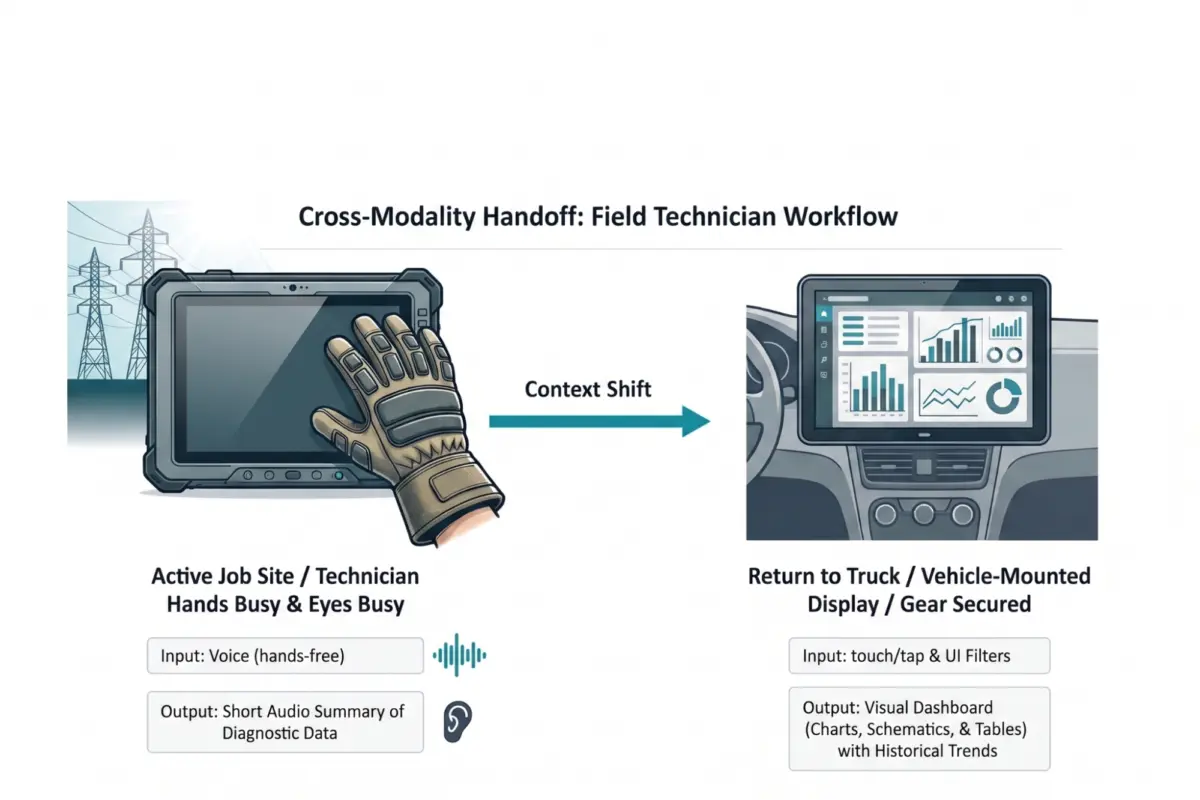
Field technicians working atop bucket trucks or inside power substations faced severe interface mismatches. Traditionally equipped with ruggedized tablets, technicians struggled to interact with standard touch interfaces while wearing thick, mandatory protective gloves. Furthermore, direct sunlight created extreme screen glare, while the cognitive load of reading dense, text-heavy diagnostic manuals compromised situational awareness around live, high-voltage equipment.
The Research Process
Researchers conducted a comprehensive Task Audit utilizing contextual inquiry and focused interviews. They observed that technicians operated in persistent "hands-busy, eyes-busy" states. Manual screen taps were nearly impossible with heavy gloves, and reading text reports diverted visual attention away from life-threatening hazards.
The Multi-Modal Solution
The resulting redesign abandoned the tablet-based chat model in favor of a dynamic, multi-modal handoff:
- Job Site Execution: Technicians utilize voice input to query system manuals while wearing protective gear. The AI responds with concise audio summaries, allowing technicians to maintain complete visual focus on their immediate environment.
- Vehicle Transition: Upon returning to the service truck, the workflow automatically transfers to a wide, 15-inch vehicle-mounted visual dashboard capable of rendering complex electrical grid schematics and historical trend data in parallel.
This context-aware adaptation reduced diagnostic task times by 20% and drove a permanent surge in daily tool adoption across all field crews.
Future Outlook: The Multi-Modal Ecosystem
The next decade of product design will not be defined by the supremacy of the chatbot, but by the maturation of ambient, multi-modal ecosystems. As edge computing advances and foundational models become increasingly multi-modal natively, the friction between user intent and system response will continue to dissolve.

Designers must embrace a structured approach to modality selection through formal Task Audits and Input/Output Alignment Matrices. By stepping away from the desk, observing work where it actually happens, and treating physical and social environmental realities as core design briefs, product teams can build systems that truly serve human needs.
The chat window will remain a vital tool in our collective design toolkit—valuable for brainstorming, exploration, and open-ended ideation. But it is time to retire the lazy assumption that it is the only tool worth building. The future belongs to interfaces that respect the human condition, adapting fluidly to the person, the moment, and the place.