The modern digital knowledge worker is drowning in software. Every week brings a wave of "revolutionary" standalone platforms promising to reinvent productivity, streamline operations, and harness the limitless potential of artificial intelligence. Yet, behind the polished marketing pitches and venture capital hype lies a stark reality: users do not want more tools. They want fewer frictions, reduced cognitive loads, and seamless workflows that respect their time.
The relentless pursuit of "AI-first" applications has triggered a widespread phenomenon known as tool fatigue. Rather than eliminating complexity, many generative AI products have introduced new layers of friction—forcing users to abandon established operating environments, memorize arcane terminal commands, or engage in endless back-and-forth chat loops within separate browser tabs.
The industry is reaching a critical inflection point. True innovation in user experience (UX) design is no longer measured by how many standalone features an application can boast, but by how invisibly it integrates into the daily habits, mental models, and workspaces users already rely on. This paradigm shift has given rise to two vital concepts: Quiet AI—systems that operate silently in the background to handle repetitive tasks—and system-level workflows, such as context-aware folder instructions, which embed automation directly where the actual work happens.
Detailed Chronology: The Evolution of Digital Workflows and AI Integration
To understand where modern software design stands today, it is necessary to examine how we arrived at an era defined by software bloat and subsequent pushback.
Phase 1: The Monolithic Era (Late 20th Century to 2010s)
For decades, productivity was defined by monolithic desktop suites—such as Microsoft Office or Adobe Creative Cloud—and specialized operating system environments. Users learned complex, rigid interfaces because these tools served as the definitive digital workshops of their time. Mental models were anchored to physical metaphors: documents, spreadsheets, trash cans, and folders. While these applications had steep learning curves, they remained stable. Users spent the majority of their working hours inside a single, predictable context.
Phase 2: The SaaS Fragmentation Boom (2010s to 2020)
The advent of cloud computing and Software-as-a-Service (SaaS) fractured this unified approach. The prevailing philosophy shifted toward micro-tools: dedicated applications for notes, task management, team chat, scheduling, and document collaboration. While this allowed companies to pick specialized solutions, it initiated a fragmented ecosystem. Knowledge workers found themselves juggling dozens of browser tabs, constantly context-switching, and losing valuable hours to notification fatigue and fractured data silos.
Phase 3: The Generative AI Gold Rush (2020 to 2023)
When large language models (LLMs) and generative AI burst into the mainstream, the software industry rushed to capitalize on the technology by building "AI-first" wrappers. Startups and enterprise giants alike raced to release standalone chat interfaces. Users were expected to copy text out of their working documents, paste it into an external chat window, refine prompts iteratively, and copy the results back. Far from saving time, this process frequently added new administrative overhead, alienating users who just wanted their existing software to be smarter.
Phase 4: The Pivot to Quiet AI and Contextual Integration (Present Day)
Recognizing the exhaustion caused by constant context-switching, UX researchers and product designers are actively pivoting away from standalone AI wrappers. The contemporary focus has shifted toward contextual integration—bringing intelligence directly inside native applications like Excel, Word, and system-level file managers. Rather than demanding that users adapt to a new AI assistant, modern design patterns embed the assistant seamlessly into the background of established workflows.
Supporting Context & Metrics: The Cost of Context-Switching
The economic and psychological toll of software fragmentation and poor UX design is well-documented by workplace research:
The Cost of Interruption: Studies in organizational psychology routinely show that it takes an average of 23 minutes for a knowledge worker to regain deep focus after being distracted or forced to switch contexts between disparate applications.
The Proliferation Paradox: Enterprises routinely adopt dozens of distinct SaaS applications, yet employees report utilizing only a fraction of them regularly. The introduction of standalone AI tools compounds this issue, creating shadow IT and overwhelming employees with redundant interfaces.
High-Severity Pain Points: UX data indicates that user satisfaction does not correlate with the novelty of a feature, but with its ability to solve high-frequency, high-frustration bottlenecks—such as manual data sorting, file organization, and repetitive document summarization.
When artificial intelligence forces users to learn an entirely new paradigm for simple tasks, it violates core human-computer interaction (HCI) principles. Conversely, when AI capabilities are woven quietly into familiar environments, efficiency skyrockets while cognitive friction plummets.
Official Statements & Expert Perspectives
Industry leaders and design educators are increasingly vocal about the need to curb tool proliferation in favor of invisible, integrated design.
"We often hear about shiny new tools that change everything (yet again). But in practice, most people don’t need more tools to deal with in their daily lives. What we actually need are better integrations of useful capabilities that neatly align with our existing and established mental models."
— Vitaly Friedman, UX Consultant and Educator (Design Patterns For AI Interfaces)
Friedman emphasizes that users are fatigued by "smart" workflows that require manual navigation of complex commands or chat prompts. Instead, they require solutions addressing problems of high severity and frequency without demanding a complete behavioral overhaul.
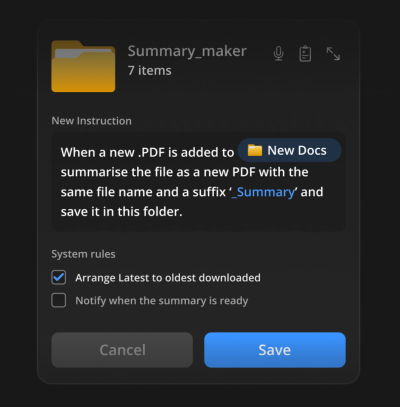
This philosophy is mirrored in emerging interface experiments, such as system-level folder instructions. Designers like Karthikeya GS have highlighted the potential of embedding intelligence directly into file management architectures:
"Users don’t get excited about navigating Terminal commands or jumping between endless back-and-forth chat interactions. They need seamless integrations of useful features to address problems where the work actually happens."
By allowing users to assign specific behavioral rules, automated summaries, and organizational logic directly to local folders, systems can act on explicit intent without requiring continuous human micromanagement.
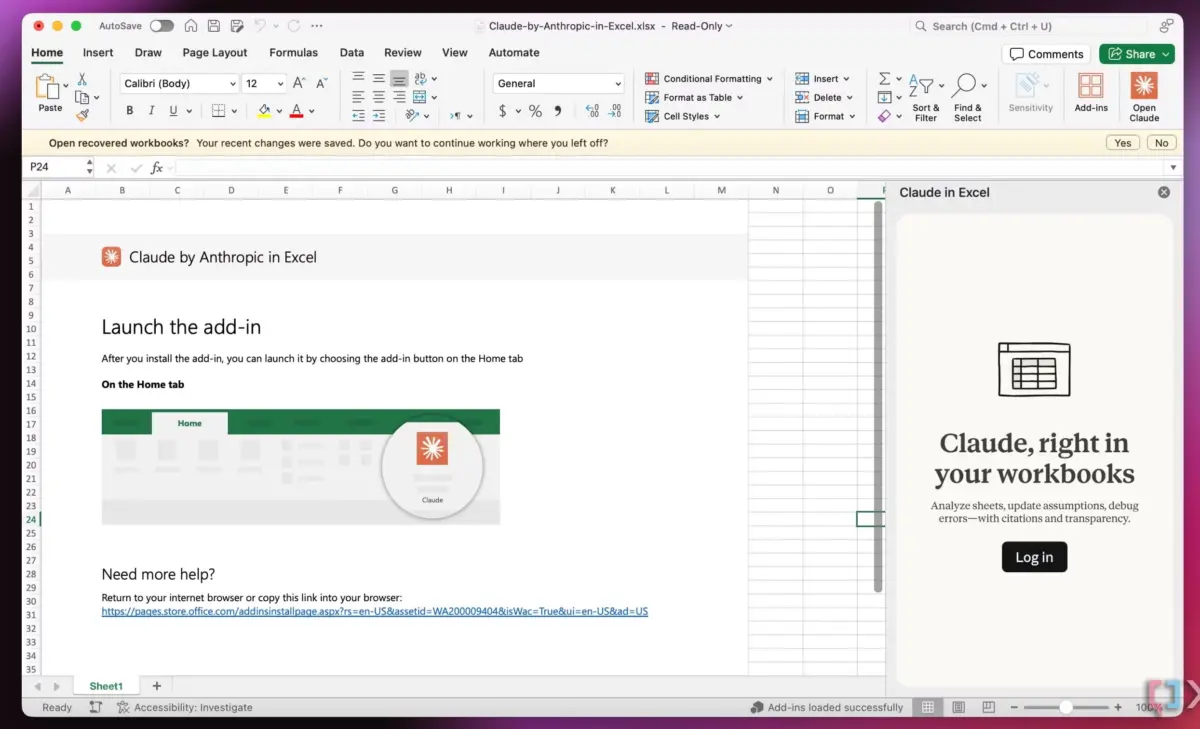
Furthermore, recent enterprise integrations—such as Claude’s native embedding within Microsoft Office suites (Excel, PowerPoint, and Word)—exemplify this philosophy. By placing assistance directly inside rows, columns, and document margins, these tools eliminate the need to switch windows, preserving the user’s flow state.
Future Outlook: Designing for the Invisible Interface
As artificial intelligence matures, the competitive advantage in software design will belong not to those who build the loudest, most feature-bloated tools, but to those who master the art of invisibility.
1. The Death of the Standalone Chat Interface
While general-purpose chat windows will always have a place for open-ended brainstorming, they are increasingly ill-suited for execution-heavy tasks. The future belongs to contextual, inline assistance where the AI understands the user’s immediate document, code block, or spreadsheet cell without requiring explicit prompting about background context.
2. Intent-Driven System Architecture
The concept of folder-level instructions points toward a broader trend: intent-driven computing. Rather than manually executing repetitive multi-step processes, users will define system rules once—at the directory, project, or workspace level—and let local, secure AI agents handle routine maintenance, sorting, and summarization in the background.
3. Preserving Mental Models
Successful AI design must respect the years of cognitive conditioning that have shaped how humans interact with computers. Whether through familiar spreadsheet grids, standard folder hierarchies, or text-editing margins, software must bridge the gap between advanced computational capabilities and deeply ingrained human habits.
Conclusion
The era of adding more tools to fix the problems caused by too many tools is officially coming to an end. By embracing Quiet AI, respecting established mental models, and prioritizing seamless integrations over flashy standalone applications, designers can alleviate digital fatigue and deliver genuine, lasting value to users worldwide.
Meet “Design Patterns For AI Interfaces”
To dive deeper into these concepts, explore Design Patterns For AI Interfaces—a comprehensive video course by Vitaly Friedman featuring hundreds of real-life examples and practical UX guidelines designed to help product creators build AI features that people genuinely want to use.