

Executive Overview
The modern software design landscape suffers from a pervasive affliction: conversational tunnel vision. Because Large Language Models (LLMs) are fundamentally trained on dialogue, the tech industry has collectively rushed to wrap every emerging AI capability in a conversational interface, defaulting blindly to the chat bubble as a universal solution.
While the chat interface is a powerful instrument for exploratory dialogue and open-ended queries, it represents a single tool in an expansive, underutilized toolkit. Product and User Experience (UX) teams are increasingly making the mistake of forcing users to adapt to the machine’s preferred mode of communication rather than engineering systems that adapt dynamically to human context, intent, and cognitive load.
True UX excellence demands that modality—the sensory channels through which humans interact with systems, including sight, sound, touch, and speech—be meticulously matched to the user’s environment. When design decisions are divorced from physical reality, tools fail. Organizations that continue to deploy one-size-fits-all chat interfaces across diverse operational environments risk alienating users, inducing severe cognitive fatigue, and ultimately failing to drive meaningful technology adoption.
Detailed Chronology: The Evolution and Pitfalls of the Chatbot Monoculture
The Rise of the Generative Paradigm
The contemporary fixation on conversational AI began in earnest with the explosive democratization of transformer-based LLMs. As tech enterprises scrambled to integrate generative AI capabilities into legacy software, development teams looked for the path of least resistance. Because the foundational models natively processed text and emitted text token-by-token, the chat box emerged as the fastest, most frictionless way to expose these features to end-users.
The chat box offered a seductive blank slate—a universal container that implied the system could handle anything the user threw at it. However, this architectural convenience quickly calcified into an industry-wide dogma, giving birth to the myth of the "do-it-all chatbot."

The Human Toll of Mismatched Modalities
As chatbots were shoehorned into every conceivable enterprise and consumer workflow, the hidden costs of this monoculture began to manifest. Users experienced acute cognitive friction, forced to translate their natural visual or spatial workflows into clumsy linear text prompts.
Consider a real-world failure mode: a traveler running through a noisy, crowded airport terminal after a sudden gate change. Burdened with luggage and a hot beverage, the traveler attempts to interact with an airline’s AI assistant. The app immediately violates basic modality principles by demanding manual text input—forcing the user to stop walking, balance their coffee, and type a lengthy booking reference into a microscopic chat box.
Upon submission, the system delivers an equally poor output modality: instead of flashing a high-contrast, glanceable gate number, it returns a dense paragraph detailing atmospheric weather anomalies, burying the critical destination data at the very bottom.
While the traveler may eventually make the flight, the interaction leaves an indelible mark of frustration. This scenario validates a widespread consumer perception: that technology companies build smart tools without caring about or understanding the actual realities of human users.
Supporting Context & Metrics: Deconstructing Cognitive and Linguistic Barriers
To systematically dismantle conversational tunnel vision, practitioners must examine the dual burdens imposed by chat-heavy interfaces: the linguistic barrier of input and the cognitive tax of output.

Input: The Linguistic Barrier of the Text Box
In a traditional Graphical User Interface (GUI), menus, buttons, and sliders provide clear, persistent visual affordances that communicate available options at a glance. Conversely, a blank chat box induces choice paralysis. Users are forced to guess what the AI is capable of, recalling exact phrasing, keywords, or technical parameters from memory.
- The Data Analyst Example: While a traditional tool allows an analyst to filter data via a drop-down menu with a single click, an LLM chat interface requires the user to act as a writer, composing a complex logical predicate in a complete sentence.
- The Creative Professional Example: A visual designer knows intuitively how a digital asset should be illuminated, yet translating subjective lighting ratios and texture parameters into a text prompt is an exhausting, indirect creative act. Forcing text input here ignores superior GUI alternatives like color pickers and spatial sliders.
Output: The Cognitive Cost of Sequential Text Reading
When an AI responds in long blocks of prose, it shifts the interpretive burden entirely onto the user. Text is fundamentally a serial medium: the human brain must decode words sequentially to extract meaning.
- Parallel vs. Serial Processing: Visual formats like dashboards and charts allow parallel processing, enabling a user to spot an anomaly or trend in under a second. Narrative text, however, requires a slow, linear reading assignment.
- Professional Stakes: A medical professional examining a patient’s vital signs or a stock trader looking for a sudden price spike cannot afford to parse narrative descriptions. In high-stakes environments, narrative outputs introduce dangerous delays, turning rapid verification into a sluggish, error-prone extraction process.
[Traditional Linear Text Loop]
User inputs prompt -> AI outputs dense text block -> User reads sequentially -> Mental fatigue & anxiety

[Optimized Multimodal Loop]
User inputs via button/voice -> AI outputs glanceable visual/audio -> Instant verification -> Zero cognitive tax
Official Standards and Frameworks: Auditing Tasks and Aligning Modalities
To cure conversational tunnel vision, product teams must move away from assumptions and ground interface design in rigorous empirical research. This requires implementing a Task Audit followed by an Input/Output Alignment Matrix.
The Task Audit Methodology
Before writing a single line of code, design teams must evaluate the physical, social, and cognitive dimensions of the user’s environment using three core research methods:
- Contextual Inquiry and Observation: Researchers observe users directly in their natural workspaces—whether an operating room, a warehouse floor, or an open-field utility grid—to uncover hidden physical constraints, ambient noise levels, and visual focus requirements.
- Focused Interviews: One-on-one sessions with end-users and operational stakeholders map out mental models, decision points, and the true cost of verification anxiety.
- Collaborative Workshops: Cross-functional teams (Product Managers, Designers, Engineers, and Analysts) build a comprehensive Task Inventory to map every step of a workflow against audit criteria.
The Input/Output Alignment Matrix
Once field evidence is captured, teams map user intent directly to the optimal modality combination using structured design frameworks:

| User Intent | Optimal Input Modality | Optimal Output Modality | Environmental Fit |
|---|---|---|---|
| Quick Status Check | Voice or Single-tap Button | Audio or Push Notification | Hands-busy, Eyes-busy (e.g., technician on a ladder) |
| Specific Detail Query | Natural Language Chat | Short Text Summary | Focused, low-density data need |
| Complex Analysis | GUI (Filters, Sliders, Drag-and-Drop) | Visual Dashboard (Charts, Tables) | Desk-based, high-resolution screen |
| Creative Generation | Multi-modal (Image + Text) | Interactive Canvas | Design or drafting studio |
| Monitoring / Alert | Passive (Background system) | Push Notification or Audio Alert | Ambient awareness environments |
| Guided Task Completion | Structured Form / Wizard | Inline Confirmation + Progress Bar | Step-by-step compliance workflows |
Case Study: Adaptive Modality in High-Risk Field Operations
A compelling validation of modality-driven design is found in recent deployments for field technicians servicing high-voltage electrical grids.
The Problem
Traditionally, technicians relied on ruggedized tablets to access technical manuals and log grid repairs. However, the physical reality of the job—wearing heavy protective gloves and working at significant heights inside bucket trucks—rendered standard touchscreens virtually useless. Furthermore, attempting to read dense, text-heavy diagnostic manuals in direct sunlight while monitoring live electrical wires created an unacceptable cognitive and physical safety hazard.
The Research-Backed Resolution
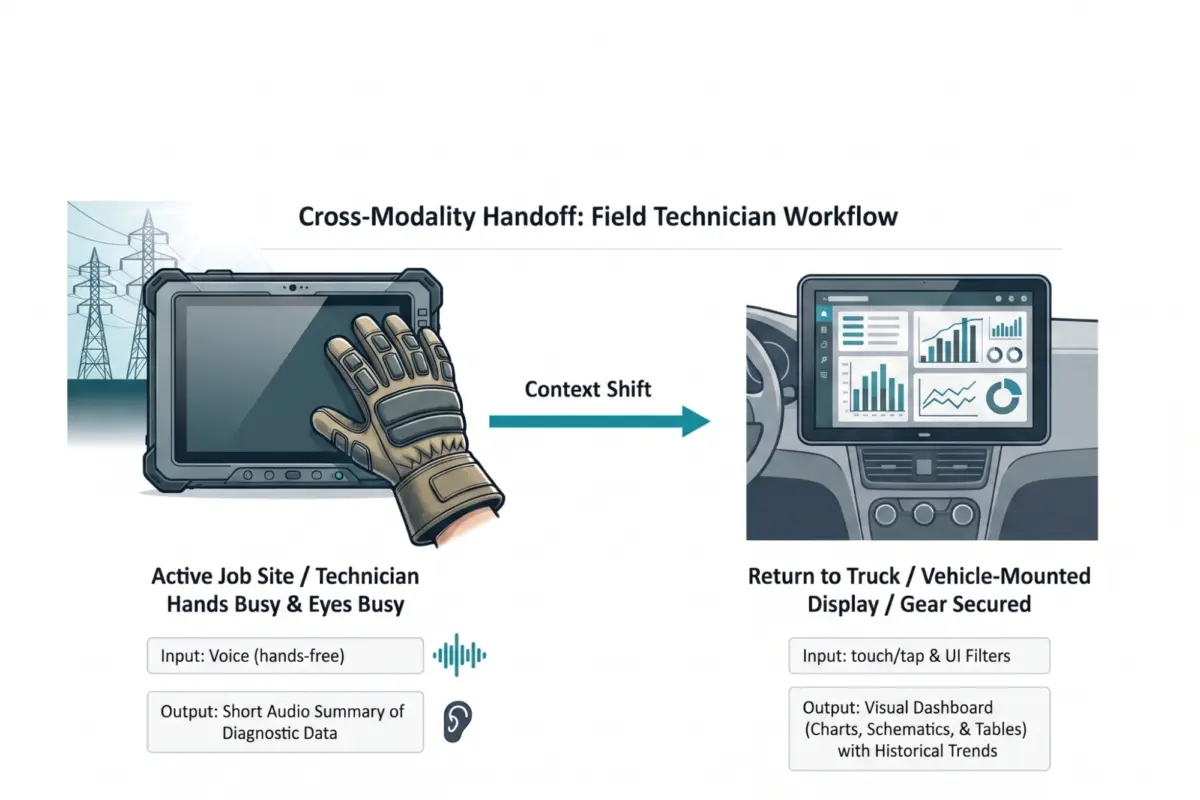
Following a comprehensive Task Audit involving contextual observations and veteran interviews, a national utility provider re-engineered their AI tool into a multi-modal handoff system:
- In the Field (Active State): Technicians utilize hands-free voice input to query system diagnostics, bypassing the physical barrier of heavy gloves. The AI responds via a short audio summary, allowing technicians to maintain unbroken visual awareness of dangerous high-voltage equipment.
- In the Vehicle (Transition State): Once technicians return to their utility trucks and secure their safety gear, workflows automatically execute a seamless handoff to a 15-inch vehicle-mounted visual dashboard, enabling high-density parallel processing of complex grid maps and historical trend analysis.
This strategic alignment of modality to operational environment reduced diagnostic completion time by 20% and drove a dramatic surge in daily tool adoption across all field crews.
Future Outlook: The Diverse Ecosystem of AI Interaction
The future of interface design will not be dictated by a single container type. As multimodal AI models mature, the industry must outgrow its reliance on the chat box and embrace a diverse, flexible ecosystem spanning visual, vocal, haptic, and ambient modalities.

Designing for the environment requires recognizing that physical and social realities are not edge cases; they are the core design brief. By embedding Task Audits into product lifecycles and matching interaction modalities precisely to human intent, organizations can eliminate adaptation friction, lower cognitive overhead, and build AI capabilities that feel less like foreign machines and more like natural extensions of human capability.