

Executive Overview
The design and product development communities have fallen headfirst into a trap of architectural laziness known as "conversational tunnel vision." Because Large Language Models (LLMs) are natively trained on sequential dialogue data, the tech industry has collectively suffered from a collective anchoring bias: the assumption that the chat bubble is the natural, universal home for every conceivable artificial intelligence capability.
While the text box and the conversational prompt are powerful tools for open-ended exploration, treating them as a one-size-fits-all panacea has led to poor user experiences. Great user experience (UX) is fundamentally about matching modality to a user’s immediate context, intent, and cognitive load. The interface must dynamically adapt to the human being, rather than forcing the human to contort their natural behavior to accommodate the machine.
To overcome this design flaw, product teams must systematically evaluate physical and cognitive constraints using rigorous frameworks—such as Task Audits and Input/Output Alignment Matrices—moving past lazy interface conventions and designing AI systems tailored to real-world environments.
Detailed Chronology: The Rise of the Chatbot Monoculture
To understand how the software industry became hyper-fixated on the chat interface, one must look back at the generative AI explosion.
Phase 1: The Novelty of Natural Language (2022–2023)
When foundational models like GPT-3 and early versions of conversational agents burst into the public consciousness, the chat interface was a stroke of genius. It stripped away complex navigation menus, replacing them with a blank, accessible slate. Users could suddenly talk to a machine using natural language, asking it to write code, draft emails, or summarize dense documents. The text box felt magical because it bridged the gap between human thought and machine execution without requiring specialized programming syntax.
Phase 2: The Industrial Default (2023–2024)
As enterprises rushed to integrate generative AI into existing software suites, product teams took the path of least resistance. Rather than redesigning complex enterprise dashboards, legacy applications, and mobile workflows, companies bolted a conversational sidebar onto their products. The chat box became the default delivery mechanism for everything from data analytics to customer support, regardless of whether a linear text stream was the most efficient way to solve a user’s problem.
Phase 3: The Breaking Point and the Return to Context (2024–Present)
As generative AI matured from a novelty into mission-critical enterprise software, the limitations of the "do-it-all chatbot" became glaringly apparent. Users began experiencing severe interaction fatigue. Forcing a financial trader to read three paragraphs of text to find a price movement, or requiring a distracted traveler to type booking references into a tiny mobile chat box while sprinting through an airport, revealed a harsh truth: conversational tunnel vision was actively degrading productivity and spiking cognitive stress.
Designers realized that modality—the sensory channels through which humans interact with systems (seeing, hearing, touching, speaking, and typing)—must be deliberately engineered around human context rather than model architecture.

Supporting Context & Metrics: The Cost of Conversational Friction
When an interface relies solely on conversation for input and output, it imposes a dual burden: a linguistic challenge for input and a cognitive challenge for output.
Input: The Linguistic Barrier
A blank chat box creates a severe discovery problem. In a traditional Graphical User Interface (GUI), menus, buttons, toggles, and filters provide clear visual affordances that signal available system actions. A chat box, by contrast, introduces choice paralysis.
- The Creative Act of Prompting: Composing a prompt is a generative, creative act. It requires translating a vague mental model into a precise technical command. For professionals—such as data analysts trying to filter a spreadsheet or designers tweaking visual lighting—writing out complex logic in a complete sentence is significantly harder than clicking a filter, adjusting a slider, or dragging and dropping an element.
- Choice Paralysis: Without visual cues, users are forced to guess what the AI is capable of, remembering exact phrasing and parameters to elicit desired results.
Output: The Cognitive Tax of Reading Text
When an AI responds in long, unbroken blocks of text, it transfers heavy interpretive work directly to the user.
- Serial vs. Parallel Processing: Text is a serial medium. The human brain must read one word after another to extract meaning, which demands focused sequential reading. Conversely, visual interfaces (charts, dashboards, color-coded tables) permit parallel processing, allowing users to spot trends and anomalies in under a second.
- The Professional Toll: Asking a doctor to read a narrative paragraph of patient vitals instead of viewing a clean numerical display, or forcing a stock trader to parse a written description of price fluctuations rather than looking at a line graph, introduces slow, error-prone extraction loops when speed and accuracy are paramount.
+--------------------------------------------------------------------------+
|                       THE COGNITIVE BURDEN LOOP                          |
|                                                                          |
|  [ Vague Intent ] ---> [ Linguistic Input Barrier ] ---> [ Chat Prompt ] |
|                                                                          |
|  [ Decision ]   <--- [ Serial Reading Processing ]  <--- [ Text Output ] |
+--------------------------------------------------------------------------+
Official Statements and Industry Perspectives
Leading voices in design and product architecture are increasingly speaking out against the homogenization of AI interfaces.

"We’ve fallen into conversational tunnel vision, defaulting every AI capability into a chat-based interface simply because LLMs are trained on dialogue data. But great UX is about matching modality to users’ context, intent, and cognitive load, so the interface adapts to the user, not the other way around." — Lead UX Architecture Research
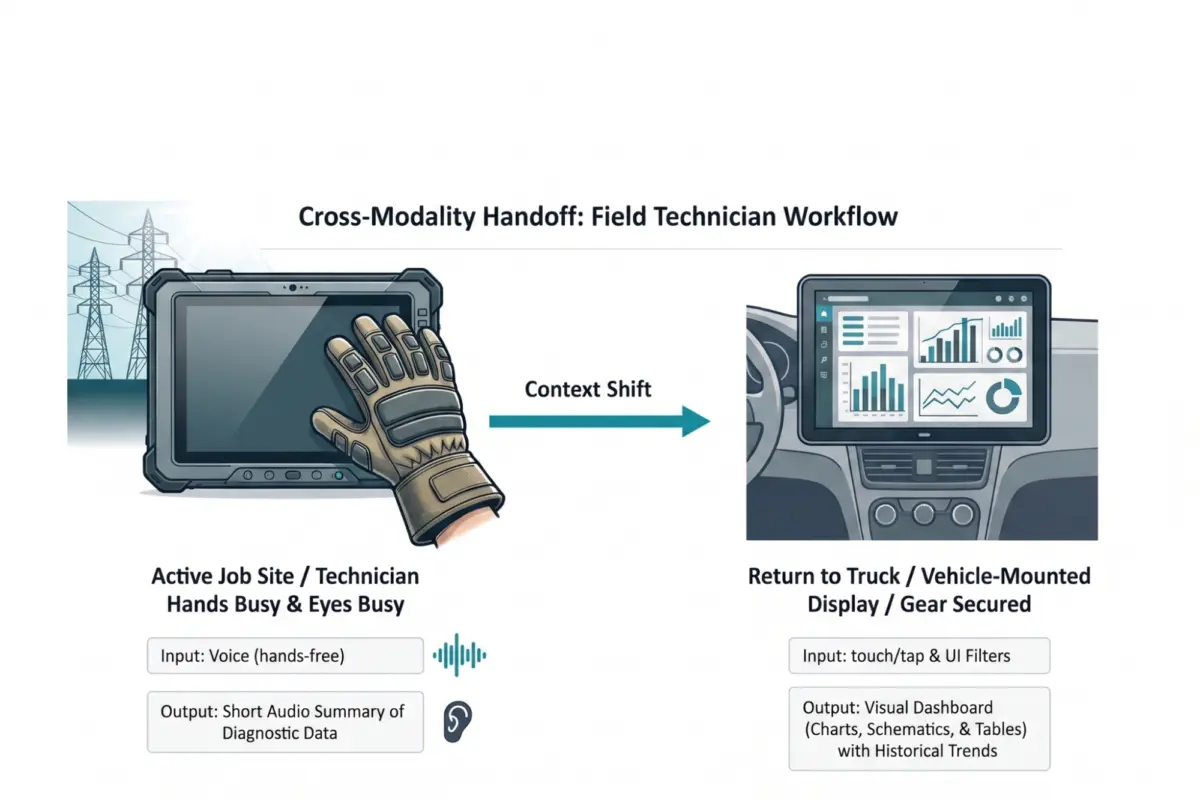
Product strategists emphasize that the physical reality of the user’s environment must dictate interface design. Whether a worker is in a quiet office environment or suspended on a high-voltage electrical grid with thick protective gloves, the system must recognize physical constraints.
Furthermore, accessibility advocates point out that breaking away from a text-only paradigm is essential for inclusive design. While visual dashboards provide rapid insights for sighted users, screen-reader-optimized audio alternatives and multi-modal handoffs ensure that AI tools expand access rather than erecting new barriers for users with visual or physical disabilities.
A Taxonomy of Input and Output Modalities
To break free from conversational defaults, practitioners need a shared vocabulary of available interface options. Modalities should be selected based on environmental fit and cognitive load.

Input Modalities
- Button / Tap: Best for single-step, binary actions (launching features, confirming alerts). Eliminates recall overhead through recognition.
- Voice: Ideal for hands-busy or eyes-busy contexts (field technicians, driving navigation). Offloads physical interaction to speech, though bounded by ambient noise.
- Natural Language Chat: Suited for ambiguous or exploratory queries (researching options, open-ended ideation).
- Form / Wizard: Designed for structured, multi-field data entry (contracts, configuration reports), breaking complex tasks into step-by-step visual sections.
- GUI (Filters, Sliders, Drag-and-Drop): Perfect for complex parameter settings or spatial tasks, preventing linguistic bottlenecks.
- Multi-modal (Image + Text): Pairs visual input with description (uploading a design mockup with annotations) to reduce descriptive overhead.
- Gesture: Enables hands-free spatial interaction (acknowledging alerts in sterile operating rooms) without surface contact.
Output Modalities
- Push Notification / Alert: Timely, ambient awareness for price spikes or task completions.
- Audio Summary: Hands-busy or eyes-busy status updates that keep users aware of physical surroundings.
- Short Text Summary: Fast answers to direct queries without the fatigue of parsing long paragraphs.
- Visual Dashboard: High-density, comparative analysis enabling rapid pattern and outlier detection.
- Interactive Canvas: Generative or iterative creative spaces where users can directly manipulate outputs.
- Inline Confirmation: Step-by-step validation providing visual proof that a system recorded a choice correctly.
Frameworks for Implementation: The Task Audit & Alignment Matrix
To ground interface design in empirical evidence rather than assumptions, product teams should deploy two core methodologies:
- The Task Audit: Conducted through contextual inquiry, observation, focused interviews, and collaborative workshops, this audit maps the physical, social, and cognitive realities of the user’s actual workspace. It documents constraints such as ambient noise, visual focus requirements, and manual dexterity limitations.
- The Input/Output Alignment Matrix: This framework maps specific user intents to optimal modality pairings. For example:
- Quick Status Check $rightarrow$ Voice Input + Audio/Push Output (Hands-busy environment).
- Complex Analysis $rightarrow$ GUI Filters + Visual Dashboard (Desk-based, high-resolution screen).
- Guided Task Completion $rightarrow$ Step-by-step Wizard + Inline Confirmation (High-stakes workflows requiring verification).
Future Outlook: The Multi-Modal AI Ecosystem
The future of AI interface design is not a single chat window, but a diverse, adaptive ecosystem spanning visual, vocal, haptic, and ambient modalities.
As demonstrated by advanced enterprise use cases—such as field technicians smoothly transitioning from voice-first, hands-free interactions on high-voltage job sites to vehicle-mounted high-resolution visual dashboards—the winning products of tomorrow will be those that respect human context.
By grounding design decisions in field research and matching modalities directly to immediate human intent, organizations can eliminate cognitive friction, boost user adoption, and build AI systems that truly serve people where they are.
