

Executive Overview
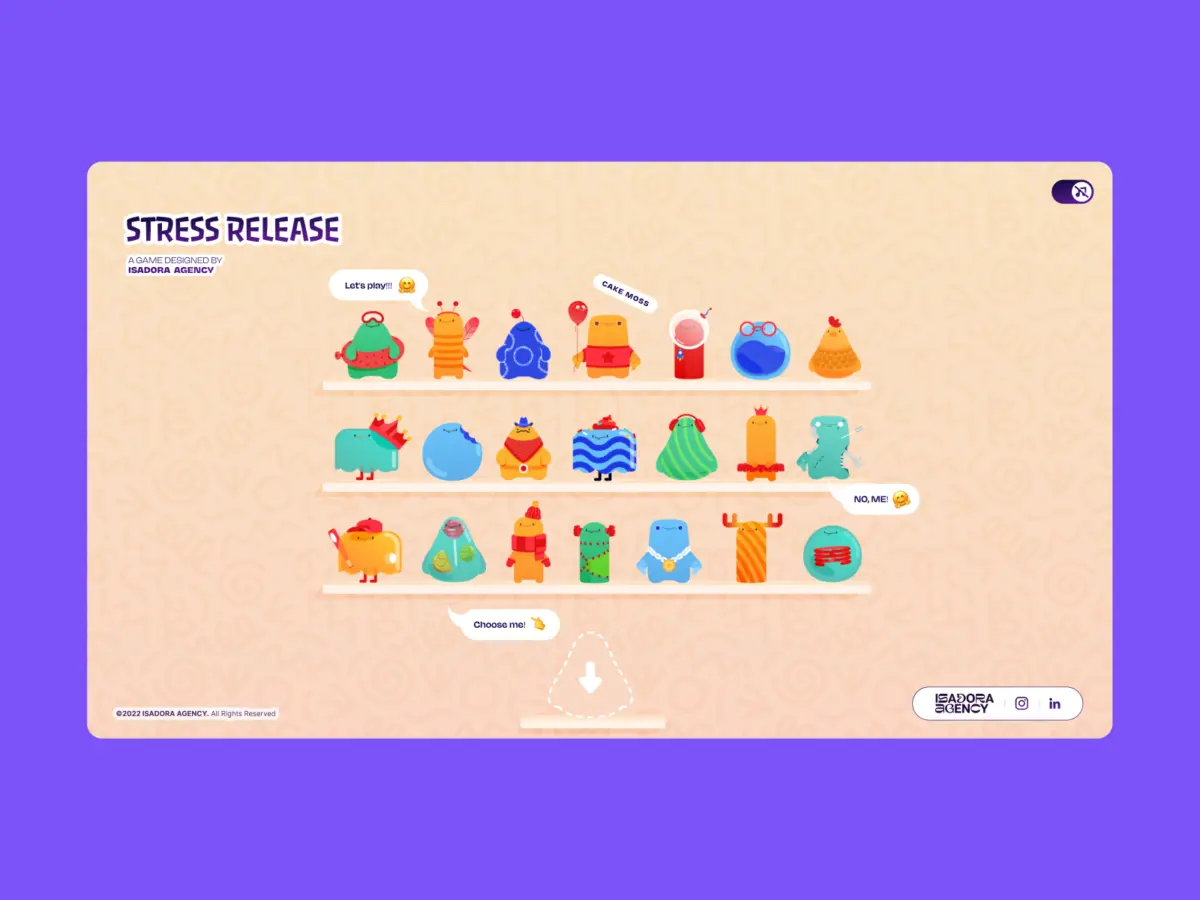
When front-end developers and UX engineers are tasked with building a web interface that feels tactile, bouncy, or destructive, the industry instinct is almost always the same: reach for a physics engine. Frameworks like Matter.js, Cannon.js, or custom WebGL solutions have become the gold standard for creating immersive, gamified websites. However, when the development team at Isadora Agency set out to build Stress Release—a digital stress-relief squeeze toy designed to let burnt-out creatives smash, stretch, and distort animated UI characters—they quickly realized that conventional physics libraries fell short of their creative vision.
The goal was to build a highly tactile experience where every click yielded a satisfying, squishy reaction. Yet, as prototyping began, a crucial distinction emerged: physics engines produce plausible motion, whereas the project’s animators had produced intentional motion. The team did not need characters to act like realistic rubber balls bouncing uncontrollably around an HTML canvas; they needed them to react in very specific, highly designed ways.
By scrapping physics engines entirely, Alexey Kopytin and the Isadora Agency team engineered a real-time stress-relief interface using zero lines of WebGL or Matter.js. Instead, they relied entirely on programmatic Lottie state controls, DOM manipulation, and distance-based mathematics. This architectural choice preserved absolute deterministic control over the art direction, proving that when building interactive web experiences, architecture must serve the art direction rather than algorithmic approximation.
Detailed Chronology: From Physics Engines to Programmatic Lottie Control
The Impasse of Algorithmic Physics
At the outset of the Stress Release project, the engineering team naturally gravitated toward standard physics frameworks. In modern web development, simulating weight, gravity, and elastic deformation is almost reflexively offloaded to libraries like Matter.js. These tools calculate rigid-body physics, collision detection, and momentum vectors with high fidelity.
However, bespoke character animations created by professional animators often rely on hand-tuned keyframes, exaggerated squash-and-stretch principles, and meticulously timed reaction loops. When algorithmic physics attempt to interpret these assets, the results can feel chaotic and unrefined. An animator might design an 181-frame build-up sequence leading to a precise visual payoff; a physics engine, by contrast, evaluates forces dynamically, frequently overriding the curated narrative arc of the asset.
Faced with this creative friction, the team made a pivotal architectural decision: abandon physics simulations in favor of absolute deterministic control. To achieve this, they turned to Lottie vector animations managed directly within the Document Object Model (DOM).
Mapping DOM Elements to Lottie States
By keeping the interface inside the standard DOM and rendering Lottie vector animations as internal SVGs, the team bypassed the rendering pipeline complexities associated with WebGL canvases. Elements were selected directly using standard IDs and CSS classes, driven by a combination of Lottie animation segments, CSS transforms, and click-event math.
To deliver a deeply satisfying tactile sensation when a user interacted with a character, the team implemented radial input mapping. This process required converting raw click coordinates from the global page space into the character’s local coordinate space:

// Character's center point in its own coordinate space
var x_center = parseFloat($("#playChar").width()  / 2);
var y_center = parseFloat($("#playChar").height() / 2);

// Click position relative to the character's top-left corner
var offset = $("#playChar").offset(); // document-relative position
var X = parseFloat(e.pageX - offset.left);
var Y = parseFloat(e.pageY - offset.top);

// Vector from center to click point
var a = parseFloat(X - x_center);
var b = parseFloat(Y - y_center);
By applying the Pythagorean theorem to calculate the straight-line distance from the center point (var distance = Math.hypot(a, b);), a single numerical value governed multiple facets of the interaction: the score awarded, the visual feedback intensity, and the exact placement of the explosion animation.
// Distance zones map to point rewards
if      (distance < 10)  givePts = 100; // bullseye
else if (distance < 40)  givePts = getRndInteger(70, 90);
else if (distance < 70)  givePts = getRndInteger(40, 70);
else if (distance < 100) givePts = getRndInteger(20, 40);
else if (distance < 120) givePts = getRndInteger(10, 20);
else if (distance < 145) givePts = getRndInteger(1,  10);
else givePts = 0; // miss

// Explosion Lottie repositioned to the exact click point
var shiftPosition = window.innerWidth < 1023 ? -20 : 200;
$("#explosionChar").css(
  "margin-left": a + shiftPosition + "px",
  "margin-top":  b + shiftPosition + "px",
);

// Fire the squish animation instantly
explosion.goToAndPlay(0);
This architecture established a concentric scoring zone system similar to a dartboard. Regardless of the visual complexity of the underlying Lottie SVG, the hitbox remained a clean, predictable circle. Furthermore, repositioning the explosion Lottie animation to coordinates (a, b) ensured that visual feedback aligned perfectly with the user’s cursor, generating the tactile illusion of physical impact purely through math and DOM positioning.
Supporting Context & Metrics: Performance and Responsiveness
Managing Narrative Flow and Interaction States
Because the application utilized DOM-managed SVG elements, desktop clicks and mobile touch events were captured natively via standard event listeners. This eliminated the need for complex raycasting or coordinate remapping layers.
Characters featured defined animation sections—such as idle loops, light reactions, medium reactions, and heavy reactions—stored as explicit frame ranges:

// Animation sections defined as frame ranges per character
const play_segments = [
  charId: 0,
  sections:
    idle:     [0,  40],   // looping idle state
    squeeze1: [41, 80],   // light reaction
    squeeze2: [81, 120],  // medium reaction
    squeeze3: [121, 160], // heavy reaction
  ,
  playOrder: ["squeeze1", "squeeze2", "squeeze3"],
  endAnimation: [161, 200]
];
When a user interacted with a character, the application executed a stepped animation sequence (stepAnim()), instantly halting current loops, disabling looping behavior, and forcing the runtime to jump directly to the target frame range:
function stepAnim()
  let p         = play_segments[0];
  let i         = p["playOrder"][curr_order_play];
  let playNow   = p["sections"][i];

  playChar.stop();                    // halt current segment immediately
  playChar.loop = false;              // no looping - play once and stop
  playChar.playSegments(playNow, true); // jump to exact frames, force immediately

  curr_order_play++;
  canPlayAnim = 0;                    // lock out further clicks mid-animation

  if (curr_order_play > p["playOrder"].length - 1)
    curr_order_play = 0;              // cycle back to start of sequence
Once the segment completed, native completion handlers returned the character smoothly to its looping idle state.
Responsive Design via CSS Custom Properties
Another significant advantage of avoiding WebGL canvases was native responsiveness. Scaling bounding boxes and collision vectors across disparate viewport sizes can introduce substantial layout complexity. By anchoring the project within the DOM, responsive resizing was handled fluidly via CSS variables (--doc-height and --doc-width). Lottie SVGs naturally scaled inside their parent containers without state corruption:
const appHeight = () =>
  const doc = document.documentElement;
  doc.style.setProperty("--doc-height", `$window.innerHeightpx`);
  doc.style.setProperty("--doc-width", `$doc.clientWidthpx`);
;
window.addEventListener("resize", appHeight);
appHeight();
Mobile Performance Optimization
Relying heavily on Lottie vector animations introduces a notable engineering trade-off: file size and rendering overhead. With 21 distinct character animations alongside multiple explosion variants, managing memory and frame rates—particularly on mobile devices—required targeted optimization strategies.

To maintain a fluid 60 frames-per-second experience, Isadora Agency implemented tiered rendering controls. For instance, when displaying the multi-character selection shelf where 21 animations played simultaneously, rendering quality was throttled and playback speed adjusted:
shelf = lottie.loadAnimation(
  container: document.getElementById("charShelf" + i),
  renderer: "svg",
  loop: true,
  autoplay: true,
  path: "assets/shelf/" + shelfFolders[i] + "/" + shelfFolders[i] + ".json",
);
lottie.setQuality(0.5); // 50% quality - reduces interpolation calculations
shelf.setSpeed(0.6);    // 60% speed - fewer frame calculations per second
Conversely, when a user entered active gameplay with a single focused character, rendering quality was restored to maximum fidelity:
playChar = lottie.loadAnimation(
  container: document.getElementById("playChar"),
  renderer: "svg",
  loop: true,
  autoplay: true,
  path: chosenChar.url,
);
lottie.setQuality(1); // full quality - only one animation at a time
Official Statements and Architectural Philosophy
The core takeaway from the development of Stress Release centers on aligning technology stacks with core design intentions. As Alexey Kopytin outlines, engineering teams must resist the urge to deploy heavy simulation libraries simply because an interface demands interactivity.
When user experience requires bespoke, highly articulated visual feedback, deterministic state control often outperforms emergent simulation. By mapping Lottie’s native timeline capabilities directly to the DOM, developers can deliver exceptionally rich, tactile user experiences while maintaining absolute, uncompromised control over the art direction.

"By mapping Lottie’s native timeline capabilities to the DOM, you can deliver incredibly rich, tactile user experiences while maintaining absolute control over the art direction." — Alexey Kopytin, Isadora Agency
Future Outlook: The Evolution of Tactile Web Design
As web browsers continue to evolve with enhanced hardware acceleration, efficient SVG rendering pipelines, and sophisticated JavaScript engines, the boundary between static web pages and immersive digital toys continues to blur. The architectural pattern established by Isadora Agency offers a compelling blueprint for future front-end engineering projects.
Rather than defaulting to complex 3D frameworks or physics engines for 2D interface elements, developers are increasingly discovering that programmatic timeline manipulation yields superior artistic fidelity. By treating vector animations as state-driven components rather than passive graphics, brands can build emotionally resonant, highly responsive web applications that respect the meticulous work of digital animators. As the digital landscape moves toward more expressive, human-centric design, decoupling interactivity from heavy physics simulations marks a maturing approach to web architecture.