

Executive Overview
Despite commanding broad browser support sitting comfortably around 94%, CSS container queries remain surprisingly underused and frequently misunderstood across the modern web development landscape. For years, the industry relied entirely on media queries as the singular bedrock of responsive design, treating the device viewport as the ultimate arbiter of layout adaptation. However, as web applications evolved into complex ecosystems of modular, reusable components, this viewport-centric approach exposed critical architectural flaws.
Container queries represent a paradigm shift: they look inward rather than outward, allowing UI components to react naturally to the specific context and spatial boundaries in which they reside. This article explores the fundamental differences between media queries and container queries, examines the psychological and practical hurdles that have stalled their adoption, and provides a clear architectural blueprint for choosing the right tool for macro- and micro-layout systems.
Detailed Chronology: From Viewport Illusions to Component Realities
To understand why container queries are so often misapplied, it is helpful to retrace how the web arrived at its current understanding of responsiveness.
When responsive web design first emerged, it was hailed as a revolutionary answer to the fragmentation of screen sizes. Media queries gave developers the ability to apply CSS rules conditionally based on characteristics of the device—most notably, its width. Yet, this created an architectural illusion: the idea that screen width alone is responsible for how responsive applications adapt to their environment.
The Blindness of Media Queries
When a developer writes a standard media query, such as:
@media (min-width: 1024px)
  .card
    display: flex;
The browser is being asked a very narrow question: "How wide is the screen right now?"
The media query answers this accurately, but it remains completely oblivious to spatial realities lower down the DOM tree. Consider what happens when that exact .card component is placed inside a grid cell that is restricted to a width of 300px on a high-resolution 1920px desktop monitor. Because the viewport width easily exceeds the 1024px threshold, the media query fires its rules anyway. The card is forced into a multi-column, horizontal flex layout despite having a mere 300 pixels of lateral breathing room, resulting in text wrapping, overflowing elements, and broken UI components.
As frontend expert Kevin Powell famously noted:
"Media queries are dumb. Not dumb in terms of the concept, but dumb in that they don’t know very much. In fact, most people assume that they know more than they do."
Because container queries share a remarkably similar syntactic footprint to media queries, developers naturally assumed they served the same purpose. This superficial resemblance led many to treat container queries as mere drop-in replacements for media queries, missing the deeper philosophical shift they represent.
Supporting Context & Metrics: The Adoption Paradox
What makes the current landscape baffling is that container queries are no longer an experimental bleeding-edge feature. According to compatibility data from Can I Use, container queries boast approximately 94% global browser support. Yet, actual utilization rates remain shockingly low.
Data from the 2025 State of CSS survey highlights a stark paradox:
- 86% of developers are fully aware of container queries.
- Only 41.4% actually use them in production environments.
While developer surveys can occasionally suffer from self-reporting biases, this metric serves as the industry’s most reliable barometer of feature adoption. Speaking at SmashingConf Amsterdam, educator and developer advocate Kevin Powell did not mince words, pointing out that container query adoption has been severely lagging. This sluggish uptake stands in sharp contrast to the fact that component-level responsiveness—the ability for a UI element to adapt to its outer container—has occupied the absolute peak of community CSS wishlists for over a decade.
The Fragmented Web
The urgency for container queries becomes undeniable when looking at device fragmentation. Modern web analytics reveal over 2,300 unique viewport sizes in active rotation across the global web. Accounting for every conceivable screen dimension using global media query breakpoints is an exercise in futility.

When we shift our mindset from the viewport to the container, we stop fighting the browser and instead rely on the content itself to dictate layout logic.
Official Perspectives and Technical Analysis
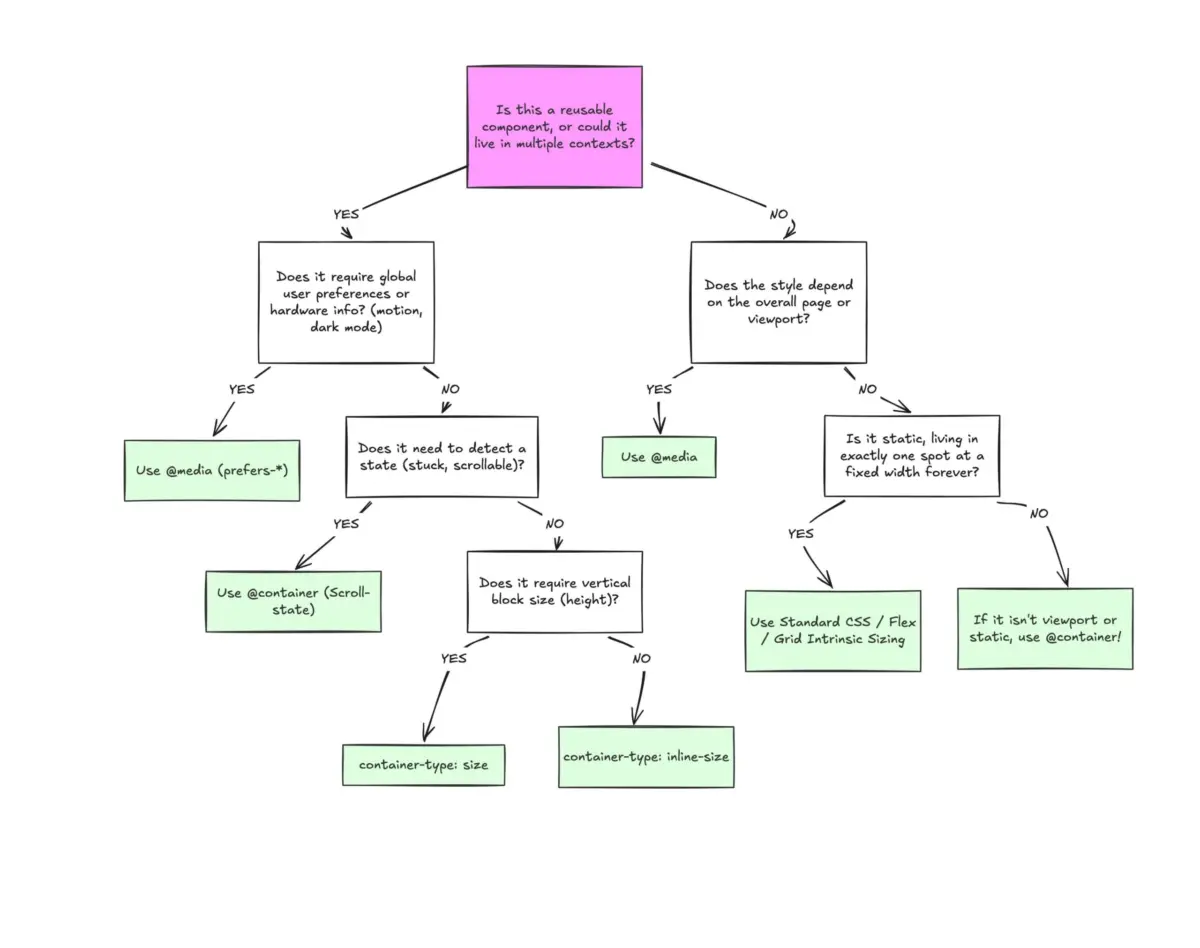
To use container queries correctly, developers must distinguish between macro-layouts and micro-layouts.
Macro vs. Micro Layouts
- Macro Layouts (Media Queries): These look outward. They govern overarching page structure, major grid systems, top-level headers, footers, system-level user preferences (such as
prefers-color-scheme), and device capabilities (like touch support). They answer the question: "What is happening across the entire application viewport?" - Micro Layouts (Container Queries): These look inward. They manage components that live inside the macro-layout—widgets, cards, navigation modules, and form inputs. They answer the question: "How much space is available for me in this specific spot, right now?"
Container Queries in Action
Let us revisit the card component example, this time utilizing a container query:
/* Register the parent wrapper as a container */
.card-wrapper
  container-name: card;
  container-type: inline-size;


/* Apply styles based on the container's available width */
@container card (min-width: 450px)
  .card
    display: flex;
    flex-direction: row;
In this architecture, the .card component is entirely insulated from the physical dimensions of the browser window. It evaluates only whether its designated parent wrapper (.card-wrapper) has at least 450px of horizontal space. If true, it transforms into a horizontal flex layout; if false, it gracefully falls back to its default block structure.
Advanced Use Case 1: Fluid Typography Within Components
Historically, responsive typography relied heavily on viewport-relative units like vw or vh paired with CSS clamp() functions:
.card-title
  font-size: clamp(100%, 1rem + 2vw, 24px);
While effective at the page level, this approach breaks down when a component is relocated to a constrained context, such as a narrow sidebar. Because the typography scales relative to the window, the text can easily become disproportionately massive or microscopic.
Container queries introduce dedicated container length units—such as cqi (container query inline size) and cqb (container query block size). By combining these with clamp(), developers can achieve truly modular fluid typography:

.card-title
  font-size: clamp(1rem, .5rem + 3cqi, 2rem);
Now, the text scales purely in harmony with the component’s immediate container, regardless of where that component is dropped on the page.
Advanced Use Case 2: Flexbox Wrap Detection
One of the most exciting capabilities unlocked by container queries is the ability to detect internal layout states without resorting to heavy JavaScript solutions like ResizeObserver.
Standard CSS cannot natively detect when flex items wrap onto a new line (there is no :wrapped pseudo-class). However, by nesting container queries inside flex items, developers can orchestrate layout transitions based on wrapping behavior:
/* The flex container */
.flex-layout
  display: flex;
  flex-wrap: wrap;


/* Register each flex item as an inline-size container */
.flex-item
  container-type: inline-size;
  flex: 1 1 390px; /* Grow to fill space, wrap at 390px */


/* Default narrow card styles */
.card
  display: flex;
  flex-direction: column;
  background: #f4f4f4;


/* Triggered once the item expands to fill a full row */
@container (min-width: 600px)
  .card
    flex-direction: row;
    align-items: center;
    background: #e2f0d9;
Known Limitations and Side Effects
Despite their immense power, container queries introduce specific architectural caveats that developers must navigate carefully.
- Self-Querying Prohibition: A container cannot query its own dimensions to style itself directly, as this would create an infinite calculation loop. For instance, you cannot declare an element as a container and simultaneously target its own display property within a
@containerblock based on that same container name. A separate parent wrapper is required. - Layout Collapse with
sizeQueries: If you declarecontainer-type: size(which evaluates both inline and block dimensions) without providing an explicit height, min-height, or aspect-ratio, the browser will calculate the container’s height as0px, effectively collapsing the layout. For most use cases, sticking tocontainer-type: inline-sizeavoids this pitfall entirely. - Custom Property Restrictions: At present, container queries cannot directly evaluate CSS custom properties (variables) within their conditions (e.g.,
@container (min-width: var(--breakpoint-lg))). This restriction prevents circular logic loops where a query condition depends on a variable that the query itself might alter.
Future Outlook: A Balanced Architectural Approach
Container queries are not meant to entirely replace media queries. Rather, modern CSS architecture thrives on the intelligent separation of concerns.
When designing user interfaces, ask yourself two simple questions:
- Does this element exist solely at the page level? (e.g., a sticky main navigation bar bound to the screen edge). If yes, reach for a media query.
- Is this component designed to be reusable across multiple contexts? (e.g., a flexible card widget that might live in a main content grid or a narrow sidebar). If yes, reach for a container query.
By aligning our styling tools with the actual boundaries of our components rather than the arbitrary boundaries of the device screen, we build resilient, truly modular web architectures fit for the thousands of distinct viewports powering the modern web.