

Executive Overview
User experience (UX) design is governed by micro-interactions, subtle visual cues, and the immediate confirmation of user intent. Among the most ubiquitous UI components across mobile and desktop applications is the accordion—a vertically stacked list of headers that can be clicked to reveal or hide associated content. Despite its apparent simplicity, the design of accordion components is riddled with usability pitfalls.
Recent landmark usability research from the Nielsen Norman Group (NN/g) brings clarity to a long-standing debate in interface design: which icons are the most reliable indicators of expansion and contraction? More importantly, the research sheds light on structural architectural failures in web navigation, specifically why split menus are inherently harmful and why segregating the interaction targets of text labels and icons leads to predictable user frustration.
This investigative report examines the psychological expectations of users navigating collapsible menus. We analyze why custom icons frequently fail, how overloaded symbols like plus/minus signs and directional arrows confuse modern digital consumers, and why the unassuming down-pointing caret remains the gold standard of accordion signifiers. Furthermore, we explore how stripping away unnecessary visual clutter and adopting straightforward conventions—such as traditional underlines for direct page links—dramatically improves task completion rates and overall interface clarity.

Detailed Chronology of UI Signifiers: Evolution and Misinterpretation
To understand why certain icons succeed while others fail, we must look at how digital iconography has evolved alongside web and mobile platforms. In the early days of graphical user interfaces (GUIs), designers relied heavily on skeuomorphism—replicating physical metaphors in digital spaces. File folders, physical buttons, and mechanical switches taught users that pushing a control yielded a predictable mechanical outcome.
As flat design and minimalist UI trends took over, the physical metaphors largely dissolved into abstract geometric shapes. However, human cognitive processing did not adapt at the same speed. Users continued to rely on learned conventions. When an accordion menu was introduced, designers cast about for symbols that could represent "more content underneath." This led to a fragmented landscape of interface conventions:
- The Absence of Icons (Pure Text Labels): Historically, text links without iconography implied direct navigation to a new URI (Uniform Resource Identifier). When modern developers began using plain text labels for accordions without accompanying visual cues, usability testing consistently revealed a primary user expectation: clicking the item would take the user to a completely new page.
- The Introduction of Directional Arrows: As multi-level menus became standard, designers introduced right-facing arrows ($rightarrow$) to imply a sub-page or deeper navigation layer, and down-facing arrows ($downarrow$) to indicate disclosure. However, user behavior proved erratic. Right-facing arrows did not reliably signal immediate page navigation, nor did down-facing arrows reliably communicate that an accordion drawer would smoothly slide open.
- The Plus/Minus Paradigm: Borrowed from tree-view file structures and mathematical expansions, the plus ($+$) and minus ($-$) symbols became popular fixtures. While users generally understood that clicking a plus sign would expand a view, these symbols suffered from severe "semantic overload."
- The Rise of the Caret: Eventually, the minimalist caret (a simple chevron or wedge) emerged as a dedicated shorthand for dropdown and accordion behaviors. Unlike arrows or mathematical signs, carets lack extraneous semantic baggage, making them uniquely suited for disclosure tasks.
Supporting Context & Metrics: The NN/g Empirical Findings
Recent comprehensive studies conducted by the Nielsen Norman Group have quantified user behavior regarding accordion icons, shattering several long-held assumptions among web developers and product designers.

The Hit Area Dilemma: Icons vs. Text Labels
One of the most revealing metrics uncovered in the NN/g research pertains to where users actually click or tap. Across almost all tested icon categories—including arrows, plus signs, and custom graphic markers—participants were remarkably equal in their likelihood to tap on either the text label or the icon itself.
The sole exception to this rule was the caret. When a caret was present, users demonstrated a distinct behavioral bias toward clicking directly on the icon rather than the accompanying text label. This psychological phenomenon demonstrates that the choice of an icon does not merely serve as a passive visual decoration; it actively defines and alters the entire hit area of the component. Designers must therefore ensure that the programmatic hit target encompasses both the label and the icon to prevent frustrating "dead click" zones.
The Dangers of Custom and Overloaded Icons
Many design teams attempt to distinguish their brand through bespoke, highly stylized custom icons. Usability data warns strongly against this practice. Custom icons fail because they lack established cognitive grounding; users cannot intuitively discern whether a stylized graphic represents a filter, a bookmark, a settings toggle, or an accordion drawer.

Even standard icons face the hurdle of semantic overload:
- The Plus Sign ($+$): In contemporary digital ecosystems, a plus sign carries a dozen different meanings depending on the context. It can signify "Add to Cart," "Zoom In," "Save for Later," "Create New Item," or "Expand." In multi-level hierarchical menus where multiple sections are expanded simultaneously, the plus sign loses its clarity, leaving users uncertain about the state of the system.
- Directional Arrows ($leftarrow / rightarrow / uparrow / downarrow$): Similarly, standard arrows are tasked with representing scrolling actions, sliding carousels, pagination, sorting mechanisms, and page jumps. Because these symbols are overworked across different UI patterns, relying on them for accordions introduces cognitive friction.
The Anti-Pattern of Split Menus
Perhaps the most critical architectural warning emerging from recent UX research is the condemnation of split menus for accordions.
A split menu pattern typically configures a single list item so that the text label links directly to an independent overview page, while the adjacent icon (or a split section of the button) controls the expansion of the accordion drawer. Usability testing demonstrates that this pattern is disastrous for task success rates.

Users routinely misclick. A user intending to open a submenu clicks the text label and is abruptly yanked away to a new landing page, breaking their browsing flow. Conversely, a user attempting to navigate to the category overview clicks the icon, only to have an unwanted accordion menu slide down clumsily.
The Recommended Alternative: Modern UX best practices dictate that navigation patterns should be unified. The primary menu item should act as a singular interactive target that toggles the expansion state. To provide users with access to the parent category’s landing page, designers should include an explicit "Overview" or "All [Category Name]" link as the first item inside the newly revealed accordion drawer. This eliminates ambiguity, prevents accidental page navigation, and respects the user’s mental model.
Official Industry Standards and Case Studies
To see these principles applied in the wild, one can examine how major global enterprises structure their information architecture.

The DHL Navigation Model
Logistics giant DHL redesigned its complex mobile and desktop navigation menus to align with clean, predictable UI patterns. By auditing their global information architecture, DHL eliminated unnecessary directional arrows and completely abolished split-menu architectures.
In the DHL design system, tapping a top-level category header smoothly toggles the accordion open. Inside each expanded drawer, a dedicated "Overview" link provides direct passage to the main category landing page. This approach removes visual clutter, speeds up mobile interaction times, and ensures zero user error regarding whether a click will navigate or expand.
Lens.org Scholarly Search
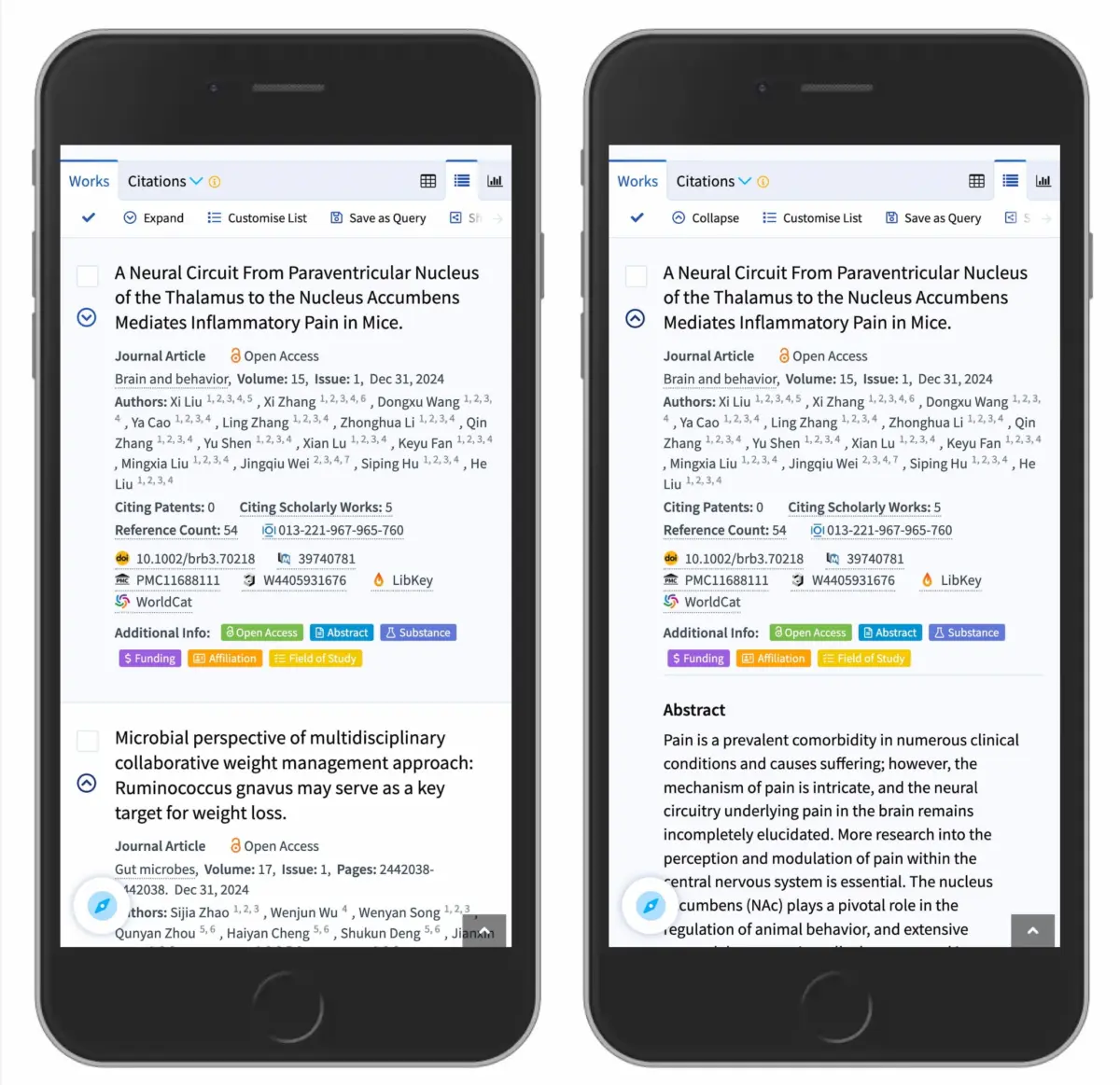
Another prime example is Lens.org, a massive global platform mapping scholarly works, patents, and research metrics. When dealing with dense mobile search results lists, Lens.org utilizes a straightforward caret-down icon to signify collapsible bibliographic records.

When collapsed, the interface displays a clean metadata summary accompanied by a downward-pointing caret. Upon interaction, the caret smoothly rotates or shifts to point upward, revealing the full abstract and extended metadata. The transition is instantaneous, unambiguous, and heavily relies on the low-cognitive-load properties of the caret icon.
Future Outlook: Principles for Modern Interface Designers
As web and application interfaces continue to evolve across an expanding array of form factors—from ultra-wide desktop monitors and foldable smartphones to smartwatches and spatial computing interfaces—the fundamentals of human-computer interaction remain anchored in clarity, predictability, and minimal cognitive load.
Product teams, UX researchers, and front-end developers can future-proof their interface design systems by adhering to the following core directives:

- Prioritize the Caret for Disclosure: When building collapsible accordions, tree views, or expandable card components, default to the down-pointing caret ($downarrow$). Upon interaction, animate or shift it to indicate the active state (such as pointing up or sideways). It remains the safest, most universally understood icon choice in modern design.
- Embrace Simplicity for Direct Links: If a user interface element is intended to take a user to a new URI or view, do not clutter it with decorative arrows or carets. Rely on the time-tested, universally recognized convention of an underline, or a clean typography change. It may lack avant-garde flair, but it works flawlessly every single time.
- Abolish Split Menus: Never force a single menu item to perform dual, competing actions via split targets (text label vs. icon). Unify the interaction model. If an element expands, make the entire header control the expansion, and place category overview links safely inside the revealed container.
- Test Against Cognitive Overload: Avoid relying on heavily overloaded symbols like plus/minus signs or ambiguous directional arrows in complex, multi-tiered navigational hierarchies. Keep signifiers context-specific and clean.
Ultimately, the overarching lesson of contemporary UX research is profound in its simplicity: simpler is better. By respecting user mental models, eliminating architectural friction, and aligning iconography with proven cognitive habits, designers can build digital experiences that feel effortless, intuitive, and truly human-centric.