

Executive Overview
In the realm of digital product design, few user interface components are as ubiquitous—or as frequently mishandled—as the humble accordion menu. Designed to save precious screen real estate by collapsing and expanding content sections, accordions seem deceptively simple. Yet, recent empirical research from the Nielsen Norman Group (NN/g) reveals that minor design discrepancies, such as the choice of a micro-icon or the implementation of a split menu, can introduce staggering amounts of cognitive friction.
For years, designers have relied on custom icons, varying directional arrows, plus-minus symbols, and split buttons under the assumption that visual ornamentation enhances usability. However, UX data tells a different story. When users interact with navigational accordions, ambiguity is the enemy of conversion and engagement. Selecting the wrong icon can trick users into expecting page navigation where none exists, while split menus—which route the text label to one destination and the toggle icon to another—actively sabotage user intent.
This investigative report examines the psychological impact of accordion iconography, unpacks why split menus are fundamentally flawed, and outlines authoritative best practices for modern web and mobile architecture. By synthesizing recent industry research and examining real-world implementations, product teams can eliminate unnecessary interface complexity and adopt the single safest icon choice: the humble, universally understood caret.
Detailed Chronology of the UX Research
To understand how our current interface conventions evolved, we must look at how navigational patterns have been tested and scrutinized over successive generations of web design.

In the early days of graphical user interfaces (GUIs), accordions were primarily utilized in desktop software file trees, where plus (+) and minus (-) signs dictated folder expansion. As the web transitioned to mobile-first responsive design, designers faced severe spatial constraints, particularly on smartphones. The accordion emerged as a primary design pattern to handle deeply nested information architectures, especially in e-commerce mega-menus and mobile documentation sites.
However, as the pattern scaled across millions of websites, inconsistency ran rampant. Some designers used right-facing arrows to indicate navigation, while others used downward-facing arrows to indicate expansion. Triangles, chevrons, plus signs, and completely custom vector shapes flooded the market.
Recognizing a persistent gap in empirical data regarding how users actually perceive these symbols, usability authorities—most notably the Nielsen Norman Group—embarked on comprehensive observational studies. These studies tracked user click-and-tap behaviors across various icon types, states, and layouts.
The historical timeline of this research highlights a sobering realization: instead of improving discoverability, decades of "creative" UI variations have actively trained users to hesitate. When users encounter a menu item, their brains instantly calculate probabilities based on visual signifiers. If those signifiers are overloaded—such as a plus sign that could mean "add to cart," "zoom in," or "expand"—the cognitive load spikes. The chronological shift in modern UX philosophy has consequently moved away from subjective aesthetic expression toward data-backed minimalism: if an icon does not instantly communicate its exact mechanical outcome, it should be simplified or removed entirely.

Supporting Context & Metrics: Decoding User Behavior
The mechanics of user interaction with accordions rely heavily on hit targets and visual signifiers. UX metrics demonstrate that users do not differentiate between text labels and accompanying icons as cleanly as designers might assume.
The Hit Area Dilemma
Data from NN/g studies indicates that participants are remarkably democratic in where they click or tap. Across almost every tested icon type—arrows, plus signs, chevrons, and triangles—users were equally likely to click directly on the text label as they were on the icon itself. The only notable exception was the caret, which drew a slightly higher concentration of direct taps on the icon graphic.
This behavioral reality means that an icon choice does not merely serve as an isolated visual hint; it dictates the psychological expectation for the entire hit area of the menu item. If an ambiguous icon is placed next to a category title, the user’s entire interaction model for that row becomes compromised.
The Problem of the "No-Icon" State
When menus feature text labels entirely devoid of any icon, user expectations crystallize rapidly: no icon implies page navigation. Users naturally assume that tapping a clean text link will transport them to a dedicated category or overview page.

When designers attempt to bypass this by introducing custom graphical shapes that lack standardized meanings, users experience disorientation. They are forced to guess whether the graphic is a decorative brand element, a status indicator, or an interactive toggle.
Why Plus/Minus and Arrows are Overloaded
While plus (+/–) and directional arrow symbols (⬅️/➡️ or ⬆️/⬇️) are widely understood in isolation, they suffer from severe semantic overloading:
- The Plus Sign (+): In digital ecosystems, the plus sign has too many jobs. It can mean "add item to cart," "save for later," "zoom in on an image," or "expand a row." When applied to multi-level navigation trees where multiple tiers are open simultaneously, the plus symbol loses its contextual anchoring.
- Directional Arrows: Horizontal arrows generally imply forward progression or linear steps, while vertical arrows can suggest scrolling, sorting, or jumping to specific anchors on a long-form page. Using them to represent accordion toggles introduces subtle contradictions in the user’s mental model.
The Danger of Split Menus
Perhaps the most alarming architectural anti-pattern uncovered in recent UX research is the split menu. In a split-menu configuration, the primary text label of an accordion header is hyperlinked to a destination landing page, while the adjacent toggle icon is programmed to expand or collapse the dropdown menu.
Usability testing consistently flags split menus as harmful. They violate foundational UX heuristics—specifically, Fitts’s Law and the principle of predictability. Users routinely miss the tiny hit target of the icon, accidentally triggering a full page navigation when they merely wanted to view sub-categories. Conversely, when they intend to visit the category landing page, they may inadvertently trigger the accordion drop-down.

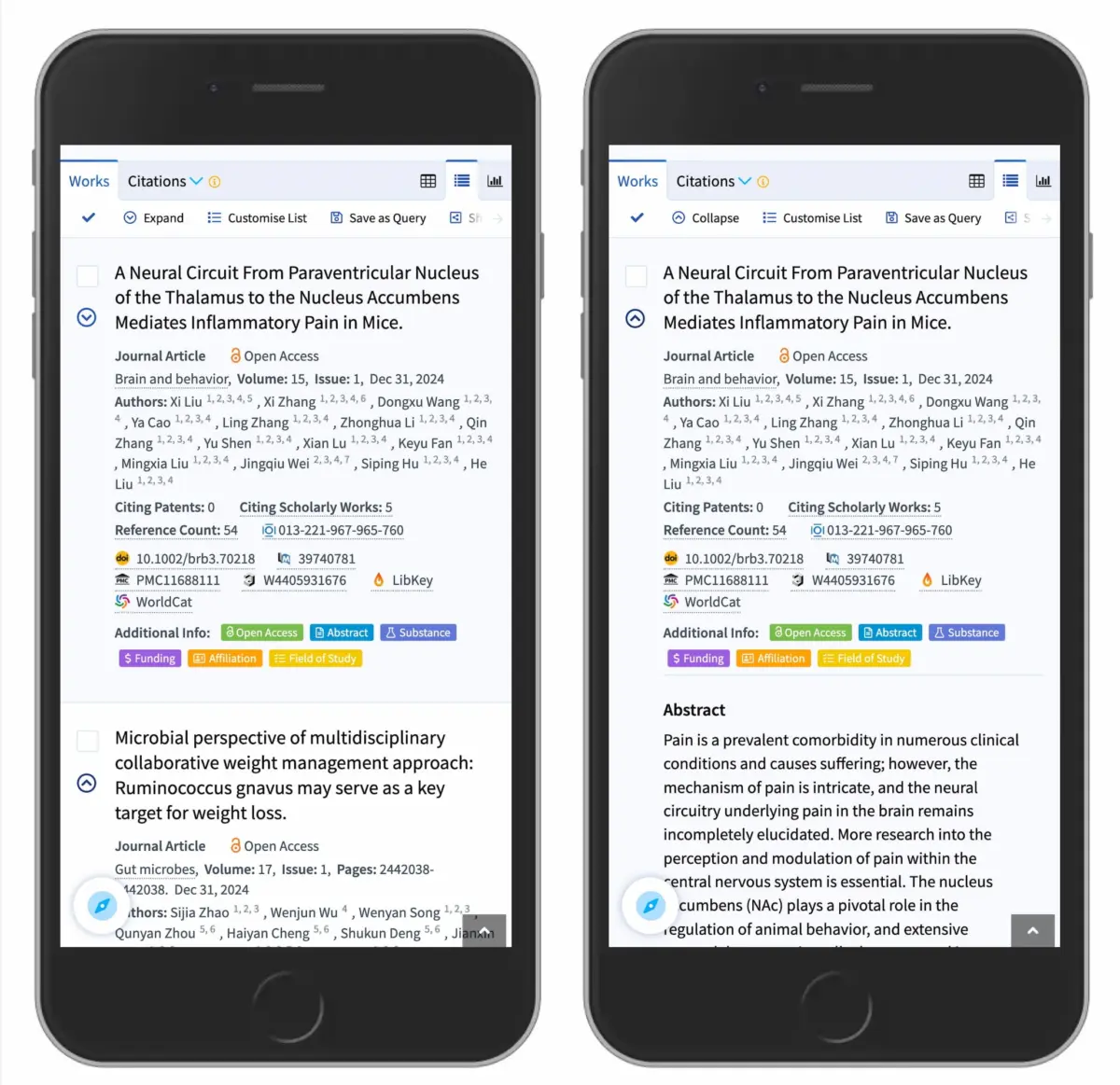
Real-world implementations by major global brands have frequently fallen into this trap, leading to unnecessary frustration, elevated bounce rates, and broken user journeys. Modern design standards dictate that if a category requires both an overview page and a sub-menu, the menu itself should open upon tapping the primary container, while a dedicated "Overview" link should be housed neatly inside the expanded dropdown drawer (as successfully demonstrated by institutional leaders like DHL and academic search platforms like Lens.org).
Official Guidelines and Expert Recommendations
To synthesize these insights into actionable design frameworks, industry thought leaders and accessibility advocates have established clear, unambiguous guidelines for accordion design.
1. The Caret is the Safest Choice
According to empirical usability data, the downward-pointing caret (🔽) or triangle is the most reliable, universally recognized visual signifier for a collapsible accordion state. By default, a closed accordion should display a downward caret. Upon user interaction, this icon transitions smoothly to an upward-pointing caret (🔼) or a sideways chevron (▶️) to denote the expanded state. This visual feedback loop provides immediate closure to the user’s cognitive query.
2. Underline Direct Links
If a text label is designed to take a user to a completely new webpage, the most effective and accessible treatment is remarkably old-school: underline it.
As design systems have evolved to favor ultra-clean, minimalist typography, many teams have stripped underlines from text links, relying entirely on color contrast or position. However, combining un-underlined text with ambiguous icons creates mass confusion. If it is a link, underline it. Refrain from cluttering it with unnecessary carets, arrows, or decorative indicators. Keep link signifiers dedicated exclusively to navigation, and keep toggle signifiers dedicated exclusively to disclosure.

3. Eliminate Split Menus Entirely
Product design teams must audit their existing component libraries to eradicate split-button accordions. When designing a hierarchical menu:
- Make the parent container trigger the accordion expansion.
- House the primary category landing page link inside the dropdown content area, labeled clearly (e.g., "All Categories Overview").
- Ensure that hit targets on mobile devices are sufficiently large (at least 48×48 pixels) to prevent mis-taps.
Future Outlook: The Evolution of Accessible Micro-Interactions
As we look toward the future of web design, digital interfaces are increasingly scrutinized through the lenses of accessibility, inclusivity, and cognitive ergonomics. With the rise of AI-driven interface generation and complex design tokens, the temptation to introduce novel, flashy UI elements remains high. However, true design maturity lies in restraint.
The ongoing research into micro-interactions confirms that human cognitive architecture evolves slowly. Universally understood symbols like the caret endure because they align with spatial intuition—pointing downward reveals what lies beneath.
In the coming years, design systems will likely enforce stricter adherence to these empirically proven patterns. Automated accessibility checkers and usability auditing tools will flag non-standard accordion implementations and split-menu anti-patterns before code ever hits production. Furthermore, as voice interfaces, spatial computing, and multi-modal devices redefine how we interact with digital data, the clarity of visual affordances will become even more critical.

Ultimately, the goal of digital architecture is to fade into the background, allowing users to accomplish their goals with zero friction. By discarding overcomplicated custom icons, eliminating treacherous split menus, and embracing the humble caret alongside clear, underlined hyperlinks, designers can build web experiences that are not only aesthetically pleasing, but profoundly intuitive.
Editor’s Note
We hope you find these insights valuable as you refine your digital products and design systems. A friendly shout-out to the researchers, developers, and designers who continuously study user behavior to make the web a more navigable, user-friendly space for everyone. That shared dedication to open knowledge is why we truly love the web.
At Smashing, our mission is anchored in supporting the people who build and design digital experiences. Whether through our in-depth articles, books, or online workshops and events, we are committed to fostering a community centered on accessibility, usability, and exceptional engineering.
We regularly host interactive online workshops featuring industry experts—complete with friendly group discounts for teams of five or more, as well as special rates for schools and students. If you are looking to elevate your team’s design standards or master modern frontend architecture, reach out to our team to explore upcoming sessions. Let’s continue building a better, clearer, and more accessible web together!