

Executive Overview
In the realm of digital interface design, few components are as ubiquitous—or as frequently mishandled—as the humble accordion menu. Used ubiquitously across e-commerce platforms, SaaS dashboards, and content-heavy portals, accordions are designed to save precious screen real estate by collapsing and expanding content blocks on demand. However, recent empirical user experience (UX) research reveals a startling reality: minor inconsistencies in icon selection, coupled with flawed interaction patterns like split menus, are silently eroding user trust, increasing cognitive load, and frustrating visitors across the web.
For years, digital designers have relied on intuition, aesthetic trends, or arbitrary stylistic choices when selecting expand/collapse indicators. Carets, chevrons, directional arrows, plus-minus symbols, and custom vector glyphs have been deployed interchangeably. Yet, comprehensive studies—most notably from the Nielsen Norman Group (NN/g)—demonstrate that users carry deeply ingrained mental models regarding these visual cues. When an interface violates these implicit expectations, interaction friction skyrockets.
This report offers an authoritative investigation into the psychology of accordion iconography. By examining user behavior metrics, analyzing the inherent dangers of split menus, and reviewing best practices championed by industry leaders, this article provides a definitive blueprint for crafting intuitive, friction-free navigation systems. Ultimately, the research confirms a foundational rule of modern interface design: when it comes to navigation and disclosure components, clarity triumphs over cleverness every single time.
Detailed Chronology: The Evolution of Disclosure UI and Modern UX Research
To understand why contemporary interface design is grappling with accordion usability, it is necessary to trace how disclosure patterns have evolved alongside the web itself.

In the early days of graphical user interfaces (GUIs) and desktop software, tree views and hierarchical menus established strict visual conventions. Operating systems like early Windows and Mac OS relied heavily on simple geometric indicators—such as triangles and plus/minus boxes—to signal expandable directory trees. When the web transitioned from static HTML documents to dynamic, interactive applications powered by JavaScript and CSS, these desktop paradigms were haphazardly ported to browser viewports without adequate standardization.
During the Web 2.0 boom, mobile-first responsive design radically changed layout constraints. With screen sizes shrinking dramatically on smartphones and tablets, the accordion pattern transformed from a niche organizational widget into a core architectural component for mobile navigation drawers. Designers suddenly faced extreme space limitations, prompting a proliferation of creative—and often confusing—iconography. To fit more features into tighter spaces, teams experimented with custom icons, animated state transitions, and multi-layered nested accordions.
As these patterns multiplied, so did user friction. Recognizing a critical gap in empirical design data, UX research institutions—spearheaded by landmark studies from the Nielsen Norman Group—began systematically testing how everyday users interact with various accordion configurations.
The research methodology typically involved observing participants interacting with simulated and live website menus under controlled conditions. Researchers tracked click-through rates, eye-tracking patterns, and verbalized expectations when users encountered different visual signifiers:

- Menus devoid of any icons.
- Menus utilizing standard carets (triangles).
- Menus utilizing directional arrows (pointing right, down, or up).
- Menus utilizing mathematical symbols (+ and -).
- Menus utilizing complex custom vectors.
The findings charted a clear trajectory away from guesswork. Users did not interpret these icons uniformly; rather, specific shapes triggered predictable behavioral responses. Icons directly dictated whether a user expected to navigate to an entirely new page or simply expand a localized container. Armed with this chronological data, the UX community has begun shifting toward a standardized, evidence-based approach to disclosure design—one where the caret reigns supreme and ambiguity is systematically eliminated.
Supporting Context & Metrics: Decoding User Expectations and Icon Psychology
To build interfaces that align with human psychology, designers must understand how users interpret visual language. The empirical data surrounding accordion icons reveals distinct patterns in user perception, click distribution, and cognitive processing.
The Problem with "No Icon"
When a menu item is presented as plain text without any accompanying visual indicator, user expectations are remarkably uniform: they expect to be transported to a new page.
Data from usability tests indicates that the absence of a disclosure icon acts as a strong signifier of direct navigation. If a user taps a category label that lacks an icon, their mental model tells them, "This is a link; clicking it will load a new URL." Consequently, when a designer attempts to make a text-only label trigger an accordion expansion instead, it frequently catches the user off guard, creating a jarring UX disjunction.

The Anatomy of the Hit Area
A fascinating insight emerging from modern UX metrics involves hit-area behavior. Across nearly all tested icon types—including directional arrows, plus-minus signs, and custom glyphs—participants were roughly equally likely to tap on the text label as they were on the icon itself.
This behavioral reality carries profound implications for front-end development and visual layout:
- The icon is not just a decoration: Because users interact with the visual signifier and the text label with near-equal frequency, the icon directly dictates the affordance of the entire interactive block.
- The Caret Anomaly: Interestingly, research shows that when a standard caret (downward-pointing triangle) is used, users actually exhibit a slight preference for tapping directly on the icon compared to other variations. This highlights the caret’s strong visual pull as an interactive trigger.
The Danger of Overloaded Symbols: Plus/Minus and Arrows
While plus/minus symbols (+/-) and directional arrows (→/↓) are widely recognized, they suffer from a critical flaw: they are semantically overloaded.
- The Plus/Minus Dilemma: In digital environments, a plus sign does not exclusively mean "expand accordion." Across different contexts, a plus icon can signify "add to cart," "save for later," "zoom in," or "create a new item." When deployed in multi-level nested navigation where multiple accordions can be open simultaneously, the plus/minus paradigm breaks down mentally, leaving users confused about the current state of the hierarchy.
- The Directional Arrow Confusion: Right-facing (
→) and downward-facing (↓) arrows present another layer of ambiguity. While a right arrow typically suggests forward progression or page navigation, a down arrow is meant to suggest vertical disclosure. However, users frequently interpret arrows as scroll indicators, slide controllers, or anchors that jump to specific page coordinates.
Why Split Menus Are Harmful
Perhaps the most damaging pattern identified in modern interface research is the split menu (or split-button accordion pattern).

In a split menu setup, the text label of a category links directly to an overview page, while the adjacent icon is programmed to open the accordion drawer. On paper, this might seem like a clever way to offer dual functionality. In practice, usability testing proves it is a disaster.
Users rarely notice or comprehend the subtle distinction between clicking the text versus clicking the icon. As a result, visitors trying to open an accordion frequently trigger accidental page loads, while users seeking the main category page find themselves stuck opening and closing menus instead. This structural contradiction violates Jakob’s Law of the Internet—which states that users spend most of their time on other sites, expecting your site to work with the same familiar mental models they already know. Split menus violate this expectation, leading to high frustration and abandonment rates.
Official Guidelines & Best Practices: The Definitive Rules of Accordion Design
Synthesizing the empirical evidence provided by UX research groups and top-tier digital product teams yields a streamlined, authoritative set of guidelines for modern web and mobile designers.
+-------------------------------------------------------------------------+
|                        ACCORDION DESIGN CHEAT SHEET                     |
+----------------------------------+--------------------------------------+
| DESIGN GOAL                      | RECOMMENDED PATTERN                  |
+----------------------------------+--------------------------------------+
| Direct Page Navigation           | Plain text with a simple underline.  |
|                                  | NO icons, NO arrows.                 |
+----------------------------------+--------------------------------------+
| Accordion Expansion (Collapsed)  | Caret/triangle pointing DOWN (▼).    |
+----------------------------------+--------------------------------------+
| Accordion Expansion (Expanded)   | Caret pointing UP (▲) or RIGHT (►).  |
+----------------------------------+--------------------------------------+
| Alternative Expansion            | Plus / Minus (+ / -) symbols.        |
+----------------------------------+--------------------------------------+
| Multi-level Navigation           | Single unified trigger per row;      |
|                                  | include "Overview" links inside.     |
+----------------------------------+--------------------------------------+
1. The Safe Choice: The Caret Rules
The single most reliable, universally understood indicator for accordion behavior is the caret (triangle).

- Default State: Use a downward-pointing caret ($blacktriangledown$) to signify that content is collapsed and available for expansion.
- Active State: Upon interaction, rotate or shift the caret to point upward ($blacktriangle$) or sideways ($black$), signaling that the container is expanded.
The caret carries zero semantic baggage; unlike arrows or plus signs, it is almost exclusively associated with vertical disclosure in modern digital interfaces.
2. If It’s a Link, Underline It
If a menu item or header is designed to transport the user to a new page, keep it clean and conventional: simply underline the text.
Do not clutter navigation items with decorative right-facing arrows ($rightarrow$) attempting to show that a link leads somewhere. Users already understand that hyperlinked text leads to a new destination. Eliminating unnecessary arrows reduces visual noise and preserves the arrow symbol strictly for functional roles where it is genuinely required.
3. Banish Split Menus
Abandon split menus entirely. Instead of attempting to force two distinct actions (navigation and expansion) into a single horizontal list item, adopt a cleaner architectural pattern:

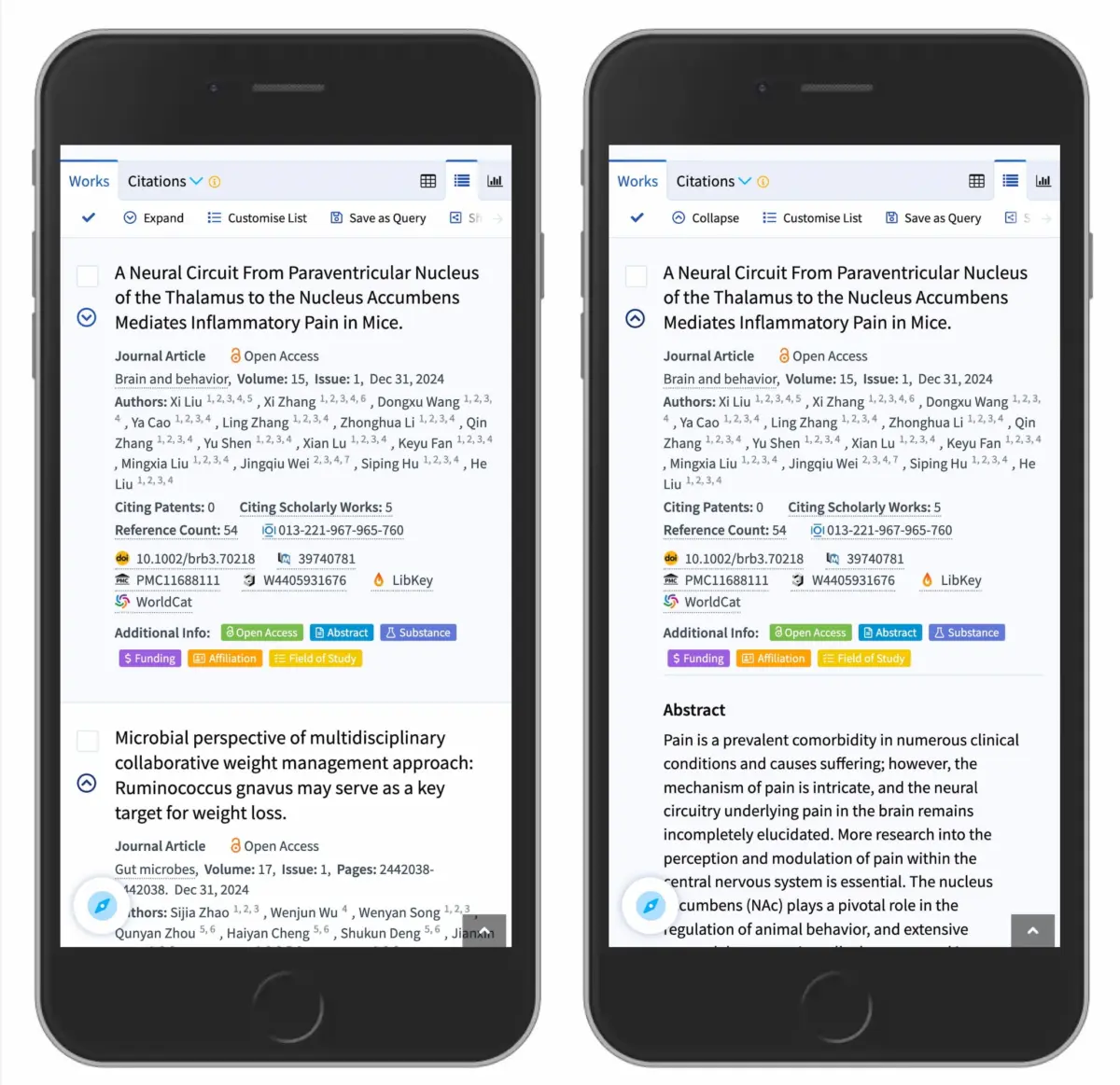
- Make the entire row a unified trigger that opens the accordion menu.
- To grant users access to the main category’s overarching landing page, place a dedicated "Overview" link as the first item inside the expanded dropdown menu.
Major logistics and e-commerce platforms—such as DHL and enterprise search portals like Lens.org—have successfully implemented this pattern, resulting in dramatically improved navigation clarity and reduced user error rates.
Future Outlook: Simplicity as the Ultimate Sophistication
As digital product design matures, the industry is experiencing a profound philosophical shift. For years, the pursuit of cutting-edge design often meant introducing novel micro-interactions, custom vector animations, and highly stylized UI components that challenged user conventions in the name of brand differentiation.
However, the empirical data on accordion iconography and navigation patterns points toward a humbling truth: users do not want to relearn how to use basic interface elements. When interacting with complex information architectures, digital consumers crave predictability, speed, and effortless comprehension.
Looking ahead, the future of interface design will undoubtedly prioritize radical simplicity. As design systems become more rigorous and accessibility (a11y) standards become legally and ethically mandated across global markets, components like accordions will face stricter scrutiny. Screen readers, keyboard navigation modules, and touch-target optimization all benefit immensely from standardized, uncluttered disclosure patterns.

By anchoring design decisions in rigorous user research rather than fleeting aesthetic trends, product teams can eliminate friction before it starts. The directive moving forward is clear: choose the caret, drop the split menus, underline your direct links, and remember that on the web, simplicity is always the ultimate sophistication.