

Executive Overview
When front-end developers, creative technologists, and user experience (UX) engineers are tasked with constructing a web interface that feels genuinely tactile, bouncy, or playfully destructive, the standard industry instinct is almost invariably the same: reach for a physics engine. Frameworks such as Matter.js, Cannon.js, or complex custom WebGL solutions have rightfully earned their reputations as the gold standard for breathing life, gravity, and momentum into immersive, gamified websites.
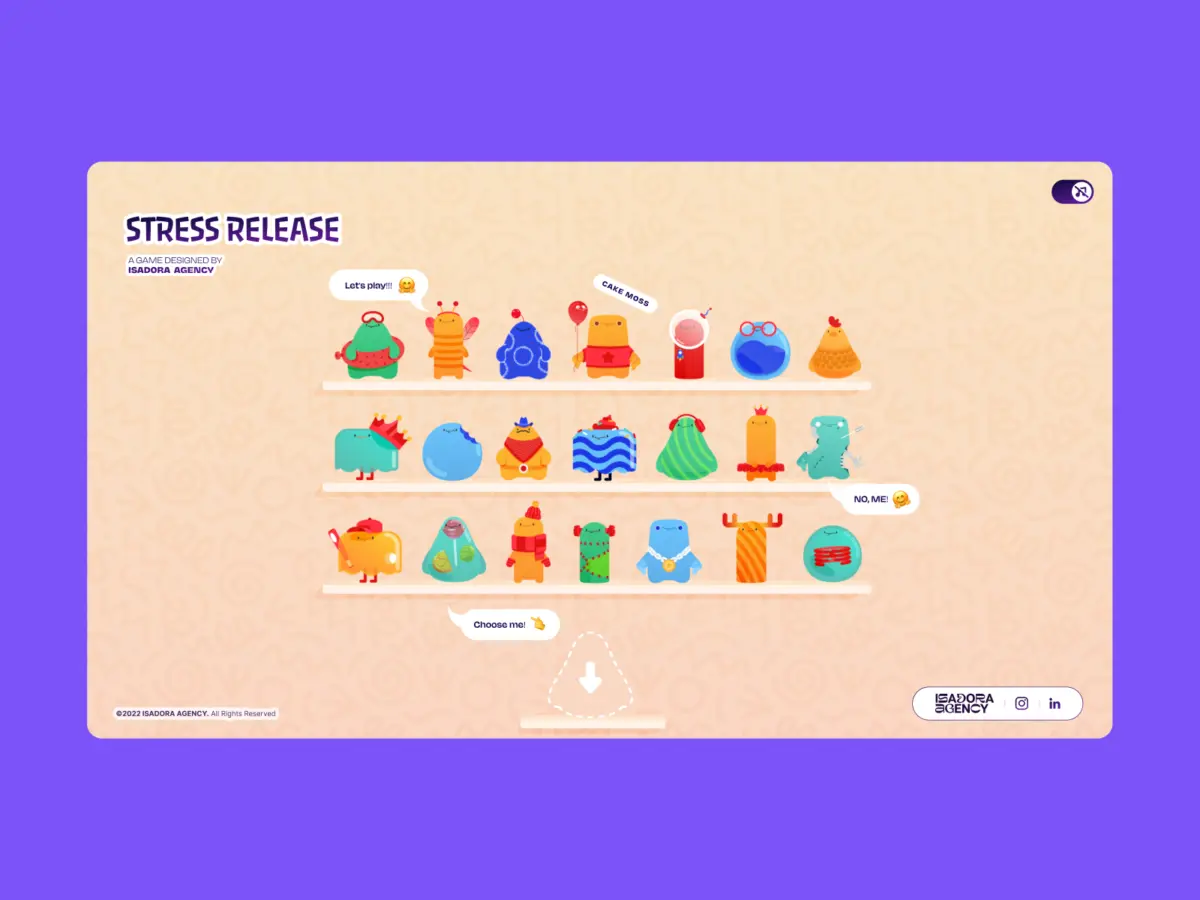
However, technology choices should always serve the ultimate art direction rather than dictating it. When the digital design team at Isadora Agency set out to build Stress Release—a playful, browser-based digital stress-relief squeeze toy engineered specifically to let burnt-out creatives smash, stretch, and distort animated UI characters—we initially explored the traditional physics route. Our primary objective was to forge a highly tactile experience where every user click yielded an immediately satisfying, squishy reaction.
Yet, as we moved deeper into the prototyping phase, we uncovered a fundamental mismatch between algorithmic simulation and creative intent. Physics engines excel at producing plausible motion, but our animators had meticulously crafted intentional motion. We did not need our digital characters to behave like unpredictable rubber balls bouncing erratically across an infinite canvas; we needed them to react in hyper-specific, beautifully designed, frame-accurate ways.
Consequently, we made a bold architectural choice: we scrapped the physics engine entirely.
In this exhaustive case study, we break down how our engineering team built a real-time, highly interactive digital stress toy without employing a single line of WebGL or Matter.js. Instead, we relied entirely on programmatic Lottie state controls, native DOM manipulation, and straightforward distance-based mathematics to achieve absolute, deterministic control over our designers’ creative vision.
Detailed Chronology: The Evolution of Stress Release
Phase 1: Conceptualization and the Physics Dilemma
The genesis of Stress Release began with a simple premise: modern professionals spend their days staring at rigid, unyielding interfaces. What if the web could offer a healthy, whimsical outlet for digital frustration? The concept required a shelf of diverse, colorful characters that users could select, poke, squeeze, and stretch.
In the early wireframing and technical scoping phases, developers naturally gravitated toward standard web physics libraries. If a user clicks a character’s cheek, a physics engine calculates vectors, applies impulse forces, and deforms a mesh. But this approach presented a massive hurdle for our motion designers. Our animators had spent weeks authoring bespoke .json Lottie files. These vector animations featured hand-drawn keyframes, deliberate squash-and-stretch curves, and carefully timed release sequences that conveyed specific character personalities.
An algorithmic physics engine would inevitably overwrite, approximate, or muddy these carefully tuned animations. A procedural bounce cannot inherently understand the comedic timing of a character’s slow-burn build-up followed by an explosive reaction. To protect the art direction, we realized our code needed to act as a precise trigger mechanism rather than an autonomous simulation loop.
Phase 2: Mapping DOM Elements to Lottie States
By committing to an architecture powered by Lottie and the standard DOM, rendering duties were gracefully handed over to the Lottie runtime, which handles vector animations as clean, scalable SVGs internally. We bypassed the overhead of setting up full canvas contexts or Three.js scenes, choosing instead to target DOM elements directly by their unique IDs and CSS classes.
To create the illusion of a deeply satisfying tactile feedback loop upon clicking a character, we engineered a system of radial input mapping. The primary engineering challenge here was converting raw, page-level click coordinates into the character’s local coordinate space.

Every user interaction is evaluated against the character’s exact center point, translating raw pointer data into meaningful metrics: score allocation, feedback intensity, and spatial explosion placement.
// Establish the character's center point within its own local coordinate space
var x_center = parseFloat($("#playChar").width()  / 2);
var y_center = parseFloat($("#playChar").height() / 2);

// Capture click positions relative to the character's top-left bounding box
var offset = $("#playChar").offset(); // document-relative layout position
var X = parseFloat(e.pageX - offset.left);
var Y = parseFloat(e.pageY - offset.top);

// Derive vectors from the center point to the click coordinates
var a = parseFloat(X - x_center);
var b = parseFloat(Y - y_center);
Following this vector calculation, we compute the direct, straight-line distance from the center using the Pythagorean theorem:
var distance = Math.hypot(a, b);This single numerical value governs multiple layers of the application logic simultaneously: the point reward, the visual intensity of the feedback, and the precise physical coordinates where the particle explosion animation renders:
// Distance zones map directly to point rewards (akin to a dartboard)
if      (distance < 10)  givePts = 100; // Perfect bullseye
else if (distance < 40)  givePts = getRndInteger(70, 90);
else if (distance < 70)  givePts = getRndInteger(40, 70);
else if (distance < 100) givePts = getRndInteger(20, 40);
else if (distance < 120) givePts = getRndInteger(10, 20);
else if (distance < 145) givePts = getRndInteger(1,  10);
else givePts = 0; // Out of bounds / miss

// Reposition the explosion Lottie container to the exact click vector
var shiftPosition = window.innerWidth < 1023 ? -20 : 200;
$("#explosionChar").css(
  "margin-left": a + shiftPosition + "px",
  "margin-top":  b + shiftPosition + "px",
);

// Trigger the squish reaction instantly
explosion.goToAndPlay(0);
This concentric zone architecture functions like a digital dartboard. The underlying visual complexity of the Lottie SVG has zero bearing on hit detection; the functional hitbox remains a mathematically pure circle. Because the explosion Lottie is dynamically repositioned to $(a, b)$, it always materializes precisely where the user’s cursor landed. This spatial accuracy reinforces the psychological illusion of physical contact entirely through arithmetic and DOM positioning.
Phase 3: Interaction Handling and Narrative Control
Because the experience relied entirely on DOM-managed SVG elements, desktop mouse clicks and mobile touch events were managed effortlessly via native event listeners. This eliminated the need for complex raycasting layers or secondary coordinate-remapping matrices.

Lottie natively manages squash, stretch, and bounce physics internally through vector animation curves. Each character file contains predefined frame ranges categorizing different behavioral states—such as idle loops, progressive reaction frames, and terminal end states. When an interaction occurs, our script jumps instantly to the frame segment matching the active game state:
// Animation sections mapped explicitly as frame ranges per character
const play_segments = [
  charId: 0,
  sections:
    idle:     [0,  40],   // Looping idle breathing state
    squeeze1: [41, 80],   // Initial light reaction
    squeeze2: [81, 120],  // Intermediate medium reaction
    squeeze3: [121, 160], // Heavy stress-relief distortion
  ,
  playOrder: ["squeeze1", "squeeze2", "squeeze3"],
  endAnimation: [161, 200]
];
With each subsequent click, the application steps through the predefined play order, executing the matching segment immediately:
function stepAnim()
  let p         = play_segments[0];
  let i         = p["playOrder"][curr_order_play];
  let playNow   = p["sections"][i];

  playChar.stop();                      // Halt current animation segment instantly
  playChar.loop = false;                // Disable looping to play once and hold
  playChar.playSegments(playNow, true); // Jump to exact frames, forcing execution

  curr_order_play++;
  canPlayAnim = 0;                      // Lock out rapid-fire spamming mid-animation

  if (curr_order_play > p["playOrder"].length - 1)
    curr_order_play = 0;                // Cycle seamlessly back to the start of the sequence
Upon completion of the animation segment, control gracefully reverts back to the idle loop:
playChar.onComplete = function()
  canPlayAnim = 1;          // Re-enable user input clicks
  if (!playEnd) playIdleState();
;

function playIdleState()
  playChar.playSegments([0, 40], true); // Return smoothly to the idle breathing loop
  playChar.loop = true;
For advanced mechanics like the "Mega Squeeze" build-up, the timeline loops on a dedicated suspenseful frame range until the user executes a final release gesture:
// Loop the "ready to release" tension frames continuously until activated
indikL.loop = true;
indikL.playSegments([181, 302], true);

// On player activation — trigger the explosive release sequence once
indikL.loop = false;
indikL.playSegments([96, 396], true);
indikL.goToAndStop(0, true); // Hard reset timeline post-completion
Supporting Context & Metrics
The Responsive Benefit of DOM-Native Architecture
A major operational benefit of rejecting WebGL in favor of DOM-based SVG rendering was simplified responsive design. Managing scalable bounding boxes, resolution scaling, and touch-target collision vectors across wildly disparate device viewports can introduce massive friction in canvas environments.

We managed responsive scaling entirely through modern CSS custom properties (variables). By recalculating viewport parameters on every window resize event, the layout adapts organically. The Lottie SVGs scale naturally within their respective flex containers without incurring state corruption or rendering artifacts:
const appHeight = () =>
  const doc = document.documentElement;
  doc.style.setProperty("--doc-height", `$window.innerHeightpx`);
  doc.style.setProperty("--doc-width", `$doc.clientWidthpx`);
;
window.addEventListener("resize", appHeight);
appHeight(); // Execute immediately upon initialization
Mobile Performance Optimization: Taming Lottie File Sizes
While our programmatic architecture preserved complete artistic integrity, it introduced a distinct engineering hurdle: payload weight.
Lottie JSON files can become heavy when rich vector shapes and excessive keyframes are involved. With 21 distinct characters and multiple particle explosion variants required for the application, asset management was critical. To maintain buttery-smooth 60 frames-per-second performance—particularly on mobile devices with constrained CPU thresholds—we implemented rigorous optimization strategies:
// Character Shelf view: 21 animated elements rendering simultaneously
shelf = lottie.loadAnimation(
  container: document.getElementById("charShelf" + i),
  renderer: "svg",
  loop: true,
  autoplay: true,
  path: "assets/shelf/" + shelfFolders[i] + "/" + shelfFolders[i] + ".json",
);
lottie.setQuality(0.5); // Reduce to 50% vector interpolation quality to save CPU cycles
shelf.setSpeed(0.6);    // Lower framerate calculation overhead for background items

// Active Play view: Single focused interactive character
playChar = lottie.loadAnimation(
  container: document.getElementById("playChar"),
  renderer: "svg",
  loop: true,
  autoplay: true,
  path: chosenChar.url,
);
lottie.setQuality(1);   // Full vector rendering fidelity for the primary focal point
By throttling background shelf animations to half-quality and reducing their playback speed, we successfully freed up crucial main-thread execution time. This ensured that the primary interactive character remained lightning-fast and responsive to user input.
Official Statements and Expert Insights
Reflecting on the philosophical shift behind the project, the development team emphasizes that engineering choices must be dictated by user experience goals rather than trendy technology stacks.

"By mapping Lottie’s native timeline capabilities directly to the DOM, front-end developers can deliver incredibly rich, tactile user experiences while maintaining absolute, uncompromising control over the art direction."
— Alexey Kopytin, Lead Frontend Engineer, Isadora Agency
When building gamified web experiences, developers often fall into the trap of over-engineering solutions with physics engines or 3D graphics libraries when lightweight, mathematical DOM manipulation can achieve superior results with a fraction of the performance overhead.
Future Outlook: The Intersection of Intentional Design and Web Technology
As web browsers continue to evolve into robust application runtimes, the boundary between passive media and interactive storytelling blurs further. Projects like Stress Release demonstrate that developers do not always need heavy-duty simulation engines to evoke physical presence in digital spaces.
Looking forward, the integration of programmatic vector controls, CSS custom properties, and intelligent asset loading will open new avenues for creative agencies aiming to build narrative-driven web experiences. By honoring the exact work of animators through code—rather than substituting human creativity with procedural approximations—developers can build web applications that feel simultaneously high-tech and organically human.

For teams embarking on heavily stylized, character-driven web projects, the lesson is clear: let your animators design the emotion, use mathematics to measure the interaction, and let your code faithfully bring that vision to life.
