

Executive Overview
Despite boasting a formidable 94% browser support rate globally, CSS container queries remain a paradox in modern web development: universally acknowledged, frequently discussed, yet surprisingly underutilized. Data from the 2025 State of CSS survey reveals that while 86% of developers are aware of container queries, a mere 41.4% actually implement them in production environments. Prominent educators and industry leaders, including CSS expert Kevin Powell at SmashingConf Amsterdam, have highlighted this sluggish adoption as one of the strangest disconnects in contemporary frontend engineering.
For years, the ability for components to naturally adapt to the dimensions of their immediate parent containers rather than the outer browser window sat at the absolute top of developer wishlists. Yet, when the feature finally arrived, many engineering teams continued to treat container queries as mere syntax swaps for traditional media queries.
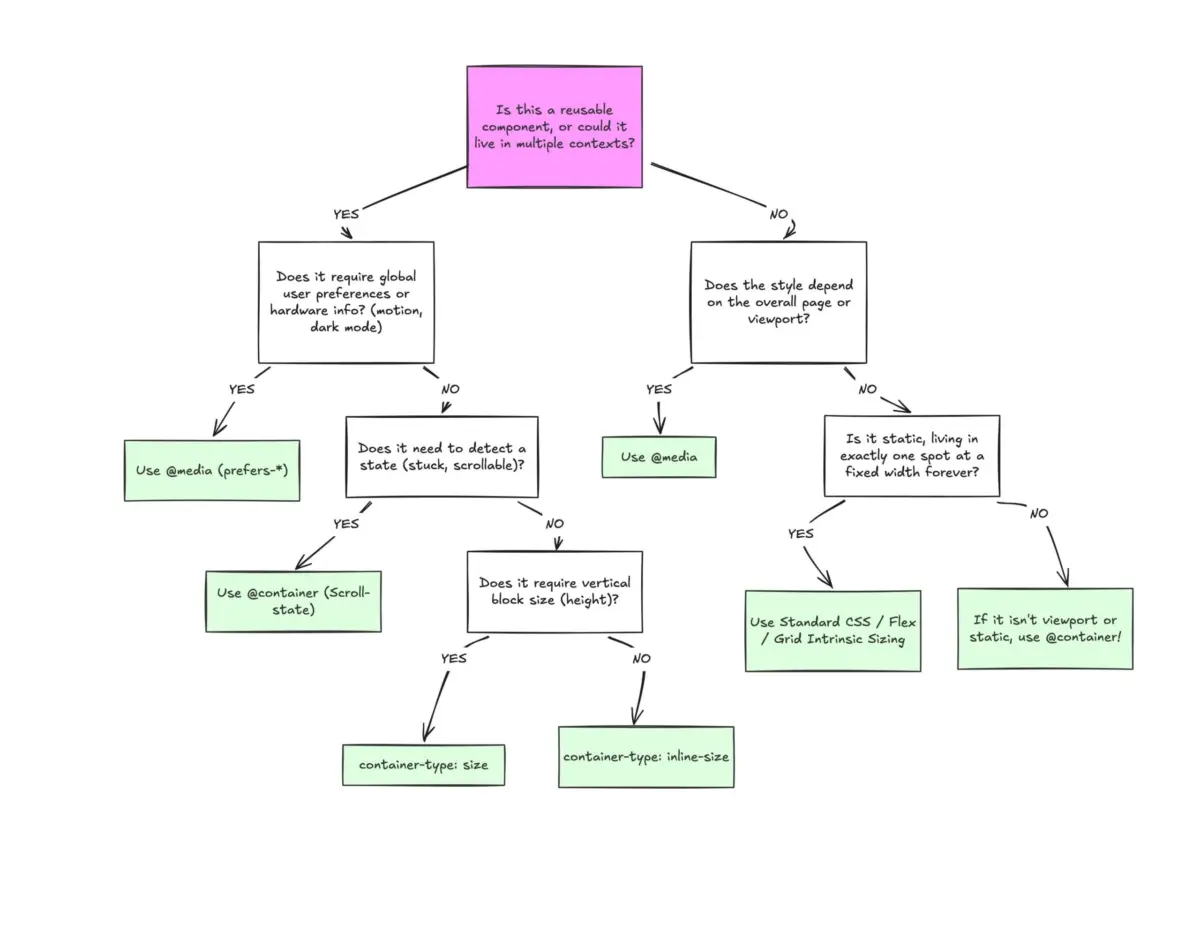
This oversight stems from a superficial visual similarity. Because @container blocks look remarkably like @media queries at a glance, developers often assume they serve the same overarching purpose. They do not. While media queries govern the "macro" layout of a webpage—looking outward to the global viewport, system preferences, and screen dimensions—container queries look inward. They empower components to ask a fundamentally smarter question: How much space is available for me in this specific spot, right now?
Understanding this distinction is no longer optional. As the web grows increasingly fragmented, with over 2,300 unique viewport sizes recorded in recent cross-device studies, relying solely on screen-width proxies is a recipe for broken components. This report examines why container queries are so widely misunderstood, explores the conceptual shift required to master them, details practical implementation patterns, and outlines the inherent side effects and limitations developers must navigate.
Detailed Chronology: The Evolution from Viewport Proxies to Component-Driven Design
To understand why container queries are so frequently misapplied, we must trace how the web arrived at viewport-centric responsiveness. Since the inception of responsive web design, media queries have served as the foundational pillars of adaptable layouts. They gave developers the ability to apply conditional CSS rules based on the characteristics of the user’s device—most notably, screen width.
However, media queries have always functioned as a proxy. When writing a classic breakpoint rule:
@media (min-width: 1024px)
  .card
    display: flex;
The developer is asking the browser one singular question: How wide is the screen right now?
For years, this approach sufficed because web pages were largely monolithic structures composed of stacked full-width sections. But as design systems evolved toward modular, highly reusable component architectures, the limitations of viewport-driven logic became glaringly apparent.
Consider a standard .card component engineered to switch from a vertical stack to a horizontal layout when the screen exceeds 1024px. On a standard laptop display, this works as intended. But what happens when that exact same .card component is placed inside a narrow sidebar grid cell that measures a mere 300px wide, viewed on a sprawling 1920px desktop monitor?
The media query remains entirely oblivious to the component’s immediate environment. Because the global viewport is 1920px, the min-width: 1024px condition fires, forcing the card into its horizontal layout despite having only 300px of physical space. The result is layout collapse: text overflows, elements cramp, and the UI deforms. As Kevin Powell famously summarized: "Media queries are dumb. Not dumb in terms of the concept, but dumb in that they don’t know very much."
The introduction of container queries marked a paradigm shift away from this macro-level dependency. Instead of forcing components to guess their context based on the browser window, container queries allow components to evaluate their immediate structural wrapper. By registering a parent element as a containment context using container-type: inline-size, inner elements can respond dynamically to local constraints.
Despite this breakthrough, initial adoption stalled. Developers transitioning from legacy CSS patterns naturally attempted to map container queries directly onto old mental models, leading to misconfigurations, infinite loops, and layout collapses that discouraged further experimentation.
Supporting Context & Metrics: The Adoption Gap and Device Fragmentation
The statistical landscape surrounding modern CSS features highlights a fascinating disconnect between awareness and execution. According to data aggregated by platforms like Can I Use, container queries have achieved nearly ubiquitous support across all major modern rendering engines, sitting comfortably at approximately 94% global support.
Yet, usage metrics tell a sobering story. The State of CSS survey highlights a massive chasm:
- Awareness: 86% of surveyed developers know that CSS container queries exist.
- Adoption: Only 41.4% actively use them in production projects.
This data is further compounded by the realities of modern device fragmentation. Recent data collection initiatives tracking viewport diversity have logged over 2,300 unique viewport sizes in active web traffic. Attempting to write media queries that anticipate every possible permutation of screen dimensions, foldable screen ratios, split-window browser states, and resizable desktop panels is mathematically and practically impossible.
When layout logic is bound to the container rather than the viewport, the burden of responsiveness shifts from brittle global breakpoints to resilient, self-contained components. A card, widget, or form element ceases to care whether it is viewed on a foldable smartphone or a ultrawide desktop monitor; it cares exclusively about whether its parent container has surpassed a designated dimensional threshold.
Official Statements and Industry Insights
Industry thought leaders have been vocal about the architectural shift required to embrace container queries fully. At SmashingConf Amsterdam, discussions centered heavily on the psychological hurdle developers face when moving away from traditional media query workflows.
In breaking down the philosophy of modern layout design, experts advocate for a strict division between macro layouts and micro layouts:

- Macro Layouts (Media Queries): These govern the overarching page architecture. They look outward to handle global structural shifts, multi-column page grids, window-spanning headers and footers, system preferences (such as
prefers-color-schemeorprefers-reduced-motion), and hardware capabilities like touch-screen detection. - Micro Layouts (Container Queries): These govern component-internal behavior. They look inward to manage how individual UI building blocks—such as cards, widgets, navigation drawers, and data tables—adapt to the specific spatial allocations provided by their immediate surroundings.
As noted in community consensus statements:
"When we think in terms of containers and components, we’re effectively relying on the content to determine layout, not the viewport."
This philosophy invalidates the old reflex of assigning rigid, abstract pixel thresholds (such as 768px for tablets) to individual components. Elements should not transform into "tablet-sized" variants simply because the browser window crosses an arbitrary line; they should transform when their localized container provides sufficient room for that transformation to occur.
Technical Implementation and Practical Patterns
To effectively utilize container queries, developers must move past superficial syntax comparisons and understand their practical implementation, along with the technical constraints that govern them.
1. Basic Size Queries
To establish a container query, a parent element must first be defined as a containment context. This is achieved by setting a container name and a containment type:
.card-wrapper
  container-name: card;
  container-type: inline-size;


@container card (min-width: 450px)
  .card
    display: flex;
    flex-direction: row;
In this example, the .card component remains entirely decoupled from the viewport. It evaluates only whether its parent wrapper (.card-wrapper) has at least 450px of horizontal space available in a left-to-right writing mode.
2. Fluid Typography Within Components
Historically, responsive typography relied heavily on viewport units (vw, vh) paired with CSS clamp() functions to scale text dynamically. However, when a component containing viewport-relative typography is shifted into a narrow sidebar, the text scaling breaks because the viewport remains large while the component space has shrunk.
Container queries introduce dedicated container length units—such as cqi (container query inline-size) and cqb (container query block-size). By pairing these units with clamp(), typography scales strictly in relation to the component’s container:
.card-title
  font-size: clamp(1rem, .5rem + 3cqi, 2rem);
This guarantees that a card title inside a compact sidebar remains legible and properly proportioned, scaling independently of the global browser window size.

3. Flexbox Wrap Detection Workarounds
One of the most powerful architectural advantages of container queries is their ability to indirectly observe internal layout changes—a feat impossible for media queries, which are structurally blind to what happens inside the DOM tree.
Consider Flexbox layouts (flex-wrap: wrap). While Flexbox effortlessly wraps items onto new lines when horizontal space is exhausted, CSS has traditionally lacked a native pseudo-class (such as :wrapped) to style items differently once that wrapping occurs. Developers previously had to rely on JavaScript ResizeObserver instances to monitor these state changes.
By nesting container queries inside flex items, developers can achieve wrap-detection natively:
/* The flex parent */
.flex-layout
  display: flex;
  flex-wrap: wrap;


/* Register a flex item as a container */
.flex-item
  container-type: inline-size;
  flex: 1 1 390px; /* Grow to fill space, wrap at 390px */


/* Default Card Styles (narrow state) */
.card
  display: flex;
  flex-direction: column;
  background: #f4f4f4;


/* Once the parent container expands enough to allow a full row */
@container (min-width: 600px)
  .card
    flex-direction: row;
    align-items: center;
    background: #e2f0d9;
As the surrounding container shrinks, items wrap onto multiple lines, expanding the individual flex items and triggering the container query to apply the expanded layout styles seamlessly.
Navigating Side Effects and Limitations
While container queries offer immense architectural flexibility, they introduce specific side effects and technical constraints that engineers must account for:
- Self-Containment Restrictions: A container cannot query itself. Attempting to apply
container-typeand a@containerrule to the exact same DOM node will fail, as it creates an unresolvable infinite rendering loop. Proper implementation requires an explicit parent-child DOM separation where an outer wrapper acts as the container and a nested child element receives the conditional styling. - Layout Collapse via Block-Size Queries: Querying a container’s full
size(including block or vertical dimensions) without an explicit height can cause the element to collapse to0px. Unless an explicit height, min-height, or aspect-ratio is provided, browsers calculate container dimensions without factoring in children. Developers should default toinline-sizecontainment unless vertical dimension querying is strictly required. - Custom Property Limitations: Container queries currently cannot evaluate custom CSS properties directly (e.g.,
@container (min-width: var(--breakpoint-lg))). Because custom properties cascade dynamically and can theoretically be mutated by the very container queries referencing them, circular dependency risks prevent their direct integration within query evaluation brackets.
Future Outlook
The maturation of CSS container queries marks the transition from document-centric web design to component-centric engineering. As design systems scale across increasingly diverse hardware ecosystems, the reliance on brittle, viewport-bound media queries is steadily giving way to intelligent, context-aware styling.
By embracing the clear demarcation between macro layouts (governed by media queries) and micro layouts (governed by container queries), frontend developers can build resilient, truly reusable interfaces. The tooling is mature, browser support is nearly universal, and the architectural benefits are undeniable. The remaining challenge is purely cultural: unlearning old viewport-centric habits and writing CSS that responds naturally to the world immediately around it.