

Executive Overview
When front-end developers, creative technologists, and user experience (UX) engineers are tasked with building a web interface that feels genuinely tactile, bouncy, or playfully destructive, the industry-standard reflex is almost always identical: reach for a physics engine. Frameworks like Matter.js, Cannon.js, or customized WebGL pipelines have long reigned as the gold standard for crafting immersive, gamified web applications. They promise realistic gravity, organic momentum, and fluid collision detection out of the box.
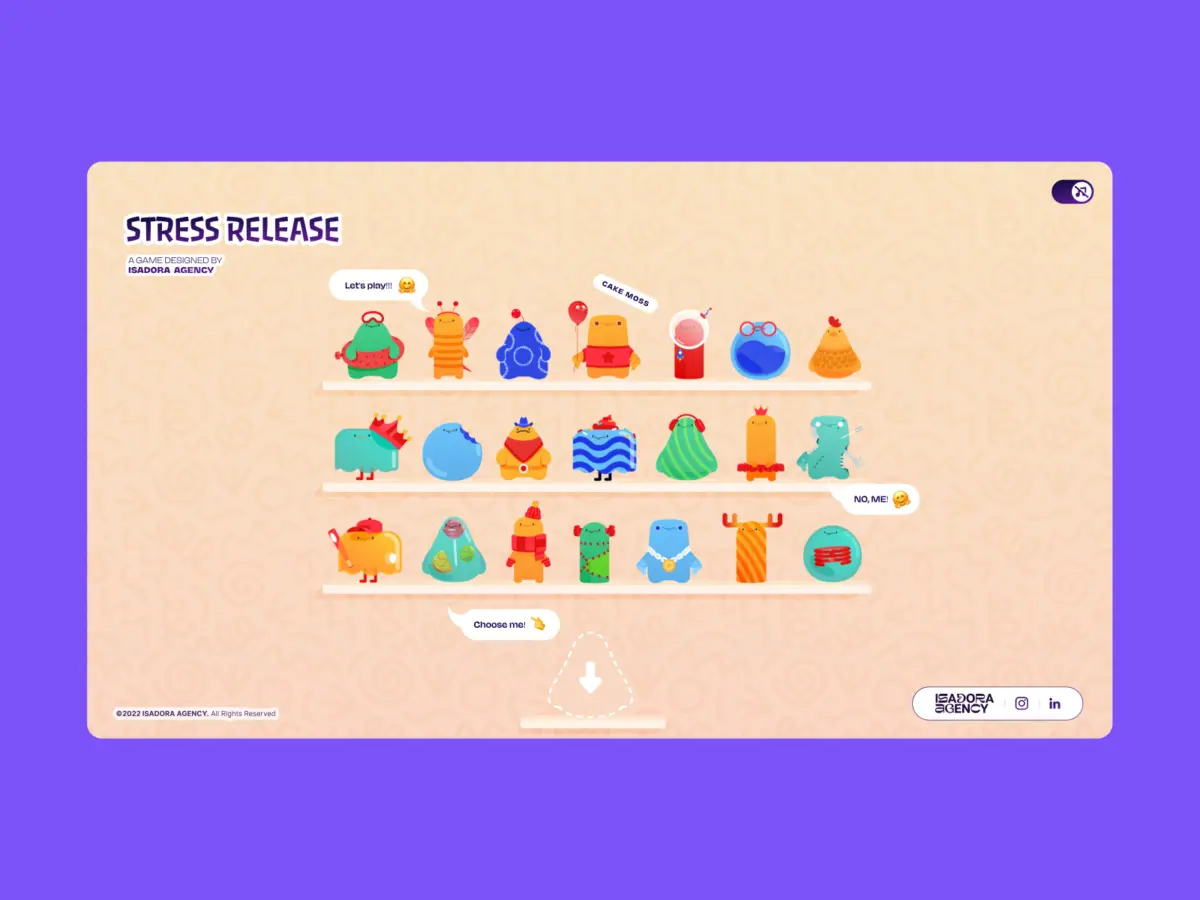
However, when the development team at Isadora Agency set out to engineer Stress Release—a digital stress-relief squeeze toy web application designed to let burnt-out creatives smash, stretch, and distort animated UI characters—they quickly realized that traditional physics frameworks introduced a fundamental philosophical mismatch. While physics engines excel at producing plausible motion, the agency’s animators had meticulously crafted intentional motion.
The goal was not to simulate chaotic rubber balls bouncing haphazardly across a canvas, but rather to guarantee that every single click yielded a precise, emotionally satisfying, and artistically directed squishy reaction. To honor this artistic vision without compromise, Isadora Agency scrapped the physics engine entirely.
In this exhaustive architectural breakdown, we examine how the team successfully engineered a real-time, highly interactive digital toy without a single line of WebGL or Matter.js. By cleverly combining programmatic Lottie state controls, native DOM manipulation, and straightforward distance-based mathematics, the developers achieved absolute deterministic control over their designers’ intent, proving that architecture must always serve art direction.
Detailed Chronology: From Physics Frameworks to Deterministic DOM Control
The Impasse of Algorithmic Approximation
The initial phase of the Stress Release project followed a conventional development pathway. The team prototyped using standard physics libraries to map click coordinates to rigid-body collisions. Yet, as testing progressed, a critical disconnect emerged.
Animators had invested countless hours designing bespoke vector animations exported as complex .json Lottie files. These sequences relied heavily on frame-by-frame exactness. For instance, the signature "mega squeeze" reaction required a precise 181-frame buildup followed by a carefully choreographed release sequence. When passed through a traditional physics engine, these hand-crafted keyframes were frequently overridden, distorted, or smoothed out by algorithmic approximations.
The team faced a stark architectural choice: force the art direction to bend to the rules of a physics simulation, or build an interaction layer that treated the Lottie runtime as a first-class citizen. They chose the latter. By relinquishing Matter.js, they reclaimed absolute deterministic control over the user interface.
Mapping the DOM to Lottie States
Opting for a DOM-based approach meant that rendering was handled natively by the Lottie runtime, which interprets vector data as dynamic SVGs inside the browser. Elements were targeted directly via standard IDs and CSS classes. To achieve a deeply convincing "tactile feel" upon interaction, the engineering team turned to radial input mapping.

The process began by transforming raw page coordinates from a click or tap event into the character’s local coordinate space. By calculating the distance from the exact center of the element using the Pythagorean theorem, the developers established a concentric scoring and feedback system reminiscent of a dartboard.
// Determining the character's center point in its local coordinate space
var x_center = parseFloat($("#playChar").width()  / 2);
var y_center = parseFloat($("#playChar").height() / 2);

// Capturing click position relative to the character's top-left bounding corner
var offset = $("#playChar").offset();
var X = parseFloat(e.pageX - offset.left);
var Y = parseFloat(e.pageY - offset.top);

// Calculating the vector components from the center to the click point
var a = parseFloat(X - x_center);
var b = parseFloat(Y - y_center);

// Computing straight-line distance via the Pythagorean theorem
var distance = Math.hypot(a, b);
This single numerical value—distance—became the driving force behind multiple application layers: reward points, feedback intensity, and the exact spatial positioning of visual particle effects.
// Distance zones mapped directly to point rewards
if      (distance < 10)  givePts = 100; // Bullseye
else if (distance < 40)  givePts = getRndInteger(70, 90);
else if (distance < 70)  givePts = getRndInteger(40, 70);
else if (distance < 100) givePts = getRndInteger(20, 40);
else if (distance < 120) givePts = getRndInteger(10, 20);
else if (distance < 145) givePts = getRndInteger(1,  10);
else givePts = 0; // Miss

// Repositioning the explosion Lottie asset to match the exact click vector
var shiftPosition = window.innerWidth < 1023 ? -20 : 200;
$("#explosionChar").css(
  "margin-left": a + shiftPosition + "px",
  "margin-top":  b + shiftPosition + "px",
);

// Instantly fire the squish animation frame sequence
explosion.goToAndPlay(0);
By decoupling hit detection from complex SVG geometry and replacing it with clean mathematical vector positioning, the team ensured zero performance lag. Furthermore, aligning the explosion animation coordinates (a, b) with the scoring logic guaranteed that visual feedback always matched physical intuition.
Supporting Context & Metrics: Performance and Responsiveness
Managing the Mobile Performance Cost of Lottie
While programmatic DOM control and Lottie integrations unlocked unparalleled creative freedom, they introduced a substantial engineering hurdle: file size and rendering overhead.

Stress Release featured 21 distinct character animations alongside multiple explosion variants, all of which needed to load swiftly. To maintain a silky-smooth 60 frames-per-second experience—particularly on constrained mobile devices—Isadora Agency enforced aggressive performance optimization strategies.
- Global Quality Scaling: Using Lottie’s native configuration options, the team dynamically adjusted rendering fidelity based on screen context. For the multi-character selection shelf (where 21 heavy animations played simultaneously), they instituted global optimizations:
shelf = lottie.loadAnimation( container: document.getElementById("charShelf" + i), renderer: "svg", loop: true, autoplay: true, path: "assets/shelf/" + shelfFolders[i] + "/" + shelfFolders[i] + ".json", ); lottie.setQuality(0.5); // Reduces interpolation calculations by 50% shelf.setSpeed(0.6); // Lowers frame calculation frequency per second - Targeted Full Fidelity: When a user transitioned to the active play screen focusing on a single character, the configuration scaled up to full fidelity without impacting overall browser memory:
playChar = lottie.loadAnimation(
 container: document.getElementById("playChar"),
 renderer: "svg",
 loop: true,
 autoplay: true,
 path: chosenChar.url,
);
lottie.setQuality(1); // Full rendering quality for the active focal element
The Responsive Benefit of DOM Elements
Another major architectural dividend of avoiding WebGL was seamless cross-device responsiveness. Handling responsive scaling across disparate mobile and desktop viewports using custom WebGL canvas wrappers often demands intricate matrix transformations and bounding box recalculations.
By anchoring Stress Release firmly in the standard DOM, the team bypassed these hurdles entirely, managing scaling effortlessly via CSS custom properties:
const appHeight = () =>
  const doc = document.documentElement;
  doc.style.setProperty("--doc-height", `$window.innerHeightpx`);
  doc.style.setProperty("--doc-width", `$doc.clientWidthpx`);
;
window.addEventListener("resize", appHeight);
appHeight(); // Immediate execution on initialization
As window dimensions shifted, the layout adapted organically to updated CSS variables, allowing Lottie SVGs to scale gracefully within their parent containers without losing internal animation states.

Official Statements and Architectural Philosophy
Reflecting on the project, the core engineering team emphasized that technology choices must always be subservient to user experience goals rather than developer convenience.
"When mapping Lottie’s native timeline capabilities directly to the DOM, you unlock the ability to deliver incredibly rich, highly tactile user experiences while maintaining absolute, uncompromising control over the art direction."
— Isadora Agency Engineering Team
Instead of relying on emergent behaviors generated by physics simulations, Isadora Agency championed deterministic narrative control. Each character’s animation pipeline was compartmentalized into explicit frame ranges:
const play_segments = [
  charId: 0,
  sections:
    idle:     [0,  40],   // Looping baseline idle state
    squeeze1: [41, 80],   // Light impact reaction
    squeeze2: [81, 120],  // Medium impact reaction
    squeeze3: [121, 160], // Heavy impact reaction
  ,
  playOrder: ["squeeze1", "squeeze2", "squeeze3"],
  endAnimation: [161, 200]
];
When an interaction occurred, the controller intercepted the event, halted ongoing loops, and forced the Lottie runtime to jump immediately to the designated frame sequence before smoothly returning to the idle state upon completion. This eradicated jitter and ensured that user input always resulted in a polished, director-approved visual payoff.

Future Outlook: The Evolution of Tactile Web Design
As web technologies continue to evolve, the boundary between passive content and active, tactile interfaces is rapidly dissolving. Projects like Stress Release point toward a compelling future for digital product design—one where developers look beyond generic third-party libraries and instead harness native runtime capabilities to achieve hyper-specific artistic visions.
The success of Isadora Agency’s physics-free experiment offers a valuable blueprint for front-end engineers across the industry. By rejecting the dogma that complex interactions automatically necessitate heavyweight physics engines or WebGL environments, teams can achieve superior performance, pristine visual fidelity, and absolute creative autonomy.
Ultimately, the lesson is clear: when building immersive digital experiences, let your designers’ intentions guide your architecture, and let mathematics and native runtimes do the heavy lifting.