There is a defining moment in nearly every software usability lab. A participant pauses at a digital login screen, enters a string of characters, and glances up, their eyes searching the room. That brief hesitation is a telltale sign of cognitive dissonance. They have already subconsciously recognized that the environment is a simulated product, not a live application. From that microsecond onward, every subsequent data point collected during the session is filtered through the skewed lens of artificiality.
In the high-stakes world of financial technology (FinTech) product design, this fidelity gap presents a severe analytical hazard. Financial consumers are hyper-vigilant by necessity. Decades of security conditioning have trained them to spot structural anomalies instantly: a balance sheet that fails to reconcile, an input field that accepts arbitrary or malformed data, or an authentication sequence that waves them through without resistance.
When a banking prototype utilizes a mocked or hollow login sequence, participants do not merely suspend disbelief; they frequently break character entirely, halting the session to flag the security oversight. Consequently, design and research teams walk away with qualitative and quantitative findings that reflect how users behave in a controlled theatrical demonstration, rather than how they navigate a live, production-grade application.
The solution to this pervasive testing flaw is more surgical than many engineering teams assume. Rather than building an entire end-to-end backend architecture, product teams must identify the exact inflection point where user trust is established and make that specific interaction real. For mobile banking and financial portals, that critical threshold is the login screen.
This article explores a comprehensive, zero-code methodology for building functional, high-fidelity login flows using ProtoPie and Figma. By implementing real-time credential validation, dynamic error states, and native-feeling biometric animations, product teams can bridge the gap between static wireframes and shipped realities—fundamentally transforming the validity of their user research.
Detailed Chronology: Building a Shipped-Quality Login Flow Without Code
To eliminate user skepticism from the outset, modern prototyping tools allow designers to construct interactions that are functionally indistinguishable from native applications. Using the fictional mobile banking app "Pie Bank" as our case study, here is the chronological blueprint for transforming a static Figma export into a rigorous, interactive testing asset.
Step 1: Strategic Importation from Figma (Scene vs. Flattened)
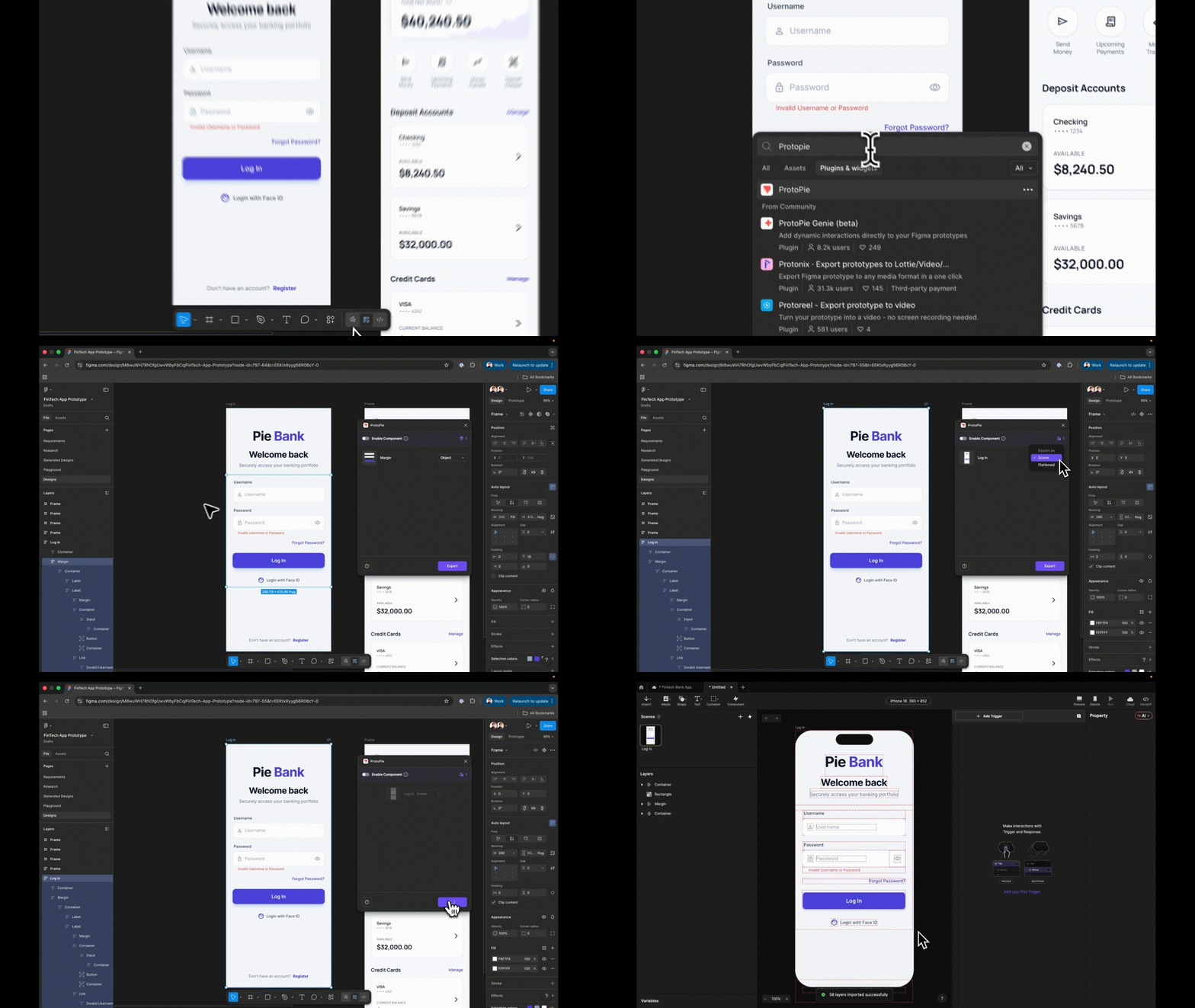
The foundation of any robust prototype begins in the design handoff. When importing assets from Figma via the ProtoPie plugin, the choice of export parameter dictates the structural integrity of the scene. Designers must explicitly select Scene rather than Flattened.
A flattened export reduces the UI elements into a single, inert image file, stripping away individual component layers. Conversely, a Scene export preserves the complete layer hierarchy, ensuring that every button, input container, and text label arrives in ProtoPie as an independent, targetable object.
Before introducing interactions, disciplined layer nomenclature is essential. Renaming a generic asset from Rectangle 14 to Input Username prevents cognitive fatigue later in the workflow, when these layers must be referenced explicitly within logical formulas.
Static placeholder text requires users to tap blindly. ProtoPie’s native Input layer changes this paradigm by accepting actual keyboard entry, enabling participants to type genuine credentials. By dragging an Input layer into the username container and matching its typographic styling to the design system, the prototype immediately begins to behave like an app.
Duplicating this layer for the password field introduces an even greater layer of realism. By changing the field type to Text Password, ProtoPie automatically handles character masking (displaying dots instead of raw text) entirely natively. No custom conditional logic or scripts are required to achieve secure visual feedback.
Step 4 & 5: Establishing Destination Scenes and Basic Navigation
A common sequencing error in prototyping is attempting to wire a navigation response before the destination environment exists. Designers must construct the target dashboard scene first.
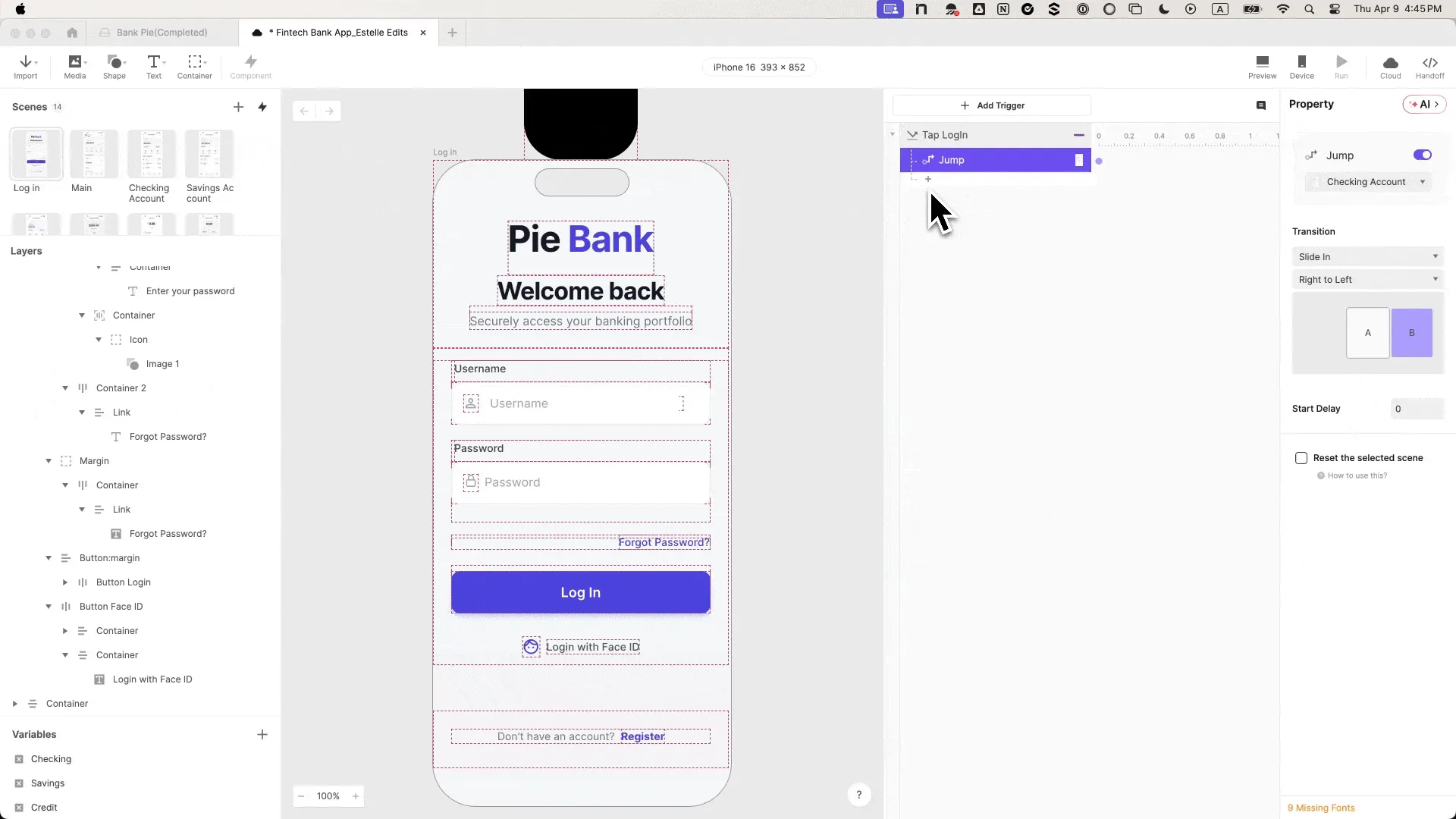
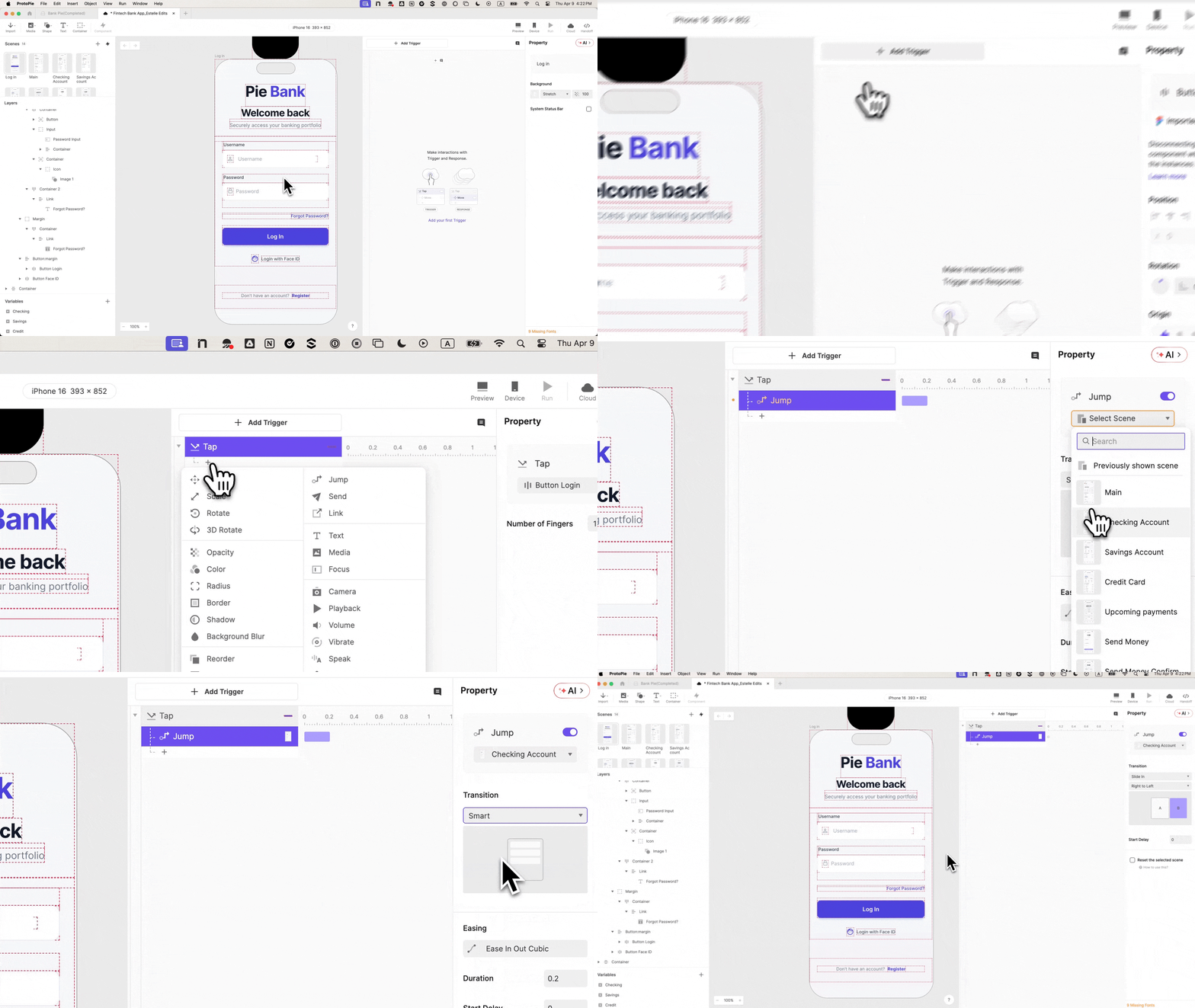
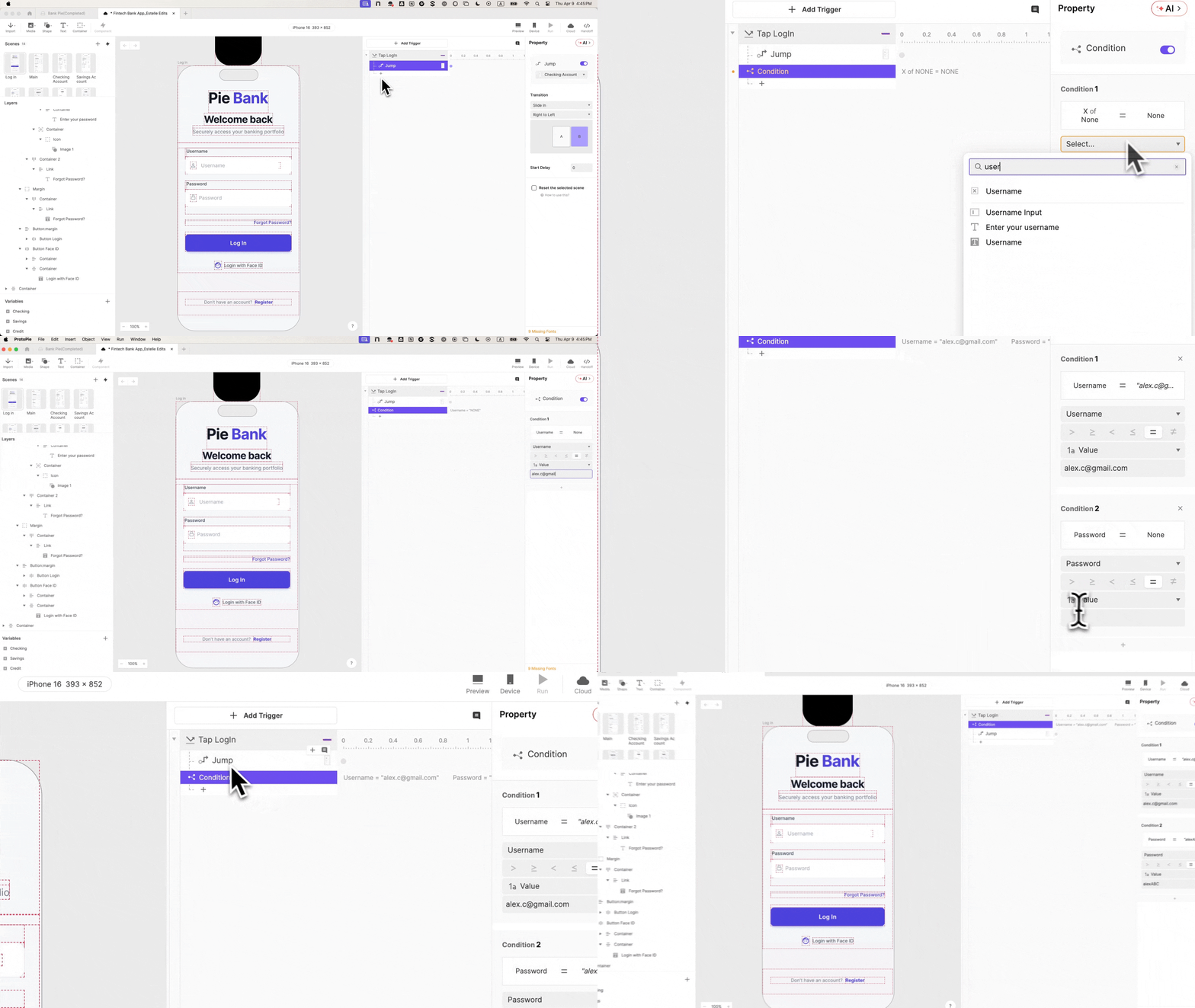
Once the dashboard is in place, selecting the "Log In" button and applying a Tap trigger paired with a Jump response (utilizing a smooth slide transition) creates the illusion of progression. However, in its raw state, this button exhibits the classic prototype flaw: it allows any input—including blank fields—to pass through. The interface remains deceptive, necessitating strict conditional validation.
Step 6 & 7: Implementing Variables and Conditional Logic
To give the prototype a memory, designers must introduce Text type variables in ProtoPie’s workspace (username and password). These variables are bound dynamically to the respective input layers using simple formulas:
Enabling ProtoPie’s live debug overlays allows researchers to watch keystrokes populate variables in real-time, confirming that data binding is operational.
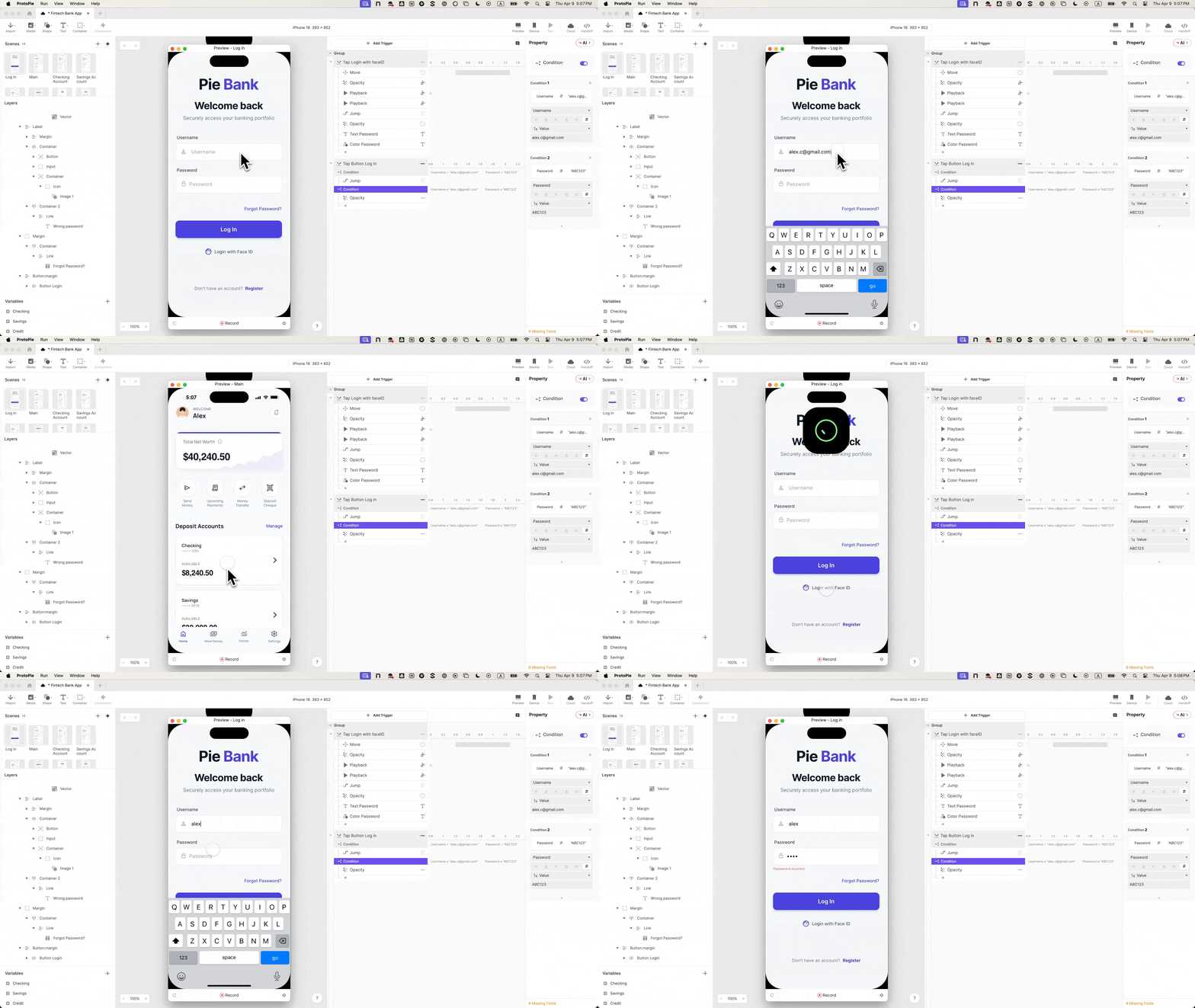
With variables active, the login button’s Tap trigger is updated to include a Condition block. The system evaluates whether the entered text matches pre-defined valid credentials. If the fields are blank, incorrectly formatted, or unauthorized, the Jump response is blocked. Only authenticated credentials grant access to the dashboard. This single constraint fundamentally alters the behavioral texture of subsequent testing sessions.
Step 8: Engineering Live Error States
Most prototypes omit negative paths, assuming users will always follow the "golden path." However, error recovery is a core component of financial UX. By setting an error message layer’s initial opacity to 0 and programming an inverse condition block, designers can dynamically trigger a Change Property response that drives the error text opacity to 100 upon entering incorrect credentials. The prototype now supports two distinct, realistic outcomes: dashboard entry or error state activation.
To erase the remaining traces of prototyping artifice, biometric authentication can be integrated using Lottie animations. By importing a Face ID animation asset and placing it off-screen, a multi-response trigger can be constructed for the "Login with Face ID" button:
Move: Drops the Lottie container into the visible viewport.
Seek: Prepares the animation frame.
Play: Executes the biometric scan sequence.
Jump: Transitions the user to the main dashboard.
By carefully staggering the timing delays—for instance, setting the play action to 0.5 seconds and the scene jump to 1.0 second—the sequence mimics the native latency of an iOS hardware sensor. Enabling "Reset selected scenes" ensures that navigating backward cleans up animation states seamlessly.
Supporting Context & Metrics: The ROI of High-Fidelity Research
The investment in high-fidelity prototyping yields measurable dividends across multiple phases of the product lifecycle. Industry data consistently demonstrates that catching usability and architectural flaws during the prototyping phase is up to 100 times less expensive than remediating them post-launch.
Prototyping Approach
Participant Trust Level
Error Path Validity
Engineering Handoff Clarity
Post-Release Defect Rate
Low-Fidelity (Static Wireframes)
Low (Frequent hesitation)
Non-existent
Subject to interpretation
High
Medium-Fidelity (Basic Click-Through)
Moderate (Breaks character often)
Simulated / Unreliable
Partial documentation
Moderate
High-Fidelity (ProtoPie / Functional)
High (Fully immersed)
Fully operational & tested
Precise logic & variable-driven
Low
In financial services, where regulatory compliance, data security, and user trust intersect, the cost of a poor user experience extends beyond abandoned carts; it damages institutional reputation. When users encounter a banking prototype where security measures are faked, their engagement drops precipitously. They shift from evaluating the product’s value proposition to scrutinizing its structural competence.
By contrast, when a login sequence behaves authentically, the testing session shifts focus from “Is this app broken?” to “How intuitive is this financial workflow?”. Researchers gain unobstructed access to genuine user behavior, uncovering critical insights regarding error message comprehension, recovery pathways, and the psychological comfort levels associated with biometric authentication.
Official Statements and Industry Perspectives
Design leaders across the digital product landscape increasingly view prototyping fidelity not as a luxury, but as an essential research instrument.
"When participants interact with a financial prototype that validates credentials and triggers authentic error states, the psychological contract changes," notes a leading UX research director specializing in digital banking transformations. "They stop playing the role of a cooperative tester trying to help you succeed, and they start acting like real customers protecting their capital. That is the exact moment your data stops being polite and starts becoming true."
Furthermore, engineering and product management stakeholders benefit profoundly during cross-functional handoffs. Traditional design specifications often leave interaction nuances—such as timing curves, conditional validation rules, and variable state management—open to developer interpretation.
When a prototype encodes these behaviors explicitly through variable bindings and timed triggers, it serves as a living specification document. Engineers no longer have to guess intent; they can inspect the logic directly within the interactive model, significantly accelerating the transition from design review to production code.
Future Outlook: The Evolution of Intelligent Prototyping
As we look toward the future of digital product design, the boundaries between prototyping environments and production software continue to blur. The integration of advanced conditional logic, local variable storage, and hardware-mimicking animations (such as native Face ID and haptic feedback simulations) points toward a paradigm where prototypes double as executable specifications.
For FinTech innovators, this evolution is particularly urgent. With the rapid expansion of embedded finance, decentralized banking applications, and complex multi-factor authentication (MFA) standards, user onboarding flows are becoming increasingly intricate. Future prototyping methodologies will likely leverage synthetic data generation and AI-driven user simulation alongside high-fidelity interactions to stress-test financial workflows before a single line of production code is written.
Ultimately, investing in the fidelity of foundational interactions like the login screen is a declaration of seriousness. It signals to participants, stakeholders, and engineering teams alike that the user experience is being built on a bedrock of rigorous, uncompromised quality. Get the threshold right, and every downstream insight generated across the product lifecycle will yield a higher, more reliable signal.