In the modern landscape of front-end engineering, crafting a high-performance, immersive web interface often leads developers down a well-trodden path. When a project demands physical feedback—such as bouncy animations, responsive destruction, or tactile user interactions—the industry standard reaction is to immediately integrate a dedicated physics engine. Libraries like Matter.js, Cannon.js, or complex WebGL solutions have historically reigned supreme as the gold standard for gamified web design, offering realistic gravitational simulations, momentum, and collision detection.
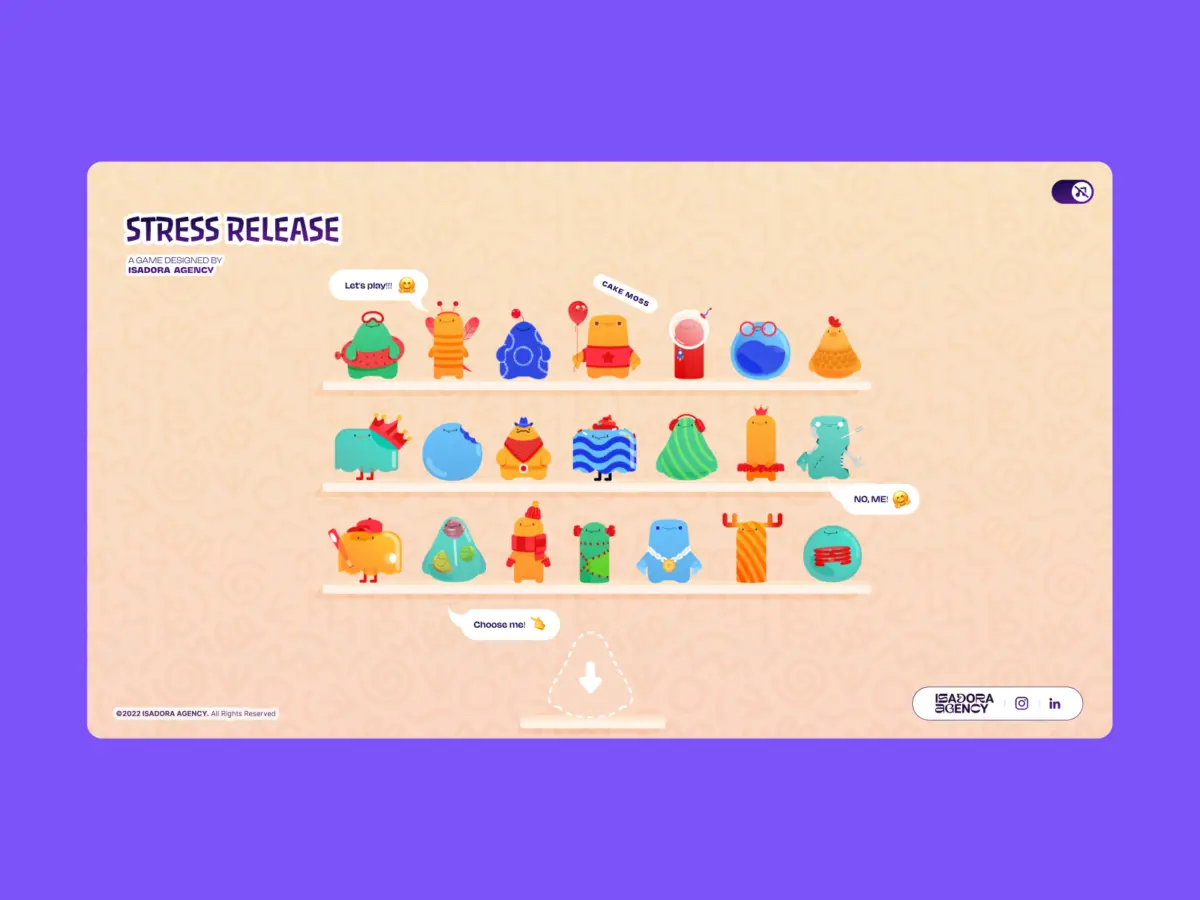
However, a critical philosophical divide exists between simulated motion and intentional motion. While physics engines excel at rendering plausible, organic physics reactions based on mathematical algorithms, they inherently strip away precise artistic control. When the Isadora Agency set out to develop Stress Release—a digital stress-relief squeeze toy tailored for burnt-out creatives looking to smash, stretch, and distort animated UI characters—they faced a fundamental architectural crossroads.
Should they rely on algorithmic physics that might approximate a squishy reaction, or should they engineer a bespoke system that honors frame-by-frame artistic vision?
Led by developer Alexey Kopytin, the Isadora Agency engineering team chose the latter. By entirely bypassing heavy WebGL setups and physics libraries, they constructed a real-time, highly tactile squeeze toy game using only programmatic Lottie state controls, native DOM manipulation, and straightforward distance-based mathematics. This deep-dive technical case study explores the architectural rationale, mathematical mapping, performance optimizations, and design philosophy behind a project that proves code doesn’t need to simulate physics to feel remarkably real.
Detailed Chronology: The Architectural Evolution of Stress Release
Phase 1: The Conceptualization and the Physics Engine Detour
The journey of Stress Release began with a distinct user experience goal: to build a deeply satisfying, tactile web interface that offered immediate emotional and physical release for users. The core concept required users to interact with a series of animated cartoon characters on screen, clicking or tapping to crush, stretch, and distort them. Every interaction needed to yield an immediate, squishy, and rewarding visual response.
Naturally, the development team’s initial instinct was to prototype using standard physics engines. They experimented with setting up bounding boxes, gravity vectors, and elasticity coefficients. But as early prototypes took shape, a jarring disconnect emerged between what the physics engine produced and what the project’s art direction demanded.
Animators had painstakingly crafted bespoke vector animations complete with precise keyframes, weight curves, and character-driven squash-and-stretch dynamics. A physics engine, by its very nature, treats objects as generic masses reacting to forces. It couldn’t guarantee that a "mega squeeze" reaction would execute its carefully paced 181-frame build-up followed by an exact release sequence. Algorithmic approximations constantly overrode the animators’ meticulous work, turning intentional, character-driven performances into unpredictable, chaotic rubber-ball physics.
Phase 2: Abandoning Simulation for Deterministic Control
Recognizing that simulation was actively fighting art direction, the team made a bold architectural pivot: they scrapped the physics engine entirely.
The new directive was clear: absolute deterministic control. To achieve this, the team decided to rely exclusively on Lottie’s native JSON animation runtime paired with standard Document Object Model (DOM) elements. Instead of calculating real-time momentum and collisions via physics loops, they would map user input directly to predetermined Lottie animation segments using geometry and DOM positioning.
This pivot transformed the role of code. Rather than acting as a physics simulator, the JavaScript layer was repurposed to listen for user intent, calculate precise interaction coordinates, and act as a flawless, instantaneous trigger for the animation layer.
Phase 3: Mathematical Mapping and Radial Input Zones
To create the sensation of a physical, tactile hit without a physics engine, the Isadora Agency implemented a system of radial input mapping. When a user clicks or taps on a character, the application must immediately determine where the impact occurred, score the hit based on accuracy, generate appropriate visual feedback, and position particle or explosion effects precisely at the point of contact.
This was accomplished by translating global page coordinates into the character’s local coordinate space. By evaluating the click coordinates against the character’s bounding center point, developers extracted a clear vector representing the point of impact:
// Establish the character's center point in its own coordinate space
var x_center = parseFloat($("#playChar").width()  / 2);
var y_center = parseFloat($("#playChar").height() / 2);

// Extract click position relative to the character's top-left corner
var offset = $("#playChar").offset(); // document-relative position
var X = parseFloat(e.pageX - offset.left);
var Y = parseFloat(e.pageY - offset.top);

// Calculate vector offsets from center to click point
var a = parseFloat(X - x_center);
var b = parseFloat(Y - y_center);
Once the vector offsets ($a$ and $b$) were established, the straight-line distance from the center point was computed using the Pythagorean theorem via JavaScript’s Math.hypot() method:
var distance = Math.hypot(a, b);
This single numerical distance metric became the driving force behind the entire interactive feedback loop. It dictated the point reward, the intensity of the character’s reaction, and the exact placement of visual explosion graphics.
Supporting Context & Metrics: The Mechanics of Tactile Illusion
The brilliance of the Isadora Agency’s approach lies in how efficiently simple math creates complex psychological feedback. By establishing concentric distance zones—much like a traditional dartboard—the application evaluates hits with absolute spatial accuracy, entirely independent of the visual complexity of the SVG elements rendered by Lottie.
Distance Zones and Point Rewards
Bullseye ($distance < 10px$): Awards maximum points (100 pts) for hitting dead center.
Mid Ring ($distance < 70px$): Yields moderate points (40–70 pts).
Outer Rings ($distance < 100px$ to $145px$): Scaled down rewards (1–40 pts).
Miss ($distance ge 145px$): Awards 0 points.
Crucially, this same spatial vector ($a, b$) is used to dynamically reposition the explosion Lottie animation container via CSS margins:
var shiftPosition = window.innerWidth < 1023 ? -20 : 200;
$("#explosionChar").css(
  "margin-left": a + shiftPosition + "px",
  "margin-top":  b + shiftPosition + "px",
);

// Trigger the squish/explosion animation instantly from frame zero
explosion.goToAndPlay(0);
This ensures that visual destruction or impact effects always manifest precisely where the user’s finger or cursor landed. The cognitive illusion of physical impact is achieved not through heavy raycasting or collision meshes, but through synchronized coordinate math and DOM manipulation.
Managing Interactive Narratives Through Animation Segments
Lottie animations are fundamentally timeline-based vector sequences defined in JSON files. Rather than playing files blindly, the team parsed character animations into explicit frame ranges corresponding to distinct game states:
When a user interacts with the character, a programmatic stepping function (stepAnim) halts the current loop, overrides looping properties, and forces the runtime to jump directly to the target frame range:
function stepAnim()
  let p         = play_segments[0];
  let i         = p["playOrder"][curr_order_play];
  let playNow   = p["sections"][i];

  playChar.stop();                    // Halt current segment immediately
  playChar.loop = false;              // Disable looping for single-fire reaction
  playChar.playSegments(playNow, true); // Jump to exact frames, force execution

  curr_order_play++;
  canPlayAnim = 0;                    // Lock out rapid-fire clicks mid-animation

  if (curr_order_play > p["playOrder"].length - 1)
    curr_order_play = 0;              // Cycle back to the start of the sequence
Upon completion of the reaction segment, the onComplete handler unlocks user input and safely returns the character to its soothing, looping idle state:
playChar.onComplete = function()
  canPlayAnim = 1;          // Re-enable user interaction
  if (!playEnd) playIdleState();
;

function playIdleState()
  playChar.playSegments([0, 40], true); // Return to idle loop
  playChar.loop = true;
Overcoming the Performance Hurdle: Optimizing Lottie for Mobile
While utilizing DOM elements and Lottie solved artistic and responsive layout challenges (handled cleanly via CSS custom properties and viewport height/width variables like --doc-height), it introduced a significant hardware hurdle: file size and CPU overhead.
Running multiple complex vector animations simultaneously can easily cripple mobile browser performance. Stress Release featured 21 unique characters, multiple explosion variants, and intense multi-character shelf screens. To maintain a silky-smooth 60 frames per second across both desktop and mobile devices, the Isadora Agency deployed aggressive optimization strategies:
Selective Quality Scaling: For high-density views—such as the character selection shelf where 21 animations play simultaneously—quality parameters were explicitly dialed down to reduce interpolation calculations:
Dedicated Focus Scaling: When a user enters active gameplay mode with a single focused character, quality settings are restored to maximum fidelity since only one primary vector animation demands CPU attention:
playChar = lottie.loadAnimation(
 container: document.getElementById("playChar"),
 renderer: "svg",
 loop: true,
 autoplay: true,
 path: chosenChar.url,
);
lottie.setQuality(1); // Full rendering quality for the active focus character
Official Statements and Industry Perspective
Reflecting on the philosophy that guided the project, lead developers and UX architects emphasize that technology choices must consistently serve art direction rather than dictating it.
"By mapping Lottie’s native timeline capabilities to the DOM, you can deliver incredibly rich, tactile user experiences while maintaining absolute control over the art direction."
— Alexey Kopytin, Isadora Agency
In an era where web applications frequently over-engineer solutions by defaulting to WebGL, three-dimensional physics engines, or heavy game frameworks for simple 2D interactions, projects like Stress Release serve as a timely reminder of the power of native web primitives. When design requirements demand exact keyframe choreography, deterministic code architecture paired with vector runtimes often yields superior emotional resonance and brand alignment than probabilistic physics simulations.
Future Outlook: The Intersection of Intentional Design and Web Animation
As web technologies continue to evolve, the boundaries between traditional web design and immersive digital gaming blur further. Tools like Lottie, combined with advances in browser rendering performance, SVG optimization, and CSS custom properties, provide developers with lightweight alternatives to monolithic gaming engines.
The success of the Isadora Agency’s architecture points toward several emerging trends in high-end experiential web development:
De-escalation of Over-Engineering: Developers are increasingly recognizing that heavy 3D engines (such as Three.js or physics wrappers) are unnecessary for 2D tactile interfaces, reducing initial bundle sizes and improving energy efficiency on mobile devices.
Animation-First Engineering Pipelines: The closer integration of motion designers and front-end developers allows vector assets to be built with programmatic segmentation in mind from day one, streamlining handoffs and ensuring artistic integrity survives the coding phase.
Mathematical Interaction Design: Utilizing lightweight geometric formulas (such as Pythagorean distance mapping) within standard DOM event listeners enables buttery-smooth interactivity that feels organic without the computational tax of physics simulations.
Ultimately, Stress Release demonstrates that when front-end architecture is deliberately aligned with creative intent, the resulting digital experiences are not only more faithful to their designers’ visions, but also more performant, reliable, and deeply satisfying for the end user.