For decades, the digital landscape has been defined by friction. Ever since the commercialization of the Graphical User Interface (GUI) pioneered by systems like the Xerox Star and popularized by the original Apple Macintosh, software has relied heavily on point-and-click interactions. If a modern web user wanted to book a trip, buy a pair of shoes, or research a health symptom, they were expected to navigate a dense labyrinth of digital architecture. They were forced to click through nested menus, adjust hyper-sensitive range sliders, fill out multi-step registration forms, accept intrusive cookie pop-ups, and keep dozens of browser tabs open simultaneously just to cross-reference basic information.
We have long since grown accustomed to spending more time managing software than actually achieving our human goals. But that foundational design contract is officially expiring.
Driven by exponential leaps in artificial intelligence (AI) and large language models (LLMs), a new generation of web tools is pioneering a radical paradigm: Intent-Driven Design. Rather than expecting users to learn complex navigation bars, memorize proprietary menu trees, and click through elaborate sales funnels, these modern platforms operate by capturing high-level human goals and silently executing the heavy lifting in the background.
This transformation is not merely aesthetic; it is an existential shift for user experience (UX) design. Building on long-standing Human-Computer Interaction (HCI) concepts—such as Golden Krishna’s “The Best Interface Is No Interface” and Don Norman’s foundational principles of human-centered design—the ultimate goal of modern web development is no longer to build prettier buttons or flashy micro-interactions. The ultimate goal is to eliminate the interface entirely. For UX designers, this requires a fundamental re-evaluation of their role: shifting from designing static, visible screens to guiding transparent, intent-driven AI experiences.
Detailed Chronology: From Point-and-Click Paradigms to Ambient Computing
To understand where web design is heading, it is necessary to retrace the evolutionary steps that normalized decades of digital friction.
The 1970s–1980s (The Birth of the GUI): The introduction of the Xerox Star and Apple Macintosh shifted computing from command-line interfaces (CLIs) to visual metaphors. Desktops, folders, and point-and-click mice democratized computing, establishing the paradigm that humans must manually manipulate digital objects on a screen.
The 1990s–2010s (The Web Page as a Container): As the internet commercialized, websites evolved into hyper-interactive document containers. Design patterns favored deep navigation trees, multi-page conversion funnels, and static forms. The computer remained a passive container of data, while the human acted as the manual orchestrator—inputting parameters, interpreting raw outputs, and executing every micro-step.
The Early 2020s (The Generative AI Breakthrough): The rapid maturation of transformer models and conversational interfaces began shifting digital input from rigid mechanical actions (clicks, toggles) to natural language. Users discovered they could bypass menus entirely by simply describing what they wanted.
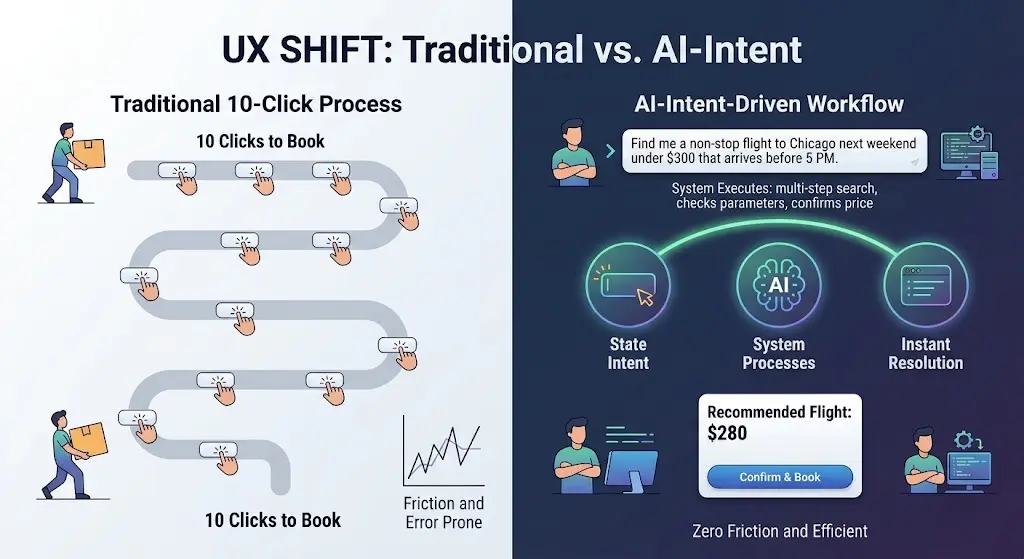
Present Day (The Rise of Intent-Driven Systems): Web architecture is transitioning toward autonomous background execution. Instead of forcing users through a 10-click process, modern web platforms parse high-level intent, synthesize contextual data, and deliver a single, unified resolution.
Case Study: The Flight Booking Evolution
To visualize this chronology, consider the traditional workflow of buying a flight online. The user experience is intentionally hyper-interactive and fragmented:
Open a browser tab and navigate to an aggregator site.
Manually input origin, destination, and exact dates using calendar widgets.
Apply filters for stops, airlines, departure times, and baggage fees.
Open multiple tabs to cross-reference prices across different airlines.
Re-enter passenger details, seat preferences, and payment information across a multi-step checkout funnel.
This is the classic point-and-click UI paradigm in action. Intent-driven design completely inverts this dynamic. Instead of forcing the user to navigate the mechanical steps of how to find a flight, an intent-driven interface asks a single, human-centric question: “What are you trying to accomplish?”
When a user expresses a goal—such as, “Find me a non-stop flight to Chicago next weekend under $300 that arrives before 5 PM”—the software reads the underlying intent, executes the multi-step search queries across disparate backends simultaneously, compares the options, and presents a single, actionable resolution. The ten tedious clicks dissolve into one clear intent outcome.
Supporting Context & Metrics: Platforms Replacing Buttons With Intent
This shift is not a theoretical vision of a distant future; it is actively reshaping the web today. Several accessible platforms illustrate how intent-capturing systems are already replacing traditional web UI patterns.
1. Perplexity AI: Search Without the Open Tabs
Traditional search engines like Google were built as digital directories. Users typed keywords, and the interface rewarded them with ten blue links. The actual cognitive labor—opening five tabs, skimming long articles, dodging aggressive ads, and manually synthesizing an answer—was left entirely to the user (though search engines are actively evolving to incorporate AI-first summaries).
Platforms like Perplexity AI allow users to perform instant intent-based searches. Instead of forcing users to click through multiple tabs, the interface synthesizes the optimal result for their specific context, citing sources inline while completely bypassing the traditional link-and-tab routine.
2. Vercel v0: Web Design Without Dragging and Dropping
For years, creating a digital product meant using visual builders, wireframing suites like Figma, or drag-and-drop web editors. Designers spent hours manually drawing rectangles, picking hexadecimal color codes, adjusting padding values, and writing CSS code.
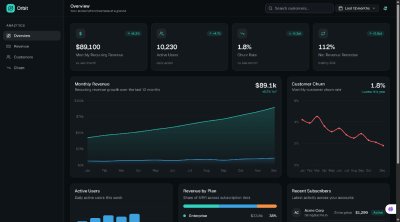
Generative platforms like Vercel v0 allow users to build fully functional user interfaces simply by describing them. By stating an intent—such as, "Build a modern SaaS dashboard with a dark-mode toggle, an analytics chart, and a user table"—the system generates clean, production-ready code and live UI components instantly, bypassing the manual layout-building phase entirely.
3. Goblin.tools: Breaking Down Overwhelming Tasks
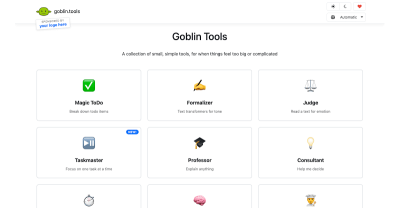
Traditional productivity tools require users to manually construct task lists, drag items across Kanban boards, and assign micro-deadlines. Goblin.tools is a single-page suite of AI-powered utilities designed specifically to lower cognitive friction. A user can type an overwhelming goal like "Plan a job interview," and the system automatically decomposes it into a structured, manageable checklist without requiring sign-ups, configuration, or manual sorting.
The Core Pillars of Intent-Driven Web Design
When traditional menus, sidebars, and forms are stripped away, how do web designers maintain usability? Designers pioneering this space rely on three core pillars:
Static layouts (Every visitor sees the same static page)
Generative UI (Layouts rendered dynamically on the fly based on immediate context)
Task Execution
Manual execution performed step-by-step by the user
Autonomous execution handled by background AI agents
1. High-Level Goals and Ambient Context
An invisible interface does not always wait for explicit text input. Guided by standards like Apple’s Human Interface Guidelines on Contextual & Ambient Design, modern systems read environmental metadata—such as device state, physical location, and historical interaction patterns—to trigger proactive actions. For example, a travel app recognizes a delayed flight notification from an email sync, automatically checks alternative routes, and prompts the user with a single resolution: "Your flight is delayed by 45 minutes; would you like me to rebook you on the 3:15 PM departure?"
2. Generative UI
In traditional web design, every user sees the exact same layout. An e-commerce platform displays the exact same navigation bar whether the visitor is a first-time browser or a returning customer tracking an active delivery.
As highlighted in the Nielsen Norman Group’s analysis of AI as a new UX paradigm, computing is shifting from command-based interaction to outcome-specification. This enables Generative UI, where interfaces are rendered dynamically on the fly. If a user expresses a need to analyze complex financial data, the interface generates a dynamic calculator widget on demand, which then recedes once the goal is accomplished.
3. Autonomous Execution and Frictionless Reversibility
Traditional interfaces are obsessed with prevention, constantly peppering users with intrusive confirmation modals (“Are you sure you want to delete this file?”). Intent-driven interfaces adapt Jakob Nielsen’s 10 Usability Heuristics on User Control and Error Recovery by shifting the safety net from prevention to easy reversibility. Because autonomous agents take actions on behalf of the user, products prioritize frictionless rollback mechanisms. A prominent “Undo” button, simple revision prompts (“Make this summary shorter”), and transparent audit logs replace irritating warning dialogs.
Official Statements and Industry Perspectives
The transition toward intent-driven design has sparked intense discussion across the human-computer interaction community.
Industry thought leaders emphasize that the metric of digital success is undergoing a profound inversion. For decades, the digital economy evaluated success through metrics such as time spent in-app, click-through rates (CTR), and page views per session. Websites were deliberately engineered to maximize visual engagement and interaction volume.
However, the philosophy championed by Golden Krishna in The Best Interface Is No Interface, aligned with the Center for Humane Technology’s "Time Well Spent" movement, challenges these legacy metrics:
"The ultimate goal of modern web design is no longer to build prettier buttons or flashy animations; it is to eliminate the interface entirely. The ultimate test of a modern digital product is no longer how visually captivating its buttons are, but rather: How effectively did this software solve the problem and get out of the user’s way?"
From a practical design perspective, UX professionals are recognizing that their core deliverables must evolve. As noted in recent discourse surrounding generative interfaces:
"Rather than designing static buttons and rigid forms, we need to learn to map and present dynamic, generative UI components that adapt on the fly to user intent."
The Hidden Risks: Navigating the Pitfalls of Invisible Design
While removing interface friction is liberating, stripping away visual controls introduces significant product design challenges. When software acts on inferred intent rather than direct point-and-click commands, designers must navigate critical ethical and technical pitfalls.
The Illusion of Control
When a website makes decisions autonomously, it can quickly feel patronising or invasive. As explored by the Stanford Human-Computer Interaction (HCI) Group, automation must maintain clear boundaries to prevent user frustration. Ethical frameworks from organizations like the Center for Humane Technology emphasize that designers must guard against manipulative defaults.
Designers must strike a delicate balance: automate routine execution, but explicitly prompt the user for high-stakes confirmations—such as financial transactions, publishing public content, or altering core privacy settings.
The Black Box Problem
In a traditional UI, if a user encounters an unexpected result, diagnosing the issue is straightforward; perhaps an incorrect filter box was checked or a wrong date was selected. With an intent-driven interface, troubleshooting becomes significantly harder.
To address this “black box” challenge, the Google PAIR (People + AI Research) Guidebook advocates for transparent feedback loops. The system must explicitly state its interpretation (“Searching for non-stop flights to Chicago under $300…”) so users can calibrate trust, understand the system’s reasoning, and correct misinterpretations instantly.
Future Outlook: The Era of Seamless Completion
We are entering an era where web applications will no longer be judged by the superficial beauty of their interfaces, but by their ability to render those complex interfaces completely obsolete.
For UX designers, mastering evolving patterns—such as ambient feedback, inline prompts, and transparent AI status indicators—is essential. By embracing these patterns, designers can ensure that screenless, agent-driven tools remain intuitive, ethical, and deeply human-centered.
The future of the web is not more interaction, more clicks, or flashier buttons. The future of the web is seamless, invisible completion.